Looking for exciting new tools to simplify the blogging experience? If so, keep reading.
We decided to get the scoop on today's hottest blogging tools.
We asked 22 pros to share their favorite new finds. Here they are…
#1: InboxQ
Mitt Ray @MittRay
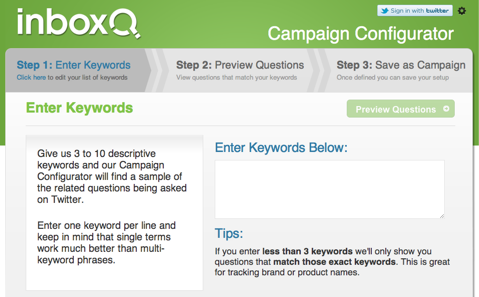
A great blogging tool I discovered a few months ago is InboxQ. I like it because it helps me come up with better blog topics. This tool helps you find questions people are asking on Twitter.
InboxQ lets you create campaigns with different keywords. Usually the best thing to do is to create campaigns with keywords from topics you specialize in. So when someone asks a question with those keywords, you will be updated about it and you can answer the question.
You can work on these questions and come up with better blog topics in your area of specialty. For example, I have two campaigns: one on white papers with keywords like white paper, whitepaper, etc., and the other on social media with keywords like social media, Twitter, Pinterest, Facebook, etc.
When people type in questions with these keywords, I get an update. If I find them interesting and I think my audience will like them too, I write blog posts based on those questions.
Use InboxQ to find the questions people are asking on Twitter.
Mitt Ray, founder of Social Marketing Writing, author.
#2: Content Idea Generator
Rich Brooks @TheRichBrooks
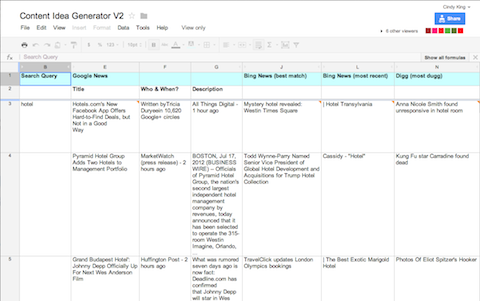
The Content Idea Generator (v2) is a Google Doc that will automatically find news and related stories for your blog from a variety of sources… everything from Google News to Reddit, from tweets to public Facebook updates and more.
While this tool works just as well for podcasts, email newsletters and YouTube videos, I've been using it for generating new ideas for blog content.
For the blogger who is seeking a cool way to keep track of interesting articles for later blog posts, check out Diigo.
Go Deeper Than an Article Can Take You
Join thousands of small-business marketers at Social Media Marketing World — three days of AI, social media, and marketing strategy taught by world-class experts. April 1–3, 2027 in Anaheim.
Every session is pitch-free and built around tactics you can use yourself, no big team required. Your All-Access ticket includes an extra day of workshops, full access to AI Business World, and recordings of everything.
This cool tool allows you to highlight and store interesting content for quick retrieval down the road. You can even embed notes to your saved content. It supports mobile devices like the iPhone, iPad and Android.
The most powerful blogging tool I have discovered recently is Disqus 2012. It is the new version of Disqus and I am absolutely blown away.
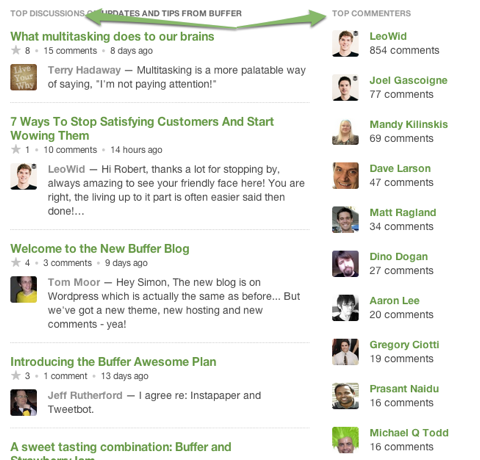
It helps me to really create an awesome community around our blog. You can up-vote and down-vote comments, see recurring commenters and have much better threading than in the old version.
Plus, everything is in real time and it feels as if the post and comments are much better connected with each other. One last point I love is that you can show related articles at the bottom of the post and see top commenters at a glance.
Use the latest version of Disqus to grow your community.
Photographs are eye-candy that helps attract attention and lures readers into your content to find out more. While incorporating your own photographs into your blog posts is optimal, you don’t always have an appropriate image available.
Flickr, the granddaddy of photo-sharing sites is highly effective for this purpose.
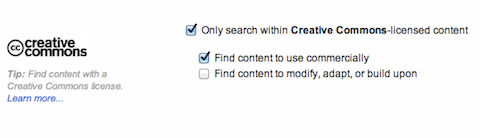
Unlike other options such as Google Images, Flickr’s advanced search enables bloggers to find images with creative commons that allow commercial use. It’s recommended that you check the rights before selecting an image, and some can be altered and some can’t.
Also, always respect other people’s intellectual property by including a photo credit with a link to their Flickr page or whatever they’ve requested.
Use Flickr to find the right photo to attract attention in blog posts.Flickr’s Advanced Search closeup of creative commons. Here’s what you need to check off!
Heidi Cohen, actionable marketing expert, president of Riverside Marketing Strategies.
#6: Focus Booster
Jason Miller @JasonMillerCA
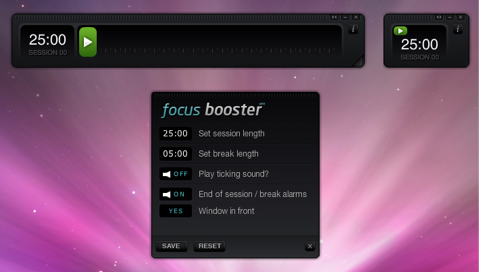
Focus Booster is a tool that many bloggers use to increase writing productivity.
I'm the first to admit that I have an incredibly short attention span. My creativity thrives in short spurts of activity with frequent breaks. With Focus Booster I can concentrate on writing and turning ideas into blogs.
The app is based on the Pomodoro technique, which recommends you break up your work time into 25-minute chunks separated by 5-minute breaks to improve mental agility.
The essential aim of the technique and this app is to reduce the impact of internal and external interruptions on focus and flow. The immediate benefit is to block out common distractions to productivity, such as constantly checking your email and social accounts.
Although the Pomodoro technique recommends 25-minute intervals, you may need to experiment to discover your optimal session length.
Use Focus Booster to improve your blogging productivity.
Jason Miller, social media manager at Marketo, regular contributor to the Modern B2B Marketing Blog.
#7: Google+ Circles
Mike Delgado @MikeDelgado
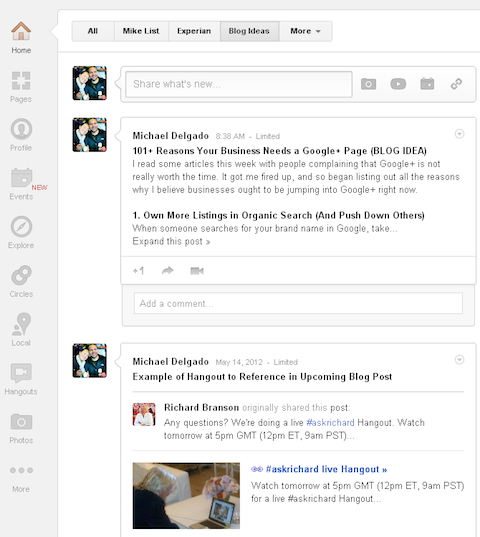
I use Google+ circles to brainstorm and store blog post ideas.
I have a circle called “Blog Ideas” that I use to store articles, media or blurbs for future blog posts. Nobody is in that circle, so I'm not bothering anyone with my random thoughts.
It's just a way for me to easily store ideas and quickly find them later since all the content is indexed.
Create a Google+ circle to store blog post ideas.
Mike Delgado, author of circled.us, social media community manager at Experian.
#8: IFTTT
Paul Colligan @Colligan
On occasion, we post something on Twitter that I’d like replicated on my blog. Sure, one can post wherever he or she wants, but this is the Internet and automation is almost always awesome.
IFTTT is a (free) web service that lets you connect “Channels” (their terminology) together so that if something specific happens, IFTTT can produce another desired result on another connected Channel. As a result, I can tweet and blog at the same time if I want to.
In the video below, I demonstrate how IFTTT is set up so that if I tweet something with the hashtag “#CT” (an abbreviation for the term “content timeline”), IFTTT will automatically publish that tweet to my blog. This requires no special software, so I can effectively “blog via Twitter” using any Twitter client (including Siri).
It should be noted that you have to give IFTTT access to any Channel you want it to interact with and the security implications should be examined accordingly.
Paul Colligan, expert in content creation and podcasting.
#9: Alltop
Jim Belosic @shortstackjim
Alltop collects headlines of the latest stories from the best sites and blogs.
We write about Facebook and this is a frequently evolving platform. Although big changes—like the recent implementation of the Timeline design—are easy to catch, it's news of small feature upgrades and updated restrictions that can fly under the radar.
Using Alltop means we don’t have to jump from one social media news site to the next. This aggregated news site provides insight and inspiration on the topics we like to address on our blog. And ultimately, it keeps us and our readers in-the-know and current with important Facebook trends and practices.
Use Alltop to stay up-to-date on the news that matters most to your business.
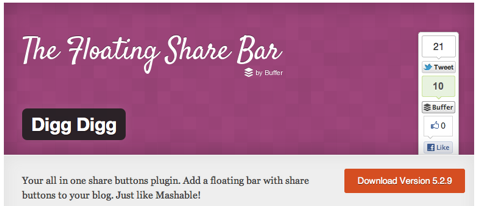
My favorite blogging tool has to be Digg Digg. It's a wonderful combination of robust sharing with simple implementation almost any blog owner can figure out how to install.
The plugin allows you to add the social sharing buttons for Facebook, Twitter, Pinterest, StumbleUpon, LinkedIn and more, in any combination.
Now there's no need to download a plugin for every social network's sharing buttons, when you can download one plugin that has everything needed to make your blog content as shareable as possible.
My favorite feature of the tool is that it can be displayed however you want: horizontally, vertically, static or even move alongside the page with your readers. This gives your audience the option to share your content on their favorite social networks.
Did I mention it's also free? It's the best way to get your content seen by the masses with the least amount of overhead.
Use Digg Digg to share your content.
Brian Honigman, digital marketing manager at Marc Ecko Enterprises.
#11: Instagram
Chris Garrett @ChrisGarrett
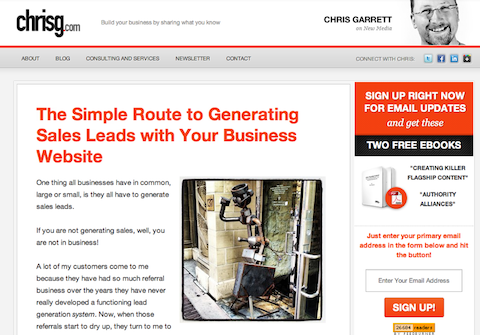
Use Instagram pictures to draw readers into your blog posts.
I have been using Instagram a lot in combination with Flickr to provide images for my articles. Most people know that having an eye-catching picture helps draw people into your article, but it is difficult to have your pictures stand out and provide the appropriate impact.
Using Instagram on my phone allows me to quickly and easily take a nice-looking photograph, which I then upload to my Flickr library. This integration with Flickr and Facebook makes it easy to grab a photograph, with the added advantage that Instagram creates images with a square shape that works nicely in a blog post, and a small download size, perfect for use on the web.
A lot of people laugh at the more extreme use of the Instagram filters, but used lightly they can add even more pop to your pictures that really lift them from the norm.
Use Instagram pictures to add visual 'pop' to your blog posts.
Chris Garrett, founder of Authority Blogger, VP of educational content at Copyblogger Media.
Tired of Guessing Which AI Moves Matter?
New AI tools and strategies launch every week — and figuring out which ones matter takes hours you don't have.
The AI Business Society filters the noise for you, with expert-led training you can put to work the same day — plus a community of marketers sharing what's actually working.
As the editor of a multi-author blog, I have to provide a lot of feedback to my writers. The browser extension Markup.io allows me to make a complete, static copy of an article before I make any edits to it. I then send a URL to my writers where they can see that unedited copy, and compare it to the edited version I save in WordPress.
It's a great way for writers to see before-and-after versions of their articles so that they know exactly what I've changed. You can also include additional markup like highlights, arrows and text boxes for even more detailed feedback to your writers.
Use Markup.io to track edits to your articles.
Don Power, managing editor of Sprout Social Insights, professional speaker, social media consultant.
#13: MarsEdit
Stephanie Sammons @StephSammons
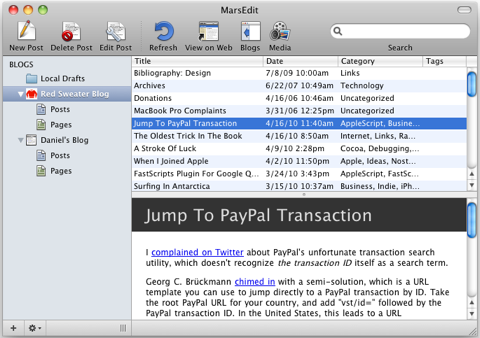
MarsEdit is a tool that is available as an application in the Mac app store. I learned about this tool in Michael Hyatt's book Platform, which by the way is a must-read for any blogger out there.
MarsEdit is a desktop blog editor that you actually purchase and install on your Mac (the app costs $39.99). MarsEdit allows you to write your blog posts without touching your browser. This prevents you from being tempted to jump into email, Twitter or browsing the web. There are no distractions! You can simply FOCUS on completing a post.
Have you ever lost your post edits online when working inside of your blog dashboard? It has happened to me too many times to count and it won't happen again with MarsEdit. Additionally I don't have to deal with a clunky interface.
OmmWriter is a text editor that combines a simple, yet artful, interface of attractive backgrounds and captivating audio with intentionally limited features that together encourage one thing—writing well.
There is a magnetic quality about OmmWriter that makes it easy to sustain the writing process until you find the shape of your article. After that, editing and inserting tags and media are a snap.
OmmWriter is a free application that is now available as an iPad app or in an upgraded version for a small fee.
OmmWriter is a powerful tool that I find invaluable for staying fully engaged within the writing process.
Jeff Korhan, professional speaker, consultant, columnist on new media and small business marketing.
#15: Optin Skin
Andrea Vahl @AndreaVahl
Optin Skin is a plugin that allows you to add an opt-in to your email list or a special offer to the bottom of every blog post. You can really customize it to have your own personal look and feel and they have a lot of premade templates. It only took me a few minutes to get this up and running.
When people get to the bottom of my article they get a little reminder to sign up for my free report and get blog updates via email.
Use Optin Skin to create an opt-in box like this at the end of your blog posts.
Many studies have shown that people ignore the sidebar, so when you are putting your opt-in right in line with your blog post, you can get people on your email list who may have missed the sidebar opt-in.
The other thing I like about the Optin Skin plugin is that you get stats on which posts are encouraging people to sign up, how many signups a day you get from the plugin and you can get even fancier and split-test your messages. Good stuff!
Optin Skin gives you stats to track the people opting in.
Andrea Vahl, community manager for Social Media Examiner, social media coach, speaker and strategist.
#16: Photo Pin
Debbie Hemley @dhemley
Photo Pin’s photos are free and come from creative commons. The tool makes it very simple to search creative commons photos, shows you a preview of the photo and then provides you with the option to download the image in multiple sizes.
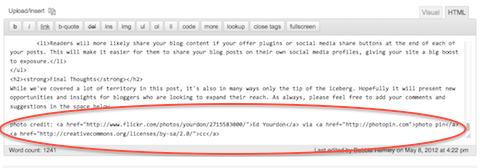
One of the greatest features is that Photo Pin gives you the attribution link (in HTML) so that you can add it to the HTML editor of your blogging software.
For example, I recently used this photo of a woman at a computer.
Use Photo Pin to find pictures to use with a creative commons license like this one.
After downloading the image, I copied and pasted the following attribution code onto the HTML editor of my WordPress blog:
I recently discovered the power of podcasting to use in conjunction with my blog.
The beauty of podcasting is that it allows bloggers to form deeper relationships with many of their regular readers, as the process of listening to a podcast is very different than that of reading a blog article.
For example, I recently had a listener tell me, “Hey Marcus, I wanted to thank you for keeping me company on my way to work the other day, it made the drive go by so much faster.”
Now obviously I was not physically “with” this person on his way to work, but rather with him in the sense that he was listening to my voice from a podcast episode.
Hearing statements like this since starting the podcast has helped me realize that it's an incredibly intimate tool to use in conjunction with regular textual blogging, and many of your readers will naturally want to “listen” to you if they already enjoy “reading” you.
One of the most important aspects of successful blogging is engaging your audience and understanding their interests.
While creating original, relevant content is a great way to start, most business owners need help to figure out what their potential audience is talking about.
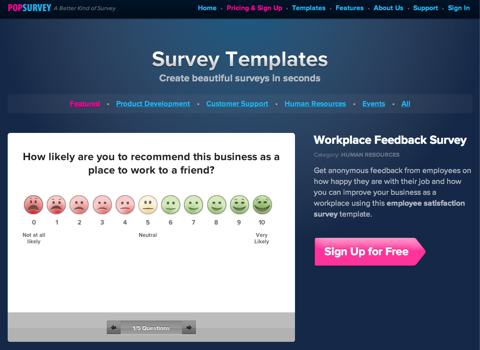
PopSurvey is a great tool that helps develop these insights while engendering a greater level of engagement for any blog. PopSurvey enables you to easily create and embed surveys into your blog to help you better understand your audience and customers. The tool also provides custom reports to evaluate your audience’s responses.
A free version allows you to conduct two surveys per month and collect up to 100 responses. The premium, unlimited version is $24 per month.
PopSurvey enables you to easily create and embed surveys into your blog.
Tim Gray, social media strategist with Blue Mountain Media.
#19: Storify
Ben Pickering @bpicks
Storify is a great way to curate articles and opinions on any given topic or capture reactions to an event in real time.
Storify can help illustrate a point with third-party content and comments or help bring to life an event by pulling in activity from the news stream or Twitterverse.
We used Storify on our blog at Strutta to share news and tweets during a conference.
Use Storify to curate real-time news like this example at a recent conference.
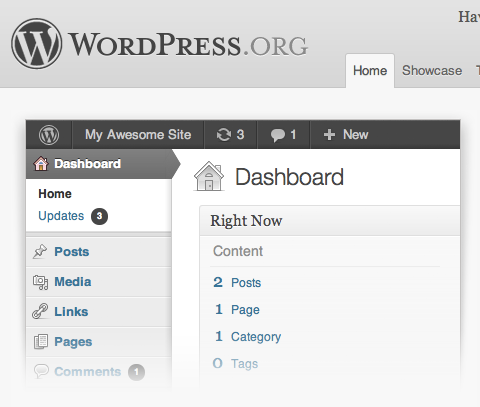
When I think of my favorite blogging tool, one word comes to my mind: WordPress. I consider WordPress the best investment a business can make to help promote its products and services.
WordPress is the best content foundation for your online marketing efforts.
It integrates well with all of the other tools you'll need to promote your business.
My favorite blogging tool is the full-screen editing mode in WordPress.
It clears the screen so I can concentrate on just the creative part of writing without thinking about the formatting, categories, tags, etc. It's like a clean slate for my ideas.
Louise Julig, Social Media Examiner's case study writer, freelance writer.
#22: WordPress App for iPad
Sara Hawkins @saving4someday
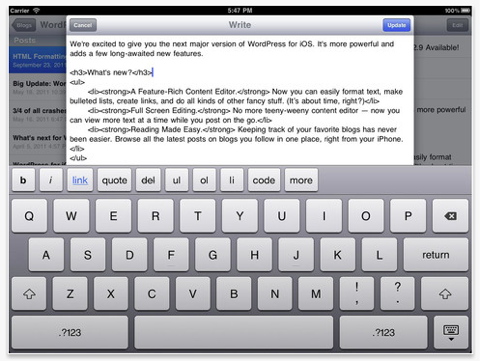
WordPress app for iPad (and iPhone) allows me to use my time waiting in a productive way.
Even if it's just getting down titles or adding to a post I have in draft, the WordPress app makes blogging on the go very easy.
It makes consistent blogging easier.
Use the WordPress app for iPad to use your time on the go.
Cindy King is the director of editorial for Social Media Examiner. She spent 25 years abroad in international business development and then built her own international business using social business networking.
 by
by  Do you blog?