 by
by  Are you looking for creative ways to improve your Facebook engagement?
By narrowing the people who see your posts, you can actually get more engagement.
It sounds counterintuitive, but it works when done right.
What Are Facebook Targeted Posts?
As you may know, Facebook recently introduced a limited rollout of Enhanced Page Post Targeting.
At the time of this writing, pages with over 5,000 likes are more likely to have the option, but that isn't always the case.
Previously you had some control over who sees your posts by clicking on the Public button beneath your post. You could target the location or language of who sees your posts both in their newsfeed and on your wall (now timeline).
This feature is now expanded with Enhanced Page Post Targeting.
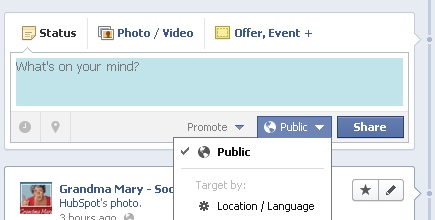
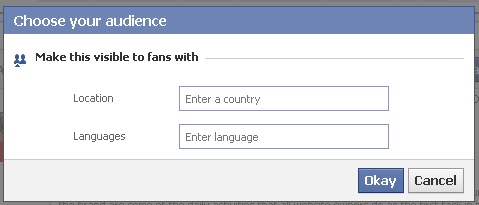
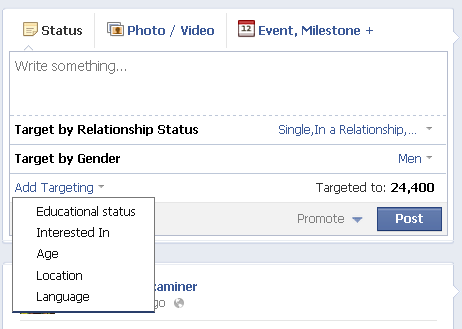
Now you can target your posts by a wider range of options including:
- Gender: male or female
- Relationship status: single, in a relationship, engaged or married
- Educational status: in high school, in college, college grad
- Interested in: men or women
- Age: select a range between 13 and 65
- Location: country, region or state, city
- Language: Type in the language
So far, Facebook has not added precise interests or other types of targeting that are available in Facebook Ads.
Also, realize that not everyone enters this information in his or her profile, so you may miss some of your target market by narrowing the post reach.
But if you use these targeting options wisely, you can have a big impact on the interaction in your post.
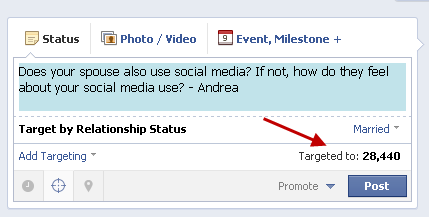
If you have targeting available on your post, you'll see the cross-hairs icon in your status area. To start narrowing your target, just click on it and then click Add Targeting as shown.
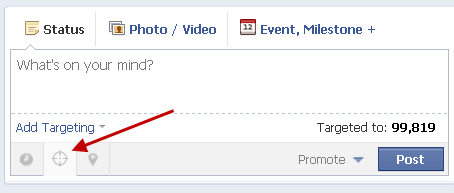
One thing that is different about the Enhanced Targeted Posts versus the previous targeting is that the post will still show on your timeline to all users.
Go Deeper Than an Article Can Take You

Join thousands of small-business marketers at Social Media Marketing World — three days of AI, social media, and marketing strategy taught by world-class experts. April 1–3, 2027 in Anaheim.
Every session is pitch-free and built around tactics you can use yourself, no big team required. Your All-Access ticket includes an extra day of workshops, full access to AI Business World, and recordings of everything.
GET MY ALL-ACCESS TICKET — SAVE $790Previously the posts would be invisible to users who did not fit the targeting. That can be problematic for pages that use the targeting often.
Facebook's solution is to hide the posts you don't want to show on your timeline. Users will still see the post in their newsfeed, but if people visit your page, they will not see irrelevant content.
Now that you know how to use the targeting, the question that needs to be answered is why use the targeting?
With all the focus on getting as much engagement as you can on Facebook, does it make sense to narrow your potential audience? Yes it does—but not always, of course.
Here are some tips on how to make the most out of targeting.
#1: Speak to a Segment of Your Audience
If you want to advertise something such as a local event or if you use different languages for your global page, then targeting obviously makes sense. But now you can also ask specific questions to just one segment of your audience.

Tired of Guessing Which AI Moves Matter?
New AI tools and strategies launch every week — and figuring out which ones matter takes hours you don't have.The AI Business Society filters the noise for you, with expert-led training you can put to work the same day — plus a community of marketers sharing what's actually working.
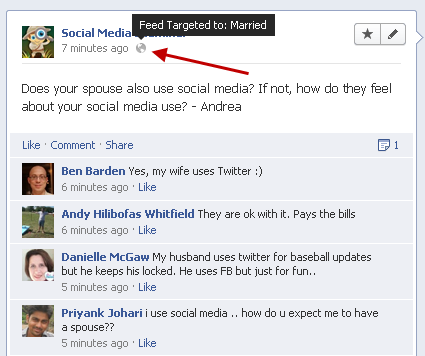
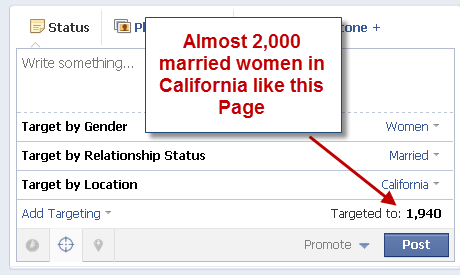
I'M READY FOR REAL AI RESULTSYou can see as you narrow your target how many people are in that segment. You can narrow this number to as low as 20! Then you can mouse over the world icon after you post to see how the post was targeted when it was posted.
#2: Make Your Targeting Known
One thing that people love is to know that you are talking directly to them. The targeting of a post is not visible to others, so you'll need to point out the fact that you are seeking their input specifically.
You may want to mention that you're using the targeting option so that they know their opinion is wanted. The post will still be visible on your timeline, so if you really want to focus the post, click the pencil in the upper-right corner of the post to hide it.
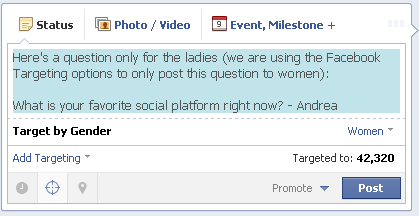
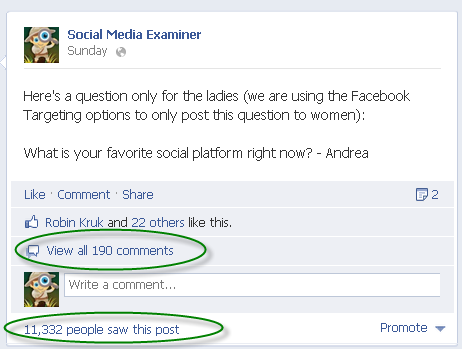
Realize that just because the visibility has gone down, it doesn't mean that the interaction will go down if you do it right. People enjoy the fact that it is a focused conversation and that will help you build community on your page.
#3: Measure Your Results
Have fun and try different targeting tactics.
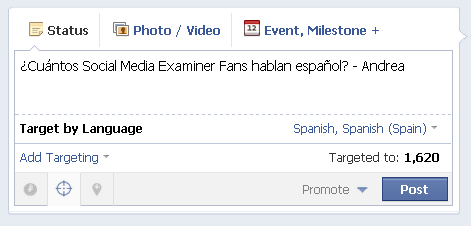
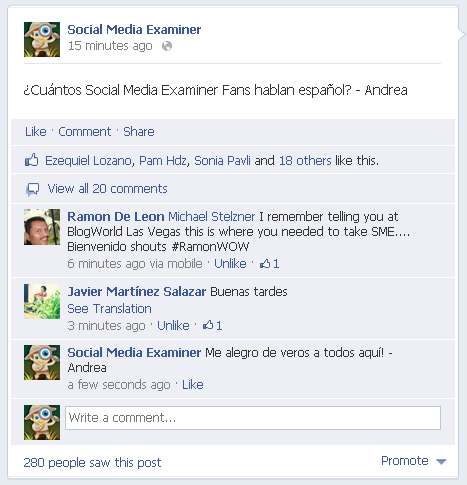
Then measure what works for your audience. If you have a smaller page, you may find that you're narrowing the target audience too much.
Watch your insights and sort by the Talking About This column to see your most engaging posts.
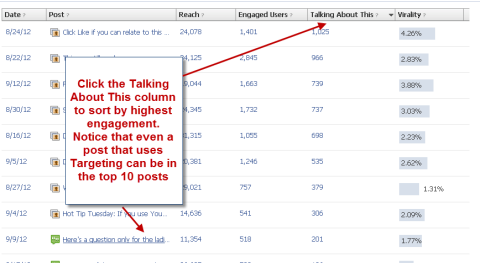
Tip: If you want to see how many people in your audience fit a certain demographic profile, you can quickly see the number when you apply different targeting parameters.
But massive engagement doesn't always have to be the goal. By connecting with segments of your audience, you can show them that you're listening and they, in turn, will love you for it.
Targeting can be a powerful tool, but you must remember to make it fun, too. Notice how the posts in these examples were asking fun questions. If you treat this as another push-marketing advertising channel, people will leave. Do it right, and your audience will become not only fans, but also friends.
What do you think? Have you tried the new enhanced page post targeting? What have your results been? Do you think this will be a good tool for your business? Let us know in the comments section below!

Where Do You Actually Stand With AI?
Most marketers use AI, but they don't know what's holding them back from real results.
Our 3-minute quiz pinpoints the one gap keeping you stuck — and gives you the exact next step to fix it.
GET MY RESULTS






