 by
by  Do you want to improve your search engine optimization?
Embracing Google+ should be on your short list of activities.
Experts continue to debate whether Google+ has the power to last beyond Google's previous attempts at entering the social networking realm.
But one thing is clear: Google+ is making its presence known in Google search results now.
Here are some ways you can ensure that your Google+ usage will help with your search rankings.
#1: Get More Followers
This may go against everything you believe about social media and how it's not supposed to be a numbers game, but rather a matter of quality versus quantity.
When it comes to using Google+ for search ranking benefits, you'll want quantity in the form of as many followers as possible.
Why? Let's look at some search results.
Rankings When Following My Personal Account
When someone who is following my personal account on Google+ searches for “freelance writer,” my portfolio site comes up #4 in search results because I have shared the link to it on my Google+ profile.
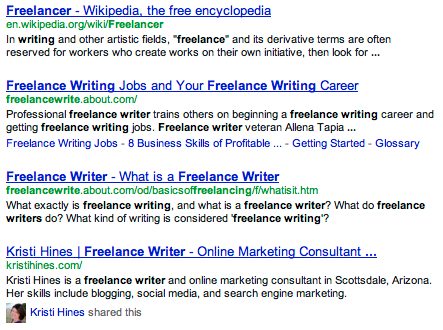
When signed into Google, this link shows a Google+ connection who shared it.
When someone not logged into Google+ searches for “freelance writer,” my portfolio site comes up #20 on the second page of search results. As most of you know, someone on the first page is much more likely to get traffic than on the second page or beyond.
This is a quick analysis of each of my favorite keywords, including the global search volume estimated by Google AdWords Keyword Tool, number of results in Google, difficulty to rank percentage by SEOmoz and how my sites rank for them in search results for someone who is following my personal profile on Google+ versus when someone is not logged into Google+.
Go Deeper Than an Article Can Take You

Join thousands of small-business marketers at Social Media Marketing World — three days of AI, social media, and marketing strategy taught by world-class experts. April 1–3, 2027 in Anaheim.
Every session is pitch-free and built around tactics you can use yourself, no big team required. Your All-Access ticket includes an extra day of workshops, full access to AI Business World, and recordings of everything.
GET MY ALL-ACCESS TICKET — SAVE $800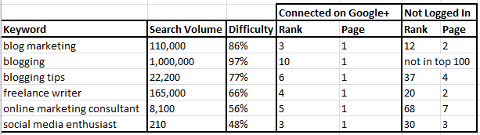
The difference in keyword rankings based on connecting with a Google+ personal profile.
Rankings When Following My Google+ Page
Now let's look at what happens when someone following the Google+ page for my blog (but not following my personal Google+ profile) searches for the same keywords compared to someone who is not logged into Google+.
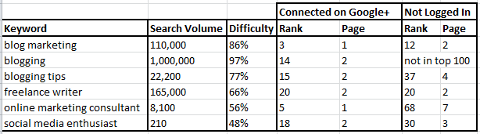
The difference in keyword rankings based on connecting with a Google+ page.
Since I don't link to my freelance portfolio from my blog's Google+ page, there is no change in search position. But you can see that although the rankings are not as good as when someone is following my personal Google+ profile, pages from my blog still rank higher for particular keywords when someone is following my Google+ page.
How to Get More Google+ Followers
So now that you can see the benefits of having people follow you on Google+, you will probably want to grow your Google+ following. The best ways to do this are as follows.
- Leverage your current following on other social networks by sharing your Google+ profile and/or page link with them to connect.
- Put a link to your Google+ profile and/or web page on your website.
- Put a link to your Google+ profile and/or web page anywhere it is allowed, including forum profiles, other social media profiles and email signatures.
- Link to your Google+ profile and/or page when you comment on blogs.
- Add a Google+ badge to your website.
#2: Set Up Authorship With Your Personal Profile
Google+ now offers a way for you to really stand out in search results by claiming authorship for articles you have written. This is something that is showing up in search results, even when people are not logged into Google+.
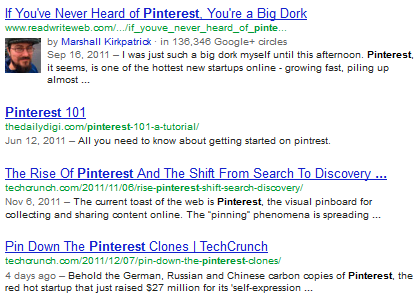
Google+ follower count for authors in search results.
If someone is logged into Google+, they will get the option to add the author to their circles directly from search results.
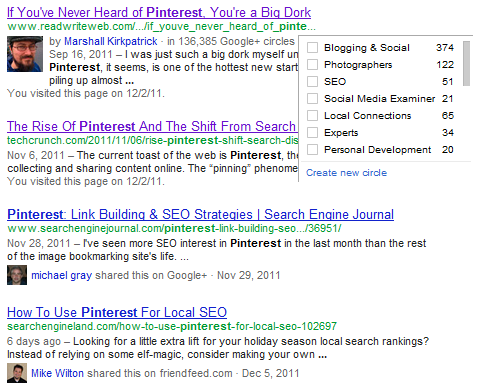
Add authors to your circles within search results.
So how do you get your blog posts to show up with your name displayed in the search results? The directions from Google+ are listed in their explanation of author information in search results.
There are two options for adding the authorship connection from your blog posts to your Google+ profile. The first is to add your email address on each page of your content (recommended for multi-author blogs) and have that email address listed in your Google+ profile.
Alternatively, you can also link your content to your Google+ profile and vice versa. When linking your content to your Google+ profile (in an author bio box, for example), you will need to format your URL as follows.
<a href="[profile_url]?rel=author">Google+</a>Replace the [profile_url] with your full Google+ URL. Mine looks like this.

Tired of Guessing Which AI Moves Matter?
New AI tools and strategies launch every week — and figuring out which ones matter takes hours you don't have.The AI Business Society filters the noise for you, with expert-led training you can put to work the same day — plus a community of marketers sharing what's actually working.
I'M READY FOR REAL AI RESULTS<a href="http://plus.google.com/118321989430962111396?rel=author">Google+</a>Then you will add your blog URL to your Google+ profile under the “Contributor To” section.
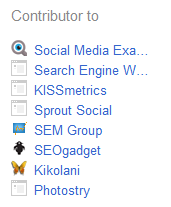
Add the sites you write for in your “Contributor To” links section.
After you have set up either approach to authorship (email or linking your content to your Google+ profile), then you can fill out the authorship request form to let Google know that you have completed the directions.
Authorship Examples
If you're having trouble getting your authorship connected, try following the lead of these authors. They don't have it set up quite the way Google suggests, but it seems to work anyway.
- Ben Parr has a link to his Google+ profile in his author page on Mashable and a link to his author page on his Google+ profile under the “Other Profiles” section.
- Danny Sullivan has a link to his Google+ profile in his personal blog's sidebar and a link to his author page on his Google+ profile under the “Other Profiles” section.
- Marshall Kirkpatrick has a link to his Google+ profile on his author page on ReadWriteWeb and a link to ReadWriteWeb on his Google+ profile under the “Recommended Links” section.
- Adam Dachis has a link to his Google+ profile on his author page on LifeHacker with no link to LifeHacker on his Google+ profile.
I have tried putting my Google+ profile link to and from my blog. For a while, my authorship was showing in Google search results, but it has disappeared in the last week or two. Not sure why it changed, but I am still attempting to make it work.
#3: Directly Connect Your Page
Be sure to directly connect your Google+ page to your website. You can add a simple piece of code to your page that no one will see on your website or you can add a Google+ badge which, as mentioned earlier, can help you get followers for your page.
By doing so, you are connecting your Google+ page to your website in a way that could help you dominate search results, as can be seen in this search for Toyota.
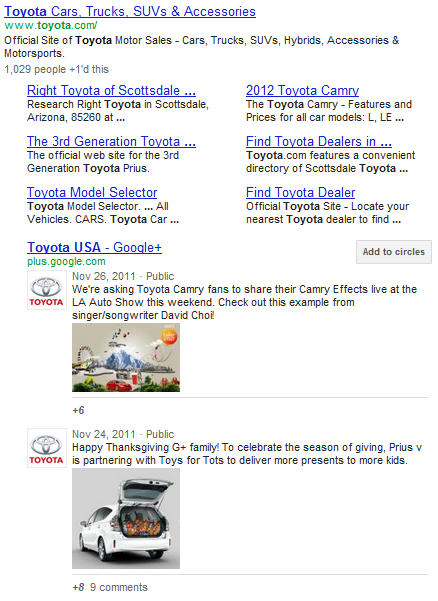
Toyota's Google+ page activity dominates the top spot.
By using the Google+ icon on their page, they have now incorporated their latest Google+ activity right below their place in search. You can even add Toyota's page directly to your circles from the search results.
This could also be a great help to businesses that have some online reputation management issues, such as less-than-desirable reviews or other content ranking on the first page directly beneath their website. The Google+ page activity could easily push those kind of results further down the page where they are less likely to be viewed.
#4: Encourage +1's
Do you have a +1 button on your website? The +1 button is Google's much more powerful answer to the Facebook Like button because the number of +1's a page gets will show up in search results, even if a searcher is not logged into Google+.
Imagine you were looking for something you didn't know much about, like a blogging platform. Which platform out of this group would look the most popular?
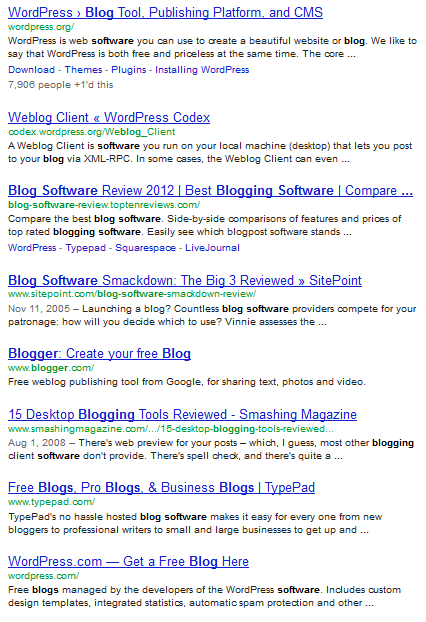
WordPress wins with the most +1's.
Be sure to get the latest +1 button code from Google and install it on both your individual pages and your main home page. It is the best social proof you can have in Google search results. Even if you're not worried about the number of +1's shown in search results, remember that the +1 button also allows others to easily share a link on your website on their Google+ profile!
#5: Fill Out Your Information
Last but not least, be sure to fill in the information for your profile and pages completely. Google prioritizes different areas of the profile for both on-page optimization and in search results.
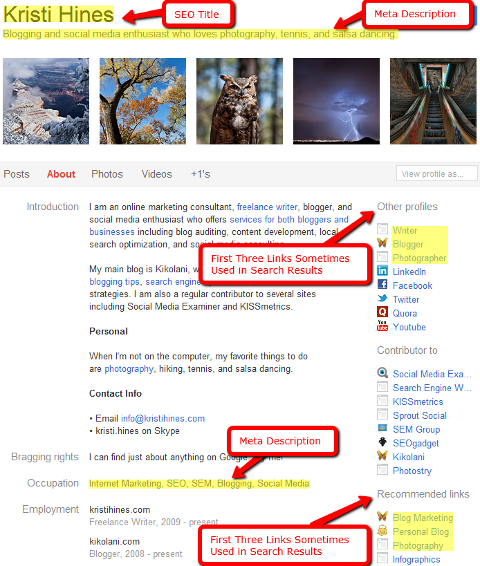
Be sure to fill in all of your Google+ profile details.
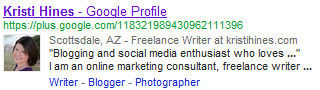
See how your Google+ profile appears in search results.
Also note how the first 55 characters of your Introduction are important for search results within Google+ itself.

View only the first 50+ characters in Google+ search results.
A great first impression here could mean the difference between someone selecting your profile or another from inside the Google+ results!
Has Google+ Helped Your Search Rankings?
Have you seen an impact from Google+ in terms of your search rankings? What other ways have you seen Google+ find its way into search results? Please share your experiences and thoughts in the comments!

Where Do You Actually Stand With AI?
Most marketers use AI, but they don't know what's holding them back from real results.
Our 3-minute quiz pinpoints the one gap keeping you stuck — and gives you the exact next step to fix it.
GET MY RESULTS






