by
by  Wondering how to get more from Instagram Stories? Have you considered using Stories stickers in your marketing?
In this article, you'll discover how to use Instagram Stories stickers to deliver engaging and useful Stories content.
Find Your Instagram Stories Stickers
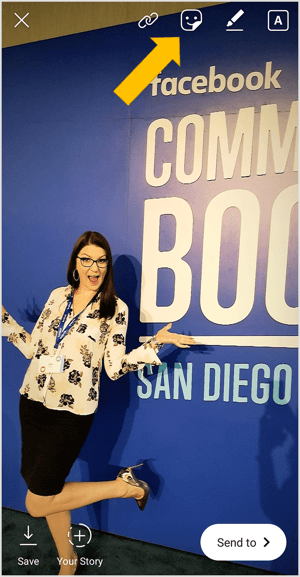
To access all of the different Instagram Stories stickers, start a story post with a photo or video. At the top of the screen, tap the Sticker icon, which looks like a square smiley face.
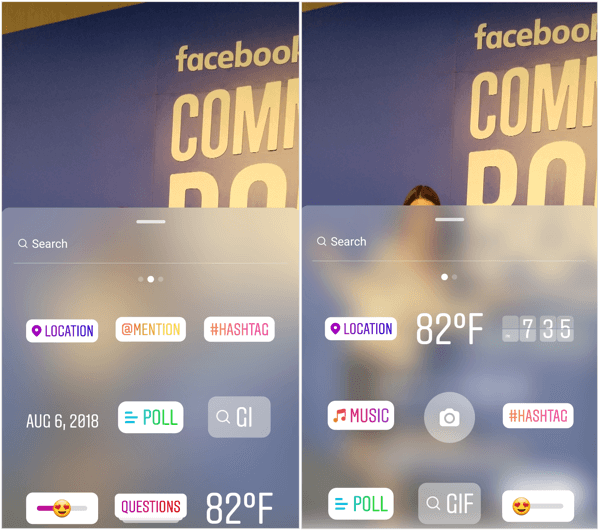
After tapping on the Sticker icon, a tray appears with various sticker options. Depending on the features that have rolled out to your account, you may have some stickers but not others. The most commonly available stickers are Location, Temperature, Clock, Date, Hashtag, Mention, Poll, Question, GIF, Slider, and Music.
You can also slide up the sticker screen to access emojis, seasonal stickers, and mood stickers.
Now let's look at how you can use some of these stickers to enhance your Instagram Stories content.
#1: Increase Interactions and Engagement With the Emoji Slider
The slider was introduced a little while ago, and can be fun but not very useful in its own right. Many people are finding creative ways to display the slider on a photo and even add other components to the context of the slider, allowing for meaningful interactions and even audience insights.
In this example, from @heystephanieliu, she turned the slider sideways, chose the hand option for the slider emoji, aligned it against the wine glass, and posed the question about “How much wine do you want?” This tactic would be a unique way for wineries or restaurants to create fun, interactive posts.
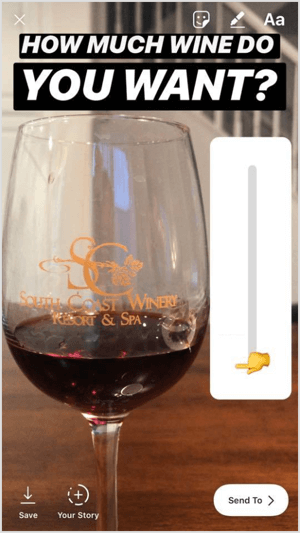
You can try a similar post with coffee or food options as well. Using a video of pouring coffee into a mug, rather than a photo, is another way to increase the interactivity of this type of post.
#2: Gather Audience Input With the Questions Sticker
The Questions sticker is a resourceful way to get direct feedback from your audience. Ask your audience targeted questions to help you get to know them better or create more of the content they desire. I used this tactic recently to find out what my followers wanted me to cover in upcoming live broadcasts.
Ready to Supercharge Your Marketing Strategy?

Get expert training and an unbeatable conference experience when you attend Social Media Marketing World—from your friends at Social Media Examiner.
Broaden your reach, skyrocket your engagement, and grow your sales. Become the marketing hero your company or clients need!
🔥 Save $600 on an All-Access ticket. Sale Ends Friday! 🔥
GET THE DETAILS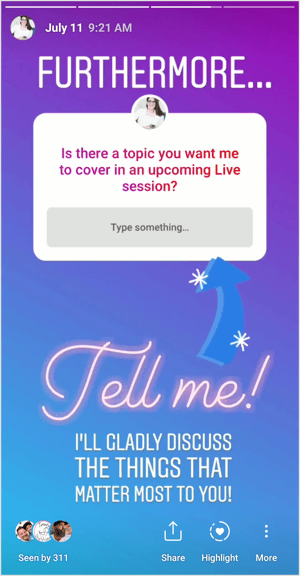
All of the responses come to you privately so it's a safe way for your audience to respond to you directly.
You can also use Questions stickers to drive community engagement around your content. In this example from @Octonation, he asked his audience to provide obscure facts about cephalopods. He added music to this post to make it more appealing. Then he was able to share various responses from the audience back to his story, giving them exposure and educating his audience at the same time.
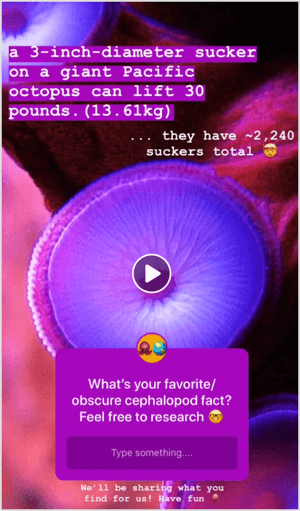
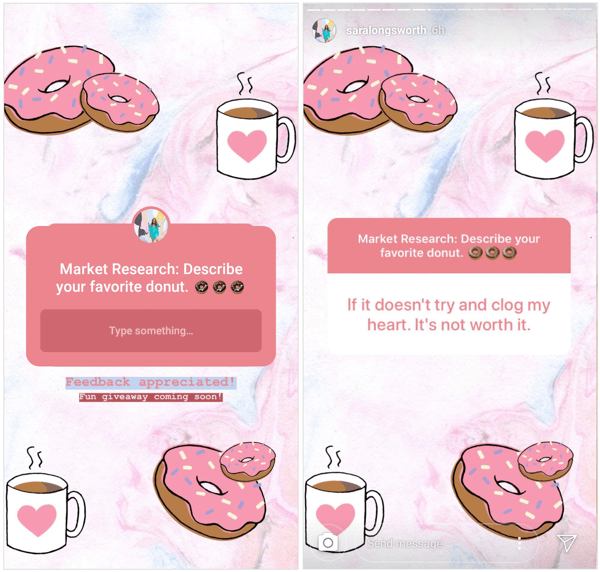
Responses to your story questions will appear in your Instagram notifications and there's currently no way to respond to them privately. You can choose to tap on the person's profile photo and then send them a direct message from their Instagram profile to respond privately.
Instead, question responses were designed to be shared as a story post. iOS users can share a question response in a sticker, which lays over either a photo or a video. Android users can currently only use photos in their response stories.
AI Is No Longer Optional for Marketers—Ready to Master It?

Join over a thousand forward-thinking marketers at AI Business World—a conference-in-a-conference at Social Media Marketing World.
Get two days of practical AI training where you'll discover:
✅ Systems that 3x your output—leaving time for strategy and creativity
✅ Proven strategies you can deploy right away—no guesswork, no wasted budget
Become the indispensable AI expert your company needs.
GET YOUR TICKETS—SAVE $300#3: Reinforce the Tone of Your Messaging With a Music Sticker
If you have the Music sticker (which not everyone does — one of my accounts has it and the other doesn't), it's a creative way to augment your Stories posts, especially photos. You can instantly create a mood or connect in a more emotional way with your viewers. Adding music also brings a static photo to life through the power of sound.
Instagram has added a long list of artists and current music tracks to the app for you to choose from. You can currently only use the music options they provide.
To add music to your post, tap the Music sticker. The next screen gives you options to choose from, including Popular, Moods, or Genres of music. Navigate through these sections to find the right tune for your story.
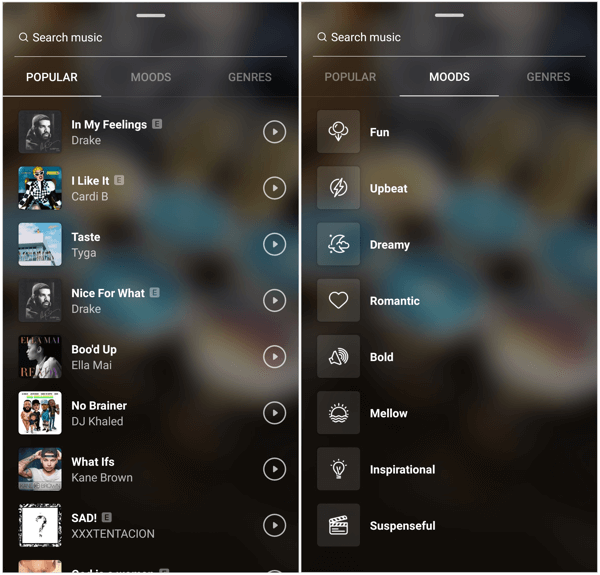
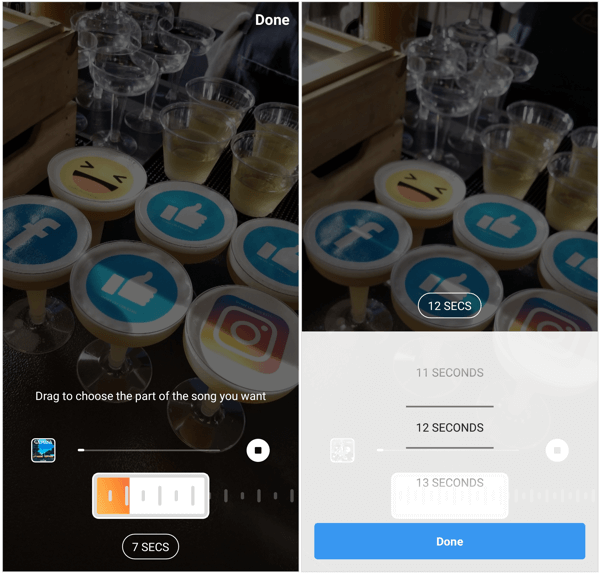
After you select a music option, you see a screen where you pick the specific audio clip to upload to your story. Use the slider to select the part of the song you want to use.
Music clips default to 7 seconds (the length of a photo post on Instagram) but you can change them to anything from 5 to 15 seconds. Increasing the length of the song duration allows that photo to play longer than the average 7 seconds in the story. To change the duration of the music clip, tap the 7 Secs button and use the scrolling tab to select the length of your choice.
Layer Multiple Instagram Stories Stickers to Deliver Deeply Stylized Content
The really creative users are taking multiple Instagram Stories stickers and features, and combining them for the most unique content. In this example from @Octonation, he used multiple effects to create an animated TV set in a story. Here's how he did it:
- Share a video to the story and then pinch it to make it smaller. (The gradient background was the default from Instagram.)
- Use the pen tool to draw a square frame around the video.
- Use the pen tool in different colors to add the TV antennae.
- Use the text tool to add the “OctoTV” and “ON” labels on the TV.
- Add a GIF sticker for the “wow” in the top-left corner of the TV to draw in animation and attention.
- Use the @Mention sticker to include a hyperlink back to his own profile.
- Add a GIF sticker for the arrows to draw attention to the call to action.
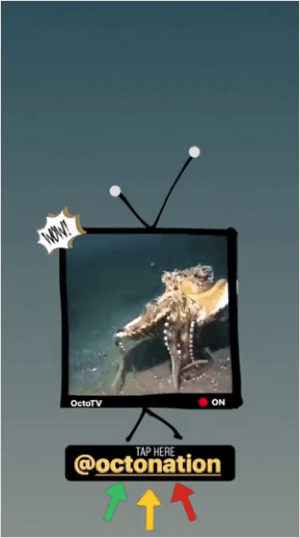
This is just one creative sample of combining Instagram Stories stickers and features to create genuinely unique and appealing content. Embrace your own creativity to find fun ways to display your content!
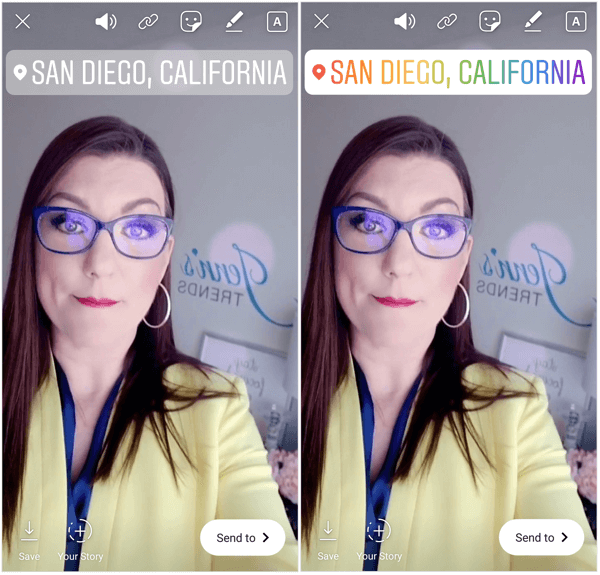
Pro Tip: One simple trick many people don't know is that many of the stickers have editable backgrounds or styles. When you select any of the @Mention, Location, or #Hashtag stickers, they default to the color and background you see on the sticker option in the tray.
To change the color and style, tap the sticker after you've placed it on your story. Keep tapping to rotate through color and style options. You can choose from different-colored text or translucent backgrounds.
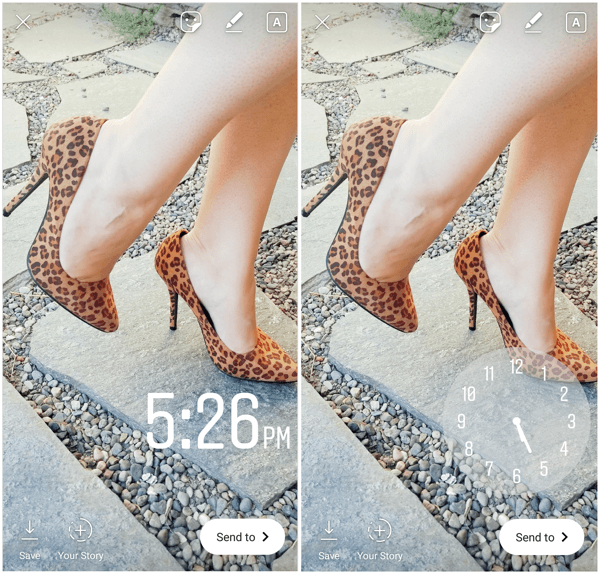
The Clock sticker is editable, allowing you to change the type of clock you include in the post. You can choose from two digital options and one analog option. Again, simply tapping on the Clock sticker after you add it to your story allows you to rotate through the various options.
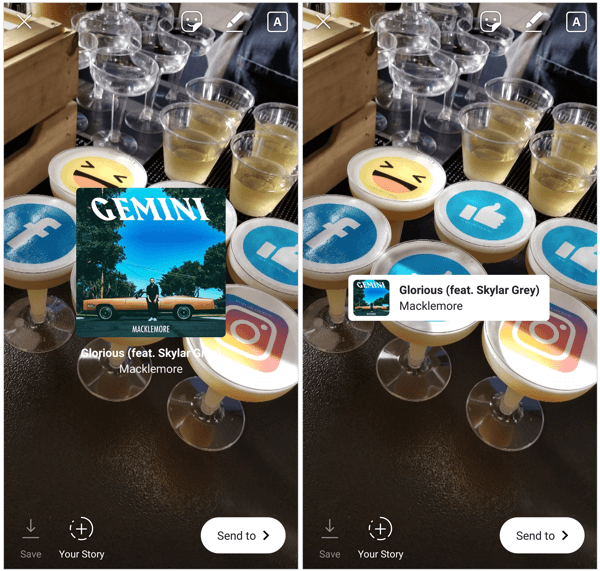
The Music sticker also allows you to edit how it appears on the story. After you've selected a music clip, the music album cover and song title appear in your story. You can drag the Music sticker anywhere on the screen and pinch to resize it.
Tap on the sticker to reveal additional display options where the song title and album cover appear less pronounced.
Click here to discover six Instagram Stories hacks to enhance your content.
What do you think? Are you excited to try some of these creative sticker ideas? Do you have any examples of people who are using these tools to create great content? Please share your thoughts or tips in the comments below.

Want to Unlock AI Marketing Breakthroughs?
If you’re like most of us, you are trying to figure out how to use AI in your marketing. Here's the solution: The AI Business Society—from your friends at Social Media Examiner.The AI Business Society is the place to discover how to apply AI in your work. When you join, you'll boost your productivity, unlock your creativity, and make connections with other marketers on a similar journey.
I'M READY TO BECOME AN AI-POWERED MARKETER