by
by  Want to learn about some hidden Instagram Stories tools?
Wondering how to change pen sizes, color-match text, and more?
In this article, you'll discover six Instagram tricks for enhancing Instagram stories that will engage your audience.

#1: Customize Font Colors
To add text to your Instagram stories, tap the Aa icon in the top-right corner when you take or upload a photo or video to your story.
In the keyboard that opens, select from a range of colors. There are actually infinite color choices! Scroll to the right on the color options to see two more pages of preselected colors to choose from.
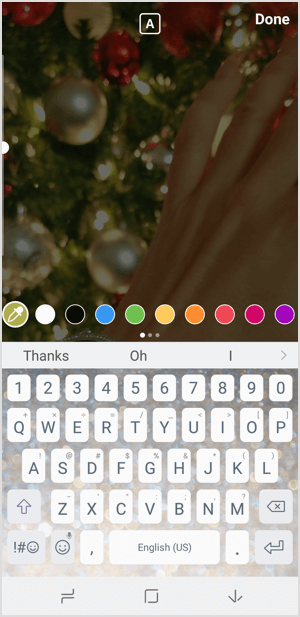
But your options don't stop there! You have two more ways to select the perfect font color.
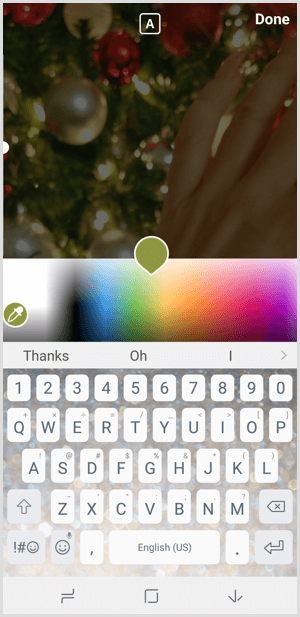
First, you can tap and hold any of the preselected color options. This opens a color bar that allows you to pick the perfect color from anywhere on the color spectrum.
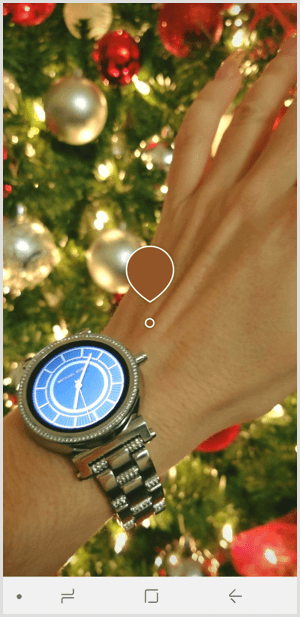
Second, you can tap on the color dropper icon to the left of the color bubbles. This will take you out of the keyboard screen and place a color dropper in the center of your image.
Tap anywhere on your image to perfectly match the color on that pixel of the screen. Once you select the color, you're taken back to the keyboard screen to add your text in the color you selected.
When you match your font or doodle colors to your brand colors, you can augment your branding within your stories. It can also add a level of detail and styling that will better appeal to your audience.
Ready to Supercharge Your Marketing Strategy?

Get expert training and an unbeatable conference experience when you attend Social Media Marketing World—from your friends at Social Media Examiner.
Broaden your reach, skyrocket your engagement, and grow your sales. Become the marketing hero your company or clients need!
🔥 Save $510 on an All-Access ticket. Sale Ends Tuesday! 🔥
GET THE DETAILS#2: Change Font or Pen Sizes
When you add text or use the pen features in Instagram Stories, these tools default to a mid-range size and thickness. It's easy to go with what Instagram gives you, but sometimes you may want to shrink the text to fit better on the screen or change the pen size to achieve the artistic style you're going for.
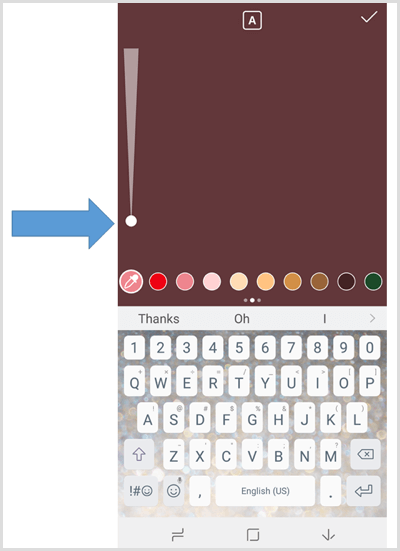
To adjust both, simply use the slider on the left side of the screen. Slide the circle up to make fonts bigger or pens thicker.
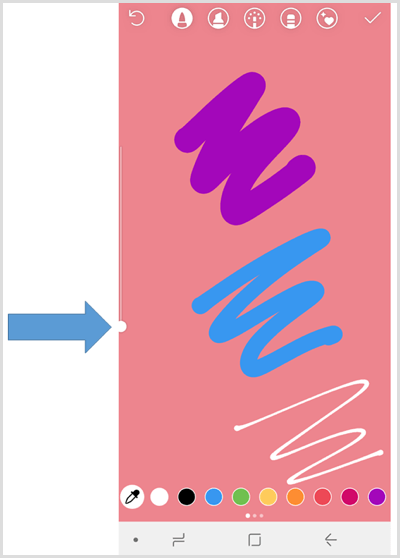
Slide the circle down to make fonts smaller or pens thinner.
#3: Create a Solid-Color Background
Sometimes you may want to share something to your Instagram story but don't want to use an image. Maybe you don't have a good image for this purpose, or don't want an image to distract from the message and text you post. In these circumstances, a simple solid-color background can be the perfect solution.
AI Is No Longer Optional for Marketers—Ready to Master It?

Join over a thousand forward-thinking marketers at AI Business World—a conference-in-a-conference at Social Media Marketing World.
Get two days of practical AI training where you'll discover:
✅ Systems that 3x your output—leaving time for strategy and creativity
✅ Proven strategies you can deploy right away—no guesswork, no wasted budget
Become the indispensable AI expert your company needs.
GET YOUR TICKETS—SAVE $150To create a solid-color background, take a photo of anything. It won't matter because the image will be covered up, but you need to start the story design by taking a photo. After you take the photo, tap the pen icon at the top of the screen and select a color for your background. Then tap and hold anywhere on the screen and the color you selected will fill the screen.

Tap Done or the check mark to save the color selection. Then continue with your editing by adding text, stickers, or doodles.
#4: Build Text via Consecutive Posts
If you have a lot of text to share and want to ensure it doesn't get missed, consider creating a series of consecutive posts to build additional text. Each story image plays for only about 7 seconds so viewers don't have time to read a lot of text.
To avoid this, put a small amount of text on a plain background or image and upload that to your story. Ensure that you save the post to your mobile device. (You can turn this on as an automatic setting or tap Save before uploading the post.)
Then start a new story post. From the photo gallery icon at the bottom left of the screen, select the image you just shared. Add the next bit of text to this image, and save and upload again. Continue this process until you've added all of the text you need.

#5: Turn Photos Into Videos
As I just mentioned, images play for about 7 seconds on Instagram Stories. Videos, however, can play for up to 15 seconds. If you want to keep your text or image on the screen longer, craft your image and turn it into a video. You can add music or animations to stand out even more.
An account that uses this tactic really well is E! News. View their stories to see how they share entertainment news updates in a cohesive story but add music and design elements to turn their photos into videos.

Using videos instead of photos may also improve your engagement. Videos with music or audio components are more likely to capture the attention of your audience as they move through the stories in their feed.
#6: Reveal Portions of an Image Behind a Colored Background
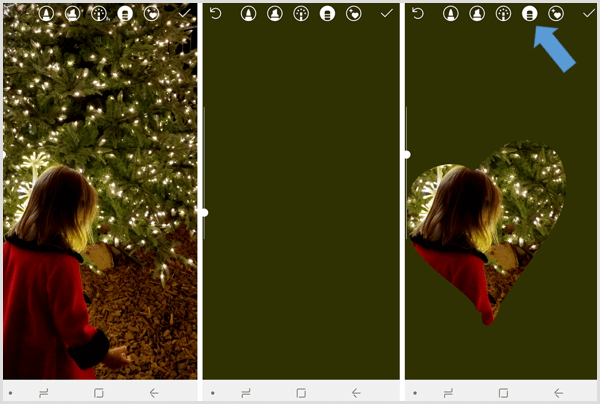
The eraser tool offers a fun way to combine a photo and a solid background. To achieve this effect, start a new story with an image you want to use. Then use the pen tool to create a solid background color as described above.
Activate the pen feature again and select the eraser icon. Then draw anywhere on the screen where you want to remove the background color to reveal the image behind it.
Want more like this? Explore Instagram for Business!
.
Conclusion
As you can see, Instagram offers quite a few features to help you create unique and well-branded posts for your stories. Instagram is investing heavily in Stories features so you can expect to see more options to get creative in the future too!
What do you think? Are you going to try out any of these tricks in your Instagram stories? Do you have any other creative tips to share? Please share your thoughts or tips in the comments below.

Want to Unlock AI Marketing Breakthroughs?
If you’re like most of us, you are trying to figure out how to use AI in your marketing. Here's the solution: The AI Business Society—from your friends at Social Media Examiner.The AI Business Society is the place to discover how to apply AI in your work. When you join, you'll boost your productivity, unlock your creativity, and make connections with other marketers on a similar journey.
I'M READY TO BECOME AN AI-POWERED MARKETER