 by
by  Welcome to Social Media Examiner TV with your host Mari Smith. In this episode, Mari reviews the new Twitter user interface.
Mari shows you how the new design impacts the way you use Twitter and how you can use popular Twitter clients and apps in conjunction with it to improve your Twitter networking. And at the end of the show, Mari gives you a hot Facebook marketing tip.
Share your feedback and read the show notes below!
Here are some of the things you'll learn in this show.
How to Use the New Twitter User Interface
Mari shares how this new interface was designed and guides you through the whole layout. She shows you how it works and how you can use this new setup to improve your Twitter marketing.
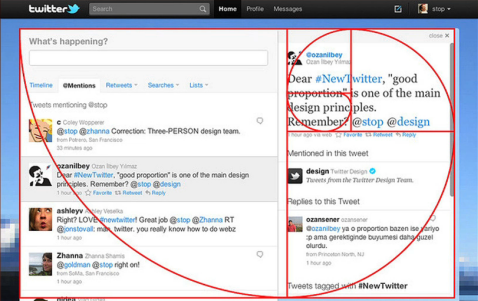
What's Better With the New Twitter?
The best thing is the new side panel because it improves your Twitter experience in a variety of ways. As you look at your tweets on the left, you can click on the tweet, or the person's name, and see extra information in the side panel on the right.
This new side panel is so useful because you can now see what's referred to as inline media. This means you can see the different media links without leaving Twitter.
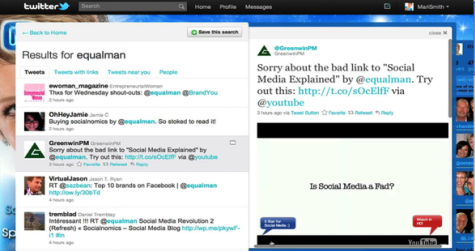
But this isn't the only thing that's useful about the new Twitter, so be sure to listen to what Mari has to say.
What's the Downside of the New Twitter?
There are only a few downsides to the new interface. One of them is that you can't add a comment with the new Retweet button. Another downside is that you can't automatically reply to several people at the same time. Listen to the video to learn more.

Tired of Guessing Which AI Moves Matter?
New AI tools and strategies launch every week — and figuring out which ones matter takes hours you don't have.The AI Business Society filters the noise for you, with expert-led training you can put to work the same day — plus a community of marketers sharing what's actually working.
I'M READY FOR REAL AI RESULTSHow to Use Your Twitter Clients With the New Twitter
Mari also shares how you can use the new Twitter user interface with popular Twitter clients.
HootSuite
Find out why you might like to use HootSuite with your new Twitter user interface and the value of HootSuite's Hootlet to make social bookmarking easier.
TweetDeck
Go Deeper Than an Article Can Take You

Join thousands of small-business marketers at Social Media Marketing World — three days of AI, social media, and marketing strategy taught by world-class experts. April 1–3, 2027 in Anaheim.
Every session is pitch-free and built around tactics you can use yourself, no big team required. Your All-Access ticket includes an extra day of workshops, full access to AI Business World, and recordings of everything.
GET MY ALL-ACCESS TICKET — SAVE $800You can also use TweetDeck for a full central command on a variety of different platforms.
Mobile Apps
This is becoming more important as most users access Twitter on their mobile devices. Here are the Twitter apps Mari mentions:
Hot Facebook Marketing Tip
Here's the code for the fab Ninja Facebook tip Mari shares at the end of the show. When emailing your list, you can ask your readers to share your content on their Facebook wall right from your email. Here's the exact code you need to use:
Just replace “URL” with the link you want your readers to share with their friends on Facebook and create the link as you would normally!
 For example, here's a link for this Social Media Examiner TV episode to share on Facebook! (Click the link or the image and a new window/tab opens up with the option for you to write a comment and post on your wall!)
If you've enjoyed this episode of Social Media Examiner TV, make sure to tweet about it (use hashtag #SMEtv), share it on Facebook or even embed this episode on your blog.
We want to hear from you! How do you like the new Twitter user interface? What has been your experience? Leave us a comment below.

Where Do You Actually Stand With AI?
Most marketers use AI, but they don't know what's holding them back from real results.
Our 3-minute quiz pinpoints the one gap keeping you stuck — and gives you the exact next step to fix it.
GET MY RESULTS






