by
by  Are you on Google+? Are you aware of the insight you can gain from social content?
Google+ is a relatively new platform for businesses and marketers.
While the concept of circles is a great way to keep in touch and interact directly with a specific niche, there's one feature that doesn't seem to get that much press, and is actually quite beneficial to businesses. It's called Ripples.
What is Google Ripples?
Ripples is a feature that shows you interactive graphs of everyone who has shared a specific post. Ripples is only available on posts that are sent out to “Public” and only displays those who shared the post publicly.
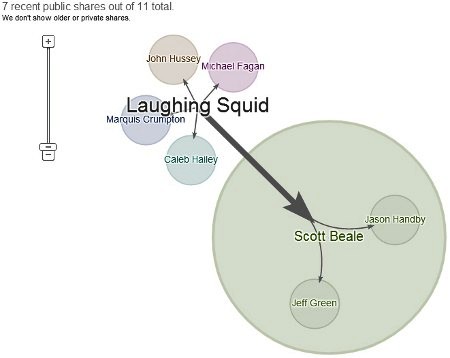
As any marketer will agree, it's important to have a visual representation of how well your content is performing on social media platforms. Not only does it give you a clear picture of data, but it also helps when conveying that data to those higher up in your company.
Unlike with other platforms such as Facebook and Twitter, where some of the more exciting and informative tools are third-party apps, Ripples is built directly into Google+ and requires absolutely zero configuration.
In this post, I'll show you how to view Ripples, decode the data and use this data to your advantage.
How to Use Ripples
First, find a post that has been shared with “Public” and has at least a few shares. To get started, we'll take a look at a recent post by Starbucks on their official brand page.
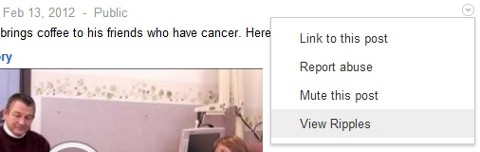
In the top right-hand corner of every public post, you'll see a little arrow. Click that and if a post has had some shares, “View Ripples” will show. Clicking that will open up a detailed graph of all the people who shared.
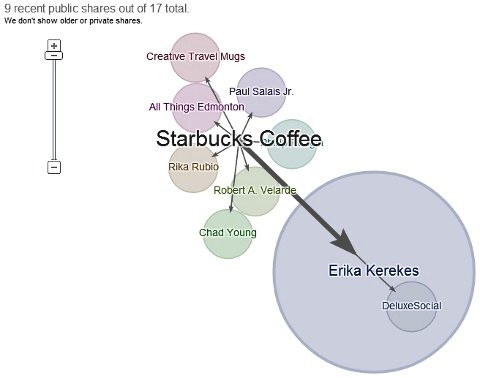
As you can see with the screenshot above, Starbucks received 17 shares total and the graph is showing the 9 most recent. Scrolling over top of a bubble and someone's name will display a little box that shows what they said in their share, if anything, as well as link to their post.
AI Is No Longer Optional for Marketers—Ready to Master It?

Join over a thousand forward-thinking marketers at AI Business World—a conference-in-a-conference at Social Media Marketing World.
Get two days of practical AI training where you'll discover:
✅ Systems that 3x your output—leaving time for strategy and creativity
✅ Proven strategies you can deploy right away—no guesswork, no wasted budget
Become the indispensable AI expert your company needs.
GET YOUR TICKETS—SAVE $150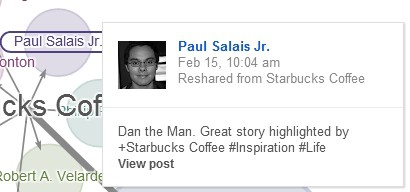
Now, while this is a great way of visualizing who shared a post, the real gold is in the fact that people who helped contribute more shares by their circlers sharing are displayed as a larger bubble.
This makes it easy to identify who has some potentially extra clout and is helping get your posts out there to even more people. Small businesses and big brands can use the Ripples feature to very easily see not only who's sharing their content, but also who's helping beyond that.
Find Your Influencers
Every business has its influencers—people who contribute quite a bit to your bottom line both online and offline. In social media, an influencer can be someone who shares a lot of your content and drives interaction.
In any instance, finding these influencers is important to making sure that you maintain and further build a relationship. While there's very little data on Google+ to discover at the moment, aside from how many people are circling a person (which isn't necessarily the best metric), Ripples are the beginning of the analytics likely to come.
Ready to Supercharge Your Marketing Strategy?

Get expert training and an unbeatable conference experience when you attend Social Media Marketing World—from your friends at Social Media Examiner.
Broaden your reach, skyrocket your engagement, and grow your sales. Become the marketing hero your company or clients need!
🔥 Save $500 on an All-Access ticket. Sale Ends Wednesday! 🔥
GET THE DETAILS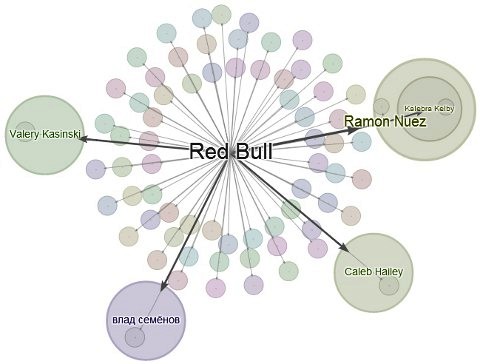
As we stated in the beginning of this post, visually seeing that data is important, as it is much easier to decode than sorting through text or having to jump from profile to profile of those who shared your content.
The circles concept on Google+ aids greatly in this instance, which leads us to the next tip…
Group Your Influencers
Over time, you'll get an idea of who shares your content the most and who helps contribute beyond in that aspect. With Facebook pages, you unfortunately can't use the Lists feature, which is only available to those who have a personal profile.
With Google+ however, both individuals and brands have the ability to create circles.
This is great because now you can group your influencers into their very own circle and make sure to nurture the relationship with them. Send out exclusive content, interact directly, start a hangout with just that circle, you name it.
The topic of influencers shouldn't take all of your focus away from everyone else in your audience, but knowing who in your audience aids a step or two beyond will give you that extra edge when it comes to using the social network for your business.
What do you think? Are you investing time into Google+? How are you using it? Leave your questions and comments in the box below.

Want to Unlock AI Marketing Breakthroughs?
If you’re like most of us, you are trying to figure out how to use AI in your marketing. Here's the solution: The AI Business Society—from your friends at Social Media Examiner.The AI Business Society is the place to discover how to apply AI in your work. When you join, you'll boost your productivity, unlock your creativity, and make connections with other marketers on a similar journey.
I'M READY TO BECOME AN AI-POWERED MARKETER