 by
by  Does your blog put out a welcome mat for comments? Would you like more interaction on your blog?
There are lots of blogs today, which means that people have many places where they can go to learn new things.
If you don't make people feel welcome, they may read and dash without leaving a comment.
Here are 7 ways you can encourage your readers to leave comments.
Tip #1: Check your blog comments settings
Do you make it easy for someone to leave a comment?
That might sound like a crazy question until you look closely at the comments settings available in the two most popular blogging platforms, WordPress and Blogger. Both platforms give you options for limiting who can post comments on your blog without really explaining the impact of your choices.
Every business has a unique situation, so you need to consider your business blog comments options carefully. In general, I recommend that you make it easy for people to comment and (nearly) impossible for spammers to comment.
So how do you do that?
On WordPress blogs:
- Make it easy for people to comment by only requiring commenters to provide their name and email address.
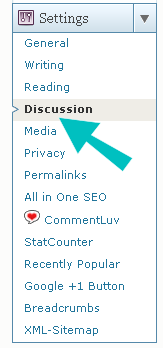
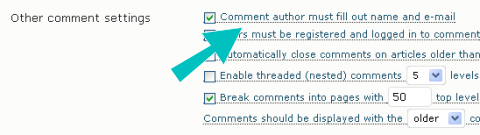
- Make it difficult for spammers to comment by turning on comment moderation for first time commenters. This option requires the blog administrator to approve the first comment from everyone. WordPress automatically approves any other comments posted by the same person.

On Blogger blogs:
- Make it easy for people to comment by selecting the option to let anyone comment.
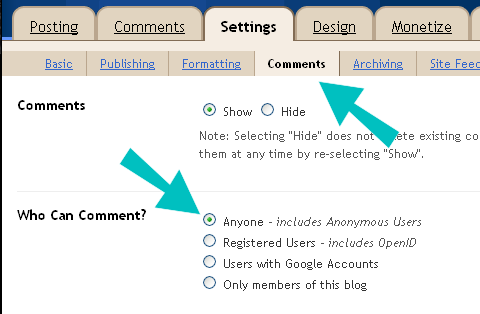
- Make it difficult for spammers to comment by turning on the word verification setting. People must type a word displayed on the screen to successfully submit a comment. Because most comment spammers are computer programs, they can't complete this typing test.

Tip #2: Ask for comments
At the end of your blog post, always ask the reader to leave a comment. It's like telling someone a story and then saying, “Well, what do you think?”
I recommend that you write a customized comment request statement at the end of each blog post. Rather than writing a generic statement (“Post your comments below”), be specific. Write a unique comment request based on the blog post content.
Tip #3: Write a blog comment policy
It's your blog. You can set the rules for what makes a safe conversation zone for your community. What you choose depends on your business and your community, along with your own sensibilities.
For example, the blog for a pub might allow more colorful language than a blog for home schooling.
Go Deeper Than an Article Can Take You

Join thousands of small-business marketers at Social Media Marketing World — three days of AI, social media, and marketing strategy taught by world-class experts. April 1–3, 2027 in Anaheim.
Every session is pitch-free and built around tactics you can use yourself, no big team required. Your All-Access ticket includes an extra day of workshops, full access to AI Business World, and recordings of everything.
GET MY ALL-ACCESS TICKET — SAVE $800When defining your comment policy, think about these factors:

Tired of Guessing Which AI Moves Matter?
New AI tools and strategies launch every week — and figuring out which ones matter takes hours you don't have.The AI Business Society filters the noise for you, with expert-led training you can put to work the same day — plus a community of marketers sharing what's actually working.
I'M READY FOR REAL AI RESULTS- Do you allow people to promote their own businesses?
- Do you allow negative comments? And where do you draw the line?
- Do you allow people to disagree with your opinions?
- Will you correct language and grammar mistakes?
Check out other people's blog comment policies while you are writing your own conversation zone rules. See how they handle challenging situations to inspire your own solutions.
Tip #4: Provide comment instructions
Do you moderate comments from first-time commenters? Do you have a blog comment policy? Why not include this information right next to the Submit button for your comments?
This type of just-in-time information helps a new blog commenter to get the information she needs to feel confident before placing her first comment.
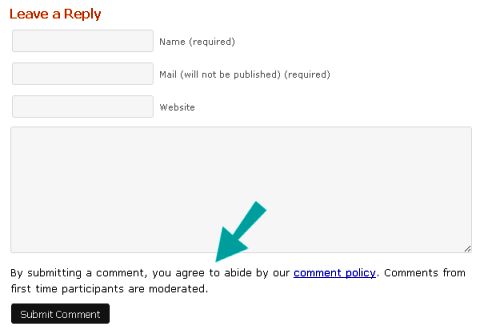
You may need to get technical support to get your instructions added to your blog post page template. However, once it is in place, it appears automatically on every post, even the ones you have already published.
Tip #5: Respond to comments
While building your blog community, you should respond to every blog comment. It shows people that you are paying attention and that you respect your community.
You want to reply to comments quickly after they post. Most blogging software allows you to set up email notifications when new comments appear. You don't have to respond immediately, but you should respond within one business day.
Conversations build relationships. Your reply to a comment continues the conversation and builds the relationship further. The more you build relationships within your community, the more they care about you and your business. It's human nature.
Tip #6: Make people feel good about their comments
What you say when you respond to a comment makes a huge difference in how that person feels about your online community. Your attitude and opinion of their comment leaks through in your word choices and the points you make.
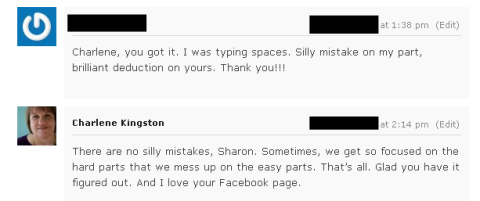
Welcome divergent opinions. To build a community around your blog, you need a thick skin to protect you from people who don't agree with you. But it goes even deeper than that. You need to welcome divergent opinions. You need to appreciate that everyone has a unique life experience that leads him or her to different conclusions. Just because someone disagrees with you doesn't mean that anyone is wrong or right. It just means you have different opinions.
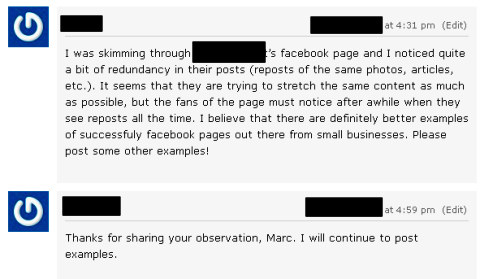
I've talked to bloggers who complain about “blog trolls,” these bloggers' label for people who disagree with their opinions. There are real blog trolls out there—people who argue, make nasty comments about people rather than debating ideas and always want to prove you are wrong and they are right. But someone who merely expresses a different opinion isn't a blog troll. It's an important distinction for you to make.
Tip #7: Build community with your replies
Bring a sense of appreciation to your blog comments and to your commenters. They didn't have to read your post. They didn't have to leave a comment. In fact, they don't have to be part of your community. They chose these things.
Always look for something smart in every blog comment, a great point that you can reply to even if you don't agree with the commenter's opinion. You've had your say in the post. Now, listen to their opinions and leave a reply that makes commenters feel good about you, your business and your online community. You do that by making them feel great about their comment.
Building community through blog post replies is a skill, and it's something you can learn to do better. Read a lot of blogs and pay careful attention to the comments and replies. When you find bloggers who excel at making the commenters feel good, study what they say. Hang out on their blogs. Engage them through Twitter or email to ask them how they think about their blog comment replies. They might tell you something that changes the way you reply to everyone.
It's Your Turn
What do you think? How do you encourage people to leave comments on your blog? Have you posted comments on a blog where you felt appreciated and welcome? Share your experience and insights in the comments box below.

Where Do You Actually Stand With AI?
Most marketers use AI, but they don't know what's holding them back from real results.
Our 3-minute quiz pinpoints the one gap keeping you stuck — and gives you the exact next step to fix it.
GET MY RESULTS






