 by
by  Facebook pages are changing. And that means your business strategy will need to change.
In fact, Facebook has made many new changes that will impact anyone with a Facebook page.
These changes emerged from Facebook's fMC 2012 Conference.
The overall message was that Facebook is looking at pages as a “mission control” point (which is where the MC comes from in the conference title).
Here is an overview of the changes and how brands can take advantage of some of the new features.
#1: Cover Photo and Profile Image
Obviously one of the biggest changes that we all knew was coming was the cover photo. No more photo strip across the top. You now have one large image to showcase your page. This image must be a minimum of 399 pixels across to be used as the cover photo. But you can have a photo cover designed to take advantage of the extra space you get. The cover photo maximum dimensions are 850 pixels by 315 pixels.
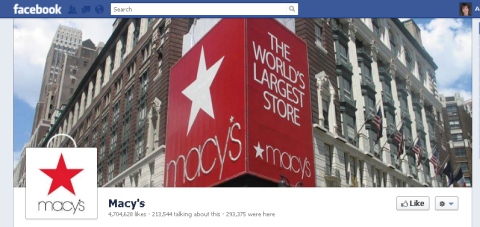
One of the biggest restrictions is the fact that you can't have any calls to action in your cover photo. You can't tell people to like or share your page or have any contact information at all, including your web address, phone number or mailing address. Get the full details about cover photos here. These restrictions will require some creativity in drawing attention to your business without some of the methods that have been used in the profile pictures recently.
The profile picture size has been changed to 180 pixels by 180 pixels. It appears next to every post in the news feed as a 30 pixel by 30 pixel picture. The profile picture is best used for your logo or other eye-catching picture without a lot of words.
#2: Larger, Highlighted and Pinned Posts
One of Facebook's mantras during the conference was the way we tell stories with Facebook. To help you tell your stories, the pictures and videos are now larger and more eye-catching.
You can also highlight a story (by clicking the star icon in the upper right of a post) so that it spans all the way across the Timeline as shown in this Lexus post with a video.
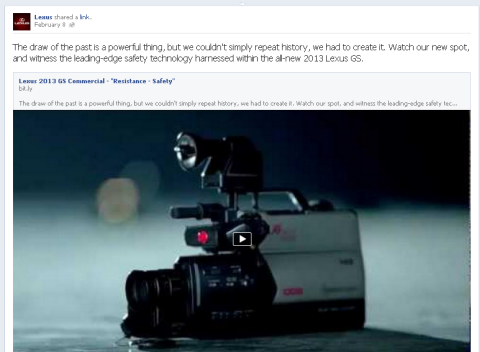
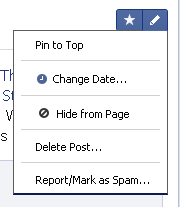
You can also pin the story to the top of your Timeline for up to a week. To do this, click the pencil icon in the upper right of the post and select Pin to Top.
#3: Setting Company Milestones
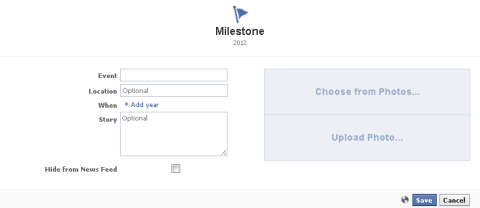
Another thing you can add to make your Timeline more interesting is Milestones. You can tell people about big events in the life of your brand or company.
All you need to do is click on the line that runs down the middle of your Timeline and select Milestone. Then you can fill out the information as shown.
Because the posts from your fans are in a separate area, your Timeline is now more focused on your story.
Go Deeper Than an Article Can Take You

Join thousands of small-business marketers at Social Media Marketing World — three days of AI, social media, and marketing strategy taught by world-class experts. April 1–3, 2027 in Anaheim.
Every session is pitch-free and built around tactics you can use yourself, no big team required. Your All-Access ticket includes an extra day of workshops, full access to AI Business World, and recordings of everything.
GET MY ALL-ACCESS TICKET — SAVE $790People may be spending more time reading your Timeline rather than just coming to your page to ask a question. The more visually engaging you can make your Timeline, the better.
#4: New Applications
One of the biggest changes is the removal of the default landing tab.
Applications are still available and if you have created a custom welcome tab or added any other special application, it hasn't disappeared.
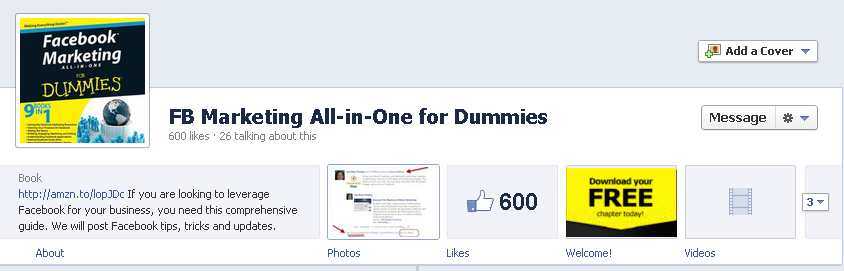
You now have 12 applications you can showcase and only the four applications that you move to the top row will appear prominently. You cannot change the position of the photos, so technically you only have three applications that you have control over in that top row .
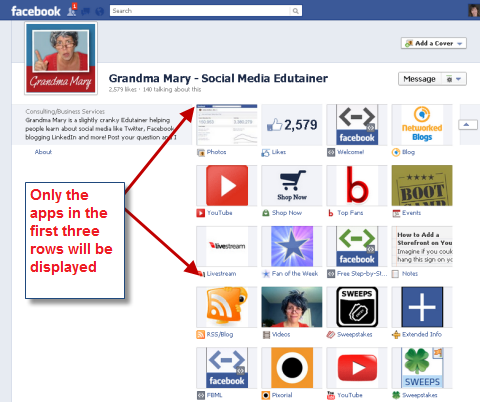
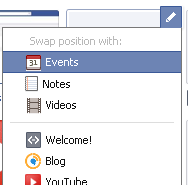
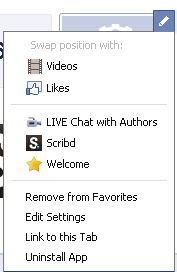
To move your apps around, first click the down arrow next to your top row of apps to display all of your apps. Next, click the pencil icon in the upper right corner of the app. Then select the app that you would like to swap positions with. As mentioned, you cannot change the position of the Photos app.
Many people are lamenting the disappearance of the default landing tab, but the new app buttons give us an opportunity to be creative. You can change the photo that appears for the app and you can rename the app to give a call to action as shown on Holdren Design's page.
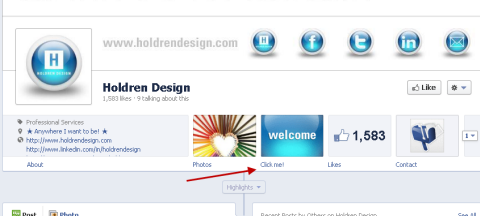
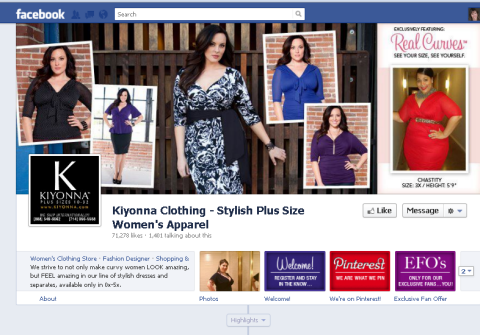
To change your app photo, again display all of your apps with the down arrow button next to the top row of apps and click on the pencil icon. Scroll down to the Edit Setting selection and from there you can add a custom tab image.
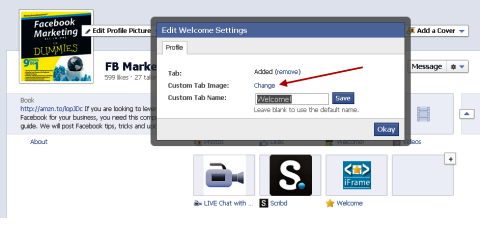
The custom tab image is 111 pixels by 74 pixels.
#5: Facebook Offers
Only a few companies have access to Facebook Offers currently, but it will be rolled out soon. According to Facebook's Offer Help section, they “expect to make Offers available more broadly soon.” Facebook Offers are like Facebook Deals on steroids.
The post is sent through the news feeds of your fans, which is much more visible. There are easy ways to share the Offer, both through the post itself and then when the Offer is claimed. Fans get the Offer by clicking the Get Offer link, see the terms and then click the blue Claim Offer button as shown.

Tired of Guessing Which AI Moves Matter?
New AI tools and strategies launch every week — and figuring out which ones matter takes hours you don't have.The AI Business Society filters the noise for you, with expert-led training you can put to work the same day — plus a community of marketers sharing what's actually working.
I'M READY FOR REAL AI RESULTS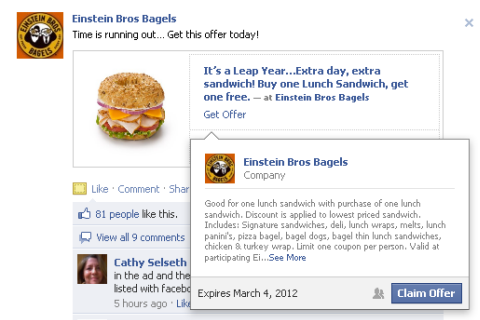
Because Facebook has everyone's email address, they are able to individually email your Offer to the person who claimed it. Unfortunately, the page does not have access to those emails through which the Offer was claimed, but at least the word is spread about your Offer.
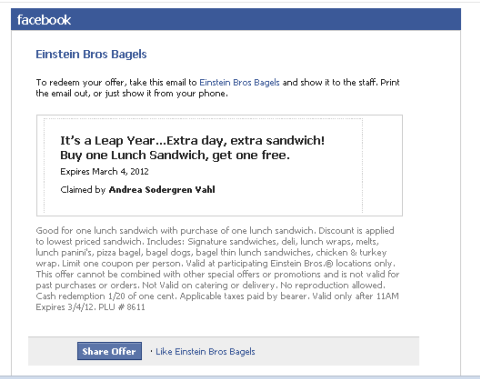
Facebook Offers could be a huge win for small businesses offering things like a “free webinar” or consultants offering a “free 15-minute consultation.”
The danger is making sure you have the bandwidth to deliver the Offer. There didn't seem to be any way to cap the number of Offers that were claimed. Einstein's Bagels had close to 30,000 people who claimed the BYGO sandwich offer. Not too difficult to fulfill if you have 500+ locations and you anticipate that some won't redeem the Offer at all—but still, you don't want to get into a bad situation with fulfillment problems.
Facebook gives some good tips on ways to make your Offer successful by telling us to “make discounts substantial”—20% off or even free—as well as setting a reasonable expiry date to “let people have a few days to see and claim the Offer.”
The other question is when Facebook Offers will be widely available. Facebook stated, “Offers are only available to managed advertising clients.” Once this is rolled out to more pages, it would seem that every page would want to create one if it was free. Plus it appears that Facebook may not be vetting the Offers before they go live. Offers may become too much of a good thing, but that remains to be seen.
#6: Facebook Insights, Admin Panel and Messaging
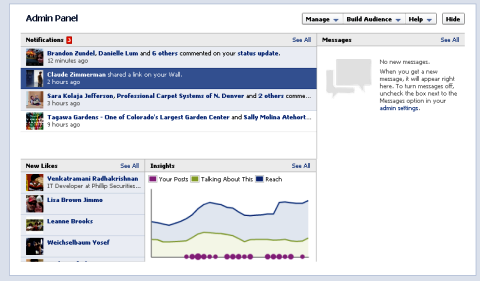
Another change with the Timeline is the location of the Insights. You can now access them by clicking on the Admin Panel in the upper right corner.
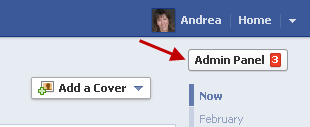
The Admin Panel has much different navigation than before, but everything appears to be there.
You will still be able to see the old-style Page Dashboard if you click the Manage drop-down menu and then Edit Page.
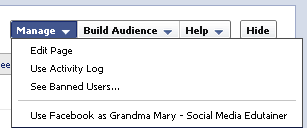
From the Admin Page, you can also invite your email contacts, invite friends, share your page and create an ad from the Build Audience drop-down menu.
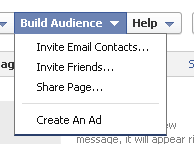
Facebook has done a nice job of giving us lots of options to learn more about the new page design from the Help drop-down menu. During the Preview, the Help drop-down menu links to tutorials, but once you publish your Timeline you will have access to some different options.
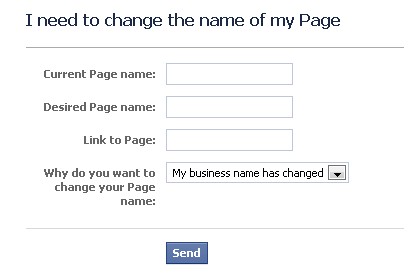
One of the capabilities will be to easily request a name change for your page. This name change is the title of your page, not the custom URL you may have set for your page. You can still access this form here. Great news for people who have changed their company branding, have had a misspelling in the name or have other tweaks they have wanted to make.
One of the most interesting developments of the new page Timelines is that we can now get more information on other pages that have changed to the new Timeline. When you click on the Likes box, just underneath their Timeline cover photo you can see the most popular age group, a People Talking About This Trend graph and their most popular week.
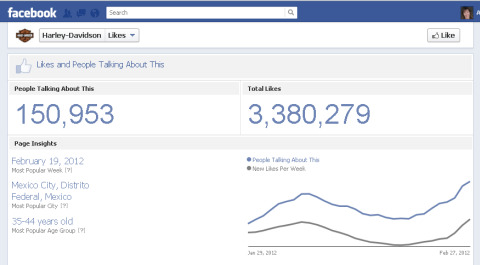
Companies could possibly hide the Likes box by swapping it to a lower position than the top 12 apps that are accessible to the public. But that would also hide the social proof of how many people like your page.
Pages will also have the ability to receive messages from fans. The Message feature can be turned on or off from the Manage Permissions area of the Admin Dashboard.
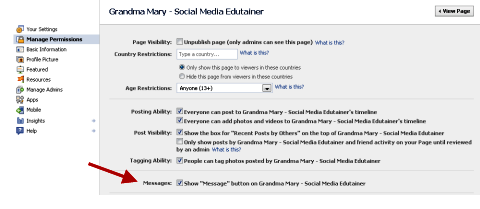
The Message button is enabled by default so if you want to disable it, you will have to uncheck the box. Messages can only be initiated by a fan—they cannot be initiated by the page to a fan. The page can reply to the message sent.
#7: Facebook Advertising
Another new announcement that was covered in the fMC Conference was some changes to advertising. The ads will be larger and the product names are the Reach Generator and Premium on Facebook. The Reach Generator is designed to reach more of your existing fans than you currently are reaching through the news feed.
Mike Hoefflinger, Facebook's director of global business marketing, said that currently pages only reach about 16% of their audience each week with posts. With the Reach Generator ads, pages can reach 50% of their fans each week and 75% each month. Beta testing done by brands such as Ben and Jerry's was able to reach 98% of fans and double engagement.
The Reach Generator ads are designed to connect to your existing audience and will include the Page Post stories. The ads will not be based on CPC or CPM models, but will be an “always on” ad. These ads will be shown on the right side of the page and they will also go into the news feed and mobile streams. Learn more about this product in Facebook's Reach Generator Guide.
Premium on Facebook is designed to distribute your stories to new connections and will be shown on the right side of the home page, in the news feed, in mobile streams and when someone logs out of Facebook. Find out more in the Premium on Facebook Guide.
Again, there were lots of big changes to pages that came out of the fMC Conference. Read more about their guides here. Ultimately, the Timeline look needed to come to pages and there are a lot of ways we can use it to our advantage.
What do you think? Now it's time to weigh in with your thoughts about all the changes. Leave your questions and comments in the box below!

Where Do You Actually Stand With AI?
Most marketers use AI, but they don't know what's holding them back from real results.
Our 3-minute quiz pinpoints the one gap keeping you stuck — and gives you the exact next step to fix it.
GET MY RESULTS






