 by
by 
Wondering how to make it easy for people to share your great content? Keep reading…
You've done the hard part, which is creating compelling content that will keep your readers coming back to your blog again and again. Now that you have these amazing posts, the next obstacle is to get people to share your content.
I found this great WordPress plugin called Digg Digg, an all-in-one social sharing tool. It's easy to configure and offers lots of choices.
#1: The Blog Setup
You can select and organize which social sharing buttons to display on your blog post.
The plugin comes with the option to add several popular social sharing sites such as Digg, Reddit, Google Buzz, StumbleUpon and several more. Personally I use it for the big 3—Facebook, Twitter and LinkedIn.
If you're not sure how to set up this plugin, I found this video tutorial by MaryKay Edelmen to be very helpful.
https://www.youtube.com/watch?v=ikX78vf4aRc

Tired of Guessing Which AI Moves Matter?
New AI tools and strategies launch every week — and figuring out which ones matter takes hours you don't have.The AI Business Society filters the noise for you, with expert-led training you can put to work the same day — plus a community of marketers sharing what's actually working.
I'M READY FOR REAL AI RESULTS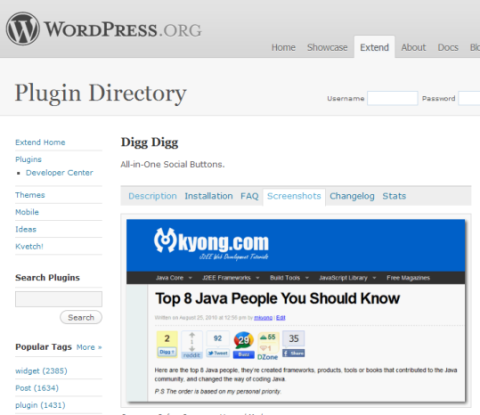
#2: The Social Setup
Most of your readers already have accounts set up on Facebook, LinkedIn and Twitter. LinkedIn is very effective when you join groups around your niche. Digg, StumbleUpon and Reddit can also be great places to post your blog article as well.
With Digg Digg you can select all sorts of different social sharing buttons.

#3: Clicks to Millions of Eyeballs
Once you've set up the Digg Digg plugin, you're ready for viewers to share your posts. Posting on these social networks puts your blog post in front of millions of eyes, and makes it simple for your followers to pass your great content onto their followers.
You can also use Digg Digg yourself to post your content. In the following video, I show you how easy it was to share my blog posts to all of my followers.
[vimeo clip_id="24205647" width="480" height="271"].
All These Impressions… Now What?
You're probably saying to yourself, “That was simple! In just 3 steps I can have my articles in front of thousands or millions of eyeballs.” It's true, you can. But if nobody bothers to click and read your post, what's the point?
Go Deeper Than an Article Can Take You

Join thousands of small-business marketers at Social Media Marketing World — three days of AI, social media, and marketing strategy taught by world-class experts. April 1–3, 2027 in Anaheim.
Every session is pitch-free and built around tactics you can use yourself, no big team required. Your All-Access ticket includes an extra day of workshops, full access to AI Business World, and recordings of everything.
GET MY ALL-ACCESS TICKET — SAVE $760This is why it's really important that you take the time to think of a headline and status to entice people to read your blog. Chris Garrett wrote an excellent article called “10 Ways to Cut Through the Social Media Noise and be Heard.” If you're struggling with getting clicks on your blog, this is a great read to get out of the rut.
Do you engage?
I'd like to hear what you do to engage people to read your blog posts. How can we turn these millions of impressions into millions of clicks and comments on your blog? Leave your comments and tips in the box below.

Where Do You Actually Stand With AI?
Most marketers use AI, but they don't know what's holding them back from real results.
Our 3-minute quiz pinpoints the one gap keeping you stuck — and gives you the exact next step to fix it.
GET MY RESULTS






