by
by  Wish you could easily reshare someone else's Instagram post?
Have you heard of Instagram's Add Post to Your Story feature?
In this article, you'll discover how to add any public post to your Instagram story and how this feature can benefit your business.
Find Out if You Have the Instagram Reshare Feature
The Instagram reshare feature is currently being tested only with a select audience. Not everyone will have access to it. Even I don't have it yet, but fortunately, my friend with @tickletreestudio does and she granted us permission to use her account to show you the features.
To find out if you have access, select any public post from any public account (including your own). Tap on the Message or Send To button (the icon under the post image that looks like a paper airplane). If you have the option to Add Post to Your Story, then you have this feature!
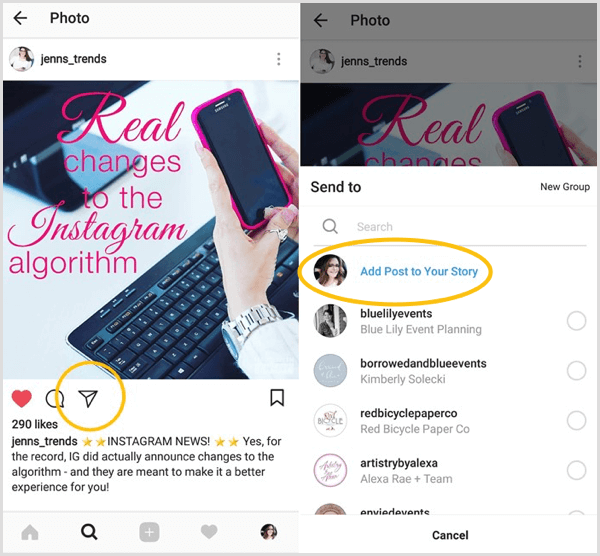
Note that Instagram gives accounts the option to block this sharing feature. If you check a post and you don't have this option, the account may have it disabled. You may want to check more than one account to see if you actually have access to the feature.
#1: Reshare Posts to Your Story
This new reshare feature is a prelude to an official “regram” feature within Instagram. It's not a fully operational regram tool as many of us would like. In this current testing version, you can share an Instagram post (from the regular feed) to your own Instagram story. You can't reshare it to your own Instagram feed.
The process to share a post is relatively quick and easy.
Select the Post to Add to Your Story
Choose any post, including one of your own, that you want to share. Tap the Send To button and choose Add Post to Your Story (as mentioned above).
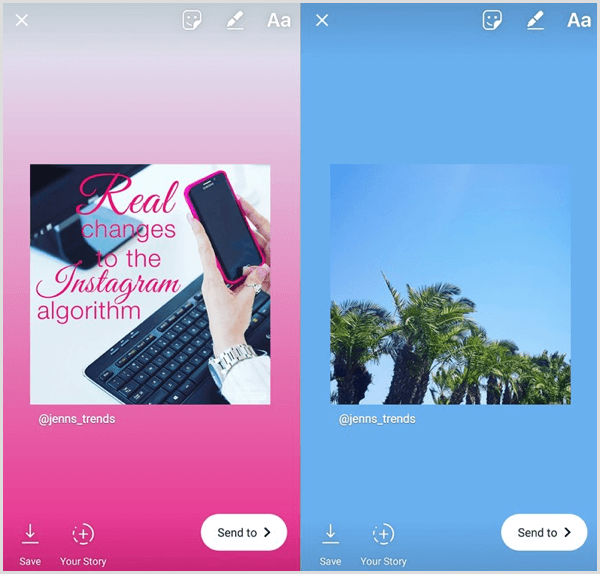
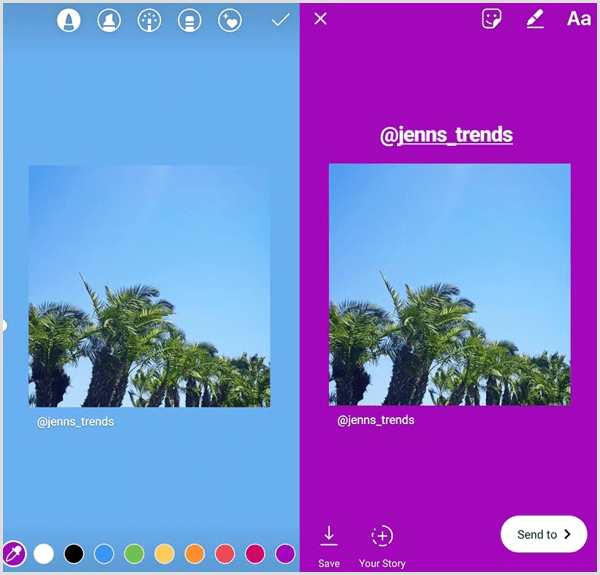
A new story post will open. Instagram's technology automatically selects a gradient of colors for the background based on the colors in the post image. The original post is a square image with the original username of the account beneath it.
Ready to Supercharge Your Marketing Strategy?

Get expert training and an unbeatable conference experience when you attend Social Media Marketing World—from your friends at Social Media Examiner.
Broaden your reach, skyrocket your engagement, and grow your sales. Become the marketing hero your company or clients need!
🔥 Save $510 on an All-Access ticket. Sale Ends Wednesday! 🔥
GET THE DETAILSEdit Your Story Post
Now that you have the story post open, edit your story as normal to add more context to your reshared post. You can drag and resize the reshared post image and add text, stickers, or other components to it.

If you don't like the color of the background that Instagram applied to the post, you can change it. First, tap the pencil icon.

Then choose a color, and tap and hold the background of the post to fill it with the color of your choice.
Tag the Original User
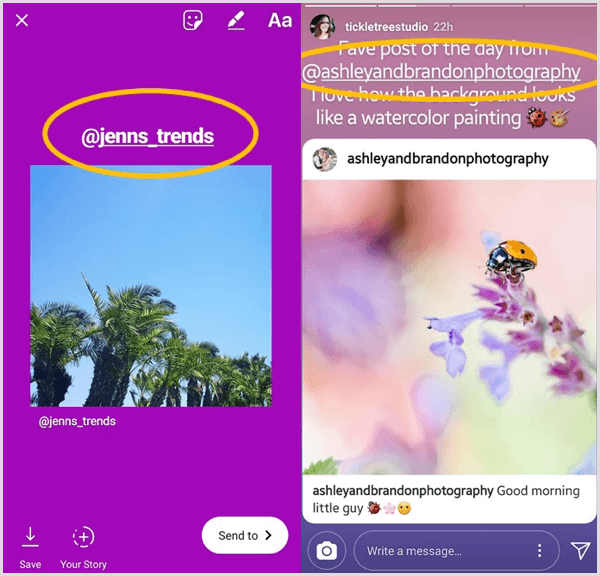
Unfortunately, with the current testing version, although the original username is listed beneath the photo in the story, the original user isn't actually tagged in the post. They won't receive a notification you've shared their post.
In this situation, it's good etiquette to give proper attribution by adding a text box that lists the original user and tagging them in the post so they receive a notification.
Upload Your Story
AI Is No Longer Optional for Marketers—Ready to Master It?

Join over a thousand forward-thinking marketers at AI Business World—a conference-in-a-conference at Social Media Marketing World.
Get two days of practical AI training where you'll discover:
✅ Systems that 3x your output—leaving time for strategy and creativity
✅ Proven strategies you can deploy right away—no guesswork, no wasted budget
Become the indispensable AI expert your company needs.
GET YOUR TICKETS—SAVE $150Now complete your story post upload like normal, and you and your followers will be able to see it on your profile.
#2: Interact With Reshared Posts
When a user has reshared a post to their story, you can tap on the story and then tap the See Post button to go directly to the original post from that user.
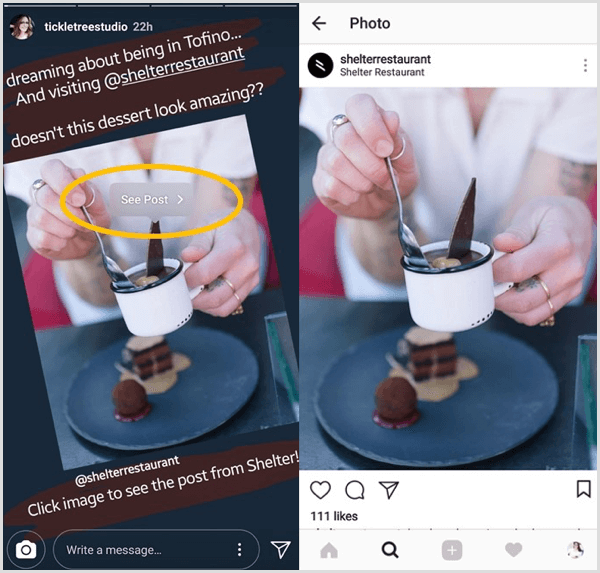
Once you open the original post, you can engage with it as normal, liking or commenting on it.
#3: Edit Your Post Sharing Settings
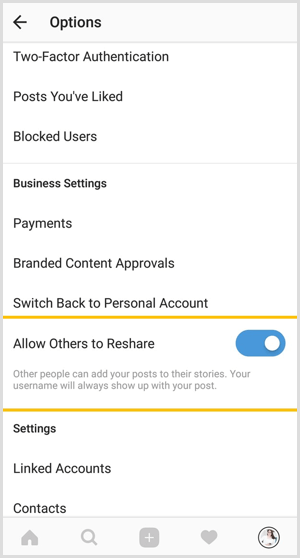
By default, your account allows others to share your posts. Everyone should currently have this option in their account settings.
There may be a situation, however, where you don't want other accounts to be able to share your posts to their stories. You can prevent this, even if you don't have the reshare feature now, by editing your settings in Instagram.
Tap on the gear icon on your profile and scroll down to the Allow Others to Reshare option. If the slider for this option is on (and blue), people currently have the ability to share your posts. To disable this setting, tap on the slider to turn it off.
#4: Legal Considerations for Resharing
There are always legal considerations around posting someone else's content on social media. They own the copyright to the original work and you require permission to reuse their content.
Many “share” functions on platforms like Facebook and Twitter allow users to skirt around copyright because they're sharing the original post with attribution. This new reshare feature on Instagram works more like these sharing functions and many users will use this tool without considering the rights of the original user.
It's always best practice to ask permission before resharing someone's content. Because this new feature is for Instagram, many users will likely be happy to see their content shared. But that shouldn't discourage you from asking for their permission first.
This will be especially true when resharing content that customers have posted about your product or service. If you're sharing content that can be shown to drive financial rewards for your business by using their posts as testimonials, you want to make sure you have explicit permission from them (via a comment on their post or a direct message) to reshare that post.
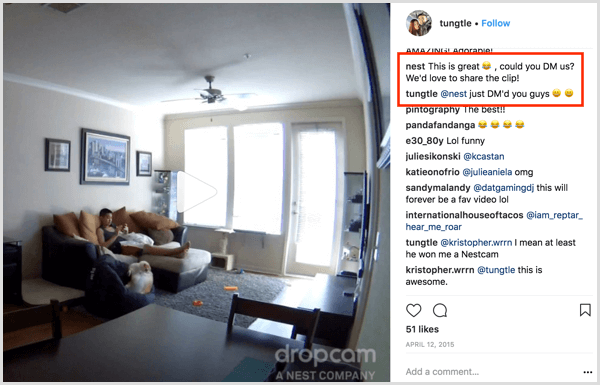
Once you have permission, have fun with the reshare feature! Enjoy adding more variety to your stories' content and providing more value to your audience.
#5: 5 Creative Ways to Use Reshared Posts
Just as many of us like to regram posts on Instagram, this reshare feature offers a variety of ways to augment your content strategy for Instagram Stories. If you have this feature, you may want to consider resharing posts in these ways:
- Showcase how your customers use your product or service.
- Highlight local events or venues near your business.
- Provide educational tips from industry leaders.
- Share breaking news or updates related to your industry or audience.
- Cross-promote your own Instagram posts to your stories for added reach to more of your audience.
Even if you don't currently have the reshare feature, it would likely be advantageous for your brand to enable the resharing function. If your followers or others have access to the feature, they're able to share your posts to their audiences. This can provide more reach and exposure to new audiences and drive more engagement on your own posts, while potentially leading to more followers.
When this feature rolls out to more users, I can see it being a great way to conduct contests (there aren't currently any restrictions on being able to reshare posts on Instagram contests), requiring a reshare of your post to enter.
Want more like this? Explore Instagram for Business!
Conclusion
The reshare feature is still currently being tested and many users don't have access to it. This has been a common request for years, however, and we can assume that this feature, or a very similar version of it, will be rolling out to all users in the near future.
What do you think? Do you have the reshare feature and are you taking advantage of it? Are you eager to get your hands on this feature? Please share your thoughts in the comments below.

Want to Unlock AI Marketing Breakthroughs?
If you’re like most of us, you are trying to figure out how to use AI in your marketing. Here's the solution: The AI Business Society—from your friends at Social Media Examiner.The AI Business Society is the place to discover how to apply AI in your work. When you join, you'll boost your productivity, unlock your creativity, and make connections with other marketers on a similar journey.
I'M READY TO BECOME AN AI-POWERED MARKETER