by
by  Do you want to attract more viewers to your videos?
Have you thought about creating custom thumbnails?
A video thumbnail works similarly to a book cover. It sells your video to potential viewers. An attractive, eye-catching thumbnail makes people more likely to click through to your video.
In this article you'll discover nine tips to create thumbnail images that boost video views.

Listen to this article:
Where to subscribe: Apple Podcasts | Spotify | YouTube Music | YouTube | Amazon Music | RSS
#1: Use a Close-up of a Person's Face
Both offline and online, we love making connections with other people. When choosing your video thumbnail, choose an image that shows a person making eye contact with the viewer. This subtle visual cue draws people in and makes them feel more connected. Once that connection is made, people will be more likely to watch the video.
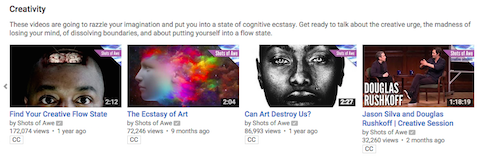
#2: Choose an Image That Conveys Emotion
As humans we're intrigued by strong emotion. A thumbnail of someone yelling or showing anger captures our attention more than an image of someone staring blankly into space.

If your video includes people, design a thumbnail that captures an emotional moment in the video.
#3: Include Simple Yet Powerful Text
Video thumbnails are small, so you don't have a lot of room to add text. To make the most of this space, it's important to write something that inspires users to click.

In your text you need to evoke emotion, be informative and rouse a little curiosity to get viewers to click through to your video.
#4: Select an Image That Reflects the Content
Your video thumbnail needs to make sense to the viewer. For example, if the goal of your video is to inform, your thumbnail needs to show this.

Don't choose images that are nonsensical or violate the viewer's expectations. If your thumbnail doesn't relate to the video or seems random, you'll erode the trust of the viewer.
#5: Pick a Bright-Colored Background
If potential viewers scroll through YouTube or another video channel, they'll look more closely at images that capture their attention. You can use a brightly colored background to draw attention to your video.

Bright colors catch the viewer's eye, so use this to your advantage.
Ready to Supercharge Your Marketing Strategy?

Get expert training and an unbeatable conference experience when you attend Social Media Marketing World—from your friends at Social Media Examiner.
Broaden your reach, skyrocket your engagement, and grow your sales. Become the marketing hero your company or clients need!
🔥 Save $500 on an All-Access ticket. Sale Ends Friday! 🔥
GET THE DETAILS#6: Embed Your Logo
Your logo helps differentiate your brand from your competitors and can bring some consistency to your thumbnails and videos. The most effective way to use your logo is to place it in the bottom-left corner of your thumbnail. Don't let it cover the entire screen because you need to leave enough space to optimize the rest of the thumbnail.
AI Is No Longer Optional for Marketers—Ready to Master It?

Join over a thousand forward-thinking marketers at AI Business World—a conference-in-a-conference at Social Media Marketing World.
Get two days of practical AI training where you'll discover:
✅ Systems that 3x your output—leaving time for strategy and creativity
✅ Proven strategies you can deploy right away—no guesswork, no wasted budget
Become the indispensable AI expert your company needs.
GET YOUR TICKETS—SAVE $150
#7: Choose Complementary Colors
When you're looking for colors that work well together, choose complementary colors. These are the colors that are opposite one another on the color wheel. If your background is yellow, for example, consider using a purple foreground.

Also experiment with analogous colors, which are adjacent on the color wheel. When using analogous colors, consider placing them next to each another in your video thumbnail.
As with any visual, the more attractive the color scheme, the more likely it will draw users' attention and compel them to click on the thumbnail.
#8: Use a Consistent Style
When you're building a brand, it's important to have a consistent image style. So for your thumbnail image, choose a visual that makes it easy for viewers to recognize your brand and content.
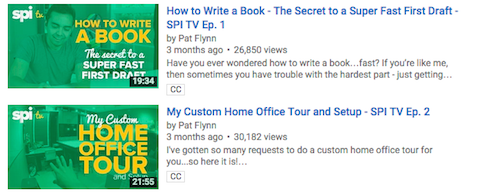
You can create a consistent design by placing your logo in the same location, selecting similar color schemes or using the same title font in your thumbnails. It's important to choose something that differentiates you from your competition.
#9: Design for All Screen Sizes
Because thumbnail images are tiny, you don't have a lot of space to capture the viewer's attention. Your thumbnail needs to look good on a variety of screen sizes, so make sure your text is readable and your image is clear even when the size is scaled down.
Create multiple thumbnails in various sizes to find the one that works best. For instance, if you browse YouTube on a smartphone, the thumbnails are about the size of a postage stamp.

If you know the majority of your viewers will come from mobile searches, make sure details in the thumbnail are visible on smaller screens.
Closing Thoughts
A video thumbnail gives people an initial impression of your video, and if users find it compelling, you'll attract more viewers.
Crafting the perfect thumbnail takes a bit of extra time, but it's time well spent. Instead of users passing over your video in favor of your competitors' offerings, a memorable, eye-catching thumbnail will draw people in and compel them to click through to your video.
Experiment with the above tactics to see which ones resonate with your viewers, and build a more consistent brand in the process. You don't have to implement every step; often with just a few simple tweaks, you'll start to see an increase in eyeballs.
As they say, a picture is worth a thousand words, so make your video thumbnail count.
What do you think? Have you tried any of these tips to design video thumbnails? What are your favorite ways to optimize your thumbnails? Share your thoughts and questions in the comments below.
Color wheel photo from Shutterstock.
Mobile video view image created with Placeit.

Want to Unlock AI Marketing Breakthroughs?
If you’re like most of us, you are trying to figure out how to use AI in your marketing. Here's the solution: The AI Business Society—from your friends at Social Media Examiner.The AI Business Society is the place to discover how to apply AI in your work. When you join, you'll boost your productivity, unlock your creativity, and make connections with other marketers on a similar journey.
I'M READY TO BECOME AN AI-POWERED MARKETER