 by
by  Do you struggle to keep up with social media tasks?
Are you looking for ways to get more done?
Whether you need help maintaining your social accounts, finding content to curate or monitoring competitors, there are ways to simplify these processes.
In this article I'll share a number of tools to maximize the time you spend on social media.

Listen to this article:
Where to subscribe: Apple Podcasts | Spotify | YouTube Music | YouTube | Amazon Music | RSS
#1: Hire Out Social Media Signups
If you don't have social media profiles and pages set up for your business yet, hire someone or use a service to create them for you. Companies like KnowEm offer a service where for about $85, they will create full business profiles and pages for you on 25 essential networks.
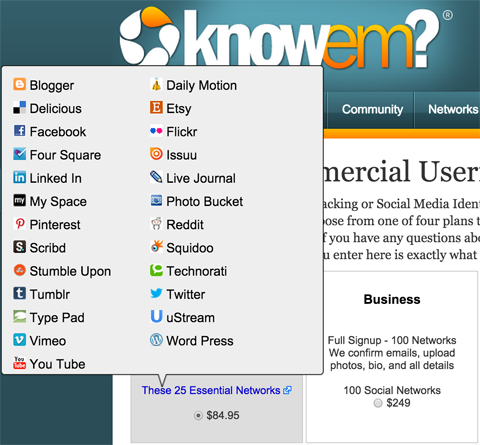
Your name will be reserved on various social networks, and you can build up the profiles at a later date. Once you passed the setup hurdle, it will be much easier to maintain them.
#2: Monitor Your Social Inbox
Stay on top of your interactions on a regular basis. Rather than constantly checking all of your social accounts, use a platform like Sprout Social to monitor your latest notifications from Twitter and Facebook.
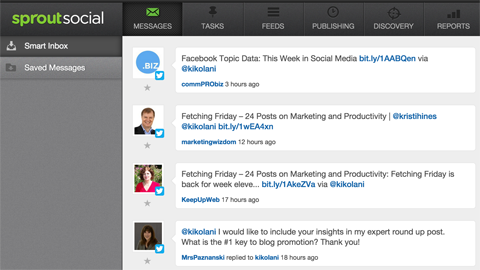
After you connect your social profiles to the app, just go to your social inbox to see public mentions, comment replies and private messages from Twitter and Facebook accounts. You'll still have to visit LinkedIn and Google+ to stay on top of those notifications.
#3: Keep Tabs on Your Reputation Via Email
To find out when people are talking about you, your business, products or services, set up a service such as Mention. You'll get notified via email anytime someone on social media mentions your business using a branded keyword search.
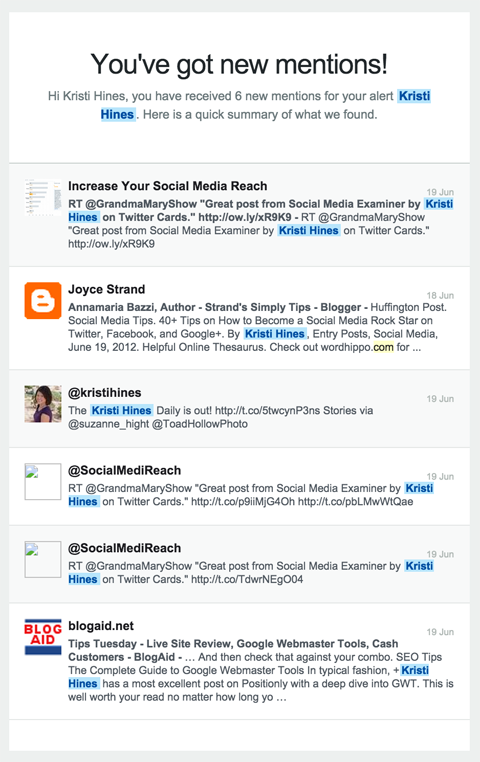
After you receive an alert, click on the links for each mention to view it in your Mention dashboard. You can then choose to reply inside your dashboard or view the original post on social media.
#4: Curate and Share Valuable Content
Posting valuable content from your industry is an excellent way to keep your social media accounts active. Plus, it helps position your business as an excellent source of information.
Use IFTTT (If This Then That), Feedly, Gmail and Buffer to easily share curated content to your social media accounts. IFTTT is a free service that automates actions among different platforms, while Feedly allows you to subscribe to your favorite blogs and Buffer helps schedule updates to Twitter, Facebook, LinkedIn and Google+.
If you don't already have a Gmail account, grab a free email address and continue.
Go Deeper Than an Article Can Take You

Join thousands of small-business marketers at Social Media Marketing World — three days of AI, social media, and marketing strategy taught by world-class experts. April 1–3, 2027 in Anaheim.
Every session is pitch-free and built around tactics you can use yourself, no big team required. Your All-Access ticket includes an extra day of workshops, full access to AI Business World, and recordings of everything.
GET MY ALL-ACCESS TICKET — SAVE $800Here's how to curate content to keep your social media accounts active.
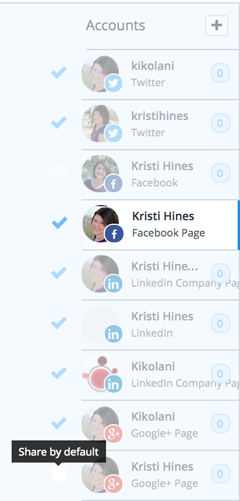
First, connect your social media accounts to Buffer and set up a schedule for each account.
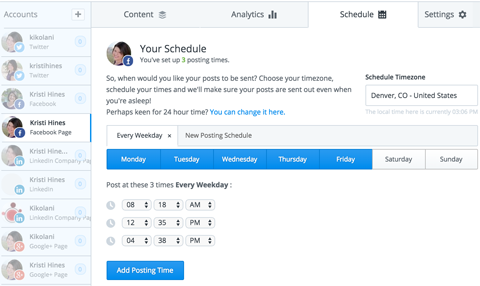
Next, select all of the accounts you want to post your curated content to as the default. Just check the circle to the left of each chosen profile.
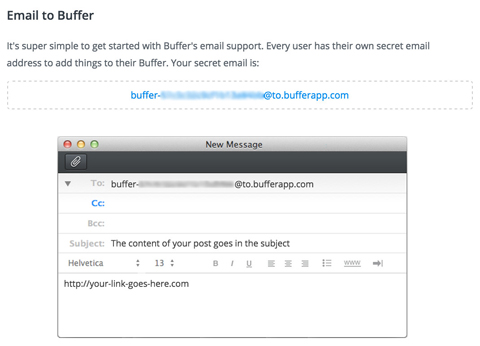
Now, go to Buffer’s How to Email Guide. Leave this page open, so you can grab the custom email address that allows you to schedule updates to Buffer via email for IFTTT.
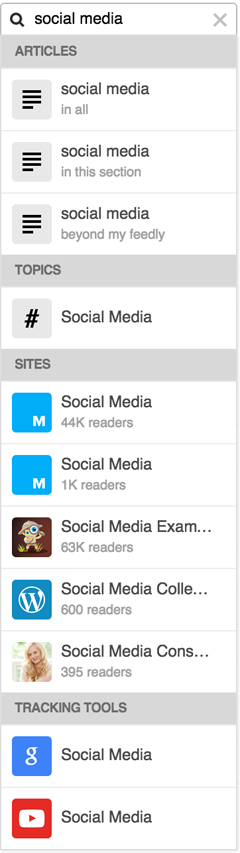
Now, use Feedly to subscribe to the best sources of content within your industry. Create a free account and use the search box to look for specific blogs or blogs on relevant topics.
Now that you have your favorite blogs and your Buffer info, use IFTTT to put it all together.
Sign up for a free IFTTT account. Then create a recipe that allows you to post any items you save for later in Feedly to the social accounts you selected as default. The recipe will start with Feedly as a trigger channel.
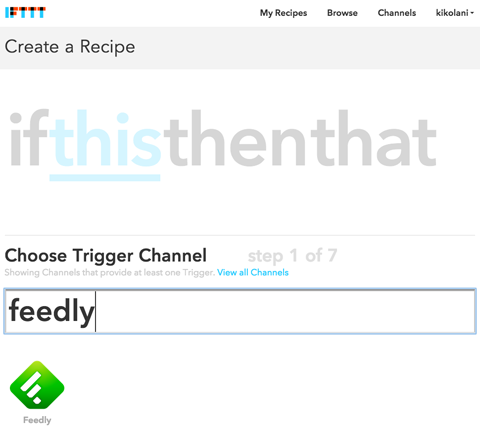
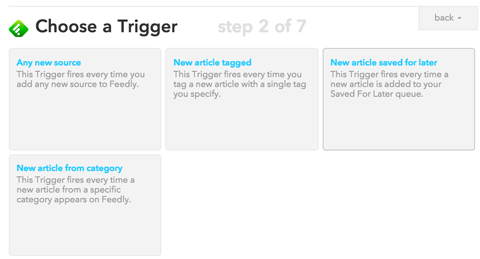
Once you've connected your Feedly account to IFTTT, you'll get to select articles saved for later from the following options as a trigger.
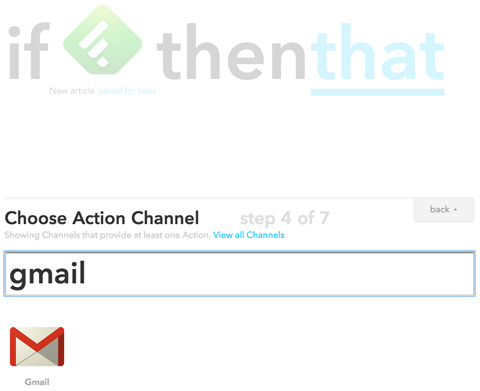
Next, select Gmail as the action channel.
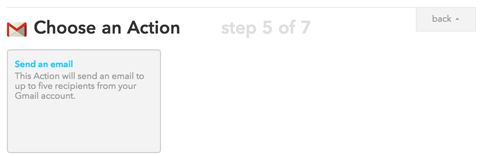
Connect your Gmail account to IFTTT, so you can select Send an Email as an action.
Now, configure the email to your secret Buffer email address, the Article Title field as the subject line and the Article URL in the body of the email.

Tired of Guessing Which AI Moves Matter?
New AI tools and strategies launch every week — and figuring out which ones matter takes hours you don't have.The AI Business Society filters the noise for you, with expert-led training you can put to work the same day — plus a community of marketers sharing what's actually working.
I'M READY FOR REAL AI RESULTS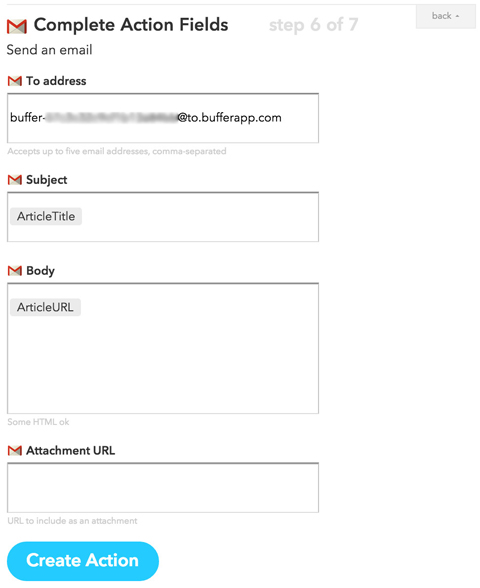
Once you've saved your recipe, test it by going to your Feedly account and saving an article for later. Just click on the bookmark icon next to a post you like.
Now, go back to your IFTTT dashboard and click on the refresh icon to force your recipe to run.

After a few minutes, go to Buffer and you should see the post you saved for later in Feedly in your default social accounts' queues in Buffer.
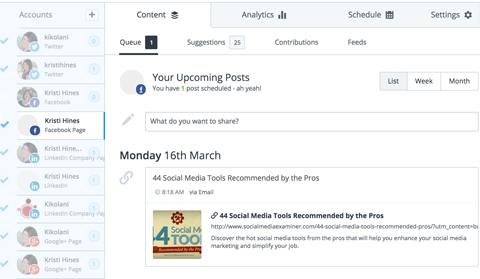
This may seem like a long setup. However, once everything is connected, all you have to do is visit Feedly on your desktop or use the Feedly app on your mobile device, and save good articles for later.
All of the social media accounts you marked as default in Buffer will share those articles with your audience at the times you scheduled them.
#5: Research Your Competitors' Social Media Presence
Another way to assess and reconfigure your social media strategy is to see what others in your industry are doing.
Rival IQ is a powerful competitive research tool that allows you to quickly add your business and your competitors to a landscape. Rival IQ pulls all of their social media data into one dashboard, so you can see how they're performing compared to you on Twitter, Facebook, LinkedIn, Google+, Instagram and YouTube.
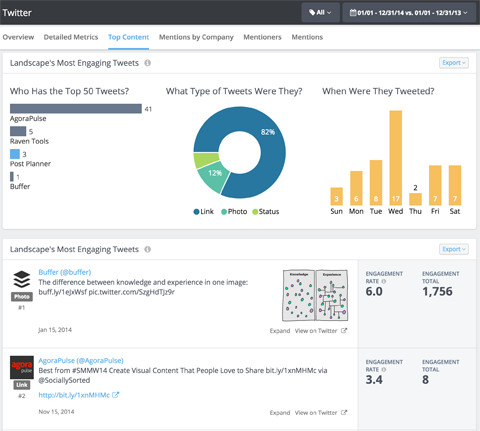
You will even receive regular email updates to alert you to top content and performance on social media.
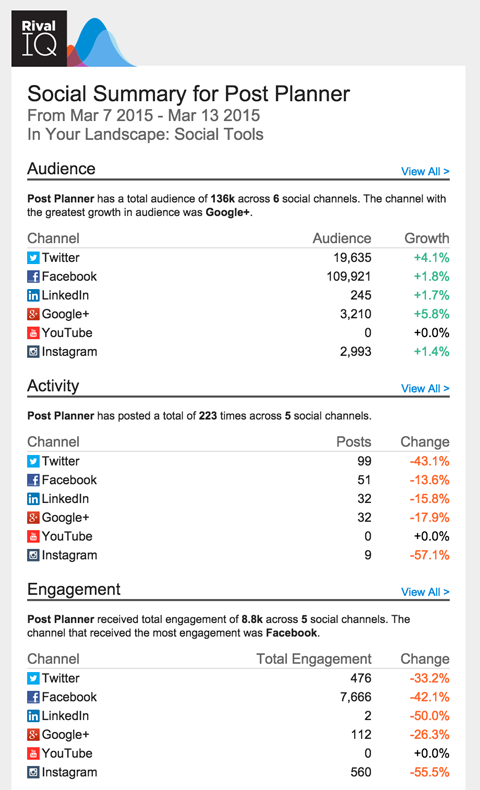
This report allows small businesses to keep tabs on their (and their competitors') social media presence without having to use multiple tools or platforms.
#6: Publish Social Media Testimonials
In most cases it's time-consuming to collect testimonials and recommendations. The need to format them so they display properly on your website even adds to the challenge.
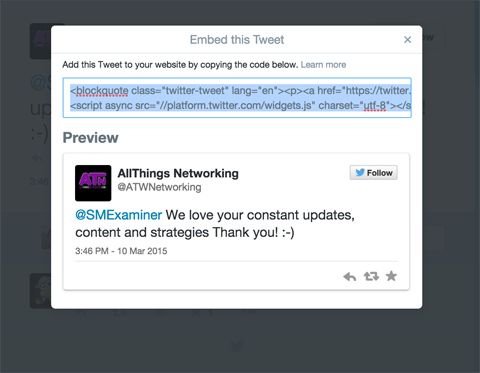
Here's the good news. If you offer great products and services, you likely already have people who are singing your praises on social media. Easily display positive mentions from Twitter and your Facebook page on your website, using the embed code provided by both networks.
On Twitter, click the three dots under a tweet to get the embed code.
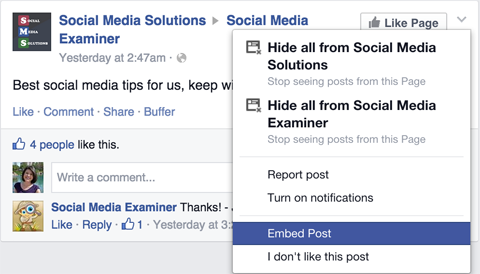
On Facebook, just click on the timestamp for posts on your Facebook page. You can then click on the drop-down arrow at the top right to get the option to embed the post (sometimes this is under More Options).
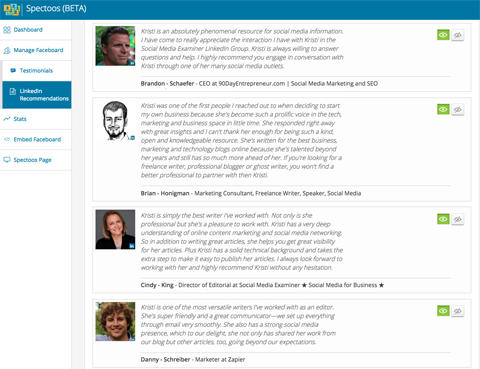
Although LinkedIn doesn't have an option for embedding their recommendations on your website, there is an easy way to do this. Start by connecting Spectoos to your LinkedIn profile to import all of your recommendations. Then, select the recommendations you want to display.
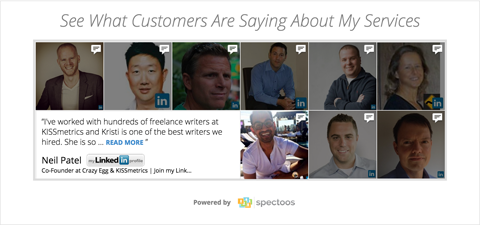
You'll receive an easy-to-install embed code that you can add wherever you want your recommendations to show. Get one recommendation at a time for free, or for $10 a month you can add the widget, which will show up to 12 at a time and slowly rotate through the rest.
Back inside the Spectoos dashboard, you'll get stats on the recommendations that get the most attention for your business.
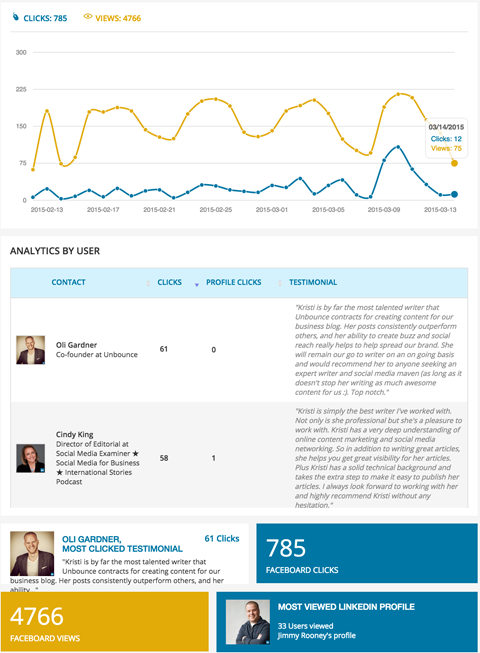
Use testimonials you get from your social media to raise your profile and build your business.
#7: Outsource Routine Social Media Activities
While a social media presence is important for any business, some businesses have absolutely no time to handle their social media. Individuals who manage a business on their own have to focus on the products and services they deliver. Or maybe they just don't have the time to learn how to do it properly.
Fortunately, outsourcing your social media management is another option. Hire someone to keep it alive until you can devote more time and resources to it.
There are lots of great social media consultants and services designed specifically to help small businesses run their social media for less. For example, 99 Dollar Social will update your Facebook, Twitter and Google+ accounts with new content once a day every day of the week (including weekends) for $99 per month.
If you do decide to outsource, take the time to learn how the pros do it, so you can be a part of or take over the social media plan someday.
Conclusion
Granted, some of these tactics may take a little time to set up, but the long-term benefit is worth it.
Social media will enhance your business presence. And it doesn't have to take all of your time to be effective.
What do you think? How much time and energy do you put into your social media management? What tips and tricks do you use to maximize your time? Have you tried any of these social media tools? Which do you find most effective? Please share your thoughts and recommendations in the comments.

Where Do You Actually Stand With AI?
Most marketers use AI, but they don't know what's holding them back from real results.
Our 3-minute quiz pinpoints the one gap keeping you stuck — and gives you the exact next step to fix it.
GET MY RESULTS






