 by
by  Are you wondering what to do with the new YouTube look and feel?
Many people either love or hate YouTube’s platform facelift.
Whatever your preference, in this article I’m going to outline some of the best ways to optimize the new YouTube layout.
Frankly, YouTube’s new design is turning out to be a step in the right direction.
YouTube has managed to add a layer of user experience and brand factor, which are only getting better. This evolution will soon prove highly beneficial to YouTube channel owners.
Here are 5 tweaks you can make to improve branding on your YouTube Channel.
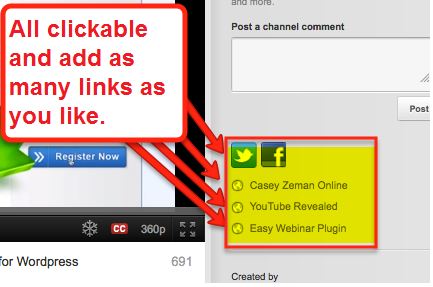
#1: Add Your Custom URLs in the Newly Placed Description Area
This option is now at the top on the right of your video. Talk about brand power. Previously, only partners could take advantage of this prime channel real estate.
However, you don’t have to be a partner to place your URL links in plain sight to the right of the video. Before, your links were drowning below the fold (scroll down) to the left. Now your channel description area is to the right of the video above the fold. That means a higher potential click-through rate to your outside sites.
Plus you can add your social media links in the description area, such as Facebook, Twitter and now Google+.
#2: Add Overlays to ALL of Your Videos
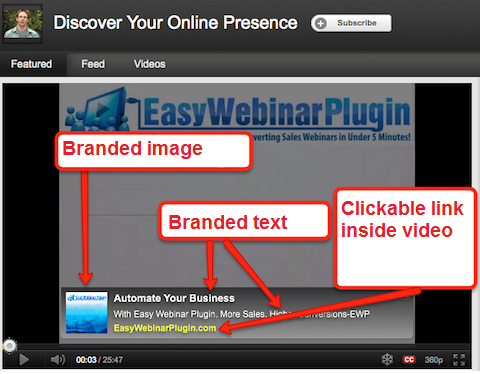
This is a huge opportunity! Most people don’t know about this feature. YouTube promotions are a vastly under-used resource for traffic generation (98 of AdAge‘s Top 100 advertisers can’t be wrong).
Previous YouTube guidelines required you to promote your videos in order to take advantage of YouTube’s self-branded overlays.
However, YouTube has changed that requirement. You don’t need to have a running and approved promotion for a specific video to take advantage of overlays.
Now you can simply create the promoted video, pause the campaign and still have the power of the branded overlay.
#3: Prevent Other Ads from Showing on Your Video
In order to keep all other ads from showing up on your featured video player, check the box that says, “Prevent ads from showing in my videos on this page.”
Go Deeper Than an Article Can Take You

Join thousands of small-business marketers at Social Media Marketing World — three days of AI, social media, and marketing strategy taught by world-class experts. April 1–3, 2027 in Anaheim.
Every session is pitch-free and built around tactics you can use yourself, no big team required. Your All-Access ticket includes an extra day of workshops, full access to AI Business World, and recordings of everything.
GET MY ALL-ACCESS TICKET — SAVE $900This is of course useful and necessary once you add your own branded and clickable overlay to your featured video.
Also, if you opt to have your newest video as the featured video, then you’ll only have to make this selection once and it will apply to all of your featured videos. Simply click on the Edit button found directly over the featured video.
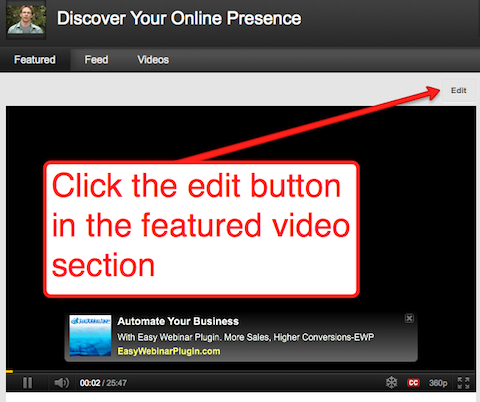
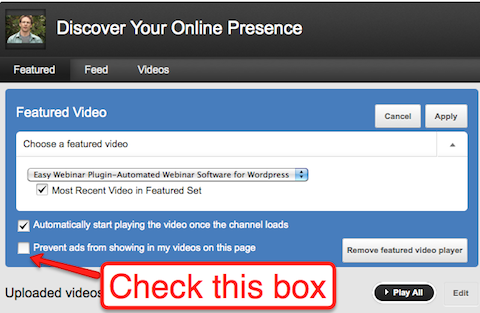
While you’re here, I would also suggest making sure the auto-play option is also checked to have your featured video start playing right away when visitors come to your channel. (This is the only way your overlay will actually show right away.)
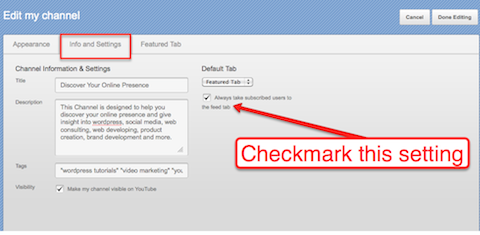
#4: Check “Always Take Subscribed Users to the Feed Tab”
It allows your existing subscribers to see your latest videos and the comments you make on other channels and videos (as well as any updates that you mention). The “Feed” tab not only brings your subscribers that much closer to seeing your channel comments, but they’re more likely to dive in and start commenting themselves to keep up with the conversations.
This can be found in the Edit Channel feature.

Tired of Guessing Which AI Moves Matter?
New AI tools and strategies launch every week — and figuring out which ones matter takes hours you don't have.The AI Business Society filters the noise for you, with expert-led training you can put to work the same day — plus a community of marketers sharing what's actually working.
I'M READY FOR REAL AI RESULTS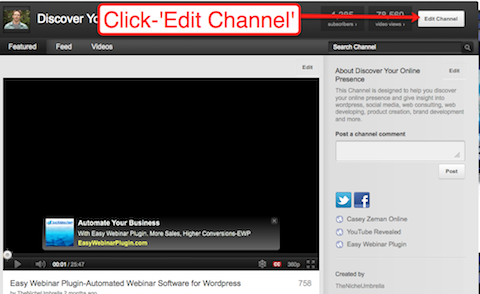
From there, go in and click the “Info and Settings” tab, which will show you where you can check the “Always take subscribed users to the feed tab.”
The Goal Here Is Engagement
YouTube is a social network site (many of us forget that). That being said, treating your YouTube Channel as your traffic filter to your external links can only work well if there’s solid engagement on the channel page itself.
For instance, if you’re trying to build engagement within YouTube, commenting on other YouTube channels is a great way to get them to come back to yours.
Ask questions. Engage in thoughtful conversation.
Nostalgia Sets in for the Old Layout
As far as the new layout goes, channel commenting is one of the only features that seem a bit lacking from the user experience and engagement point of view. You can still comment; and actually, I like where the comment is structured on the channel (the top to the right of the video).
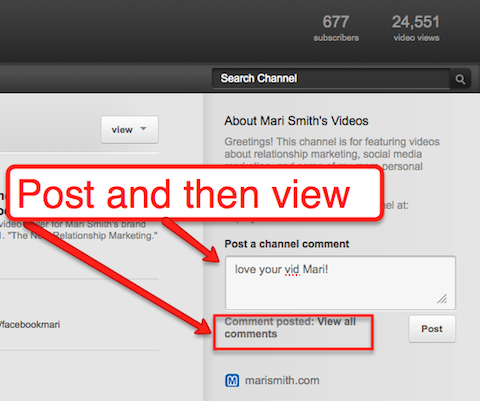
But it is more of a “submit your comment” box and not a place where you can read the comments that are coming through the channel. (In this regard, I prefer the old layout.)
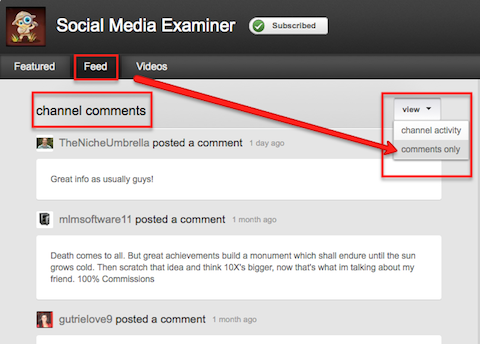
In fact, the only way to see the comments is from either the feed section or after you’ve submitted a comment.
With the new design layout, new users coming to your channel can certainly watch a series of videos with a more fluid user experience than before. However, from the channel page, the only way to read existing interaction on the channel is by going to the Feed tab and clicking through to “comments only.” (Seems counterintuitive to the flow that YouTube has fine-tuned.)
#5: Prioritize Your Favorite Channels on your Home Page Using the Pinned Subscribers Feature
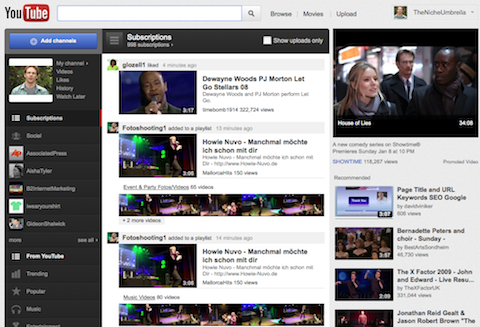
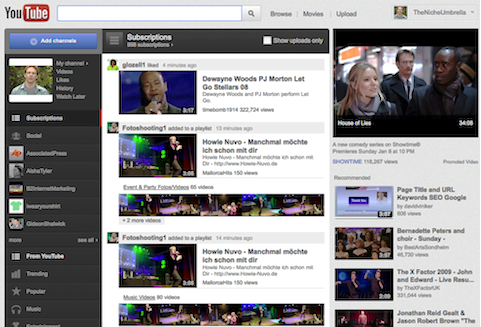
The recent home page changes mean big things for YouTube. Social is what’s on their mind—and the home page, having more personalization, reflects that.
- The channels you’re subscribed to are in list form under your profile on the left.
- The middle column shows all the activity of those whom you’ve subscribed to.
- And the Pinned feature allows you to take your top 10 YouTube users and have their information fed to you first.
So How is this Powerful?
The benefit is that you can scan the activity of those YouTube channels within your same niche to discern if their patterns on YouTube are successful or not. I don’t have to look too far to know what someone I subscribe to is doing. It’s right there in front of me. Not only that person’s upload patterns, but also the frequency of his/her communication—video commenting and channel subscribing—ultimately, how he/she is using YouTube socially to establish relationships.
Closing Thoughts
YouTube will not stop with their changes. They’ll continue to make the platform more social user–based. That, coupled with their push for more original content, may mean that they are not yet out of the social race. They might not win this year. But if you think about Google+ integrating fully with YouTube, you can definitely see a powerhouse to be reckoned with.
What do you think? How do you feel about the changes to YouTube—both from the marketer’s and the viewer’s points of view? Please leave your questions and comments below.

Where Do You Actually Stand With AI?
Most marketers use AI, but they don't know what's holding them back from real results.
Our 3-minute quiz pinpoints the one gap keeping you stuck — and gives you the exact next step to fix it.
GET MY RESULTS






