 by
by  At the 2011 f8 conference, Facebook announced Timeline — a major overhaul of the personal Facebook profiles to which we've all grown accustomed.
UPDATE December 15, 2011: Facebook announced that Timeline is now available worldwide. Read how to get started.
When Timeline is rolled out, your personal profile will be organized in reverse chronological order, as a “timeline” of your life, like an online scrapbook. As Facebook CEO Mark Zuckerberg says, “Timeline is the story of your life… in a new way to express who you are.”
When Will Timeline Become Available?
At this point, only those who are registered Facebook application developers have the option of converting their personal profiles to the Timeline format. And only they can see the Timelines of others who've opted for it.
However, it's quite easy to become a “developer” for purposes of getting access to Timeline. Read this article on how to quickly become an “app developer” and have the Timeline option for your profile.
The Timeline Cover Photo: A Great Opportunity for Creativity
For those with a creative bent, probably the most exciting change is the Timeline cover photo, an 851px x 315px canvas that you can fill with the image of your choice.
Inserted into the lower left of the Timeline cover is your profile photo. The fun is coming up with interesting and clever ways to have your cover photo and your profile photo interact.
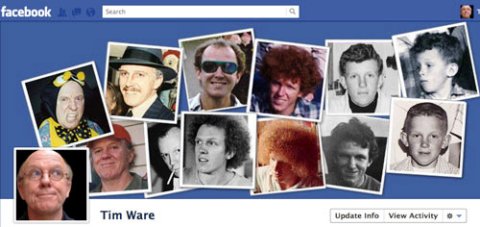
For my cover photo, I simply made my profile photo the last in a chronological array of pictures of me:
Timeline Cover Photo Examples to Kickstart Your Creativity!
Many will use the cover photo to simply put up a beautiful photo or family picture. For example, Mark Zuckerberg just has his dog and his face:

Not that there's anything wrong with this, but it's a missed opportunity to have some creative fun.
For instance, Kelly Cromwell's fairly straightforward family picture becomes:

Creative Approaches to Your Cover Photo
There are several ways to approach the integration of your cover photo and your profile photo to create an effect:
- Show the user observing the “action” in the cover photo
- Create a continuation of the cover photo
- Simply complement the cover photo
- Extend the theme of the profile photo
- Provide “meta” commentary for profile and cover photos.
Get Inspired by What Others Have Already Done
The following examples should help spark your imagination and give you some ideas of the possibilities.
E3 — Milan, Italy
A number of creatives at the E3 digital agency in Milan went to work designing artful and clever cover photo concepts.
Go Deeper Than an Article Can Take You

Join thousands of small-business marketers at Social Media Marketing World — three days of AI, social media, and marketing strategy taught by world-class experts. April 1–3, 2027 in Anaheim.
Every session is pitch-free and built around tactics you can use yourself, no big team required. Your All-Access ticket includes an extra day of workshops, full access to AI Business World, and recordings of everything.
GET MY ALL-ACCESS TICKET — SAVE $800Gianmarco Carrieri integrates the cover and the photo, hinting at endlessly repeating recursivity!

Giuseppe Draicchio cleverly and beautifully integrates cover and photo.

Alfredo Tomaselli positions his photo outside the cover, using his destructive laser glasses to immolate the old personal profile.

Fabio Maravilla gets with the recursive barber shop mirror effect.

Ivan Marino cleverly removes helmet and head, and makes great use of white space.

Maurizio Mazzanti turns his cover photo into a movie screen, which he watches.

Tired of Guessing Which AI Moves Matter?
New AI tools and strategies launch every week — and figuring out which ones matter takes hours you don't have.The AI Business Society filters the noise for you, with expert-led training you can put to work the same day — plus a community of marketers sharing what's actually working.
I'M READY FOR REAL AI RESULTS
Annalisa Modotto nicely illustrates a progression of thought, with an edible resolution.

Ekkapong Techawongthaworn's Experiments
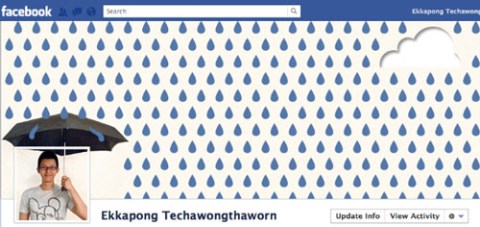
Ekkapong Techawongthaworn, a student in San Francisco, created several great cover photo concepts, which he posted on his Google+ profile:


Other Cover Photo and Profile Photo Approaches
Below are a few more examples, utilizing various techniques and metaphors to entertain and amaze Facebook friends.
Mohammad L. Azzam creates a clever interaction between the cover and profile photos that resonates with the text content.

Hugh Briss uses his cover photo to both say something about himself and promote his business.

Jeremy Bronson creates a surreal and humorous integration of cover and profile photos.

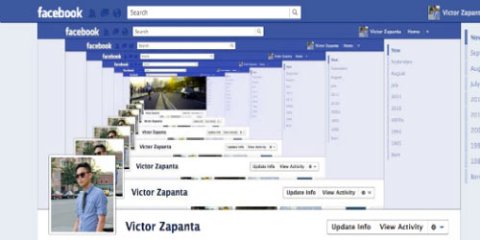
I love how Victor Zapanta uses the barber shop mirror effect for some radical recursivity! And check how that distant road continues the effect…
Some Tips on How to Create Your Cover Photo
First, you can click here to download a Photoshop PSD template I made to help you create your cover photo.
Once you've got your cover photo and profile photo, you just need to add them to your Timeline.
How to Add Your Timeline Cover Photo
Just to the left of the vertical Timeline bar, you'll see:

Once you've selected the image you want for your cover photo, click “Save Changes.”
Remember, the displayed size of your cover photo is 851 x 315 pixels. If you upload an image that's more than 851px wide, it will be scaled down to a width of 851px.
If your image, or the scaled-down image, exceeds 315px in height, you have the option to horizontally position your image. Superimposed on your image you'll see “Drag to Reposition Cover.” Just mouse over the image, at which point your cursor becomes a hand icon, and drag the image to where you want it to be, and then click “Save Changes.”
Upload Your Profile Photo
Once you've added your cover photo, you can upload your profile photo, which, as mentioned above, is inset on the left side of your cover photo.
The displayed size of your profile photo image is 125 x 125 pixels, but the total space taken up is 135 x 135 pixels due to the 4-pixel white border and 1-pixel dark outline. The minimum width for an uploaded profile photo image is 180 pixels.
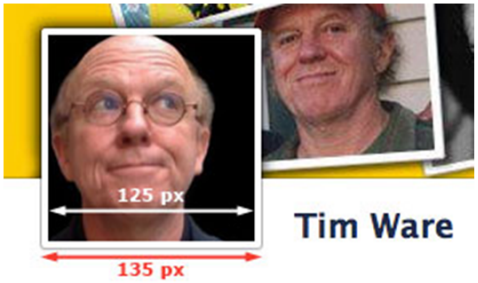
Once you've uploaded the profile photo you want to use with your cover photo, you can position it vertically (it is automatically scaled down to 125px in width) by mousing over the image and selecting “Edit Thumbnail” from the contextual menu. Then edit the thumbnail in the popup window to get it where you want it.
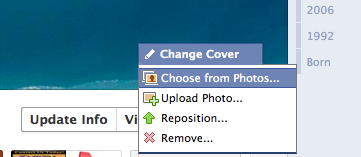
You can also continue to position the cover photo by mousing over it and selecting “Reposition” from the “Change Cover” contextual menu:
Take Advantage of this Fun Opportunity for Creativity!
It's time to flex your creative muscles! Have fun expressing who you are in a unique and creative way.
What do you think? And feel free to post URLs to your Timeline in the comments. Leave your questions and comments in the box below.

Where Do You Actually Stand With AI?
Most marketers use AI, but they don't know what's holding them back from real results.
Our 3-minute quiz pinpoints the one gap keeping you stuck — and gives you the exact next step to fix it.
GET MY RESULTS






