 by
by  Do want to create stronger visual content for your social channels?
Looking for tools to help?
A number of budget-friendly tools make it easy to create visual content that invites your social media audience to engage with it.
In this article you'll discover five tools for creating visuals that engage your social community.
Listen to this article:
Where to subscribe: Apple Podcasts | Spotify | YouTube Music | YouTube | Amazon Music | RSS
#1: Quiz Your Followers
Apester is a digital storytelling platform that allows you to create and embed surveys, personality tests, video quizzes and polls into your social posts. The polls and quizzes alone can engage your community even if they're not shared.
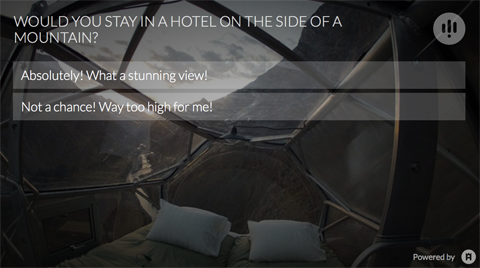
The idea is to increase reader engagement, make stories more shareable and get people to take part in the conversation. At the same time, you're collecting feedback that you can use to produce more relevant content in the future.
Apester has a user-friendly interface that makes it easy to create “personal interaction units.” When you embed these units in your content, you create a seamless user experience that gets your audience actively involved in the story.
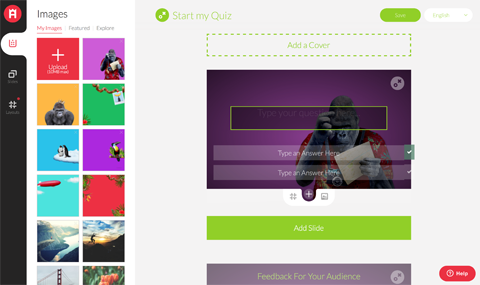
The tool makes it easy to share your content on social networks (such as Facebook, Twitter, Pinterest and Reddit). When a user clicks on one of the share buttons, it creates a shared link directing users to your blog.
#2: Curate a One-Stop Content Trail
The average bounce rate on blogs for new visitors is 60.2%, and the average reader stays only 1 to 2 minutes on your website. One way to get people to really engage with your content is to use a tool like Roojoom, which is a content curation and creation platform.
Roojoom lets you collect content from your online and offline sources (such as your web pages, videos, PDFs and marketing materials) to create a “content journey“ for readers. You then guide readers step by step through the journey, all from within one centralized place.
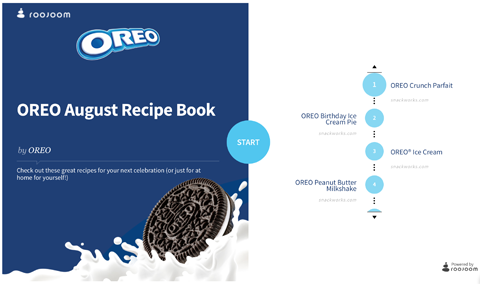
Readers can then share links to the Roojoom instead of to individual sources. They're encouraged to interact with the content, and this keeps them reading the content until the end.
Once they're hooked, most people will turn to social media and share links to the great content they discovered.
#3: Invite Community Collaboration on Maps
Visual tools that engage a community are pretty awesome, but tools that actively get users to take part are on a whole other level.
3 Days of World-Class Training—Zero Travel!
Couldn't make it to Social Media Marketing World and AI Business World this year? Get all of the great content at a fraction of the price with a Virtual ticket.
That’s full access to recordings of every keynote, workshop, and session—the ones people travel thousands of miles to see. Don't wait. Get your Virtual ticket and enjoy actionable content that you can watch anytime, anywhere.
Dubbed a “community visualization platform,” you can use Mapme to let your community develop and add to existing maps you create around a specific topic, such as startups in San Francisco. In other words, they're maps created by the people for the people.

Want to Unlock AI Marketing Breakthroughs?
If you’re like most of us, you are trying to figure out how to use AI in your marketing. Here's the solution: The AI Business Society—from your friends at Social Media Examiner.The AI Business Society is the place to discover how to apply AI in your work. When you join, you'll boost your productivity, unlock your creativity, and make connections with other marketers on a similar journey.
I'M READY TO BECOME AN AI-POWERED MARKETER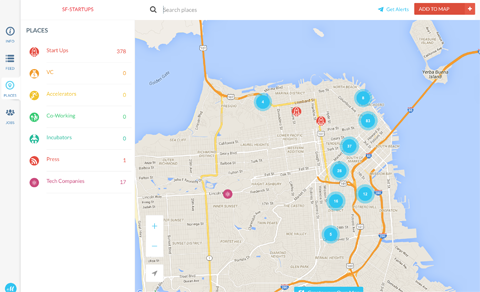
Mapme is a visual user-generated tool aimed at businesses and organizations. You'll find a gallery of maps built with Mapme on the company's website.
Once you've created a map based on a topic, you share it with your customers on social media, who can then get involved by adding new locations. It's similar to Foursquare, but it's not restricted to places of entertainment.
Each map can be customized by content, look or feel (such as a logo) and different categories. When you create a map, you fill in the activity on the map, and then open it up to public users of your site. There's no better way to connect with your community than by getting them actively involved.
#4: Display Instagram Galleries
Instagram has claimed its throne as the king of engagement with over 300 million active monthly users who like about 2.5 billion photos and videos per day. But currently the only way to display Instagram photos on your website or blog is with a third-party widget.
SnapWidget is one of the most popular, visually appealing widgets, and more than 100,000 websites use it daily.
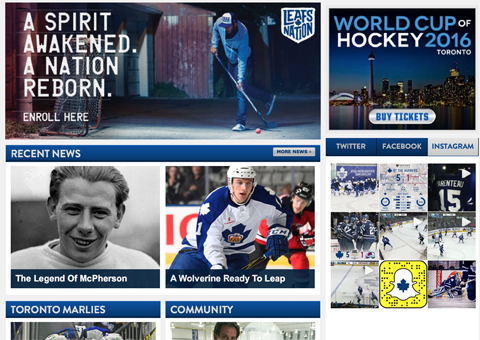
The tool offers both free and paid versions. The free version lets you pull the photos from an Instagram hashtag or account and display them on your blog. You can personalize the format, as well as the size, layout, colors and effects and choose whether the sharing buttons show up next to your photos.
The free version is ad-supported, so each thumbnail links to a page on SnapWidget.com where the photo is displayed with the site's ads. The paid version offers extra features, such as more advanced customization options.
#5: Design Appealing Images
Content with visuals gets 94% more views than content without, and it's much more likely to be shared on social media. That makes using images a no-brainer for marketers.
Pablo (as in Pablo Picasso) by Buffer is a free social media image creation tool. Choose from a wide array of stock images (or upload your own photos), add a text overlay and post the finished product to your social channels.
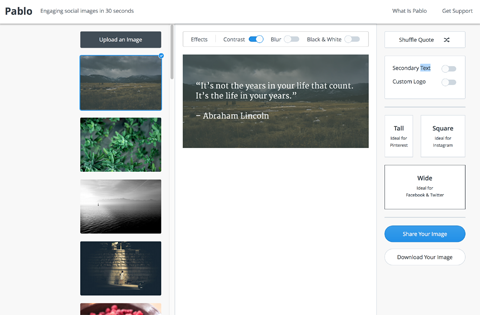
You can create graphics with stats or facts, inspirational quotes, recipes or important announcements. Pablo is noted for its speed and easy-to-use filters and sizing options.
Conclusion
With the abundance of visual content tools out there, it's easy to feel overwhelmed by the prospect of finding the right ones for your own marketing needs. Even if you're on a tight budget and can't afford to hire a full-time graphic designer, the easy-to-use tools covered in this article can help you create compelling visual content for your business.
There are loads of marketing tools for visual content creation, and these are just a taste of what's out there. For any marketer or content creator looking to dabble in design and increase engagement, I'd recommend trying out one of these visual tools.
What do you think? Have you used any of these tools? What are your favorites for visual marketing? Please share your thoughts in the comments below.

Curious About How to Use AI?
Our newest show, AI Explored, might be just what you're looking for. It's for marketers, creators, and entrepreneurs who want to understand how to use AI in their business.
It's hosted by Michael Stelzner and explores this exciting new frontier in easy-to-understand terms.
Pull up your favorite podcast app and search for AI Explored. Or click the button below for more information.







