 by
by Wondering how to start building real automations for your business? Curious what it actually takes to get an AI agent working across your entire tech stack?
In this article, you'll discover tips to use Claude Cowork to plan, build, and deploy AI automations.
Claude Cowork: A Human-Friendly Agentic AI Platform
Most people still interact with AI the same way they have since ChatGPT launched: type a prompt, get a response, type another prompt, get another response. The human drives every step. Claude Cowork breaks that pattern.
Cowork grew out of Claude Code, an internal tool Anthropic originally built for its own developers. When the broader market discovered Claude Code could do far more than write code, demand grew fast, but the terminal-based interface scared off most non-technical users. Cowork wraps the same agentic engine in a desktop interface that shows connected folders, active plans with steps being crossed off in real time, and clear visibility into what the AI is doing at each stage. No command line required.
The result isn't just a nicer-looking chatbot. Isar Meitis explains that three specific capabilities separate an agentic platform like Cowork from a regular chat.
The first is autonomous planning and execution. In a standard chat, the user tells the AI what to do, evaluates the response, and provides the next instruction. In Cowork, the user defines goals, constraints, and available data, and then the AI builds its own plan, displays it, and executes each step without requiring constant direction.
The second is persistent memory. A regular chat starts fresh every time, but Cowork stores information in markdown files that it can read and write across sessions. Brand guidelines, proposal formats, client histories, and process documentation all stay accessible without re-uploading them each time.
The third is tool use. Cowork doesn't just have access to external tools; it knows how and when to use them. It recognizes when to pull a call transcript from Fathom, when to update a CRM record, and when to draft an email.
The combination of these three capabilities lets it act as an agent on behalf of the user across connected systems.
Two examples illustrate what's possible once automations are in place.
For content creation, Isar has Claude research what top performers in his niche are posting across platforms, then cross-reference that with his own podcast episodes, YouTube videos, and community calls. The system finds content he has actually said that aligns with current trends, generates posts and images, cuts video clips, and presents everything for review before publishing. Nothing gets posted without human approval.
For sales, when a discovery call ends with a request for a proposal, the AI verifies the request from the call transcript, researches the prospect and their company online, examines the industry landscape, and writes a full proposal. Isar reviews it, provides feedback, and the system generates the final document, updates the CRM, saves it to Google Drive, and creates a draft email with the PDF attached. A process that used to take two hours takes ten minutes.
#1: Tips to Identify the Right Task to Automate
Isar recommends starting with a frequent task that either consumes significant time or simply isn't enjoyable.
Once a task is chosen, Isar recommends describing it in plain language, the way someone would brief a consultant: the role, the company context, the frequency of the task, the source of the data, and the destination of the output.

Which AI Moves Actually Matter?
That's what every marketer is wrestling with now. New AI strategies, new tools, new takes every week — but no clarity. Most marketers and business owners are trying to figure out AI alone.The AI Business Society is your trusted guide. Get expert-led training you can put to work immediately. Plus a community of marketers sharing what's actually working.
I'M READY FOR REAL AI RESULTSCowork then helps build the automation, the skills, and the connectors step by step.
#2: Tips to Write Requirements That Drive Successful Automations
Requirements are the tactical lever that makes everything work, because AI excels at execution. If the requirements define exactly what's needed, including the data sources, workflow, connections, and expected outputs, the AI will implement it in minutes. Vague requirements lead to wasted time, wasted tokens, and wasted effort.
The first step is to create product requirements documents (PRDs) to define what needs to be built.
The practical method for writing PRDs is to have Claude conduct an interview. Isar provides the high-level concept, then Claude asks roughly 40 questions over 30 minutes to an hour. From those answers, Claude produces a 25- to 40-page document that defines exactly what needs to be built.
Reading the full document isn't necessary. Because the content comes directly from the interview answers, the substance is already validated. Isar asks for an executive summary, reviews that, and moves forward.
With a PRD defining what to build, the next question is where to start.
Claude creates a development plan in which human judgment shapes the priorities: from a comprehensive PRD, the most critical component is built first as a minimum viable product (MVP). Isar asks Claude to identify which piece will deliver a quick win without excessive complexity. In the sales proposal example, the core MVP was converting a call transcript into a written proposal. CRM updates, email drafts, and Google Drive integration came later.
3 Days of World-Class Training—Zero Travel!

Couldn't make it to Social Media Marketing World and AI Business World this year? Get all of the great content at a fraction of the price with a Virtual ticket.
That’s full access to recordings of every keynote, workshop, and session—the ones people travel thousands of miles to see. Don't wait. Get your Virtual ticket and enjoy actionable content that you can watch anytime, anywhere.
Once the MVP is identified, the instruction is simple: tell Claude to implement it. Based on the detailed requirements document, Cowork might build four skills, an orchestrator, a couple of n8n processes to connect systems, and a connector to Gmail, all in one pass.
From there, each session builds on the last. Isar literally asks, “Where are we in the development, what do you suggest would be the next step, and why?” Claude then identifies dependencies and suggests priorities, while Isar applies judgment, approves or redirects, and the cycle continues.
#3: Tips to Connect Claude Cowork to Business Tools With Connectors, MCPs, and APIs
The first thing to set up is your local file access.
A folder icon with a plus sign in Claude Cowork connects the session to a folder on the computer where Cowork reads and writes files. Isar recommends maintaining a single main folder called “ClaudeCowork” with subfolders for each project, and always connecting at the top level so the AI can navigate to the context required by the current task. This way, the AI can access only what's inside the connected folder, providing a natural containment boundary.
Beyond local files, four connection methods give Cowork access to external tools.
Native Connectors: Anthropic has built approved connectors with major platforms, including Google Drive, SharePoint, Notion, ClickUp, Asana, monday.com, and most marketing platforms. These are tested and maintained, and should be the first option.
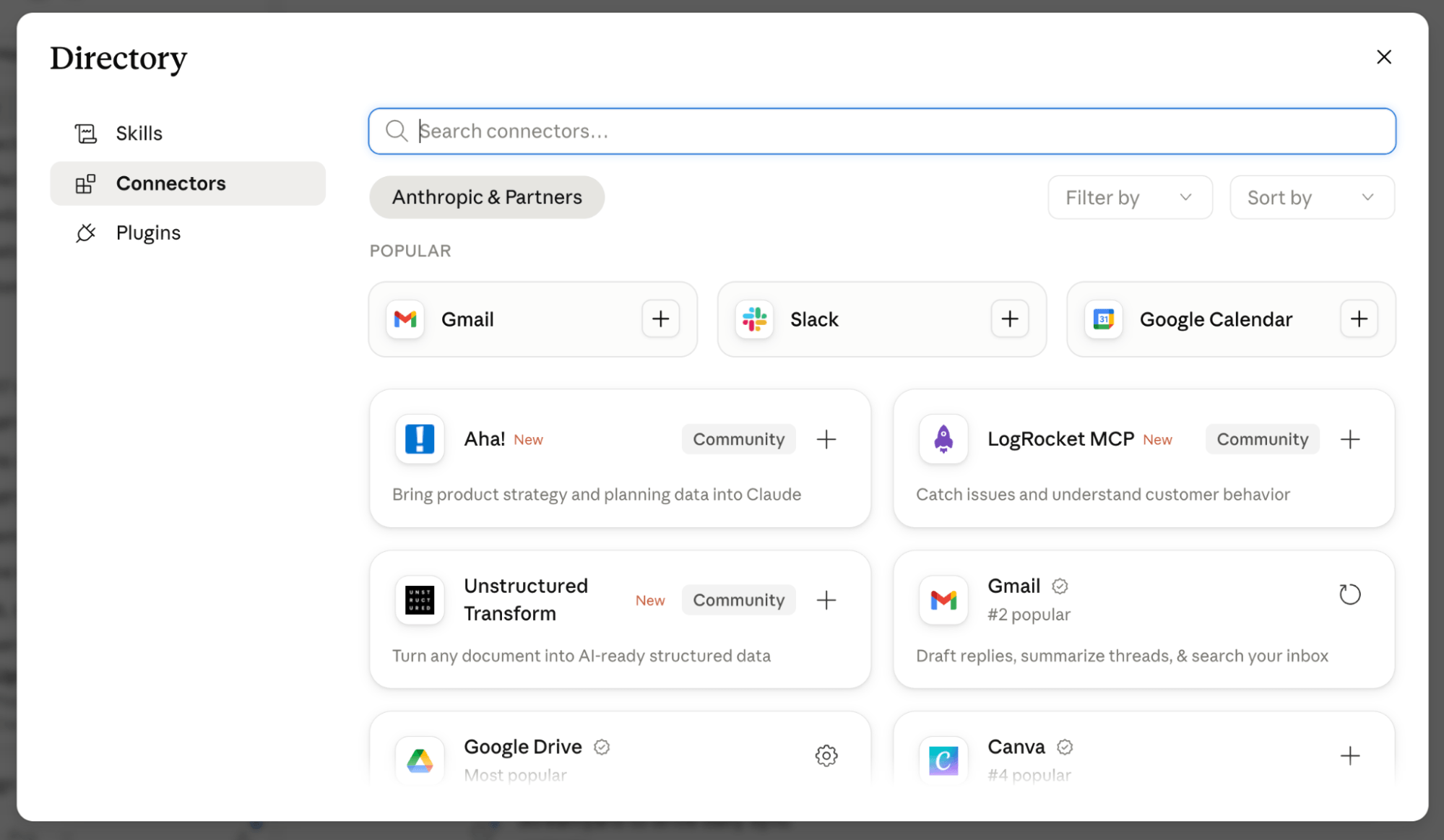
MCPs From the Software Vendor: MCP stands for Model Context Protocol, a standard developed by Anthropic about a year and a half ago. Isar compares it to a USB connector. On one side, someone develops the API integration once. On the other side, a standardized protocol lets any AI platform connect in seconds. If the software company itself has published an MCP, it's safe and well-documented.
Custom MCPs Built by Claude: If no official MCP exists, Claude can build one. Provide the API documentation and describe the specific functions needed. Claude writes the MCP and generates a markdown file explaining how to use it. API credentials can be stored securely in Keychain on Mac, where even Claude doesn't access the actual keys directly.
Chrome Browser Extension: Claude can operate a Chrome browser directly, opening pages, clicking buttons, navigating menus, and performing actions as a human would. It won't enter passwords or copy secret keys. When it hits a login screen, it asks the user to authenticate, then takes over. For tools without any formal integration, the browser is often the fastest way to get started.
Isar's recommendation for implementation follows a clear hierarchy: start with native connectors, then vendor-published MCPs, then custom-built MCPs, and use the Chrome browser for tools that lack any other integration.
Isar Meitis is the founder of MultiplAI, an AI consultancy and training company. He is an AI strategist and educator who helps businesses implement AI strategies and is the host of the Leveraging AI podcast. Check out his Multi-Agent Orchestration Course. Follow him on LinkedIn.
Other Notes From This Episode
- Connect with Michael Stelzner @Stelzner on Facebook and @Mike_Stelzner on X.
- Watch this interview and other exclusive content from Social Media Examiner on YouTube.
Listen to the Podcast Now
This article is sourced from the AI Explored podcast. Listen or subscribe below.
Where to subscribe: Apple Podcasts | Spotify | YouTube Music | YouTube | Amazon Music | RSS
✋🏽 If you enjoyed this episode of the AI Explored podcast, please head over to Apple Podcasts, leave a rating, write a review, and subscribe.
Stay Up-to-Date: Get New Marketing Articles Delivered to You!
Don't miss out on upcoming social media marketing insights and strategies! Sign up to receive notifications when we publish new articles on Social Media Examiner. Our expertly crafted content will help you stay ahead of the curve and drive results for your business. Click the link below to sign up now and receive our annual report!

Curious About How to Use AI?
Our newest show, AI Explored, might be just what you're looking for. It's for marketers, creators, and entrepreneurs who want to understand how to use AI in their business.
It's hosted by Michael Stelzner and explores this exciting new frontier in easy-to-understand terms.
Pull up your favorite podcast app and search for AI Explored. Or click the button below for more information.







