 by
by Are you convinced it's too late to build a YouTube presence that actually moves the needle for your business? Have you wondered what separates creators who stall out in obscurity from those who grow a sustainable following in just a year or two?
In this article, you'll discover how to launch and grow a YouTube channel from scratch—including the pre-production framework that drives real results, the production steps that build audience trust, and the strategies that turn viewers into paying clients.
Why It’s Not Too Late to Start a YouTube Channel to Market Your Business
The most persistent misconception holding midlife professionals back from YouTube is the belief that the platform belongs to a certain type of person: someone bubbly, charismatic, naturally funny on camera.
Ty Myers says that what actually matters is understanding a specific viewer's problem and communicating a solution clearly enough that the viewer feels heard. Those skills transfer directly from careers in sales, consulting, teaching, or any field where someone has spent years figuring out what an audience needs.
#1: Four Steps to Get Started on YouTube
Ty approaches YouTube through the lens of building a business, and he breaks the startup process into four distinct phases. The first two happen entirely before recording begins.
Define goals and mission: The starting point is clarity about why a channel exists. Is the goal to generate leads, attract consulting clients, sell a product, build an audience around domain expertise, or leave a legacy?
That question determines everything downstream from content strategy and audience targeting to what success looks like. Ambiguity, Ty says, is the single biggest killer of channel growth. Channels that try to serve everyone serve no one.
Define the Avatar: Once the mission is clear, the next step is identifying the specific person the channel is trying to help. What are their fears, desires, the problems they're trying to solve, and the outcomes they want?
That specificity has to show up not just in your thinking but in titles, thumbnails, and the actual words spoken in videos. The YouTube algorithm reads every word in a video's transcript and knows the viewing habits and preferences of every user who logs in. The more specifically a video signals who it's for, the better the algorithm can match it with the right viewer.
Start Making Simple Videos: The third phase is putting in reps, even when the output is rough. Perfectionism, especially common among people who've been highly competent in a previous career, leads to months spent at the starting line rather than on the platform.
Ty recommends getting early videos out regardless of quality. Around 15 videos in is typically where creators start feeling comfortable enough on camera that their real personality comes through.
Pivot From Quantity to Quality: Once those first 15 or so videos are published and the workflow feels manageable, the focus shifts from building reps to studying YouTube as a platform—understanding how it works as a distribution system, not just a place to upload videos. What's working for other channels? What do high-performing videos in the niche have in common? That's where the real leverage lives.
#2: Your YouTube Pre-Production Structure
The most common mistake Ty sees from creators at every level is approaching video production in the wrong order: scripting and filming first, then figuring out the title and thumbnail after the fact.
Topic, title, and thumbnail together account for 80% of a video's success. Filming a mediocre video with a well-researched topic, a sharp title, and a strong thumbnail will outperform a polished video nobody clicks on.

Which AI Moves Actually Matter?
That's what every marketer is wrestling with now. New AI strategies, new tools, new takes every week — but no clarity. Most marketers and business owners are trying to figure out AI alone.The AI Business Society is your trusted guide. Get expert-led training you can put to work immediately. Plus a community of marketers sharing what's actually working.
I'M READY FOR REAL AI RESULTSThe time allocation Ty recommends reflects this. Of the 10 hours a week you have for YouTube, 6 of those hours should go to pre-production: researching what's working on the platform, testing title variations, sketching thumbnail concepts, and evaluating whether a topic is worth pursuing before investing 15 hours in scripting, filming, and editing.
Identify Topics That Will Perform
Pre-production starts with the avatar and works backward. If a channel helps other YouTubers improve their content, a creator might identify audio quality as a common problem and frame a video idea around “how to improve audio quality in a YouTube video.” That framing then gets pressure-tested before any recording happens.
The first tool Ty uses for this validation is VidIQ, a free YouTube growth tool with keyword research functionality.
Entering a topic idea into VidIQ surfaces monthly search volume and helps identify which phrasings of the same concept actually have an audience. Long-tail versions of a phrase may not yield useful data, so the goal is to iterate until landing on phrasing that people are genuinely searching for.
The next step is to run the same search directly on YouTube and analyze the results. With the vidIQ browser extension installed, creators can see not just which videos exist on a topic, but which ones dramatically outperformed the channel average in terms of views.
The key signals to look for are recency (if the strongest results are all from several years ago, the topic may have had its moment) and view trajectory (vidIQ shows whether a video has maintained steady growth over time or just had an initial spike that flatlined). A topic supported by recent videos with sustained view growth signals persistent audience interest—the kind worth building content around.
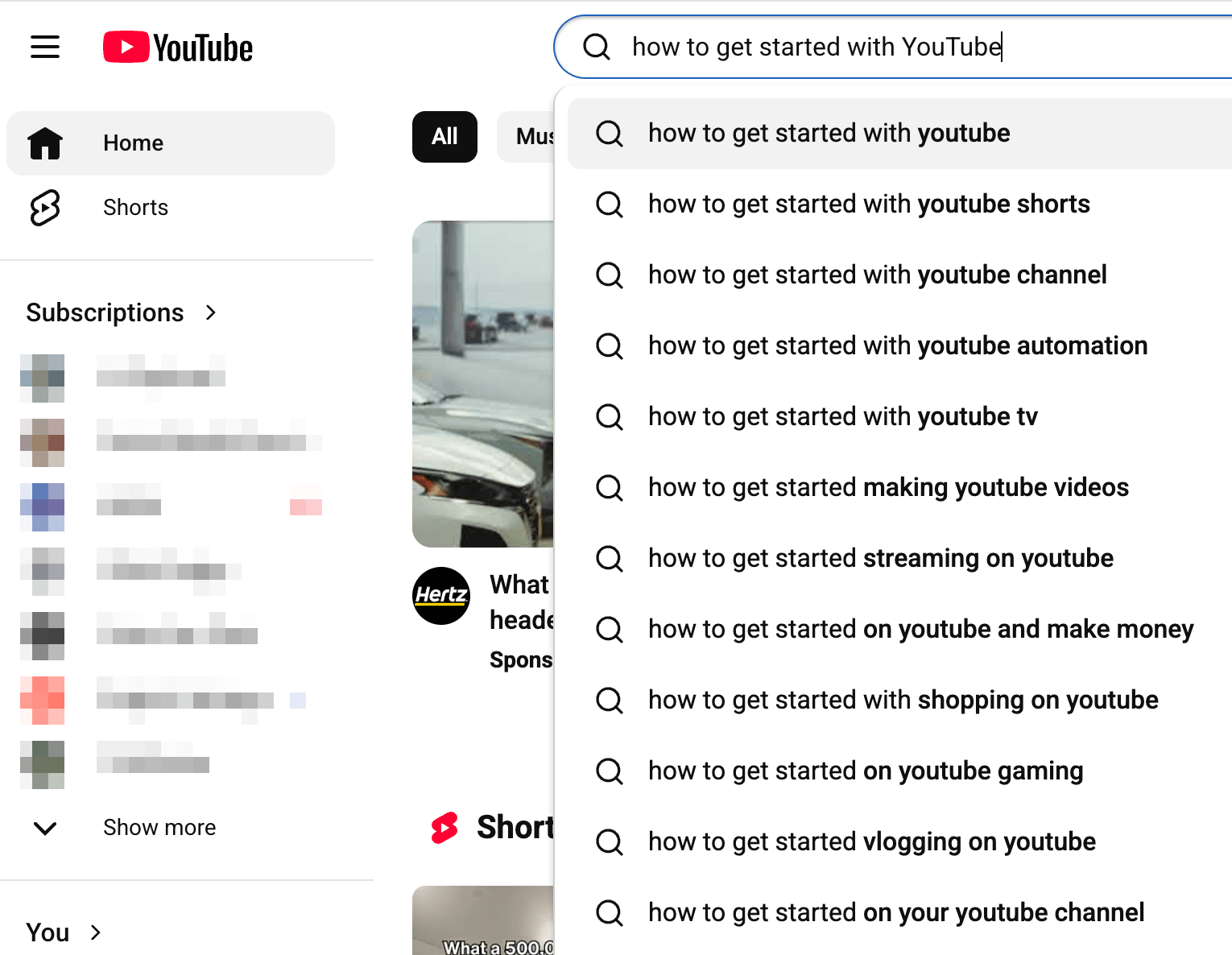
Pro Tip: YouTube's autocomplete feature is another research signal. Each suggestion that appears while typing in the search bar represents a phrase people are actively searching. Letting autocomplete populate results can reveal how audiences naturally phrase questions about a topic. This is useful for finding titles that match actual search intent.
Emulate High-Performing Videos Without Copying Them
Once you identify an outlier video, the question becomes how to make something similar without just replicating it. There’s a clear line between emulation and plagiarism. Emulation means reverse-engineering what made a high-performing video work—the script structure, the title format, the thumbnail approach—and then filling it with your own stories, experience, perspective, and analogies.
Ty does this on his own channel. When he finds a video that performed well in his niche from a year or two ago, he asks whether he can make a similar video from his own experience. If yes, he borrows the structural framework, adapts the title, and designs a comparable thumbnail, but the content is entirely his own.
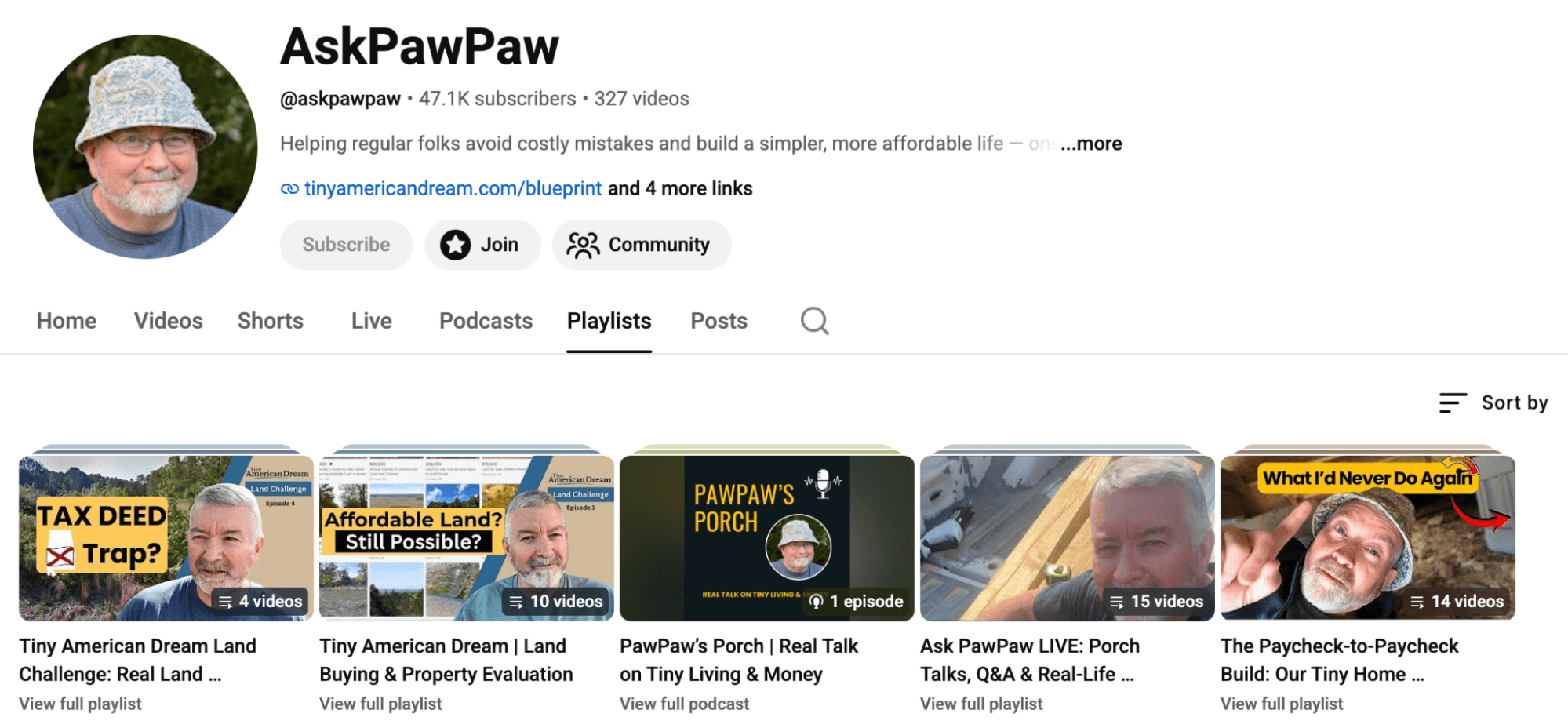
Kevin, who runs the Ask PawPaw YouTube channel, came to Ty making content about budgeting, HSAs, and investment vehicles for people nearing retirement. Those videos weren't gaining traction.
3 Days of World-Class Training—Zero Travel!

Couldn't make it to Social Media Marketing World and AI Business World this year? Get all of the great content at a fraction of the price with a Virtual ticket.
That’s full access to recordings of every keynote, workshop, and session—the ones people travel thousands of miles to see. Don't wait. Get your Virtual ticket and enjoy actionable content that you can watch anytime, anywhere.
Through outlier research, Ty noticed that videos about tiny homes, specifically shed conversions, were drawing hundreds of thousands of views from a creator who was simply walking around the shed display at a Lowe's parking lot and filming himself. Ty advised Kevin to do the same: go to a local lot, record what he was seeing, talk about square footage and pricing, and ask whether it could work for him.
The format clicked. Kevin eventually pivoted his entire channel to talking about tiny home shed conversions and helping viewers find land to put them on—a niche with clear, measurable audience demand.
#3: Develop Your YouTube Script, Hook, and CTAs
Ty has integrated AI tools into both phases of pre-production.
For data-heavy video topics, Google Notebook LM handles deep research. It pulls academic articles, industry reports, and executive interviews, and synthesizes the findings into a structured summary he can use for scripting.
For scripting, Ty uses Claude, which also has a connector to vidIQ for keyword research directly within the tool.
His preferred scripting approach is to have the AI interview him about the video topic before asking it to write anything. He gives Claude the core topic and asks it to ask him questions—about his relevant stories, experiences, perspectives, and analogies—one at a time.
As each answer informs the next question, the conversation surfaces the raw material that generic AI-generated scripts lack: personal context that makes a video feel specific and credible rather than templated.
Craft a Hook That Keeps Viewers Watching
Once recording starts, the first 15–30 seconds carry disproportionate weight. Ty identifies three elements that every strong hook should include.
The first is calling out the viewer explicitly by naming who the video is for. When an opening line precisely describes a viewer's situation, they immediately know they're in the right place.
The second is a counterintuitive statement or a curiosity gap that gives the viewer a reason to keep watching. Stating something that challenges a common assumption creates a question in the viewer's mind that only the rest of the video can resolve.
The third is credibility, establishing that the creator has done what the viewer wants to do. Lead with specific results before getting into content. It can read as forward, but it works because viewers are always evaluating whether your time is worth their own.
The hook closes by setting the stage: telling viewers what the video covers and tying it directly to the outcome they're trying to achieve.
Deliver CTAs That Turn Views Into Revenue
Ty's channel generates revenue through his coaching program, not through AdSense. Getting viewers from free content into a paid offer happens through two approaches—one explicit, one subtle.
The explicit version is a mid-roll CTA placed somewhere in the middle of a video. Ty briefly mentions that the topics he's covering are the same ones he works through with clients in depth, and points viewers to the link in the description. It's a direct mention, not a hard sell, but it makes the offer visible to viewers who are already getting value from the content.
The subtle approach is to reference client work naturally throughout the video—mentioning something observed while working with a specific client or an example that came out of a coaching engagement. Viewers who hear those references repeatedly start to understand that a service is available and that the creator has hands-on experience with the problems being discussed. That kind of passive signal builds trust over time in a way a pitch alone can't.
#4: How to End YouTube Videos to Drive Session Duration
Ty uses end-screen cards differently than most creators do.
Rather than pointing viewers toward an offer or a subscribe prompt, he uses them to keep viewers on his channel by linking directly to the next video. YouTube prioritizes session duration, so if your content helps someone stay on the platform longer, It rewards it with more distribution.
To support this, Ty never ends a video with outro music, a recap, or any other signal that the session is wrapping up. He goes directly from the last piece of instructional content into a question that can only be answered by watching the next video.
That transition drives clicks to the next video, which creates another opportunity for a mid-roll CTA, which increases session duration, creating a self-reinforcing loop that compounds the business value of every session.
Bonus: Recommendations for Video Recording Equipment and Setup
Getting production-ready doesn't require significant gear investment. A phone on a simple tripod and a mic plugged in via USB-C are genuinely all that's needed to start.
Ty filmed over 100 videos using an iPhone 15 and a USB-C Shure MV7+ microphone podcasting mic that costs less than $300 that plugs directly into newer iPhones.
A quality mic is the one piece of equipment Ty considers non-negotiable from day one. Poor audio is the fastest way to lose a viewer, and a decent mic removes that friction before it starts. Everything else can be upgraded later; audio should be addressed immediately.
Natural light from a window, slightly diffused by a curtain, handles lighting.
Ty Myers is a YouTube growth coach who helps midlife creators start, grow, and monetize their channels. He runs the six-month Momentum Builder coaching program. Follow him on YouTube.
Other Notes From This Episode
- Connect with Michael Stelzner @Stelzner on Instagram and @Mike_Stelzner on X.
- Watch this interview and other exclusive content from Social Media Examiner on YouTube.
Listen to the Podcast Now
This article is sourced from the Social Media Marketing Podcast, a top marketing podcast. Listen or subscribe below.
Where to subscribe: Apple Podcasts | Spotify | YouTube Music | YouTube | Amazon Music | RSS
✋🏽 If you enjoyed this episode of the Social Media Marketing podcast, please head over to Apple Podcasts, leave a rating, write a review, and subscribe.
Stay Up-to-Date: Get New Marketing Articles Delivered to You!
Don't miss out on upcoming social media marketing insights and strategies! Sign up to receive notifications when we publish new articles on Social Media Examiner. Our expertly crafted content will help you stay ahead of the curve and drive results for your business. Click the link below to sign up now and receive our annual report!
Curious About How to Use AI?
Our newest show, AI Explored, might be just what you're looking for. It's for marketers, creators, and entrepreneurs who want to understand how to use AI in their business.
It's hosted by Michael Stelzner and explores this exciting new frontier in easy-to-understand terms.
Pull up your favorite podcast app and search for AI Explored. Or click the button below for more information.







