by
by Are hashtags and reels part of your Instagram marketing? Wondering whether link overlays and early access content will actually help your content reach the right people or just add more work to your plate?
In this article, you'll discover five major Instagram updates rolling out now and learn exactly how to use them to strengthen your content strategy.
#1: How to Use Instagram’s Exclusive 24-Hour Early Access Reels
Instagram is testing a feature that lets creators release reels exclusively to followers for the first 24 hours before they become public. Chelsea explains that when non-followers visit your profile and see one of these reels, they encounter a blurred thumbnail with a clock icon and a star symbol indicating early access until the timer expires.
The feature creates psychological urgency. Non-followers who discover your blurred content can choose to follow you immediately to unlock access during that exclusive 24-hour window.
According to Chelsea, this operates as the opposite of trial reels, which prioritize non-followers first.
She raised an important concern about whether Instagram's algorithm will penalize content that underperforms with followers during the early access window. Since the platform tests content with a smaller audience first before expanding distribution, weak initial performance could hurt your reach when the reel goes public after 24 hours.
She emphasizes that content released through early access must be exceptional because followers expect more when they actively choose to follow you to unlock specific content.
Strategic Use Cases for Early Access Reels
Chelsea sees two distinct applications for early access reels.
First, for community-focused creators who want to reward loyal fans with exclusive first looks at announcements, product launches, or series premieres. She personally values this approach because she prioritizes growing deep connections with her existing community over maximizing reach to strangers.
Second, for brands running a signature series where each episode builds anticipation. Many creators currently produce ongoing series, and early access gives followers a reason to stay engaged and check back for new installments.
When to Use Early Access vs Trial Reels
Chelsea recommends using trial reels to A/B-test different hooks and concepts to see which resonate. She notes that Instagram allows up to 20 trial reels per day, though its AI now detects duplicate content with different text overlays. Creators need genuinely different hooks and B-roll footage for each test.
Chelsea knows a marketers who was temporarily blocked from posting for posting too many trial reels. While she doesn't know the exact number posted or how long the timeout lasted, Instagram clearly enforces boundaries around trial reel volume. The platform will also catch creators trying to game the system by posting the same video with slightly different text overlays.
For early access reels, Chelsea recommends using them for major announcements you've been building anticipation for through Stories or for series content that creates ongoing loyalty among your follower base.
#2: How to Use Instagram Reels Insights Tools for Creators
Instagram has added comprehensive analytics directly inside the Edits app, giving creators new ways to measure performance without switching between platforms. The new insights tab allows sorting reels by views, likes, comments, reposts, shares, saves, new followers gained, and lowest skip rate.
Ready to Supercharge Your Marketing Strategy?

Get expert training and an unbeatable conference experience when you attend Social Media Marketing World—from your friends at Social Media Examiner.
Broaden your reach, skyrocket your engagement, and grow your sales. Become the marketing hero your company or clients need!
🔥 Save $500 on an All-Access ticket. Sale Ends Wednesday! 🔥
GET THE DETAILS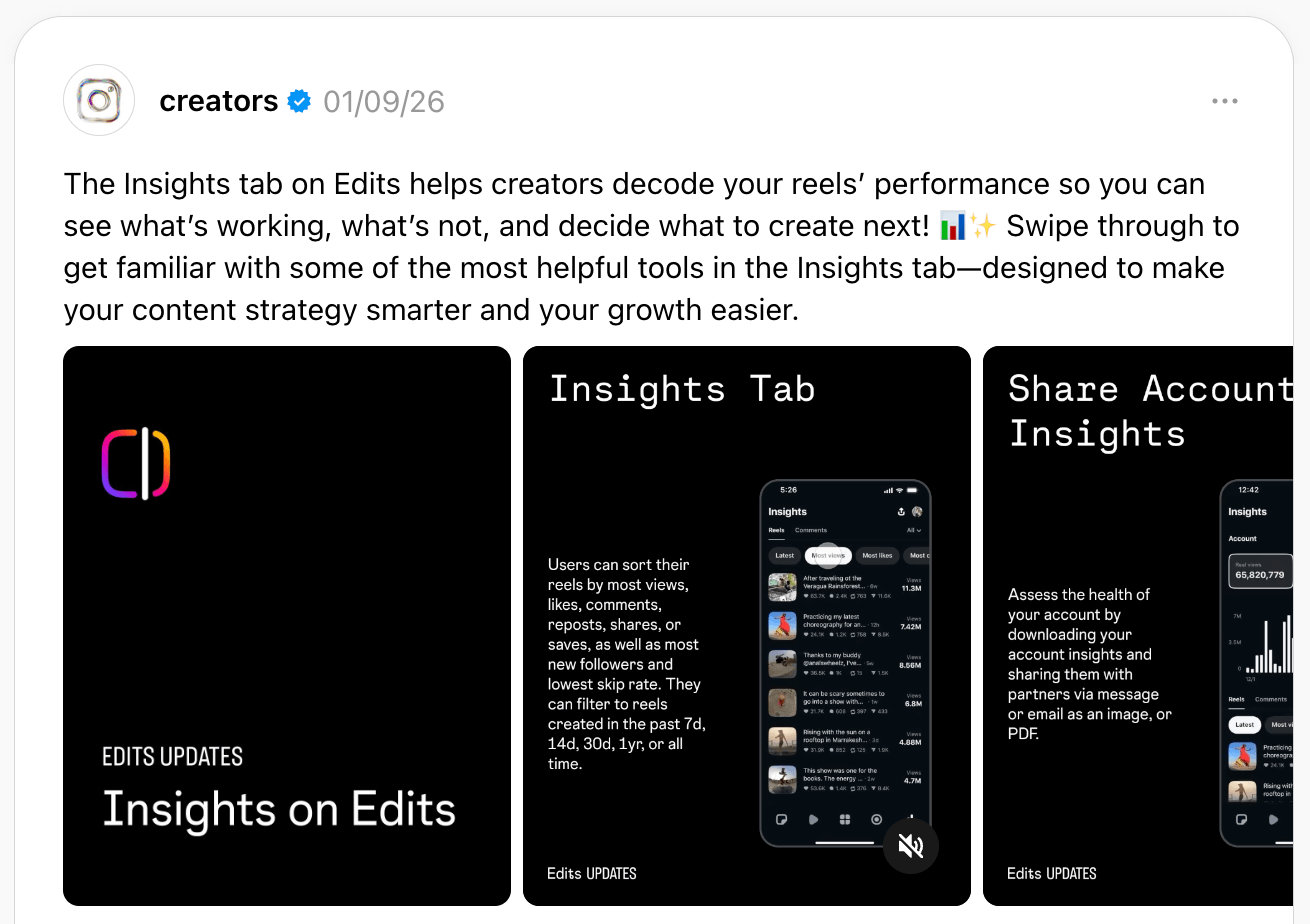
Analyzing Time-Based Performance Comparisons
Creators can now filter performance data across multiple timeframes, including the past week, two weeks, 30 days, or one year. Chelsea calls these new insights a social media manager's dream because they finally provide all comparison data in one place, going back up to a year.
The platform also generates downloadable PDFs with charts and visualizations, making it easier to deliver professional-looking reports to clients or bosses.
Using Lowest Skip Rate to Perfect Your Hooks
Chelsea identifies the lowest skip rate as the critical metric for analyzing the first three seconds of your videos. She recommends that teams use this metric specifically to A/B-test hooks by comparing videos side by side.
When one video shows a lower skip rate than another, teams should examine the visuals of the first three seconds from both videos simultaneously to identify exactly what retained viewers. This side-by-side comparison reveals the small nuances about opening moments and watch time retention that make the difference between viral content and videos that get scrolled past.
Using External AI to Analyze Instagram Insights
Chelsea uses Claude and ChatGPT daily for ideation, pushing back against suggestions, requesting opposite perspectives, and poking holes in ideas. She can't imagine having that level of AI assistance built directly into Instagram because the standalone AI platforms offer far more sophisticated analysis capabilities than anything Instagram could build into its app.
During the discussion, Michael Stelzner shared a powerful technique for analyzing Instagram data that most creators overlook. He recommends recording your phone screen while slowly scrolling through Instagram insights, then uploading that video to AI tools.
Start by opening Instagram Insights on your phone and recording your screen to capture everything. Scroll slowly through all your data so the AI can see every metric clearly. Then upload this video to Gemini, which has the best vision model for frame-by-frame analysis. Anyone with a paid Google Workspace account can access Gemini's advanced capabilities at gemini.google.com.
After uploading your screen recording, use this exact prompt:
Analyze everything you see in this video and share the important insights I might have overlooked.
This prompts the AI to examine your data frame by frame and to surface patterns you wouldn't catch by analyzing tiny numbers on a mobile phone screen. The AI identifies trends, anomalies, and opportunities hidden in your metrics that would be nearly impossible to spot manually.
#3: How to Use Instagram’s AI-Generated Content Sentiment and Ideation Tools
AI-Generated Comment Summaries
Instagram now uses AI to analyze multiple comments and generate sentiment summaries that show exactly what people are saying about your content. Instead of manually reading through 500 comments, creators can instantly see the overall vibe of audience reactions.
Chelsea sees this as particularly valuable for larger brands with hundreds or thousands of comments per post. The feature saves significant time while also surfacing potential content ideas from recurring themes in comments. For personal brands and sensitive creators who might fixate on negative feedback, the summary helps maintain perspective by showing the overall sentiment rather than letting one critical comment derail their day.
Weekly AI-Generated Content Ideas
The Edits app now provides a weekly feed of 10 personalized content ideas based on your past reels. Creators can save, edit, or skip these suggestions.
Chelsea expressed concern that these AI suggestions might not actually help creators think strategically or might simply encourage sameness. She creates long-form talking-head videos over 1 minute, but when she checks the inspiration section in Edits, the platform only serves her short, trendy B-roll content.
Because the AI doesn't recognize what she actually makes, she worries this feature might pigeonhole creators into repeating their existing content style rather than helping them evolve or explore new formats. The AI suggestions work only if creators want to continue doing exactly what they've already been doing.
Michael Stelzner suggested that external AI tools like Claude or ChatGPT deliver far superior results for content ideation. He explains that you can feed these tools your scripts and audience data to identify topics you haven't yet covered.
Michael recommends creating custom AI assistants, such as a YouTube hook specialist, and suggests that creators could build an Instagram or TikTok content expert. You tell the AI about your target audience and the topics you cover, then it can analyze what you've already created and suggest areas you haven't explored yet.
AI Is No Longer Optional for Marketers—Ready to Master It?
Join over a thousand forward-thinking marketers at AI Business World—a conference-in-a-conference at Social Media Marketing World.
Get two days of practical AI training where you'll discover:
✅ Systems that 3x your output—leaving time for strategy and creativity
✅ Proven strategies you can deploy right away—no guesswork, no wasted budget
Become the indispensable AI expert your company needs.
GET YOUR TICKETS—SAVE $150#4: How to Use Clickable Links in Reels via the Instagram Edits App
Instagram now allows creators to add clickable overlay links directly on reels when exporting from the Edits app. These links appear as visual elements on the video itself rather than just text in the caption, and they can direct viewers to other Instagram profiles or public reels.
Chelsea describes the visual presentation as similar to YouTube's card system. When linking to a profile, a bubble appears on the reel showing the profile photo and username. When linking to another reel, viewers see a preview they can click to watch the next content.
This visual presentation works significantly better than plain text links because viewers can see what they're clicking toward rather than encountering a generic link with no context. However, Chelsea acknowledges that new features only work when consumers learn to use them. She's tried using cards in her content before with minimal click-through success. The key will be whether these visible overlays perform better than hidden link features because they're more obvious and visual.
Strategic Use Cases for Clickable Links in Reels
Chelsea sees this as particularly valuable for creators running signature series, which have become very popular on Instagram. Creators can now say, “If you want to check out the next video in this series, just click here,” while pointing to the visible overlay showing the actual next episode.
She compares the functionality to YouTube, where she regularly clicks on suggested videos when creators reference additional content during their videos.
Another use case works for educators and B2B marketers creating tutorials or process-based content. If a video covers Step 3 of a multi-step process, creators can use link overlays to direct viewers back to Step 2 or forward to Step 4. This lets viewers navigate directly to the information they need.
However, these clickable links only work within Instagram's ecosystem. They cannot direct viewers to external websites or landing pages outside the platform. Chelsea notes that Instagram's strategy is to keep users on the platform and get them to consume as much content as possible in one session, using what she refers to as the “video funnel.”
A Workaround for External Links
Chelsea has used a strategy that becomes even more valuable with clickable overlays. She created a podcast Instagram account once with a specific external link in its bio, even though she had no intention of growing that account. By linking to that profile in her reels, viewers could easily access the external link in that account's bio.
#5: How to Work Within Instagram's Hashtag Limits
Instagram announced it reduced the hashtag limit from 30 tags per post down to just 5, but Chelsea reveals she's actually limited to only 3 hashtags, suggesting Instagram may be testing even stricter limits with power users before rolling out further reductions to everyone.
At the same time, Instagram continues discouraging generic hashtags like #reels or #explore, warning that these can negatively impact reach. Chelsea interprets this as the platform recognizing when creators try to game the system with irrelevant tags, noting that the AI will recognize when hashtags don't match the actual content.
The platform’s AI analyzes every word in captions, listens to what creators say in videos, and even recognizes objects creators hold on camera. She's seen Instagram correctly identify books she held in videos, even when she never mentioned the book title out loud. The summary feature picked up the book name just from the visual.
Michael Stelzner further explains that hashtags originated on Twitter as a way to categorize content so the platform could intelligently serve relevant material to users. For many years, Instagram users maxed out at 27, 28, or all 30 hashtags because that's how the system understood what content was about and who should see it.
Now, with advanced AI, hashtags serve little purpose. The algorithms understand synonyms, so creators don't need to include every possible keywords variation.
Strategic Tips for Instagram Hashtags
Chelsea treats hashtags simply as keywords with a pound sign in front, focusing on what her ideal clients would search for and the topics her content actually covers.
She sometimes posts without any hashtags and still gets the AI summary showing what Instagram thinks the content covers, and distribution works normally.
In the future, Chelsea believes Instagram might hide hashtags from view or eliminate them entirely, noting that Instagram attempted to hide hashtags on Threads. As the limit drops from 5 to 3 and potentially to 1 or 0, she expects the feature will eventually phase out completely.
#6: How to Adapt to Instagram's Customizable Reels Algorithm
Instagram now allows users to manually select topics they want to see in their Reels feed, giving individuals unprecedented control over their content algorithm. Users access this through settings, where they can add interests, mark topics to see less of, or completely remove topics from their feed.
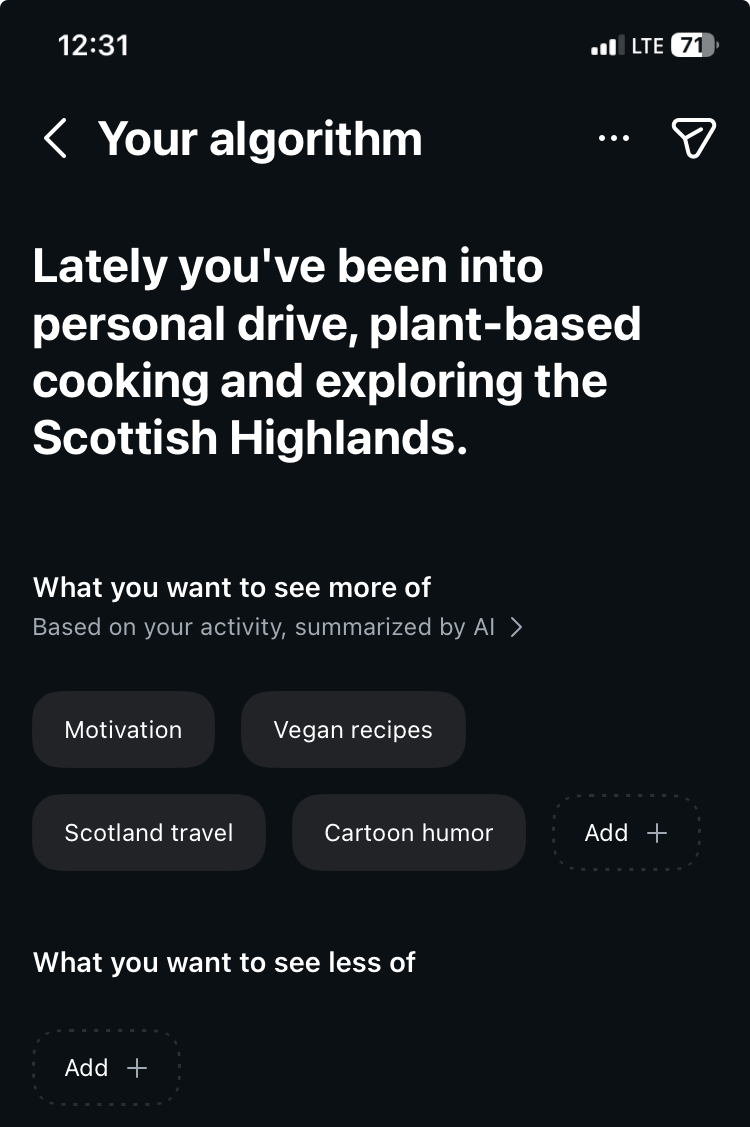
This customization feature currently applies only to the Reels feed. However, Instagram CEO Adam Mosseri indicated plans to expand it to other content formats in the future.
Chelsea immediately tested the feature as soon as it launched. She tried entering niche interests and found that many specific topics were accepted by the system. Only when she got extremely granular did the platform reject certain keywords.
The system continues learning after initial setup. Chelsea returned months later and discovered Instagram had automatically added more topics it predicted she would enjoy. She now periodically reviews the list to remove suggestions she's not interested in.
Users can choose different levels of filtering. They can request to see less of a topic without completely removing it, or they can tell Instagram to never show them that content again.
The Brand Perspective: Should Marketers Worry?
Chelsea believes brands initially panicked when this launched, fearing their views would crash if users could actively exclude entire topics. Many marketers worried that if Instagram only shows content to people who explicitly select related topics, their reach would plummet.
She takes the opposite view, seeing this as positive because it means content reaches people who are actually interested in that subject matter. Someone who lists dogs in their interests will see dog-related content, while someone who excludes sports will never see sports brands in their feed.
Chelsea tested entering various niche terms and found Instagram's AI accepted many specific categories beyond broad keywords. She doesn't think brands need to worry about fitting into exact predefined tags because the AI is smart enough to categorize niche content appropriately.
The bigger issue is whether brands create content that directly speaks to their target audience, who are interested in that topic. If a brand makes relevant content for interested viewers, the algorithm will serve it to the right people regardless of exact categorization labels.
Chelsea Peitz teaches sales professionals how to leverage social media and technology to build powerful personal brands and develop content that generates real leads. She hosts The Chelsea Peitz Podcast, and her most recent book is What to Post. Follow her on Instagram.
Other Notes From This Episode
- Connect with Michael Stelzner @Stelzner on Instagram and @Mike_Stelzner on X.
- Connect with Jerry Potter on LinkedIn and YouTube.
- Watch this interview and other exclusive content from Social Media Examiner on YouTube.
Listen to the Podcast Now
This article is sourced from the Social Media Marketing Podcast, a top marketing podcast. Listen or subscribe below.
Where to subscribe: Apple Podcasts | Spotify | YouTube Music | YouTube | Amazon Music | RSS
✋🏽 If you enjoyed this episode of the Social Media Marketing podcast, please head over to Apple Podcasts, leave a rating, write a review, and subscribe.
Stay Up-to-Date: Get New Marketing Articles Delivered to You!
Don't miss out on upcoming social media marketing insights and strategies! Sign up to receive notifications when we publish new articles on Social Media Examiner. Our expertly crafted content will help you stay ahead of the curve and drive results for your business. Click the link below to sign up now and receive our annual report!

Want to Unlock AI Marketing Breakthroughs?
If you’re like most of us, you are trying to figure out how to use AI in your marketing. Here's the solution: The AI Business Society—from your friends at Social Media Examiner.The AI Business Society is the place to discover how to apply AI in your work. When you join, you'll boost your productivity, unlock your creativity, and make connections with other marketers on a similar journey.
I'M READY TO BECOME AN AI-POWERED MARKETER