
The Fastest Way to Increase Your Google Ranking

social media how toHow many times have you heard someone say, I just want that top search result on Google? For a business website, the top spot in the search engine returns can be a lead generating machine.

Think about it. Google is where most people go when they are researching. What if there was a way to get your company’s website on that coveted first page?  Well there is…

One of the best ways to gain that top spot is by blogging. Incorporating a blog into a website can have a huge impact on the overall website’s search engine rankings.

A blog does two important things in terms of the search engines:

  1. Adds naturally occurring, keyword-rich pages.
  2. Increases the potential for incoming links from high-quality websites.

This article will reveal the why and how for improving your search engine rankings with blogs.

Playing the Numbers—Static vs. Dynamic Websites

The average small business website includes anywhere from 10-20 static web pages. These are the basic pages you see on most sites such as the home page, an “about us” page, product descriptions and even pages with contact information. Once created, these pages rarely change. In some cases, even small changes on these pages can be an expensive proposition that involves bringing in a web designer.

If the site is well-built with all the appropriate code and metadata, the search engines will index these 10-20 pages of content.  If the site is highly optimized and focused on a limited number of keywords, the search engines may connect those 10-20 pages with the right keywords (the search engine terms used to find information). However, due to the inherent needs of a website, some pages aren’t indexed for the desired keywords (i.e., contact forms).

Best-case scenario, 10-20 pages are recognized by the search engines as possible returns for the targeted keywords.

The Impact of Blog Posts

Now let’s take our static website and add a blog. For the sake of this example, let’s say that there are five representatives in the company who have each agreed to write one blog post per week.

Here’s where our blog really starts to pay off. Each time a new blog post is added, a new page is indexed by the search engines. By the end of the first month, the website has doubled the number of pages originally indexed by the search engines.

Within a month, our website—which originally had 10-20 pages in the search engine pool—now has 30-40 pages that can possibly be returned in the top spot on Google. Stretch that out over the course of a year and our 10-20 page website now has around 250 pages indexed in the search engines.

And while a blog post a day is a lot of work, scale it back to one blog post per week and we’ve still more than doubled the number of indexed pages during the first year.

Each indexed page adds another ticket to the great Google lottery. The more tickets you hold, the better chance of winning the top spot in the search engine rankings.

The Power of Incoming Links

Now let’s say that our faithful bloggers have been adding their daily posts on topics of interest to their industry. Word gets around that they put up some valuable information and at the very least offer a voice for the company.  A couple of blog posts have been emailed to fellow colleagues and even better, fellow industry bloggers are starting to link to the blog. The site starts to appear on fellow bloggers’ blog rolls and specific posts are linked as references and points of discussion in other online publications.

Google likes these incoming links. Google likes them even more when the links come from sites that are relevant to the content in the blog.

Then one day, a mild-mannered New York Times reporter is conducting research for a story related to our company’s industry. Because the blog has added a number of indexed pages to the website and others have started to link to the blog, it pops up in the reporter’s Google search. Our reporter includes a link to the blog in his article.

Google really likes incoming links from big, high-traffic sites like the New York Times. Along with the initial traffic sent to the blog from the New York Times article, Google sees that the New York Times linked to our site in an article related to keywords indexed in our blog. Google recognizes that the New York Times is an important Internet site and makes the connection that because the New York Times has linked to our little blog, our blog must be important. Thus Google moves it up the search engine rankings.

Congratulations. Thanks to the addition of a blog, our little website of 10-20 static pages now holds one of the top spots in Google search results.

Indexed Pages + Relevant and Reputable Links = Search Engine Success

At the 2009 WordCamp San Francisco (a gathering of WordPress users), Google’s Matt Cutts pointed out the importance of being both relevant and reputable. Incoming links from reputable sites such as the New York Times in which the content is relevant to the content in the post are highly valued by Google.

A blog is one of the best ways to continually add pages to a website that generate relevant and reputable links.

In the scenario above, our business blog has managed to provide both relevant content and generate reputable links—two big keys to success on Google.

Real-World Example

Don’t believe me? Let’s take a look at a real-world Google search to see the impact of a blog in action.

Let’s say that we’ve just moved to Baltimore and need a realtor to help us find a new home. We go to Google and search “Realtor Baltimore.” Once we get past the map-based search results (important to note), the national sites such as Realtor.com and the national brokerages, one of the first local real estate agents to show up in the organic search results is Wayne Curtis at www.charmcityrealestate.com.

CharmCityRealEstate.com includes a blog with posts dating back to November 2006. As you can see in the image below, Google has indexed 145 pages of CharmCityRealEstate.com. Many of these pages are blog posts filled with naturally occurring keywords related to the real estate market in Baltimore.

Now let’s take a look at another realtor in the Baltimore area. This realtor’s website did not rank in the Google search results and does not include a blog. As you can see from the image below, the site shows only 14 pages indexed with Google.
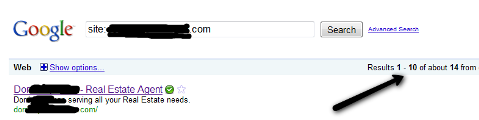
Measuring incoming links is a little more difficult as different tools return different numbers. You can get a basic overview by using the search term “link:yourdomain.com” in both Google and Yahoo. Using Alexa.com’s “Site Info” tool we can see www.charmcityrealestate.com’s top incoming links.  The very first link returned on Alexa is a link from HDTV.com’s television series House Hunters, a highly relevant and reputable real estate site.

Quality of Pages Indexed and Incoming Links

When conducting this experiment, you can find sites that don’t rank as well on Google yet have more pages indexed. This is often because the pages indexed do not rank for the keywords searched.  A topical blog naturally lends itself to keyword-rich posts just by the nature of the content.

The same holds true with incoming links. Too many incoming links from websites that are not relevant to the content on the site can actually hurt a website’s search engine ranking.

Consider Keywords When Creating Posts

Now that you can see the importance of keyword-indexed blog posts, you can begin to optimize your posts to include relevant keywords.

Going back to our example above, we can use the Google Keyword Tool to see that during the month of March, the phrase “Realtor Baltimore” was searched on Google 2,900 times in the U.S.; however, the phrase “Realtors Baltimore” was searched 60,500.

Since “Realtors Baltimore” was searched around 57,000 more times than “Realtor Baltimore,” it would be wise to use both terms when writing a post about choosing a realtor in Baltimore.

Incorporate the Blog

If the goal is to raise the search engine results of the larger website, it is important to incorporate the blog into the larger website. Use a call to action at the end of the blog post to direct the reader to other parts of your website. Keep it on the same domain and provide clear links that encourage visitors to explore the rest of your website.

Make it easy for your reader. If the path to your larger website isn’t clearly marked, they will never find their way.

ROI

Measuring the ROI of social media is tricky, but consider the value of the top spot on Google. How much would you pay for the top organic search return? Although it doesn’t happen overnight, a blog can be one of the best ways to get there.

Have you seen a jump in the search engine rankings since adding a blog? If your business is not blogging, what’s holding you back?

Tags: , , , , , , , , , , , , , , , , , , , , , , , , , , , , , ,

About the Author, Jim Lodico

Jim Lodico is a copywriter and marketing consultant specializing in creating powerful content and teaching businesses how to use blogs. You can follow him on Twitter @jlcommunication. Other posts by Jim Lodico »


Share this post


71 Comments

 
  1. mktgpro says:

    Excellent tips & very well explained! Being relevant & reputable are the two sure shot strategies to dominate the search engine listings

  2. Moon Hussain says:

    Jim, I love the details you went into with website vs. blog getting indexed. It helped me see the picture more clearly.

  3. Dino Dogan says:

    Great stuff…thnx :-) The Fastest Way to Increase Your Google Ranking

  4. Matt says:

    You're absolutely right and this is something I recommend to most people trying to start a website.

    To show a practical example, we can use my latest venture Theme Thesis.

    It used to just be a static skin gallery for the Thesis Wordpress theme but last month I started a blog on it as well. I've only written 12 articles so far but my traffic from Google has gone from ~470 to 2,334 people and there's still a week left of the month.

  5. Thanks for a very good read, Jim. One question: for inbound links, does commenting on relevant blogs hold the same SEO weight as getting a relevant source/high profile site to link to one's site? Thanks.

  6. Jim says:

    Thanks all for the comments.

    Good question Jason. I believe most blogging programs use “nofollow” links for the comments. I know WordPress does. A nofollow link tells the search engine spiders not to include the link or follow the link to the next site.

    Without nofollow links, comment spam can quickly become a huge problem.

  7. CityCliq says:

    Great tips Jim! We have definitely experienced a greater influx of relevant traffic since spending more time with our blog. The search engines seem to just eat that section of our site up :-)

    Thanks again for the post!

  8. swimmer35 says:

    THis is a great article! But I have one question. Would this tip still work with a blogger blog linked to the website? example: http://www.grassrootsweb.net

  9. [...] into a search engine magnet. But don’t just take it from me. Social Media Examiner calls it the Fastest Way to Increase Your Google Ranking. And who doesn’t want that! [...]

  10. Jim says:

    @Swimmer35

    I'm not positive but I don't think it would work in the way I describe above. I'm not a big fan of Blogger for professional/business blogs as it is too limiting and most outgrow it quick.

    The site you provide above, grassrootsweb.net, provides an excellent example of a problem I've seen many times when businesses use Blogger. Once you click through to the blog, there is no easy way back to the main website.

    In order to get the most from the blog, there should be a seamless connection to the main web site- the pages which do the selling. The blog is one way to bring the target to your site. The key is to get them to the right pages once there.

    I'm a big fan of WordPress on a self hosted site. I believe WordPress has reached a point where it can easily provide the platform for a fairly advanced website. There are plugins available to make it do about anything and enough themes that you can create a unique site.

    I've started using WordPress to build small business websites that can be managed by the end user.

  11. Hey Jim, thanks for the great tips. This really helped make the picture a bit clearer for getting good Google rankings.

    This is better than some info I have paid for! Thanks again.

  12. Great post! I really like the experiments shown here.

  13. Wynne says:

    This is definitely a strategy I am using. It works.

  14. Peter says:

    Jim-
    Thanks for the great info. I completely agree with the concepts.
    I have questions abut using link:yourdomain.com as a tool to check visibility. If I do this for some sites that obviously have huge numbers of links in, I get unusually low counts. link:ebay.com returns 747 results. link:youtube.com returns 2180 results. Why so low? Why not just rely on the usually-more-believable Alexa info?

  15. TisaYonts says:

    Thanks, I am encouraged a little more to get my blog up

  16. Thanks for your thorough discussion about how to maximize the benefits of blogging from our own website. I'm sure MANY of us are finding it very helpful. I'm still working on my website and blog, and wondering if I should include all the metadata etc on just the home page or on every static page and every post as well.

  17. swimmer35 says:

    Thank you. I fixed the issue with the links – that was my error.

    I Use a special program for my web design – I find it works wonderfully. Freeway Pro

    So you do not think the external blog will have the same effect – even w the links fixed.. ?
    I appreciate your input

  18. I work for Mentorlynx, a real estate investment training company. We don't have any followers yet but it's amazing how fast we've climbed in certain searches we're targeting. I love the tip! I can use this for job security! LOL. But thank you. I look forward to many more. I just joined today.

  19. Briana Ford says:

    Thanks so much for this Jim. Definitely helpful. I'll keep all of this in mind as I'm designing my upcoming website.

  20. [...] at the top of the site’s search results. So how can businesses claim that top spot? This post by Jim Lodico offers some tips for companies looking to quickly increase their Google [...]

  21. Greaet in-depth post Jim!

  22. Great tips. My blog is separate from my online store. Should I incorporate the blog one of my pages?

  23. Larry Kunz says:

    Thanks, Jim. You gave me a great story and some really good, practical advice.

    Along with everything you mentioned, I know that I also have to keep the site active. How long do you estimate it would take, after the Times reporter links to my blog and I rocket to the top of the search results, before I lose that advantage and sink back to the bottom? Any tips on holding onto my advantage once I've got it — other than to keep doing what I've been doing?

  24. Jim says:

    I actually had a Times reporter link to a sports blog I run. I think it's much harder to go up the links then it is to go back down. With my sports blog, I usually let it lapse during the off season. However, it's well enough indexed has enough posts and good links coming in that when I bring it back to life, it jumps right back up the rankings.

  25. Rob Berman says:

    I definitely need to go back and do a keyword search again to help the blog maintain its keyword richness.

  26. Great article! Do you see greater SEO benefit if you blog is hosted on a separate server than your website? I've read that if your blog and website are on the same server, somehow the search engines know that the same person owns both, so they don't give as much credit to the links. Is this true?

  27. Seth_M_Miller says:

    I love the clear-cut information and the examples with screenshots.

    I didn't know about finding how many pages were indexed in a search engine using the “site:” syntax. Very cool.

    Try it on yahoo and you will find something they call a “site explorer”!

    Seth

  28. Cam Gleeson says:

    Jim, I have sincerely never read a post that has so coherently and succinctly put together the arguments for the benefits of blogs. This is just a brilliant post

  29. Danny Flores says:

    Jim, this is the exact information I am always looking for. Thank you for sharing this with us. I do have one questions in regards to building the blog into the website. What is the best way to show it on the home page without robbing attention form the other parts of the website?

  30. bellevuedentist says:

    Jim,

    Nice article. Adding to one's blog or blogs is work, especially if you have other work that has to be done. In a very competitive area like cosmetic dentistry, I don't think a 20 page site could take over the top spot on Google very easily, but I think this was simply for illustrative purposes. I did like your comment on attaching the blog to your main site, which is what I did with my original blog but have found it problematic as in is “tended” by my site host (http://www.brooksidedental.com/blog) and they have to update new versions. Thus I started a new cosmetic dentistry blog at (http://bellevuedentist-cosmetic.blogspot.com) –because I don't have to update with new versions. People keep telling me that I should switch from the blogspot format to Wordpress, but I really like how easily I can work with the blogspot format. Also, you didn't comment on rewriting articles and using the different versions on separate blogs that you may own. I have done that with a few of my articles, but not all. Any thoughts on that.

  31. Robbie,

    You should include meta data on every page (and different for each new post).

    If you are using WordPress (this is what we use), you will want to add the SEO plugin we reference on this page:
    http://www.socialmediaexaminer.com/11-essential...

    Mike

  32. Bonnie – You want it on your company web site for sure! – Mike

  33. Lesley says:

    If your website software does not support a blog, can you just write article pages on your website? Is there anything special about a blog post that differentiates it from any other information page? I know you miss out on comments being posted to it, but could I just write articles/blog posts on my website?

  34. Great job of breaking down the importance of consistently adding fresh content to a website. This will be very helpful when trying to get a business owner to understand why running a blog is a MUST for his business.

  35. I am not too sure about that for certain categories. There is another website ahead of ours for a certain keyword but we have more relevant links and back links.

    Another major factor is age of domain – makes sense to me.
    (BTW, their website is older than ours.

  36. I am working really hard to get two blogs a week out – I have two different blogs – one real estate – other social…. this is fun, and I can see already the power of production, if we could get a commitment from a few other people to write as well… the company website will only become more powerrful – I am using links to larger companies as well, to give them credit mostly… I really loved this blog post…THX

  37. [...] via The Fastest Way to Increase Your Google Ranking | Social Media Examiner. [...]

  38. [...] The Social Media Examiner‘s recent e-newsletter called for businesses to consider that blogging can be the fastest way to improve Google rankings.  Author Jim Ladico pointed out the power of keyword rich content, incoming links, and incorporating a blog into your main website. [...]

  39. juliacassidy says:

    Thank you once more for a very well organized and well written article with not only relevant but useful tips for anyone using social media for business purposes. I had to say so because this is not the first time I read an article here, and I get the need to put it into practice right away and also to recommend it to other entrepreneurs I interact with who I know will also be interested in them.

    Keep up with the amazing work

  40. Jim says:

    And the search engines like some internal linking.

  41. Jim says:

    Thank you so much Cam.

  42. Jim says:

    When it comes to building websites, WordPress is about all I know but there are a number of themes available that allow you to incorporate “featured posts” into page. This can be an excerpt or just a list of headings in the lower part of the page below the fold.

    You can also incorporate posts into the sidebar using widgets.

  43. Jim says:

    That's a good question. The only problem, where do you put all those pages? With a blog, they naturally fall into place in chronological order. You can then click to expand them into their own pages.

  44. Great Article on SEO very informative thanks for sharing

  45. emarketed says:

    I'm a major blogging advocate and these are some great tips. Choosing the right keywords and consistency is a great plan that can sometimes be hard to stick to!

  46. Chris says:

    I have a blog that is a separate domain from my website, but somehow it is connected???

    My Blog does not have any indexed pages, but has a page rank 2 (same as my site). http://freegamesforchildren.net

    My site has ~20 basically static pages but has 143 indexed pages. I think that I connected them accidentally when I started the blog with my hosting package. Maybe this is a good thing?
    http://teachwithgames.com

    FYI- I use Market Samurai to find these details.

    If there is another explanation or if this is a problem that I should change, please tell me.

    Thanks for all your information,
    Chris

  47. Vanessa says:

    What a terrific post, Jim! I really appreciated this one, especially the link you provided to the video by Matt Cutts. It's encouraging to hear that having a blog can really work to get you up in the search rankings. I am new to blogging, so I have much to learn, but I do thank you and all of the great folks at Social Media Examiner for helping make this learning process much easier and enjoyable. Thanks!!

  48. Jim says:

    Looking at your site, it appears that you've got a number of pages behind the membership portal. That is probably why you're seeing 140 or so indexed pages. Remember, number of indexed pages are only one factor. Google might not recognize appropriate key words for each page.

    As for Freegamesforchildren.net, you should submit the site to Google so that it Google knows it's there. (WordPress plugin Google XML Sitemap).

  49. Ashley Miller says:

    Great and well written post. I honestly thought it would be all about the complicated process of SEO optimization but you made it sound so simple. Still, it looks like hard work. Have to keep those blog posts fresh. And it still looks like a challenge to get people to link back to you. Also, the nofollow thing. I read that blog commenting is one of the ways you can get those linkbacks. But I think every blog is on nofollow now, so is this still relevant?

  50. Jim says:

    No question blogging takes work. Think of it like advertising only only you pay with your efforts rather than $. Although a controversial topic, I think in some situations, outsourcing blogging is justified (creating informative, how-to type content as opposed to personal content for a company website).

    Again, you have to look at the value of the top organic search spot on Google. How does it compare to that of a paid advertisement in any medium?

    I also think there is something to be said for writing timeless posts–quality information that doesn't get stale quick. How-to post are a good way to build content with a long shelf life.

    I think comments can still be an effective method for promoting your site. For example, I hope that others find my comments on a post like this insightful enough that they will click on my name to see my website. In that sense, I think comments can be helpful.

    As for getting others to link back to you, it is like any p.r. and is often based on the relationships you can form with others. Sometimes sharing content with bloggers who might be interested in the topic can be effective. Not necessarily asking for a link but letting them know about an article that might be of interest to their readers.

  51. Hami says:

    an excellent post by Jim. I wonder you have mastered the way of explaining difficult things to amateurs. Matt Cutt must appoint you to make his work and lectures simplified.

  52. Jim says:

    Please let him know that I'm available.

  53. This is an excellent article. You've done a great job of explaining the concepts in an easy to understand way, without dumbing down the message (which is so rare). I've sent this along to several “newbies” I advise on blogging — I know they'll appreciate it.

  54. [...] Media Examiner shares The Fastest Way to Increase Your Google Ranking which explains why blog websites are better for increasing your rankings than traditional [...]

  55. SEOZodiax says:

    Google has over 183 Million websites indexed to a daily audience of close to 3 Billion Searcher.. And 50 Billion searches weekly . Google has created more millionaires over the last decade than any industry in the last four decades combined. There are hundreds and thousands of success stories reported of people making seven-figures comfortably from home selling ordinary items like shoes, mobiles, gadgets, ebooks, cakes, electronics, consultation etc . Where 10 years back a startup company would usually take 2-3 years to break even with their investment – now the Search engines and specifically Google's exposure has made it possible for a company to go from Scratch to a Multi Million Dollar in revenue in a couple of years – in some case even months.

    Targeting hundreds Keywords simultaneously and doing the Ranking math correctly can get your website on the first page of Google in days instead of months.

    Long Tail Keyword is not a new concept at all – but what I'm going to share with you is an amazing concept if applied will instantly give your website a massive exposure on the Search engines with very little effort.

    These long tail keywords are actual search queries, therefore optimizing your site and creating content to match these search queries will allow you to attract visitors who search for information via these and similar search terms.

    If you're going by the Long tail way all by yourself, I highly recommend 3 softwares – Wordtracker, Keyword Discovery and Keyword Analyzer for the initial keyword research. Or have you entire operation outsourced to a Seo service provider.

    The term Long Tail Keywords was coined in the 2004 – and many business houses have openly accepted the idea and the success that came with it, but I only know just one company who recently launched their SEO service dedicated to long tail optimization. I' recently had a chat with the core team and was pleasantly surprised to see to what level they have taken the Long Tail concept to. They are the very first company to provide Long Tail SEO Services. In fact they named their company perfectly – Long Tail keywords are indeed “Buyer Keywords”. There are plenty of freelance marketers and SEO experts who can execute such a SEO campaign or you can do it yourself by outsourcing some portions of the work. http://www.BuyerTrafficSEO has swiftly curved a niche for themselves being the only provider of this breed of SEO service.

    Softwares :

    KeywordDiscovery
    Wordtracker
    KeywordsAnalyzer

    The only Long Tail SEO Service I know of :

    http://BuyerTrafficSeo.com

  56. Excellent article, I see so many people wanting blogs on their sites (or in addition to them) who all have a mentality of “if I add a blog, Google will like me”. Of course that might become true if they actually do as this article points out i.e. Work at it!

    Its all about regular posts written around keywords that are good enough to attract links.

  57. [...] The Fastest Way to Increase Your Google Ranking [...]

  58. greg says:

    this is an excellent post very well explained thanks

  59. Cedric says:

    Nice post!
    I found a helpful tool that you can add under “Real-World Example”

    It checks your site page's in google with statistics;
    http://webstock-media.com/pages-indexed-by-goog...

  60. AppFlak says:

    Well explained post on how to improve search rankings

  61. [...] Start a Corporate Blog This idea started swirling around my head after I read this post from Social Media Examiner.  It talks about the influence blogs can have in search [...]

  62. [...] It’s one thing to create social media profiles on sites that are relevant to your industry and that you want to use. But it’s a whole other thing to create them just to get a backlink to your website with no intention of going any further. There are better and more effective methods of link-building and other strategies to increase your Google ranking. [...]

  63. Cody Swann says:

    Thanks Jim. Any idea on improving the value of a backlink from your Twitter profile? Meaning if you Tweet about relevant content to your keywords, is that backlink worth more?

  64. [...] For the full article go to The Fastest Way to Increase Your Google Ranking [...]

  65. Djenna70 says:

    Great post Jim. I think this site is claiming to have written your article. http://www.situatedresearch.com/blog/2010/07/th...

  66. Djenna70 says:

    Great post Jim. I think this site is claiming to have written your article. http://www.situatedresearch.com/blog/2010/07/the-fastest-way-to-increase-your-google-ranking-blogging/nn

  67. [...] The fastest way to increase your google ranking from Social Media Examiner [...]

  68. [...] The number one way to increase traffic to your company website is to start a blog.  Basically, and in the most layman terms possible, the more content you have connected to your company website, the higher up you’ll appear on the Google page when someone searches for your keywords. [...]

  69. [...] 29, 2010 in Uncategorized The Fastest Way to Increase Your Google Ranking | Social Media Examiner. Email [...]

  70. [...] quite hard enough on the search engine optimization (SEO) – or page rank – benefit, though.  Posting in the Social Media Examiner, Jim Lodico essentially says you can probably justify your entire blogging effort on that one [...]


Leave a Comment


XHTML: You can use these tags:
<a href="" title=""> <abbr title=""> <acronym title=""> <b> <blockquote cite=""> <cite> <code> <del datetime=""> <em> <i> <q cite=""> <strike> <strong>


blog comments powered by Disqus



