How to Customize Your Facebook Page Using Static FBML

social media how toIs your Facebook page dull and uninviting?  Maybe you’ve seen those really attractive Facebook pages and wondered, “How’d they do that?”

Given Facebook’s powerhouse status for marketers, isn’t it time you upgraded your Facebook page?

How can you help your brand stand out from the competition and increase the relevancy of your Facebook page?

The answer: Static FBML.  This article will share what you need to know to conduct a Facebook page makeover.

What Is Static FBML?

FBML stands for Facebook Markup Language, which is a subset of HTML.

Static FBML is a Facebook application that allows Facebook page administrators to create custom boxes and tabs on their Facebook pages. This application is only available for Facebook pages, not for personal profiles or Facebook groups.

Adding Static FBML to Your Facebook Page

You can add Static FBML in four easy steps.

#1:  Make sure you are an administrator of the Facebook page so you have the ability to edit.
#2:  Go to the Static FBML application.

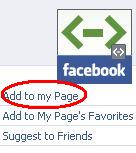
#3:  Click “Add to my Page.”

#4:  A window will appear that contains a list of the Facebook pages for which you are an administrator. Click “Add to Page” to add the application.

Static FBML is now added to your page.

Before you add content to your FBML box, you should have an idea whether you want to set up your FBML box as a tab or keep it as part of your wall on the left-hand column. That way, you can make the necessary image or video size adjustments so these components fit in the space provided.

Setting Up Static FBML as a Tab

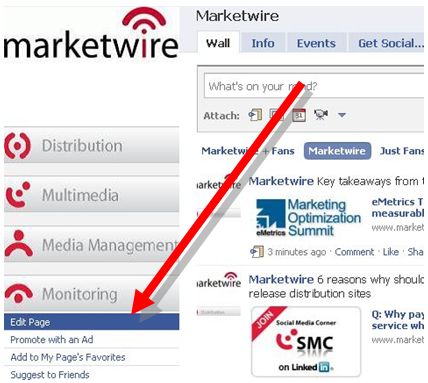
To set up your FBML box as a tab, click on “Edit Page” under your Facebook page logo/avatar located on your wall.
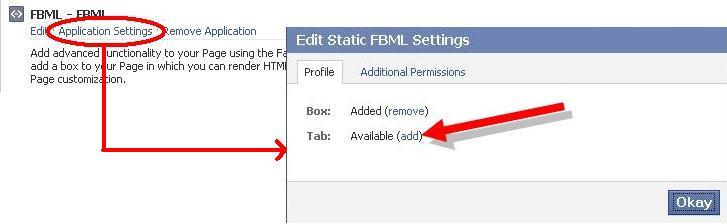
Scroll down to the “Applications” section and locate the FBML app and click “Application Settings” (see below). Make sure that the “Tab” setting is “added”. Your FBML box is now added as a tab.

To the left of application settings you will see an “Edit” option on your FBML.  This is where you will ultimately paste your HTML code.  You can also add a “box title.”  The box title becomes the name of your tab.

Please note that your FBML box must be coded for a maximum width suitable for a tab. The maximum width for an FBML box for a tab is 520 pixels.

Setting Up Static FBML to Your Left Column Wall

The ability to have multiple FBML boxes encourages you to have an FBML box on your tab as well as part of your wall on the left-hand column (or JUST on the wall). Let’s add an FBML box to your wall.

Go back to your wall and click on “Edit Page” under your Facebook page logo/avatar.

Find the FBML box and click on “Application Settings” (shown below).

Make sure the “Box” settings are “added”. The “Box” setting is important so that you have the option of moving your FBML box to the left-hand column of your wall.  Go back to your wall, find your boxes tab and locate your FBML box.  Click on the pencil icon (shown below) and select “Move to Wall tab.”

Your new FBML box is now added to your wall.

Please note that your FBML box must be coded for a maximum width suitable for your wall. The maximum width for an FBML box on the left side of your wall is 180 pixels.

Click here, go to the wall and scroll down to see the ‘Useful Links’ box on SocialMediaExaminer.com’s wall.  You can drag boxes up and down the left side of your wall.

Adding Content to Your Static FBML Box

Now that you have an idea where you want to place your FBML box, it’s time to edit and add content. To begin, click on “Edit Page” located under your Facebook page logo. Scroll down to the “Applications” section and locate the FBML app, but this time click “Edit.” The FBML box will be empty.

This is the area where you can name the FBML box and add HTML code. Please note that FBML does not work with all HTML code.  For example, JavaScript does not work.  You’ll need to experiment.

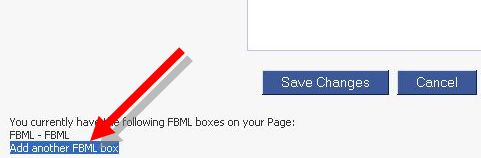
If you scroll down to the bottom of the box, you can add additional FBML boxes.

The maximum number of FBML boxes you can have is 10.

Now let’s spice up your Facebook page. I’ll go over the two most popular enhancements using Static FBML – adding a clickable image and embedding a YouTube video.

How to Add a Clickable Image in Static FBML

When adding an image in the FBML box, I’ve found that the best place to host images is Photobucket. Using Flickr or Facebook photos caused issues for me. If it works for you, stick with it. The maximum width for an image in the FBML box for a tab is 520px.

There is no maximum height, but think of it as a landing page by keeping the scrolling to a minimum. Ask yourself: do you want users to scroll down to get the message or do you want to get the main point across once they’ve landed on your page?

Upload your image to your Photobucket account. Copy the direct URL to the image you intend to use in your FBML box. Next, you want to use this code:

<a href=”http://xxxxx” mce_href=”http://xxxxx” target=”_blank”><img src=”http://yyyyy” mce_src=”http://yyyyywidth=”##px” height=”##px” border=”0″ alt=” “></a>

Replace the xxxxx with the target URL. Replace the yyyyy with the direct link to your uploaded Photobucket image. Replace the ## with your width and height in pixels.

How to Embed a YouTube Video in Static FBML

As with images, I would recommend a maximum width of 520px for a tab. After uploading your video, you want to use this code:

<fb:swf swfbgcolor=”000000” imgstyle=”border-width:##px; border-color:white;” swfsrc=”http://www.youtube.com/v/xxxxx” imgsrc=”http://img.youtube.com/vi/xxxxx/2.jpg” width=”520″ height=”400″ />

Replace the xxxxx with your YouTube’s video ID. In both examples below, “MqqKPWhY4es” is my YouTube ID.

Example 1: In this YouTube link: http://www.youtube.com/watch?v=MqqKPWhY4es, all the characters after the “=” are the YouTube ID.

Example 2: If your YouTube link looks like this: http://www.youtube.com/watch?v=MqqKPWhY4es&feature=player_embedded, all the characters after the “=” and before the “&feature” will be the YouTube ID.

You can change the values of “swfbgcolor” and “imgstyle” to your preferences. The “imgsrc” is a bit trickier because it is a preview image. When a user clicks on the preview image, it turns into the video. To see a real-life example, you can go to the Marketwire page (see below screen shot). In order to change the preview image, you can replace the URL to a direct link to one of your Photobucket images (or any other source).

Make sure you open and close all tags and quotes.
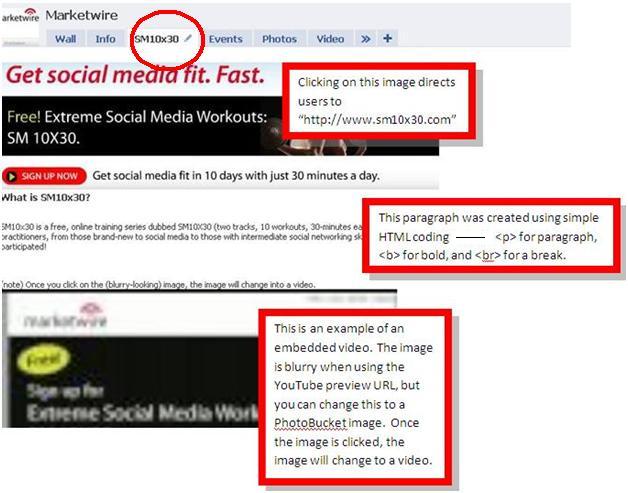

Example of a clickable image with an embedded video

How to Set the FBML Box as the Default Landing Tab

The option of setting your FBML box as the default landing tab, rather than the wall, is one of the most relevant enhancements you can make to your Facebook page. This is where adding Google Analytics to your Facebook page helps tremendously with tracking.

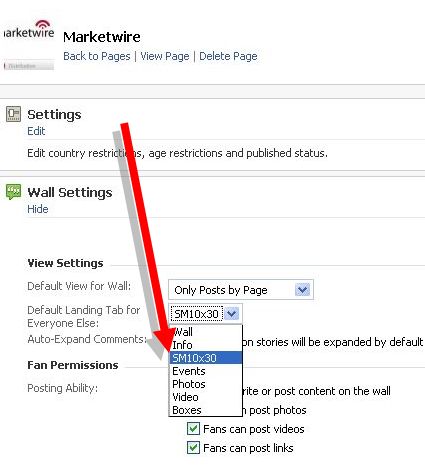
In order to set your FBML box as your default landing page, go to “Edit Page” under your Facebook page logo and scroll down to “Wall Settings.” You’ll notice a section called “Default Landing Page for Everyone Else.” Visitors who are not fans of your page will see your newly created FBML box. Visitors who are fans will land on your wall.
That’s it!

Static FBML a Must-Have for Facebook Pages

The ability to enhance your page as a marketing vehicle by driving traffic to your website and engaging even more with your audience should warrant consideration. Many administrators shy away from Static FBML because they’re intimidated with coding.

My suggestion: review this post, research a bit more on Google and try it out. In the words of Ben Stiller from the movie Starsky & Hutch, Do it! Do it! Do it!.

I hope this tutorial has given you some insight on how to implement Static FBML to your Facebook page.

What are your thoughts on Static FBML? Is there a reason why you haven’t added it yet?  Comment below and let’s get this discussion going!

Tags: , , , , , , , , , , , , , , , , , , , , , , , , , ,

About the Author, Nick Shin

Nick Shin is an online marketing strategist specializing in SEM, social media, and PPC. When he isn't collaborating or consulting on marketing strategies, you can find him on the tennis court. Other posts by Nick Shin »


Share this post


286 Comments

 
  1. Great Post!!! I was actually just looking into this

  2. Nate says:

    Well put together post. The FBML tab, on the page, is automatically generated so you don't have to click the add to wall tab. I found this great quick and easy FBML tutorial that basically visualizes the steps you went over! Thanks :)

    http://www.youtube.com/watch?v=xbbtawGnPYA

  3. Thank you Nick. And my under-utilized FB fan page thank you, too!

    I will definitely print this out and use ASAP.

    Much appreciated!

  4. Patrick says:

    Nice overview. I have a question about photos. I would like to use an animated gif for one of my images. However, once you define an image source, Facebook saves it to their server and calls from their server, not yours. Thus, when you upload an animated image, facebook saves the static version and displays that instead. Do you have any idea on how to fix this?

  5. Nick Shin says:

    Thanks Jorge! The things you can do with FBML is pretty amazing. I've actually updated the Marketwire (referenced above) Facebook page since this post. Check out the welcome tab: http://www.facebook.com/marketwire

  6. Good post. A nice landing page definitely makes you different and more interesting to the average facebook user. I've noticed more people have Liked my facebook page since I customized the landing page.

    Thanks for the info.

  7. Nick Shin says:

    Great tutorial. I am by no means a designer (pretty obvious right) or savvy in coding so this goes to show that ANYONE can do it. Thanks for providing that video!

  8. Nick Shin says:

    You're welcome Linda! Feel free to post here if you have questions or to the Social Media Examiner page: http://www.facebook.com/smexaminer. Your questions will help a growing community.

  9. Hey Patrick,

    I knew Facebook was adding I,ages to their proxy server but did not know they were converting animated GIFs to static ones. Sounds like a good question to post on their developer forum.

  10. Nick Shin says:

    You'll need to change the “imgsrc”, which is the preview image. Try uploading your image to photobucket, then replacing your imgsrc with the photobucket link instead.

  11. Nick Shin says:

    I absolutely agree in that it makes your Facebook page different. Standing out from the competition is great, but more importantly, it provides visitors a reason to stay on the page just a little longer and interact with your page just a bit more.

  12. Patrick says:

    Thanks Nick and Michael. I've tried Photobucket and many other photo storage/sharing sites and it just doesn't seem to work.

  13. Nick Shin says:

    I've briefly looked into this as I've yet to have a need for an animated gif. It turns out that the animation gets stripped out during Facebook's caching process. I don't believe there's a way to put one in a custom tab.

  14. Jacinta says:

    Static FBML is very powerful! I've added the coding for FBML to my Social Media Pocket Guide app for the iPhone/iPad/iPod touch. Find it on the app store!

  15. Nick Shin says:

    Indeed it is very powerful. Even with the limitations of Static FBML, it's by far my favorite app on Facebook.

  16. Les says:

    Awesome – THANK YOU!

  17. Daniel Mclaren says:

    Struggling to make it work with an image appearing. the code I have used in the FMBL space is…

    <img src=”http://yyyyy” mce_src=”http://i768.photobucket.com/albums/xx327/uksportsnetwork/UKSN_Social_Media_summit.gif” width=”238px” height=”68px” border=”0″ alt=” “>

    Any advice would be great, thanks!

  18. Nick Shin says:

    You're welcome Les!

  19. Melissa says:

    Thanks for the helpful post! We put an entire, fully-functional job board on our Facebook page using FBML and it's been very helpful! If you're curious, you can check it out http://www.facebook.com/SkillStormFB .

    I'd love to know what you think!

  20. akstout18 says:

    I recently read that Facebook was going to be doing away with landing pages for pages with less than 10,000 “likers” – is this still the case? If so, won't everyone who creates these pages now, and has less than 10,000 “likers” lose these customizations?

  21. Nick Shin says:

    I've never heard of “mce_src”. I noticed that your gif is an animated gif so the animation will be stripped out during Facebook's cache process. Try this code instead, it worked on my test page (obviously with no animation though).

    imgsrc=”http://i768.photobucket.com/albums/xx327/uksportsnetwork/UKSN_Social_Media_summit.gif” width=”238px” height=”68px” border=”0″ />

  22. Nick Shin says:

    I like what you did with the hide/unhide to fans option that Static FBML offers. That's a great incentive to “like” your page to be able to see the content. Have you considered changing the tab to “jobs” instead of “search for…”? Maybe test it for a couple weeks and check your FB analytics like visits and increase in the number of fans.

  23. Nick Shin says:

    Facebook originally intended to put restrictions on landing pages for Facebook pages, but then retracted it fairly quickly due to the outcry by many Facebook users: http://www.insidefacebook.com/2010/05/20/facebo...

  24. Linda says:

    This is a great tutorial – thanks for posting it! Very detailed.

  25. steveborgman says:

    Nick, I have three words for you, “Fantastic! Thank you!”

  26. akstout18 says:

    Oh that's great to know. Thanks, Nick!

  27. DeKoning says:

    I thought maybe Bill Lord had guest-written this post as he's been churning this stuff out at Vital. :) http://www.twitter.com/Bill_Lord

  28. Nancy says:

    This a great summary, thank you!

  29. Ilan Amit says:

    Hi Nick,

    Do you have any expriance with multi location support on a single FBML tab?
    I am trying to use fb:restricted-to location and it doesn't working.

    Thanks

    Ilan Amit

  30. Deb Lamb says:

    Wow! I had no idea how complicated that was, however, you make it seem simple. I'll be checking into it for sure!

    Thanks for the detailed instructions!

    Deb Lamb
    Freelance Ghostwriter
    http://www.youreverythingservices.com

  31. Dino Dogan says:

    Great run down of FB's HTML….

    Am I the only one finding it hard to balance the “social” aspect of social media with the technical aspect?

    Best platforms just work and are not made for technical people, but if you want to be a serious player, you must learn wordpress, FBML, and ungodly amount of other things…of course, if you dont want to learn you have to pay someone else to manage it for you, but that puts a real barrier between small fish in social media and big fish that can afford technical expertise.

    Any thoughts on this from the hoi polloi on SME? :-)

  32. Bill Lord says:

    Facebook is still planning to change the width of the FBML pages from 760px to 520px though, which will really screw things up for some users! Just a heads up. :) http://wiki.developers.facebook.com/index.php/T...

  33. Tom says:

    Hi Melissa
    I like the functionality of “first become the Fan, than see the jobs”. Would you be so kind and tell, how did you do it? Thanks in advance and all the best!

  34. Nick Shin says:

    That's a great point Bill and that is exactly why I mentioned a “maximum” of 520px in the article multiple times even though the change in width hasn't been implemented yet.

  35. Nick Shin says:

    Hope you're able to use some of the tips!

  36. Nick Shin says:

    Appreciate that Steve!

  37. Nick Shin says:

    Thanks Nancy. Hope you find it useful.

  38. Nick Shin says:

    I've played around with it and I've never had any luck with the fb:restricted-to location code. I can only assume there's some sort of bug, but that isn't confirmed as it's not an urgent issue for me. Have you tried the other fb:restricted-to codes to see if those worked? http://developers.facebook.com/docs/reference/f...

    Just a note, if you can't get those working, I'd avoid using the code altogether. You don't want to accidentally limit viewers who should be able to view the content.

  39. Nick Shin says:

    You're welcome Deb! If it's any consolation, I'm a novice at coding so if I can do it, anyone can do it. (How's that for a cliche huh?) The biggest difference is that I do a lot of research and spend lots of time trying to figure out what works. I'm still learning the intricacies of Static FBML, but loving the learning process.

  40. HSoule says:

    The cod in your How to Embed a YouTube Video in Static FBML section of your article doesn't seem to work. I have had multiple people try it. Just hoping you can correct this.

  41. Kim says:

    Thanks for this tutorial! I bookmarked an earlier Social Media Examiner post on Static FBML, but was still somewhat confused afterward. This post is extremely helpful. Thanks for the detail!

  42. Nick Shin says:

    Welcome to the digital age ;-)
    I agree with you 100% re: the difficulty in finding the balance between “social” and technical. It is hard, but that time you spend, say creating a decent looking FBML page, has its rewards. The first goal is to make sure you're part of the conversation. The technical aspect should come later when you've established yourself in the social space. Implementing static FBML is by no means a priority, but something everyone should consider once you've found your voice in social media and have developed even a small following.

  43. Nancy Cawley Jean says:

    Thanks SO much for this. I have been trying to figure this out and this is going to be SO helpful! :)

  44. Nick Shin says:

    As long as you replaced the “xxxxxx”, “yyyyyy”, and “##” signs with yours, it should work fine. Could you copy and paste your code?

  45. TwtrCoach says:

    Great Info here Nick.

    Was also looking info.

    Just set up a new fan page. Do you know if there is any restriction to Static FBML like you need to have reached the 25 members to use it or….

    Cheers.. Are

  46. Nick Shin says:

    Glad you found it helpful Kim!

  47. Nick Shin says:

    It takes some trial and error, but hopefully this how-to guide will make your life a bit easier (and save you a bundle of time!).

  48. Nick Shin says:

    Fortunately, there are no restrictions for using Static FBML. I use a test account that has 0 fans and all is good.

  49. Ilan Amit says:

    Thanks Nick.
    The thing is that I have a G8 piece of code that showing a slide show of some pictures, and when its working (either in the Right-to-Left language preference, like Hebrew), or in the Left-to-Right, like English, it is amazing! – giving a real impact.
    Maybe I should change the code … Do you mind looking at it .. its not so long, and I will be more than happy to share it with everyone!

    Ilan

  50. Nick Shin says:

    I'll take a look if it's not a fb:restricted-to code. As mentioned, that's never worked for me. Does the code work without any restrictions? If it does, then it's definitely the “fb:restricted-to” code that's an issue.

  51. Rhonda Dirvin says:

    Nick,
    I was not able to post my question on your facebook fan page. I'm sorry I don't know what a “target URL” is, but I used your code example below and I still can't get my image to post. Here is my code, any help you can provide would be GREATLY appreciated!!

    <imgsrc=”http://http://i915.photobucket.com/albums/ac354/jrdirvin/Fan%20Page%20Pics/Alicurtain.jpg” width=”265px” height=”200px” border=”0″ />

  52. Ilan Amit says:

    This is the Code that its working good only for Right-2-Left Language (for example Hebrew). I need to make it work, in all Languages (without knowing which one).

    <div id=”slideshow_wrapper” style=”width:700px; height=533px; clear: both; margin-top: 0px; “>
    <div id=”slideshow” style=”overflow: hidden; width: 700px; float: left; position:relative; margin-left: 10px”>
    <div id=”slideshow_inner” style=”position: relative; width: 3550px”>

    <img width=700 height=533 src=”http://i983.photobucket.com/albums/ae312/giladlarom/1.jpg” />
    <img width=700 height=533 src=”http://i983.photobucket.com/albums/ae312/giladlarom/2.jpg” />
    <img width=700 height=533 src=”http://i983.photobucket.com/albums/ae312/giladlarom/3.jpg” />
    <img width=700 height=533 src=”http://i983.photobucket.com/albums/ae312/giladlarom/4.jpg” />
    <img width=700 height=533 src=”http://i983.photobucket.com/albums/ae312/giladlarom/5.jpg” />

    </div>

    </div>
    <img id=”left_button” src=”http://i923.photobucket.com/albums/ad76/NLStudio/next1.png” onclick=”gor(); return false;” style=”position:absolute;top: 20px;left: 630px; display: block; width: 80px; cursor: pointer;” />

    <img id=”right_button” src=”http://i923.photobucket.com/albums/ad76/NLStudio/prev1.png” onclick=”gol(); return false;” style=”position:absolute;top: 20px;left: 100px; display: block; width: 80px; cursor: pointer; opacity: 0.3;” />
    </div>

    <script>

    //Script for slideshow
    var numslides = 5;
    var slidesvisible = 1;
    var currentslide = 0;
    var slidewidth = 700;
    function gor() {
    if (currentslide <= (numslides-slidesvisible-1)) {
    Animation(document.getElementById('slideshow_inner')).by('left', slidewidth+'px').by('right', '-'+slidewidth+'px').go();
    if (currentslide == (numslides-slidesvisible-1)) {
    Animation(document.getElementById('left_button')).to('opacity', '0.3').go();
    Animation(document.getElementById('right_button')).to('opacity', '1').go();
    }
    if (currentslide < (numslides-slidesvisible-1)) { Animation(document.getElementById('right_button')).to('opacity', '1').go(); }
    currentslide++;
    }
    }

    function gol() {
    if (currentslide > 0) {
    Animation(document.getElementById('slideshow_inner')).by('right', slidewidth+'px').by('left', '-'+slidewidth+'px').go();
    if (currentslide == 1) {
    Animation(document.getElementById('right_button')).to('opacity', '0.3').go();
    Animation(document.getElementById('left_button')).to('opacity', '1').go();
    }
    if (currentslide > 1) { Animation(document.getElementById('left_button')).to('opacity', '1').go(); }
    currentslide–;
    }
    }
    </script>

  53. Terri says:

    the video code gave me a blank page
    one thing confused me in the instructions “after uploading the video…” does that mean I need to upload the youtube video onto the facebook page?
    here's what I put:
    <fb:swf swfbgcolor=”000000” imgstyle=”border-width:##px; border-color:white;” swfsrc=”http://www.youtube.com/v/48VYt4tY3Fk” imgsrc=”http://img.youtube.com/vi/48VYt4tY3Fk/2.jpg” width=”520” height=”400” />

  54. Niall Devitt says:

    Hi Nick, trying to add a clickable Image using your code & Photobucket. Image is working fine but when you click thru, it takes you to the boxs tab. Any advice would be greatly appreciated. Code below:

    <img src=”http://i931.photobucket.com/albums/ad157/nialldevitt/Facebook/7_4-1.jpg?t=1276027925” mce_src=”http://i931.photobucket.com/albums/ad157/nialldevitt/Facebook/7_4-1.jpg?t=1276027925” width=”160px” height=”85px” border=”0″ alt=” “>

    Thanks,
    Niall

  55. TwtrCoach says:

    Thanks Nick. Great to know.
    Cheers.. Are

  56. Michael says:

    Nick,
    Do you know, where I could find some more info regarding this hide/unhide effect, which you mentioned in the above reply?

  57. Nick Shin says:

    Without sitting down and spending my time with your code and testing, unfortunately I don't know what the issue is. Have you tried a more simple approach and embedding a flickr slideshow or photobucket slideshow?

  58. christos akratopoulos says:

    No terri…

    Try this:

    When you upload your video in youtube copy the embedded code. It should look like this:

    <object width=”480″ height=”385″><param name=”movie” value=”http://www.youtube.com/v/48VYt4tY3Fk&hl=el_GR&fs=1&”></param><param name=”allowFullScreen” value=”true”></param><param name=”allowscriptaccess” value=”always”></param><embed src=”http://www.youtube.com/v/48VYt4tY3Fk&hl=el_GR&fs=1&” type=”application/x-shockwave-flash” allowscriptaccess=”always” allowfullscreen=”true” width=”480″ height=”385″></embed></object>

    Copy this link: http://www.youtube.com/v/48VYt4tY3Fk&hl=

    Then the code for FBML is this:

    <fb:swf
    swfbgcolor=”000000″
    imgstyle=”border-width:3px; border-color:white;”
    swfsrc='http://www.youtube.com/v/48VYt4tY3Fk&hl='
    imgsrc='http://img.youtube.com/vi/48VYt4tY3Fk/2.jpg' width='480' height='385'/>

    You can always check if it's working here:

    Greetings from Greece. Hope i helped…

  59. Nick Shin says:

    Copy and paste EXACTLY like this and it will work okay; it did for me and your video. Note the spaces and hard breaks.

    <fb:swf
    swfbgcolor=”000000″ imgstyle=”border-width:3px; border-color:white;”
    swfsrc=”http://www.youtube.com/v/MqqKPWhY4es”
    imgsrc=”http://img.youtube.com/vi/MqqKPWhY4es/2.jpg” width=”520″ height=”400″ />

  60. christos akratopoulos says:

    I don't know why but the embedded code didn't came up in my previous post. This is it:

    <object width=”480″ height=”385″><param name=”movie” value=”http://www.youtube.com/v/48VYt4tY3Fk&hl=el_GR&fs=1&”></param><param name=”allowFullScreen” value=”true”></param><param name=”allowscriptaccess” value=”always”></param><embed src=”http://www.youtube.com/v/48VYt4tY3Fk&hl=el_GR&fs=1&” type=”application/x-shockwave-flash” allowscriptaccess=”always” allowfullscreen=”true” width=”480″ height=”385″></embed></object>

  61. christos akratopoulos says:

    <object width=”480″ height=”385″><param name=”movie” value=”http://www.youtube.com/v/48VYt4tY3Fk&hl=el_GR&fs=1&”></param><param name=”allowFullScreen”

    value=”true”></param><param name=”allowscriptaccess” value=”always”></param><embed src=”http://www.youtube.com/v/48VYt4tY3Fk&hl=el_GR&fs=1&” type=”application/x-shockwave-flash” allowscriptaccess=”always” allowfullscreen=”true” width=”480″ height=”385″></embed></object>

  62. Nick Shin says:

    Could you provide the code that you used?

  63. Niall Devitt says:

    When I try to paste the code, that's what happens :-(

  64. Nick Shin says:

    This code worked for me:
    <img src=”http://i931.photobucket.com/albums/ad157/nialldevitt/Facebook/7_4-1.jpg?t=1276027925″ width=”160px” height=”85px” border=”0″ alt=”">

    You might want to reconsider the width and height. If you remove the specs, the image doesn't look stretched. Try it out.

  65. Terri says:

    thanks for your help

  66. Terri says:

    that worked great-thanks for your article and your help

  67. Nick Shin says:

    You're welcome Terri!

  68. Carol Jones says:

    DINO,

    Greetings from rural Australia.

    I'm a very small fish. Who lives and works from my remote property in a village of 49 farming families in rural Australia.

    The internet and email arrived in my rural village in 2001. That's when I launched my first website, done at little cost by a student at Charles Sturt University in Bathurst NSW Australia.

    And after fumbling around for 4 years and discovering that any further work on my website by web designers will cost thousands of dollars, I made the decision in 2005 that I have to conquer the online world on my own.

    And so began my serious adventure into cyberspace.

    I've taught myself everything. Mostly from online teleseminars that usually start between 1am and 3am Australian time. And books. Blogs. Video tutorials. And Google search.

    I now self host 3 Wordpress sites using the Thesis theme and have completely revamped my original website that uses the FrontPage platform.

    I use Twitter, Facebook, LinkedIn, Hootsuite, Tweetdeck and cannot remember all the rest.

    I taught myself HTML and CSS from a Sitepoint book. In just an hour a day, starting every morning at 4am in August 2009, I had my first self hosted Wordpress/Thesis site up, complete with a shopping cart I configured myself, by November 2009.

    I have Facebook Fan Pages for every product in my range. I learned how to create FBML boxes, use Notes as a second blog site, move boxes to my wall, set up a Facebook shopping cart, and post often to every fan page. I use Hootsuite for posting.

    To date, I've not set up a Welcome Page because I haven't come across easy enough to follow instructions.

    But Nick Shin has changed that.

    Even without a Welcome Page, my fan page for my principal product gets hundreds of visitors a week. Because I have a Facebook status box on one of my websites and the fan page also ranks pretty high on Google.

    All this learning and doing took my principal product from page 45 on Google to position number 3 on page one of Google in Australia. It's been in that position for 4 years.

    I did all the above by spending no more than the cost of books and the odd teleconference such as the Social Media Success Summit. Everything else I needed to know was free. Including my time.

    I've never used Adwords. Never paid for any online advertising on any search engine. Nor have I paid for technical advice.

    My next move is to video. I've purchased the camera, tripod and am spending time viewing other videos to understand what I like, why. What I don't like, why. What's popular, why.

    YouTube, here I come!

    Many years ago a friend told me that his mother never lost an opportunity to point out to him that the only time success comes before work is in the dictionary.

    Dino, now's the perfect time to stop reflecting about how disadvantaged you may be as a small fish and start doing more for and by yourself so you can become a significant small fish.

    I hope the above is of help to you.

    Best wishes and take care,

    Carol

    Carol Jones
    Director
    Interface Pty Ltd
    Designers of The Fitz Like A Glove™ Ironing Board Cover
    http://www.SimpleSolutionsForDifficultProblems.com
    http://www.InterfaceAustralia.com

  69. Dino Dogan says:

    Informational AND inspirational. How do you do it? :-)

    If I may offer a piece of advice in return. When doing vlogs, having a point, a message, content, etc is awesome, but people mostly respond to the emotional content of the “performance”. No one remembers the exact words Dr. MLK Jr did in his “I had a dream” speech, but we all remember the emotional content. No one remembers Obama's inaugural speech but everyone remembers the way it made them feel.

    Gary Vaynerchuck is a really good role model in this regard…check him out. (not to compare Gary to above mentioned guys, Im just saying he's on the money with his vlogs).

  70. Carol Jones says:

    DINO,

    Greetings from rural Australia once again.

    That's brilliant advice regarding videos. And exactly what I'm discovering when I view them.

    Emotion. Energy. Charisma. Being genuine.

    Knowing it is one thing. Nailing it is another!

    I'll tap you on the shoulder for further encouragement.

    Best wishes and take care,

    Carol

    Carol Jones
    Director
    Interface Pty Ltd
    Designers of The Fitz Like A Glove™ Ironing Board Cover
    http://www.SimpleSolutionsForDifficultProblems.com
    http://www.InterfaceAustralia.com

  71. Nick Shin says:

    Try this without the width and height:
    <img src=”http://i931.photobucket.com/albums/ad157/nialldevitt/Facebook/7_4-1.jpg” border=”0″ alt=”">

    When you copy and paste the code, try deleting the quotes (”) and retyping it on your keyboard. Sounds odd, but I've found that tends to fix a minor issue.

  72. Nick Shin says:

    That's a very inspirational story, thanks for sharing! I learn from researching and trying things on my own. I consider myself a beginner at coding although my “skills” have improved, but it's the countless hours I've spent doing trial and error on my own websites before figuring out what works and what doesn't. It's about evolving and building one's knowledge base to develop oneself into an expert or go-to resource. Learning never fades…

  73. Maggie says:

    Thank you…I am going to try it out tonight

  74. Rhonda Dirvin says:

    Nick,
    Thanks for the tips, they were very helpful but I couldn't quite get there. I'm sorry I don't know what a “target URL” is, but I used your code example above and I still can't get my image to post. Here is my code, any help you can provide would be GREATLY appreciated!!

    <imgsrc=”http://i915.photobucket.com/albums/ac354/jrdirvin/Fan%20Page%20Pics/Alicurtain.jpg” width=”265px” height=”200px” border=”0″ />

  75. Nick Shin says:

    You're welcome Maggie. Be sure to read the comments as well. There are some pointers that will help resolve some headaches you might run into later.

  76. Carol Jones says:

    NICK,

    Greetings from rural Australia.

    Your comment made me laugh. I'm the world's foremost expert on doing something over and over again until it finally works.

    I don't read instructions well. Never have. My partner is the same. Between us we have four university degrees. And it took us hours to follow the graphic instructions and finally figure out how to put our Dyson vacuum cleaner together!

    Your Welcome Page instructions are very detailed and look so very easy to follow. Even for me. I've downloaded them and will implement a Welcome Page. When it works – and I'm sure I'll misread something and have to trial it over and over again – I'll report back with a link.

    It's a pleasure to add you to my list of people I've learned from. At no cost. This is the best way to learn.

    And being able to make personal contact with you, Nick, is the icing on the cake.

    Best wishes and take care,

    Carol

    Carol Jones
    Director
    Interface Pty Ltd
    Designers of The Fitz Like A Glove™ Ironing Board Cover
    http://www.SimpleSolutionsForDifficultProblems.com
    http://www.InterfaceAustralia.com

  77. Sybil says:

    It looks like you're missing a space in your code…

    <img src=”http://http://i915.photobucket.com/albums/ac354/jrdirvin/Fan%20Page%20Pics/Alicurtain.jpg” width=”265px” height=”200px” border=”0″ />

  78. [...] Finally, there’s a great step-by-step tutorial for creating custom Facebook pages, on Social Media Examiner: How to Customize Your Fan Page Using Static FMBL. [...]

  79. This is amaaaazing, I can definitely handle doing this and will try this out on my client @Styleloungelive!! Wish me luck! http://www.jazzyconsulting.com ;)

  80. yessenia says:

    hey ppl come visit my pfrofile

  81. Rhonda Dirvin says:

    Thanks for trying. This didn't work either….

  82. Ilan Amit says:

    Yes. But this code give a different look, very slick .. big and give the correct impression.

  83. Oh, this is just really handy – I did modify my facebook page using static FBML, but comparing to this guide – I did just beginner steps! Bookmarking and coming back definitely – thanks!

  84. Michal says:

    Hi Nick,

    Thank you for the information. I copied the code you give for the clickable image but all I get is a blank page.
    Do you have any idea why?
    The code is:
    <imgsrc=”http://i930.photobucket.com/albums/ad147/beetle_il/BK_Header.jpg” mce_src=”http://i930.photobucket.com/albums/ad147/beetle_il/BK_Header.jpg” width=”400px” height=”67px” border=”0″ alt=” “>
    Thank you
    Michal

  85. rhyslittle says:

    Hey! There are some good tips here with some good examples: http://www.marismith.com/how-to-add-a-custom-la...

    I've been implementing some of these initiatives for my company page here:

    http://www.facebook.com/pages/Southampton-Unite...

    Let me know what know what you think, like it if you do! Thanks :-)

    Rhys

  86. Hello Melissa

    can you tell me how did you add the Job search-engine to your Facebook Fan page? I realy like it
    rafi2008@gmail.com

    thanks

    Rafael

  87. Isaac says:

    Thanks for a great post! Here is an example of a landing page (International Committee of the Red Cross): http://www.facebook.com/icrcfans

  88. juliacassidy says:

    As usual, great post, very useful and easy to follow. I have a couple of facebook fan pages of which I am the administrator and I am following the steps right now.
    Thank you so much for the advice and for the explanation.
    I'll share this article with a lot of other facebook fan pages' administrators I interact with

  89. Jonathan Patterson says:

    One main thing to note about adding html is that you should omit the head and body tags… FBML puts those in automatically. Erroneously adding those in results in a blank page.

  90. Claire says:

    looks like you've got two http:// in there – remove one and it should work

  91. Thanks for this post~information I needed right now – my Fan Pages will definitely be changed soon.

  92. [...] How to Customize Your Facebook Page Using Static FBML [...]

  93. NetElixir says:

    Excellent ideas! I'm excited to spruce up our page!

    http://netelixirblog.wordpress.com/

  94. Nick Shin says:

    (edit)

    I got it to work, try this code. Eliminate the “%20″ and put a space between “img src”

    <img src=”http://i915.photobucket.com/albums/ac354/jrdirvin/Fan Page Pics/Alicurtain.jpg” width=”265px” height=”200px” border”0″ />

  95. Nick Shin says:

    Thanks Jasmine and good luck!

  96. Nick Shin says:

    Glad to hear you've found this article useful. Be sure to check the comments as there are some tidbits in there that will help you later.

  97. Jason Thomas says:

    What a great post. Lots of details here with great visualization to make the process easier. FaceItPages http://www.faceitpages.com has a DIY Facebook page creation tool that makes it easy to create a professional FBML business page.

  98. Nick Shin says:

    Yep, put a space between “img src” and retype all the quotes (”) like this:

    <img src=”http://i930.photobucket.com/albums/ad147/beetle_il/BK_Header.jpg” mce_src=”http://i930.photobucket.com/albums/ad147/beetle_il/BK_Header.jpg” width=”400px” height=”67px” border=”0″ alt=” “>

  99. Nick Shin says:

    Thanks for sharing! Mari always has good stuff about Facebook; I've dubbed her the Queen of Facebook.

    Regarding your page, why did you link your image on the “Hello!” tab? When clicked, it doesn't go anywhere and that can be a frustrating user experience. Either eliminate the link so it's a static image or make it a clickable image to your website/blog.

  100. Nick Shin says:

    You're welcome Isaac and thanks for sharing!

  101. Nick Shin says:

    That's great to hear! The comments have some additional pointers as well so be sure to check those out too.

  102. Nick Shin says:

    A great point. Thanks Jonathan!

  103. Nick Shin says:

    Glad it could be of use and I'm glad I could convince yet another Fan page administrator to consider using Static FBML.

  104. Nick Shin says:

    W00t! That's what I like to hear!

  105. Nick Shin says:

    Thanks Jason!

  106. Nick Shin says:

    I definitely understand why you'd want to use your code because I agree, it does look slick. There is no way I would have been able to create something like that. I am not a coder and don't intend to be so the easiest for me in saving time is to just use what's out there and use what I know will work. Static FBML isn't meant to be a full on website so if it means doing away with the “slickness” and sticking with the more conventional, so be it. As long as it works, I'm game.

  107. Nick Shin says:

    Thanks for the kind words Carol. I've always had a knack for giving detailed instructions that isn't tooooo technical because I'm not a techie myself. It feels good to know that so many readers of this how-to post has found it useful, but more importantly easy to understand and follow. That was my goal because I know the frustration of spending ridiculous hours trying to find out what happened or didn't happen. Something as little as forgetting to put a or a closing quote (”) used to take me hours. Sad, but I learn.

  108. rhyslittle says:

    Hi Nick, Thanks thats most helpful I've now linked to our page at http://www.plugandplaydesign.co.uk/southampton – I didn't realise that if the default page was the Welcome box, that it would loop when clicked! Good spot!!!!! I am working on updating the content regularly and adding value with tips, suggestions and offers etc, and possibly an intro video… do you (or anyone else) think there is anything I can do to improve likes? Thanks! Rhys

  109. Nick Shin says:

    Hi Michael, send me an email: marketingshindig@gmail.com

  110. Niall Devitt says:

    Thanks Nick, it's now working. Cheers, Niall

  111. Michal says:

    Thank you. now it works!

  112. Nick Shin says:

    Hi Rhys, wow that was a quick response and update. Way to be on top of things! As for aesthetic looks, I'm continuing to experiment myself with our Marketwire Facebook page – http://www.facebook.com/marketwire , but the most important thing is to update your content with relevant information to your fans/followers. One note, be careful with offers. You want people to “like” you for your content and the value you provide, not the discounts/offers. An intro video can certainly do wonders, it has for Social Media Examiner – http://www.facebook.com/smexaminer.
    It's a great opportunity to show first time visitors what you represent, your/team's personality, why people should “like” you, etc. Good luck!

  113. TommyRay says:

    For the life of me, I cannot find that “Edit Page” on either the Dev wall or my profile wall pages. Perhaps they did some changes?? I'm not a 'complete' idiot LOL so I should be seeing this, but, well, I sure don't. Any help is sure appreciated! Thanks!!

  114. Nick Shin says:

    I'm not sure what you mean by “dev wall”. This only applies to your Facebook page (not your personal profile, community page, or group). Not to make any assumptions, are you the administrator of your Facebook (fan) page? Without admin rights, you cannot edit your page.

  115. TommyRay says:

    Well, I am the originator of the FaceBook Page so I take it I would also be the admin for the account, yes. Perhaps I need to Publish this in order for it to show up, I did mark the Sandbox option to be available to just myself while I work on it.

  116. TommyRay says:

    I am unable to get myself to become an admin as of yet, but see I am not the only one with the problem. Though I have yet to find the answer. Will have to work on it later. Will post my resolution here for others as well. Unless, perhaps, you know how to make yourself an admin on your own FB account? THANKS for the reply!

  117. Nick Shin says:

    Once you create a Facebook page, you become an administrator. However, I'm not sure whether publishing the page makes a difference. Please do tell if you figure out what the issue is. That's a weird problem.

  118. Virginia says:

    Hi, I'm using these customization instructions to add an image that can be clicked to open a video on another site … well, that was my intent anyway. It's not working. I can't simply include the video on the FB page as it's too long, so I wanted to have the image and let users click it to see the video. This is the code I'm using in FBML (I removed the mce stuff but that didn't seem to have any affect):

    <center><img src=”http://photos-h.ak.fbcdn.net/hphotos-ak-ash1/hs319.ash1/28099_129306890427471_129252647099562_249911_3804069_s.jpg” alt=”XAware technology overview video “></center>

    I know that the href links is accurate and the image I've indicated shows up nicely, but when I click the link it simply opens another Facebook page in a secondary tab. Why?

  119. Nick Shin says:

    Recopy and paste the code, but retype each quote (”). When I did that, it fixed the issue. I'm not sure why this issue is happening.

    RE: the video on the FB page, what is too long?

  120. voconnor says:

    Hi Nick,

    Yay! Thank you … that worked like a charm.

    I uploaded the video after creating it as an mp4, but it's over 2 minutes long, and so FB said “no”. So, that's why I wanted to create the image and the link to the video, which is on our website.

    Thanks for your help … I'm going to continue customizing the page.

    Thanks again!

  121. Nick Shin says:

    You're welcome! Glad I could be of service.

    RE: video length, I did not know that. Interesting…

  122. Magictommyray says:

    Yeah, I am still looking about for a fix. I do not know WHY I do not see an “Edit Page” link. If it is in Blue like it shows above in the example image, then I see no similar type of links in Blue, only EDIT type Icons and Links. But no Edit Page link at all. Wow. I may have to create an entirely new profile to correct it since there seems to be no easy fix that I can find, and no contact for FaceBook Support that I can see, either. I see others with admin probs on Like buttons, but of course, being my own page, I already like it LOL and there is no Like button for it.

  123. Nick Shin says:

    What do you see under your Facebook page profile picture? Do you see any of the 4 links: edit page, promote with an ad, add to my page's favorites, suggest to friends. Can you link me to your page?

  124. TommyRay says:

    BTW I have been checking in the forums and in help to No avail whatsoever. Noone seems to have or have had a similar problem. I am thinking I am surely going to need a new account to work from, which is fine. Though of course it BUGS me LMAO so am sure I will be looking into it more before giving up. Likely after I have had enough inner dialog to make a decision on how beneficial it would be to spend the time and find a solution, har. THANX for the assistance! AWSOME job on article, BTW!!

  125. TommyRay says:

    No, I don't. Only Edit Profile link. Here is the URL: http://www.facebook.com/home.php?#!/profile.php…

  126. Nick Shin says:

    Thanks for the link. The moment I saw the link, I knew the answer. As mentioned in the post, the Static FBML box only works for Facebook PAGES. The reason why you're not seeing the links in the screenshot is because the link you provided is for your personal profile. Pages and profiles are different and have different functions. In order to create a Facebook page, read this post – http://www.marketwireblog.com/2010/03/02/tips-f...

  127. Mentorlynx says:

    So rad! Thank you. Once again you've changed my life! LOL.

  128. aaa says:

    Is it possible to get facebook user id from fan page with static fbml instead of getting from facebook application?

  129. TommyRay says:

    Awesome. I admit not knowing the difference until now. The similarities, though, is what had me dumbfounded. THANKS for the clarity, I am sure I shall now make leaps and bounds.

  130. Nick Shin says:

    Yep, just retype all your quotes (”) and it works like a charm.

  131. TommyRay says:

    Some links that helped:

    If you don't have a page, you can create one here:
    http://www.facebook.com/pages/create.php

    You can create a page as a (1) Local Business, (2) Brand, Product or Organization, or (3) Artist, Band or Public Figure. OR as a Community option.

    Help Page for FaceBook Pages
    http://www.facebook.com/help/?page=904

    THANKS for straightening me out!! Now to enhance my page and start developing from there. You pointed me down the right road, THANX AGAIN!!

  132. Thanks for this information. I'm starting to explore fbml and this is helpful.

  133. rhyslittle says:

    Thanks Nick! Great advice, I will make sure to enrich my content! Good shout on the offers/discounts, I hate that! :-) Love the site by the way, really good hub of information, Rhys

  134. Nick Shin says:

    You're welcome Rhys! The Social Media Examiner Facebook page does an incredible job engaging their fans and providing valuable content. Although it gets easier as the number of fans increases, it's undeniable that SME has built a community here on the blog as well as on Facebook. A great model to imitate.

  135. Nick Shin says:

    You're welcome Tommy! Thanks for providing the resources on creating a Facebook page. Good luck!

  136. Nick Shin says:

    Apparently Social Media Examiner is changing lives one person at a time. I've done my part…

  137. Nick Shin says:

    Errr, not sure what you're asking here triple A. Could you clarify?

  138. Nick Shin says:

    You're welcome Ann Marie. Be sure to read the comments as there are additional tips that will resolve some headaches you might run into later.

  139. Sarah says:

    Thanks so much for this info. Where do I get info about HTML codes and FBML so I can create the content… appreciate your response

  140. Rhonda says:

    Nick, you are the BEST!! Thank you so much!

  141. Rick says:

    Thanks for your article. It is very helpsul. Could you tell me is it possible for static fbml to detect the user id (facebook id) when people are viewing the fan page? I tried with ajax in fbml, it asks for the permission. Is there a way to get around with the permission?
    Thanks.
    Oh, by the way, the comment doesn't load in firefox 3. It loads in IE.

  142. Rick says:

    For example, if a visitor's facebook id is 12345, is it possible to display his facebook id(12345) on the static fbml fan page which they are viewing? Thank you.

  143. Nick Shin says:

    The FBML codes, which is Facebook's version of HTML, can be found in this article. Just follow the directions and everything should work. If not, post here.

  144. Nick Shin says:

    Sorry, but I'm still not understanding what you're trying to do. Can you provide a real life example? Maybe a visual will help me understand.

  145. I've wanted to add Static FBML to my page since starting on Facebook, however when I go to the Static FBML page to add the App to my page, their is no “Add to My Page” Button, only a “Add to My Page Favorites” button. Why is this? Is it because I have a writer's Fan Page? Your help is appreciated.

    Thanks, @SocialChadder

  146. Koach says:

    Great information here! If you need more help with customizing your pages you could try searching for Social Media Funk on Facebook.

  147. [...] (UPDATE) This seems to be a very useful tutorial on using FBML - http://www.socialmediaexaminer.com/how-to-customize-your-facebook-page-using-static-fbml/ [...]

  148. Yifat says:

    Wow – a trully great tutorial, i was looking for this kind of thing for a long time.
    If possible – can i ask you how do you add an image with 2 different URL parts? or an image that has a video inside?
    thx

  149. Dan Jablons says:

    Nick, thanks for writing this! I'm definitely going to work on it.
    Do you know of a truly comprehensive guide to FBML? I'm looking for a tutorial, a guide, or anything that gives us even more data about FBML so we can do more amazing things with Facebook.

    Please let me know.

    Dan Jablons
    dan@retailsmartguys.com
    Retail Smart Guys
    http://www.retailsmartguys.com

  150. InternetAdMedia says:

    @SocialChaddar: Had exactly the same problem. I realized that I hadn't created the page while logged in to my account. Make sure you create the page while logged in to your personal account. FB doesn't seem to allow multiple accounts, and I'm now really sure if its possible to add an app to a page created using a business account.

    This is what FB has to say about multiple accounts:

    “Please be aware that managing multiple accounts is a serious violation of Facebook's Terms of Use. If we determine that an individual has more than one account, we reserve the right to terminate all of their accounts.

    Maintaining multiple accounts, regardless of the purpose, is a violation of Facebook's Terms of Use. If you already have a personal account, then we cannot allow you to create business accounts for any reason.”

  151. akiko says:

    I just want a static image to be inserted in one of the tab and this code is not working… followed everything else but when i save the html code, nothing shows up on the tab. any idea why?

    this is the code i'm using.

    <img src=”image path inserted here” border=”0″>

  152. Nick Shin says:

    Try going to “EDIT PAGE” under your Facebook page avatar pic. Then go to your FBML application and click “APPLICATION SETTINGS” and make sure the “TAB” option is “ADDED”.

    @shinng

  153. Nick Shin says:

    First, you need to be an admin of your Facebook page.

    Once you go here: http://www.facebook.com/#!/apps/application.php…, there is an “ADD TO MY PAGE” link. If you only see “ADD TO MY PAGE's FAVORITES” and “SUGGEST TO FRIENDS” links, you might already have it installed on your Facebook page. To double check, go to your Facebook page, click on “EDIT PAGE” and check to see if there is an FBML application already added.

    @shinng

  154. Nick Shin says:

    That's a great point. Thanks for sharing. I always recommend creating a Facebook page through your personal account. It's less of a hassle and you don't need to worry about “multiple accounts” as you have explained.

    @shinng

  155. Nick Shin says:

    Thanks and glad it could be of use.

    I have yet to try an image with a video inside, but I imagine you will have to create an image, then overlay the image with your video. Same thing goes for an image with 2 different URLs; create an image, then overlay the image with 2 separate images that contain links for the URLs.

    @shinng

  156. Nick Shin says:

    You're welcome! This article contains the basics of adding Static FBML to your Facebook page. If you are interested in doing other things with FBML, my advice is to simply Google what you're trying to do. Google is your best friend.

    @shinng

  157. Nick Shin says:

    Have you replaced all the necessary code with your own? For example in the code that you said you're using, you need to insert the URL to your image. If you have already done that, then please copy and paste the exact code you're trying to use and I'd be more than happy to help you.

    @shinng

  158. heather__b says:

    I have a really simple code that always works fine:
    <img src=”XXX.jpg”>

    My challenge is when I layer several together there is a thin white space between the images.

    How can I simply get rid of this thin white space?

  159. Diannetrussell says:

    A whole school class of us are trying to get the Add A Clickable Link instructions to work but nothing we do works, even with the most meticulous attention to URL, pixel dimensions, etc.
    Have the rules changed?

  160. InternetAdMedia says:

    Thanks Nick! Took me some time to figure this out so I hope that it helps anyone having the same problem. Thank you for a very informative post and your reply.

  161. Diane Christie says:

    I am in the same class with Dianne, and tried using the code you posted, with Flickr, then with Photobucket, and it just won't display on the page at all.

    Here is my code: <img src=”http://i889.photobucket.com/albums/ac95/Putergirl777/Facebook%20images/Welcomepage.jpg” mce_src=”http://i889.photobucket.com/albums/ac95/Putergirl777/Facebook%20images/Welcomepage.jpg” width=”517″ height=”479″ border=”0″ alt=” “>

    I used the same code on another tab a few days ago and it worked fine.

    Our class members would greatly appreciate your help.

  162. Nick Shin says:

    Not too sure Heather as I haven't experienced that. Can you provide the code you are using? I can take a look, but no promises with this “white space” issue ;-)

    @shinng

  163. Nick Shin says:

    No rules have changed. There were a couple things you missed. I made a comment about this earlier to another user. Check my response to Diane Christie.

  164. Nick Shin says:

    I took a look at your code and there are a couple things you need to change. 1) retype all the quotes (”) and 2) delete the “%20″ between “Facebook” and “images”. The code should look like this:

    <img src=”http://i889.photobucket.com/albums/ac95/Putergirl777/Facebook images/Welcomepage.jpg” mce_src=”http://i889.photobucket.com/albums/ac95/Putergirl777/Facebook images/Welcomepage.jpg” width=”517″ height=”479″ border=”0″ alt=” “>

  165. Sandi says:

    Can you help? I added the static FBML tab to my page put the code in and it was working fine – the image showed up and then a few weeks later I clicked on my welcome tab and the image is now missing. I haven't change anything, any idea why it would just not show up any more? Here is the code I used:
    <img
    src=”http://www.sandramariephoto.com/pics/fs/fan_1273496372029.jpg “>

  166. test1000 says:

    Nick, you sure did bring a smile to my face!! I wouldnt have been able to figure out how to do it , if it werent for your tutorial! Keep posting!!

    Also i'd like to put up on my profile what you suggested in one of your posts above, become a fan to get job searches ! How do i go about it ??

  167. test1000 says:

    And i notice lot of fb fan pages allow registration/sign up forms as tabs ! Any idea how you can put up forms for users to register on facebook itself via the fbml tab? Will this require the site to have fb connect integrated or is there a way to do it some other way too?

    Please do reply to both my posts, it will be highly appreciated!!

  168. A1143179 says:

    Hi Nick,

    Hope you are well. “Facebook id” I said above is the facebook user id. When you login and put your mouse on your name, you can find the link http://www.facebook.com/profile.php?id=XXXXXXXX where XXXXXXX is the facebook id for this user.

    Well, you can also consider this as username instead. Actually what I want to do is simple. I want to display the username (or name registerd in the facebook) of the visitor when they visit the fan page. Is it possible? Is it possible to do this without showing permission warning?

    Thanks for your replies!!!

  169. Great article, really helpful thank you.

    Here's my collection of all other good stuff about FBML from other experts too

    http://www.linkedin.com/groupAnswers?viewQuesti...

    Hope it helps : )

  170. Katherine Salt says:

    Hi there

    You mention the max width for the tab is 520px but could you tell me what the width is if I put an image in the side bar please.

    Many thanks
    Katherine

  171. voconnor says:

    Hello, I used these instructions (great job btw!) to update my company's facebook page, but for some reason, I can't edit my personal facebook page … and here's my question: how do I know if I'm the administrator of my own facebok page? My apologies for the idiocy of it, but I am really struggling with this.

  172. Tin says:

    I have a html code for my booking website on my own homepage. how is it possible to add it to facebook? I would like to post it on facebook, that the guests can book my hotel on facebook.

  173. Nick Shin says:

    There's a space between the “jpg” and the “.

    Use this code and it should work: <img src=”http://www.sandramariephoto.com/pics/fs/fan_1273496372029.jpg”>

    @shinng

  174. Nick Shin says:

    Thanks, appreciate that!

    Could you clarify on your question? I'm not sure what it is you're trying to do.

  175. Nick Shin says:

    What are they registering for? If it's an email list, usually you have to go through your email vendor and they automatically give you a code that you can place. I think the best way is to google “registration form static fbml”.

  176. Nick Shin says:

    The maximum width for an FBML box on the left side of your wall is 180 pixels (it's in the article :-)

    @shinng

  177. Tisa Yonts says:

    Wow, I think this is the most helpful article I've ever come across on tech help with customization!!!

  178. Kcooperwv says:

    Tricky. I went in and resaved it and now it works. :)

  179. kelvin says:

    Saw this article. Wanted to do it. Now it doesn't work. Anybody know what's going on w/ FB?

  180. Sandi says:

    It works again. I knew it had to be something stupid I was missing.
    THANKS!

  181. Pdavis says:

    I cannot get my youtube video to work on my fan page. I'm not sure what I'm doing wrong. I put the entire embed code from youtube into the “xxxxx” area, and then I tried to put only the 14 character one after the youtube.com/xxxxx

    Any ideas? This is my first attempt at fbml.

  182. kelvin says:

    Pdavis: I would copy his working example and just change the video ID. You'll notice his non-working example looks like this: “http://www.youtube.com/v/xxxxx”, but his personal video link is this: “http://www.youtube.com/watch?v=MqqKPWhY4es”. I'd copy the latter and put in your own ID.

    Am I wrong? Anyone?

    P.S. FBML was down yesterday, but is working today. Thank goodness.

  183. kelvin says:

    Upon further inspection, I retract my previous suggestions. Anyone else?

    But I'm still glad that FBML is working again.

  184. Pdavis says:

    I've tried several things but to no avail. Thanks for the suggestion. Hoping someone can help. I know I can do this instead of paying hundreds of dollars for someone else to do it. :o)

  185. Schalken999 says:

    tried this but dosent seem to work

  186. [...] means you’ll need proper branding (images, messaging, etc.), a proper bio, a decent FBML page and an active [...]

  187. I would like to add a box and tab called “Resources” to my page. In it I would like to add links to my audio podcasts. How can I add this using the directions in this article? I'm not interested in adding You-Tube. Thanks for your advice

  188. [...] need to establish promotional branding (messages, images, etc.), a company bio, a decent FBML page and an active [...]

  189. I tried using your example code to add a YouTube video to my FB tab, It didn't work for some reason.

    This is the format for the code you suggested:

    <fb:swf swfbgcolor=”000000” imgstyle=”border-width:##px; border-color:white;” swfsrc=”http://www.youtube.com/v/xxxxx” imgsrc=”http://img.youtube.com/vi/xxxxx/2.jpg” width=”520″ height=”400″ />

    This is the code exactly as I have entered it in FBML

    <fb:swf swfbgcolor=”000000” imgstyle=”border-width:0px; border-color:white;” swfsrc=”http://www.youtube.com/v/VA99F6B8hEE” imgsrc=”http://img.youtube.com/vi/VA99F6B8hEE/2.jpg” width=”520″ height=”400″ />

    any suggestions

  190. This was awesome!!! Thank you. I feel much better about approaching this now. I thought I needed to be an HTML wiz to get anywhere… keep the good info coming!

    Zarina Zertuche

  191. [...] an excellent post over at Social Media Examiner about using FBML that includes detailed steps (and example code you can copy) on two specific [...]

  192. [...] Media Examiner has some good tips here on how to create your own. FBML is very simple and similar to HTML, so don’t be [...]

  193. flavia says:

    i spent a whole day trying to make this work, and the problem was with the quotation marks! thanks soooo much for clearing that up! :)

  194. Avi says:

    I tried placing a static image link using your code, but I got a blank. I then tried another method that I saw and the image appears but the link doesn't work. Can you help me figure out what I'm doing wrong? Thanks.

    <fb:swf
    swfbgcolor=”000000″
    imgstyle=”border-width:3px; border-color:white;”
    swfsrc='http://www.nucampaign.org/products/we-con-the-world'
    imgsrc='http://www.wecontheworldvideo.com/wp-content/uploads/2010/07/Pic-for-T-Shirt-FB-Tab1.jpg' width='560' height='642'/>

  195. Avi says:

    I also tried the code provided in this blog post with a photobucket link for the image and it's not working either (code is below). Any help is most appreciated. Thank you.

    <img src=”http://i762.photobucket.com/albums/xx261/avirach/PicforT-ShirtFBTab1.jpg” mce_src=”http://i762.photobucket.com/albums/xx261/avirach/PicforT-ShirtFBTab1.jpg” width=”560px” height=”642px” border=”0″ alt=” “>

  196. Evan says:

    Okay…..I'm not understanding the terminology of the instructions. This is what I have put into the FBML code:

    <imgsrc=”http://http://i927.photobucket.com/albums/ad114/corpclothes/Facebook%20Welcome%20Page/FacebookWelcomePg.jpg” mce_src=”http://http://i927.photobucket.com/albums/ad114/corpclothes/Facebook%20Welcome%20Page/FacebookWelcomePg.jpg” width=520px” height=”450px”border-”0″alt-”">

    I'm sure that I'm making this too difficult. I don't know what the 'target' URL is and I didn't see the answer to that question in any of the posts above. I clearly see the 'direct link' code for my image on the photobucket site, but am not seeing anything marked or labeled with the 'target URL' code.

    Any help will be greatly appreciated.

    Evan Milton

  197. supi says:

    How can get the video center aligned.. I have some other images in my tab which are at the center of the tab. I just want to add my video just below those images. But the video comes to the left aligned

  198. tess says:

    Hi. I'm looking for a way to hide/unhide fans. I would like to start with an image with a promotion and then when someone becomes a fan the image changes to the details for the promotion however when I try to do this with two images one of the images has a big space above it and I can't seem to get rid of it. It works fine if I use text and no images. Any pointers?

  199. [...] Customize your Facebook page using Static FBML. [...]

  200. Ravn says:

    I've got problems adding a clickable image to my site. I've tried it with several photo-sites: Photobucket, Flickr, Picasa – nothing seems to work. The link itself works fine, so there seems to be a problem with the image source. Any help would be great! This is the code I used:

    <img src=”http://www.flickr.com/photos/25386698@N07/4767333289/” border=”0″ alt=”Herbstgold”>

  201. db says:

    What am I doing wrong? I go to the Static FBML application page from my business account and the only option I get is “Add to my page's favorites.” I don't get an “Add to my page” option.

  202. [...] Adding Customization to your Facebook Page [...]

  203. Dbladen says:

    nm. I figured it out. Needed to complete my personal profile to add an app.

  204. Nick Shin says:

    I'm not a fan of using Flickr as an image source on a Static FBML box. Could you provide the code that includes the Photobucket link? Be sure to retype the quotes (”) when trying it.

    @shinng

  205. Nick Shin says:

    Could you reply with the code you are trying to use? Also include the link to the video. It should look similar to the example in the article.

    @shinng

  206. Nick Shin says:

    Glad you found it helpful!

    @shinng

  207. Nick Shin says:

    Without actually trying to code, the first think I'd recommend is to copy and paste your quote and then retype all the quotes (”).

    @shinng

  208. Nick Shin says:

    Without actually trying your code, I'd recommend copying and paste that code and then retyping all the quotes (”).

    @shinng

  209. Nick Shin says:

    <imgsrc=”http://i927.photobucket.com/albums/ad114/corpclothes/Facebook%20Welcome%20Page/FacebookWelcomePg.jpg” width=520px” height=”450px”border-”0″alt-”">

    Try using this code and be sure to retype all the quotes (”).

    @shinng

  210. Nick Shin says:

    Try putting a <center> before the code and a </center> after all the code.

    @shinng

  211. air force ones says:

    Nike's technology makes basketball players to improve their skills may be raised. It has been linked with the basketball, can not be separated. nike air force 1 shoesinitially started as a professional athlete in the brightest stars, but soon engulfed the entire country.Once you put on nike air force 1 shoes, you are reluctant to take off the. Its originality, credibility, and super-luxurious comfort will make you fascinated. This product is stylish yet high-quality, do not miss it, we also provide you with more preferential service, you could enjoy free shipping no tax and more discount.We will always provide customers with quality products, you can easily visit here to find your product for you.http://www.airforceonesbox.com/

  212. Linna291 says:

    Nike to become the mainstream of fashion is not without reason.It features mesh upper with the style of the Bird's Nest.Under the surface,there is another small mesh ipper.Rubber outsole for traction.Natural ankle shape. The '07 nike air force 1 shoesfollows the contours of the wearer's ankle.Although Air Force has a long career, it is still enduring. Instead, the issue of each new causes great sensation, and instantly become best-selling products.Our products in the market are highly competitive, not only because it is a well-known brand, but also because it has a 100% quality, no one wants to wear the shoes to wear a few days or bad, our company ensures that customers essential interests. Our products are sold nationwide and can provide customers with free shipping.You have another choice? Quickly to buy! !http://www.airforceonesbox.com/

  213. WhitneyL says:

    Does anyone know how to add the option to a static FBML page where only Fans can see the page? I have a default landing tab but I wanted to add another tab for only my Fans

  214. Benihanna36 says:

    Thanks for the information. Tt sounds like you know what you're talking about, however, I can't get it to work for the life of me – that is, posting an image – a banner logo for my business – in my FBML box. No idea why it won't work, but, I'm giving up for now…I'm about to throw my computer out the door and really don't want to do that! :)

  215. Benihanna36 says:

    PS – here is what I have typed in my FBML box…any ideas? Thx!

    <img src=”http://i59.photobucket.com/albums/g320/benbrock/bjd/memoheader3copy.jpg” mce_src=”http://i59.photobucket.com/albums/g320/benbrock/bjd/memoheader3copy.jpg” width=”520px” height=”390px” border=”0″ alt=” “>

  216. Andrea says:

    I retyped my quotes & it worked perfectly too! But what a problem til I found this suggestion!

  217. Hakea says:

    I love the way the ICRC's Welcome Page looks!!! It is clear and easy to follow.
    Can I ask how you did that?

  218. I am not able to access or even find Static FBML application. I can locate a few groups dedicated to this, but there is nothing on my FB account that shows up as this application. Has FB taken it down. I just spent 20 minutes trying to find it. I did find a group devoted to teaching it and they offer a link to the ap, but that link only takes me to my Home feed. Baffled!

  219. Nick Shin says:

    LOL, we don't want your computer to take the heat!

    I haven't tried out your code, but try retyping all the quotes (”). It has worked for several users (previous comments). Let me know if that doesn't work and I'll try it on my test page.

    @shinng

  220. Nick Shin says:

    The direct link is in the post, but here it is again:

    http://www.facebook.com/#!/apps/application.php…

    You should be able to “add to my page” from there. If that option is not there, you might already have it installed on your page. Remember, you must be an admin of your page first.

    @shinng

  221. Hi Nick, thank you for trying. The problem I think is Facebook. When I try to access the application, either from my fan page, or from searching for it on Facebook, or the link you gave me, I land on my News Feed page. Nothing I try takes me to the application. Any ideas about this dilemma?

  222. J Rob says:

    Is there a way to get rid of the Youtube preview picture so people only have to click once?

  223. Carol,
    You are right up there with mega inspirational in what you've done and now, how you have revved up my inspirational bone. And Nick's instructions and how he has so eloquently and easily answered everyone has opened up communication to where I don't feel like such a dufious asking a techie question.

  224. Carol Jones says:

    KATHLEEN,

    Greetings from rural Australia.

    What a lovely reply. Your comment is equally inspiring.

    Asking questions and offering opinions is often tricky.

    This is confirmed by reading the vitriol contained in replies to comments that dare to differ – on forums not as sophisticated as Social Media Examiner.

    I always think it's a hark back to the days when we lived in caves. When our lives centred around not ruffling feathers.

    Because the pecking order in our tribe dictated who was in charge. And who wasn't. When recriminations were fast and often fatal.

    I'm sure this explains why less than 10% of visitors to a site are willing to stick their necks out by leaving a comment.

    But if you don't ask questions, how do you learn? There's no such thing as a stupid question to the person who doesn't know the answer.

    And we all start from Ground Zero. Sometimes, people just forget that.

    I find that reading comments and understanding how other people interpret information is such a help when grappling with how to present something on a website.

    Social Media Examiner is a great place to learn. And to express opinions without recriminations.

    It's a pleasure to meet you, Kathleen. I now look forward to reading about your achievements!

    Best wishes and take care,

    Carol

    Carol Jones
    Director
    Interface Pty Ltd
    Designers of The Fitz Like A Glove™ Ironing Board Cover
    http://www.InterfaceAustralia.com
    http://www.SimpleSolutionsForDifficultProblems.com
    http://bit.ly/TheIroningDiva

  225. Susanbourkem says:

    Fantastic stuff I just spent 2 hours trying to sort out with their info but yours is more concise thanks
    Susan Bourke Monahan

  226. [...] of Social Media Examiner and also visit our Facebook Page then you’ve already heard about creating custom tabs using Facebook’s Static FBML for engaging first-time Facebook [...]

  227. Gilbert says:

    so was i jorge,you might want to check out ehow.com they a simular post with more info on how to get your page done.

  228. I have the exact same problem and i don't find a way to solve the issue :-(

  229. Hi Mauro, I submitted a bug report to FB, but there is little chance I will hear anything back. Since you have this problem too, then it appears to be something with FB. Can I ask if you are out of the US? I am in Romania and I am wondering if this problem has something to do with accessing FB from outside the US. Any other non American FB users of Static FBML who are NOT having a problem?

  230. [...] reader of Social Media Examiner and also visit our Facebook Page then you’ve already heard about creating custom tabs using Facebook’s Static FBML for engaging first-time Facebook visitors. Още по темата :Hello world!… Тест 1… [...]

  231. SunSports says:

    Good morning.
    I have 3 FBML pages which were all working fine untill a couple of days ago.
    Has there been some change in Facebook which I should implement ?
    http://www.facebook.com/pages/Tournois-Rugby-Ca...
    http://www.facebook.com/pages/Riudellots-de-la-...
    http://www.facebook.com/pages/Sun-Sea-and-Sand-...

  232. SunSports says:

    They all now seem to be working. Sorry for the fuss….maybe just a temporary Facebook glitch ?

  233. Nick Shin says:

    Thanks Susan! That's exactly what I was hoping this article would do.

    @shinng

  234. Nick Shin says:

    To my understanding you must have a preview picture in order to activate the video, but I can't verify since I'm not an expert on the video content, However, you can change the image so that it isn't the blurry YouTube preview picture. Just change the link. Hope that works.

    @shinng

  235. Nick Shin says:

    Haha, not to laugh at your misery, but I try to remind people to read the comments as well. The little things can make a big difference ;-)

    @shinng

  236. Nick Shin says:

    Thanks! As I tell people who are unsure of FBML, if a novice at HTML can do it, anyone can (as long as you understand the basics of coding). Through this process alone, I've “upped” my HTML game. Glad you found it useful!

    @shinng

  237. Stephen_reed6 says:

    hey nick i cant add the fbml app to my page wat the prob contact me at 870 378 7210 or stephen_reed6@yahoo.com

  238. Nothing there for me either…I”m in the US…think FB took it down?

  239. Schoukse says:

    Any idea how a fan page can be set such that the fan page wall is only visible to people who “like” the fan page and not others??

  240. This is all great, it's a necessity to know FBML if you want to bling your Facebook page, but I know that my world would be a much better place if they did away with FBML and just allowed you to use standard HTML… Sigh…

  241. nickshin says:

    Although I agree with you, FBML isn't THAT bad. Some desirable elements have been stripped by FB, but the ease of use outweighs the negatives. I think more folks are understanding the coding aspect because of FBML's ease of use.

    @shinng

  242. [...] For me the best post on this is from my big favourite the Social Media Examiner.  In How to Customize Your Facebook Page Using Static FBML, Nick Shim provides a how-to guide on adding the application to your Facebook page and making [...]

  243. Supermanx1616 says:

    I also tried

    <IMG SRC=”http://i999.photobucket.com/albums/af113/jferg1616/JJ%20Printing%20Lenexa%20Kansas/JJ.jpg”>

    But no luck

  244. Loryshaircream says:

    Hi,
    By adding this tab, will I be able to edit the name of my facebook fan page?

    Kindly reply to: loryshaircream@gmail.com

    Thank you very much!

  245. Vitaly_the_First says:

    Hi, Nick! Thank you for your really useful article. Really helpful was advice to retype quotes.

  246. Nate says:

    I have the same problem and can't find a solution. :(

  247. Er2_wizard says:

    obviously it don't work dude, what happened? you are driving everyone crazy here. stop it or find the solution. we are not all idiots.

  248. Er2_wizard says:

    Got it to work……… retype all the ” surrounding inserted code. works great. Thanks Nick

  249. Mckinney Ali says:

    We were responding to me?

  250. Mckinney Ali says:

    I meant, were you responding to me, Er2_wizard?

  251. Mckinney Ali says:

    OK – the image is not showing, but when I click the empty box, it takes me to my target destination. Why isn't the image showing up? Here's my code:

    <img src=”http://www.facebook.com/photo.php?pid=475220&id=1805536065″ mce_src=”http://www.facebook.com/photo.php?pid=475220&id=1805536065″ width=300px” height=”450px”border-”0″alt-”">

  252. [...] at least one opt-in box. For instructions on how to add custom content to your page, see this post. Go to Social Media Examiner’s Facebook Page to see a sample opt-in [...]

  253. Tighe Walzak says:

    Nick – I'm confused about adding a linked image in the code. What if I have a JPEG, for example, that I want to use and don't have a url?

  254. Tighe Walzak says:

    Nick – I’m confused about adding a linked image in the code. What if I have a JPEG, for example, that I want to use and don’t have a url?

  255. Soda Creek says:

    Hey there – I am in the same boat as MMorris – and I *do* have “tab option added and the “box” option – but the tab is blank – picture just appears in the boxes tab. I don;t even WANT a boxes tab – just the “Order Online” tab… hmmm

    Here's my code:

    <img src=”http://i38.tinypic.com/30mlm6p.jp” mce_src=”http://i38.tinypic.com/30mlm6p.jpg” width=”320px” height=”240px” border=”0″ alt=” “>

    any ideas??

  256. Soda Creek says:

    Hey there – I am in the same boat as MMorris – and I *do* have “tab option added and the “box” option – but the tab is blank – picture just appears in the boxes tab. I don;t even WANT a boxes tab – just the “Order Online” tab… hmmmnnHere’s my code:nnu201dnnany ideas??

  257. Gotoeden says:

    I cannot seem to get my image to show up…..What exactly do you mean by “target URL”? I am a bit confused

  258. Gotoeden says:

    Okay I understand what the target is now but my image is still not showing up

  259. Nick Shin says:

    Double check that your image is working (photobucket is the most reliable). Then retype all the quotes (”) and double check coding like spaces and spelling.nn@shinng

  260. Nick Shin says:

    I’d recommend using photobucket as your photo host rather than linking to your Facebook album. After you’ve changed the URL, double check all the codes and retype all the quotes (”). Hope that works for you.nn@shinng

  261. Nick Shin says:

    You’re welcome! I got lucky in fixing that issue. As is the case with me when it comes to coding, trial and error worked. I’m glad it’s helping fix a lot of people’s issues with the codes.nn@shinng

  262. Nick Shin says:

    When you refer to the name of your FB fan page, are you referring to the URL? If so, adding this tab is just an aesthetic change and does not affect the name of the fan page. In order to edit the URL for your FB fan page, you must have at least 25 fans. Then you can edit under settings.nn@shinng

  263. Nick Shin says:

    Have you tried retyping all the quotes (”)? Also, it’s good to double check any spacing issues as well. That has solved a lot of other people’s issues with the code. nn@shinng

  264. [...] on a Fan page, some of the primary benefits include the ability to have a custom vanity URL, add custom HTML code, user analytics (known as Insights), and have better search engine presence since they are visible [...]

  265. Mr. Digitech says:

    thanks, this is an awesome tutorial

  266. [...] allows you to insert HTML code into a standard Facebook page, and customize it however you want. Social Media Examiner has an awesome tutorial on how to add it to your page, complete with detailed instructions on [...]

  267. Hi, Nick. Do you know how to change container width without css? As far as I can see, css doesn’t work in Static FBML.

  268. Amanda says:

    hey – Great tutorial, but I was wondering how I can add the FBML app to a Page without having a personal profile associated with it? Does anyone know how larger companies handle this? I hate to have it tied to anyones personal profile since different employees could login and use it. Any thoughts on a good way to handle such a thing from a business perspective?

  269. Luke Brassinga says:

    FANTASTIC job Nick! Your tutorial was extremely helpful and very easy to follow. Quick question, I know it’s somewhat “late in the game” to be adding boxes, (upon attempting to set up a box in my page’s left column I received this message “Soon Facebook will no longer support profile boxes from applications. Bookmark your favorite applications to find them easily. Learn more about this change in the Help Center.”) Do you have any new information regarding alternative methods to customize one’s own FB page?
    Thanks and keep up the good work!

  270. Yuth says:

    Hi Nick

    Thanks you for Great knowledge I have some more question to ask about FBML.

    How Do i move youtube box to the position that i want in FBML box everytime it going at top page from start.but if i want to move that box to bottom or in middle,What is the code look like i try to use CSS position order but not working. Do you have some suggesstion??

    Thanks you very much

    Yuth

  271. Codemastercool says:

    Hi.
    Can this be used to post things on a friends wall? I’ve tried pasting some beautiful ascii art on a friends page for her birthday, but the formatting screws up.

  272. Yuth says:

    No worry, Nick i can do move youtube already!

  273. Try getting it perfect in a text editor first and then paste. Facebook’s interface can be wonky when you copy and paste formatted text

  274. nice post thanks a lot

  275. Piyush Agarwal says:

    With Boxes being removed from facebook, can we still add FBML to left panel. If yest how, mine one shows a bad msg saying this will be removed soon…

  276. Picanel says:

    They will remove the left column box soon. Is there anything we can do so we can keep put the Fbml box on the left? It says, use the ‘bookmark’ ?


Leave a Comment


XHTML: You can use these tags:
<a href="" title=""> <abbr title=""> <acronym title=""> <b> <blockquote cite=""> <cite> <code> <del datetime=""> <em> <i> <q cite=""> <strike> <strong>


blog comments powered by Disqus