 by
by  Facebook's new community pages have created a lot of confusion for businesses. Many companies have been surprised (and many angry) to find their brands showing up in community pages that are fully outside of their control.
The root of the anger: Businesses have invested in Facebook pages only to find community pages appearing that seem to compete with their pages.
This article is designed to demystify Facebook community pages and provide you with important actions you can take.
What Is a Facebook Community Page?
Facebook first announced Community Pages as a feature designed to address all the fan pages set up around generic, non-business topics. For example, “I Love Sleep,” or “I Need a Vacation.”
Facebook wanted to differentiate between bona fide Official Facebook Pages (fan pages for businesses) and what they now call Community Pages. In Facebook's words:
Community Pages are a new type of Facebook Page dedicated to a topic or experience that is owned collectively by the community connected to it. Just like Official Pages for businesses, organizations and public figures, Community Pages let you connect with others who share similar interests and experiences.
Facebook Business Pages Vs. Community Pages
On first pass, the concept of Community Pages seems like a great solution to create a clear delineation between 1) Official Pages (Facebook's term for business fan pages)—administered and controlled by company representatives and 2) all the fan pages created around an idea or topic.
The example Facebook uses in their blog announcement is for cooking. So, the Cooking Community Page could prove to be a helpful source of information on a topic you're passionate about (although you could just as easily find the information directly on Wikipedia!) and/or a great networking resource to identify and reach out to people who share your passion for cooking.
(Interestingly enough, when doing a search for the same Cooking Community Page Facebook profiled in their blog announcement, I couldn't find it using their internal search facility. I waded through pages and pages of search results and in the end just went to Google and entered “facebook cooking community page” (not in quotes) and the Community Page came up second!)
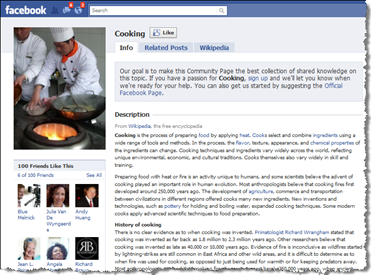
This is an example of a a community page
Two Types of Community Pages
One of the many factors causing much confusion around these Community Pages is the fact that there are TWO types of Community Pages: Facebook-administered and user-administered.
I'll go into more detail about each below, but in a nutshell, Facebook-administered are all the auto-generated Community Pages. User-administered are Community Pages you can set up yourself that essentially look identical to fan pages (Official Pages), but you create them for a topic, not your business.
Go Deeper Than an Article Can Take You

Join thousands of small-business marketers at Social Media Marketing World — three days of AI, social media, and marketing strategy taught by world-class experts. April 1–3, 2027 in Anaheim.
Every session is pitch-free and built around tactics you can use yourself, no big team required. Your All-Access ticket includes an extra day of workshops, full access to AI Business World, and recordings of everything.
GET MY ALL-ACCESS TICKET — SAVE $800Facebook-administered Community Pages
Let's tackle Facebook-administered first, as that's what Facebook actually announced on April 19, 2010 on their blog.
Facebook automatically created 6.5 million Community Pages in mid-April. These pages were auto-generated from users' “Likes and Interests” and “Work and Education” sections of the personal profile Info tab.
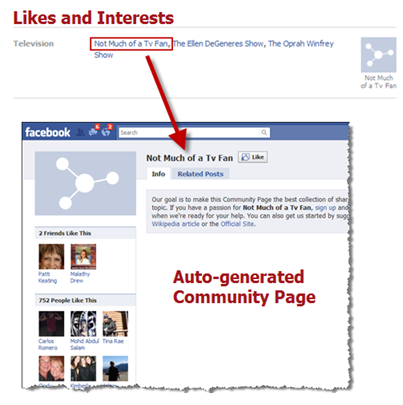 Here's an example of an auto-generated page
Given that these Community Pages were auto-generated, anything separated by commas produced a Community Page with those keywords/phrases as the title. So there are thousands of such pages, many of which have only one or two fans (people who Like that page).
Where Does the Content Come From?
Depending on the subject matter of each Community Page, content (including the Page photo) gets automatically pulled in from Wikipedia. All other content is auto-populated from wall posts and status updates made by any Facebook user containing the keywords of the Community Page.
This is where the nightmare begins for many businesses, schools and more. There are no administrators (yet) for Community Pages and you have zero control over what shows up on the page.
Here are the Official Fan Pages of SeaWorld Florida and SeaWorld San Diego. And, here are just three Community Pages for SeaWorld, out of hundreds. (The first two have a tab and image pulled from Wikipedia. The third has the Wikipedia tab but no image. There are many of these Community Pages without images).
By the way, community pages have a tab called “Related Posts.” In the below screen shot, the “Related Posts by Friends” includes any related updates from friends OR related fan pages you have joined (liked). Try clicking on the SeaWorld Community Page.
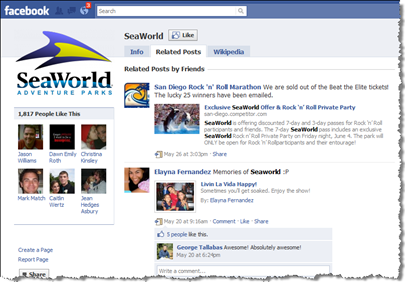
What About Privacy?
A user's privacy settings DO affect how their content is viewed, even on Community Pages. For example, let's say you had “Posts by me” set to “Friends only.” In that case, if and when any of your content happened to have keywords of a Community Page, only your friends could see that content and no-one else.
However, as Jeremiah Owyang pointed out in this tweet, the vast majority of Facebook users seem to be completely unaware of how their information is being viewed. (That is, despite the new simplified privacy settings!)
You only need to take a look at www.YourOpenBook.org and do a search for something like “I hate my job.” Yikes, such a tragedy. Lots of people unhappy at work.
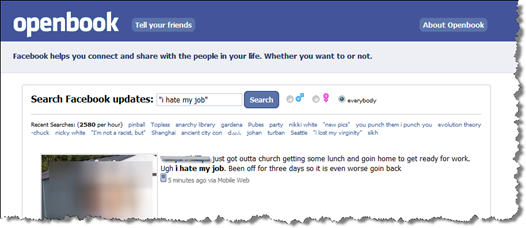
Openbook allows anyone to search any and all public Facebook (status) updates. You don't have to be logged into Facebook or even be a Facebook user to access any information on Openbook because it's all publicly available information.
In other words, these updates appear because the users have their privacy settings wide open. (I'm actually a strong advocate for wide-open privacy settings; my rule of thumb is if you don't want it shared, don't share it. However, I completely understand that rule doesn't work for everyone!)
This content is essentially the same as any content that could appear on related Community Pages, but it's much easier to find with one central search engine such as Openbook.
To find actual Community Pages, you need to use Facebook's search facility, which can often yield literally hundreds of results all jumbled up with regular fan pages in a variety of categories along with your Official Page. Definitely an area needing improvement!
Do Businesses Have Any Control?
Following is a forum post (used with permission) from a social media coordinator for expressing her frustration with the confusing morass of Community Pages for the college.
Much to my surprise I did a search on our College name yesterday on Facebook. Now there is a “Community Page” with the exact same name. They stole our logo without permission and are aggregating all of our posts—and other completely unrelated posts.

Tired of Guessing Which AI Moves Matter?
New AI tools and strategies launch every week — and figuring out which ones matter takes hours you don't have.
The AI Business Society filters the noise for you, with expert-led training you can put to work the same day — plus a community of marketers sharing what's actually working.
I'M READY FOR REAL AI RESULTSThis page has 53 fans—our students I assume. I immediately let our students know that this was not our page, nor were we responsible for any information put on it. However, there is no way to post anything on the Community Pages. Clicking on the “Sign up” to add to this page button was a joke, as was adding an official website. “Thanks for signing up, we'll let you know when we need your help” which to me translates—”we aren't really sure what we are doing yet.”
When I dug further I found a dozen or more versions of our College name with “nursing” or “business” in them—WITH NO CONTENT. Isn't creative content important in social media??? Why would Facebook push all of these blank pages?
Why in the world would Facebook create all of these pages with no content? I don't want our students confused by these pages. Is anyone else having this problem? This just seems like the most ridiculous move ever.
Alyssa has articulated exactly why so many organizations are reacting to the confusion of Community Pages.
For clarification—any logo or image on Facebook-administered Community Pages is pulled in automatically from Wikipedia. Facebook users do become fans by clicking the “Like” button, the same as Official fan pages. However, the vast majority of fans were automatically connected because they had the Community Page name in their “Likes and Interests” section. For further explanation on how these auto-connections came about, see Facebook's official post.
Unfortunately, at present, businesses have little to no control over any Facebook Community Pages. However, given that the “official” content is being pulled in from Wikipedia, as Jeremiah Owyang points out in his excellent post, “To be successful, brands must keep their Wikipedia pages fresh and accurate.”
User-administered Community Pages
Let's talk about the second type of Community Pages—ones you create yourself. If you have an idea for a Community Page, setting one up is very easy. Just go to the same Create a Page section as before, and you'll now see a second choice on the right (see screenshot below).
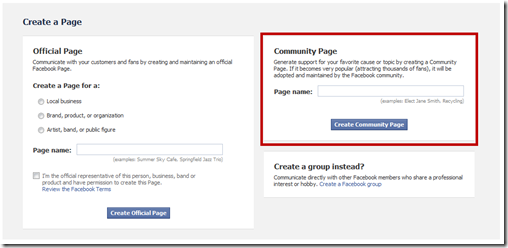
When creating an Official (fan) Page, you need to first give thought to the category/subcategory and page name, as neither can be changed after the fact. You also need to confirm you are an official representative and have permission to create the page.
But, creating a Community Page is super-easy—give your page a name, and voila! No category to choose, no need to verify you're the official company rep.
Now, initially, your new Community Page will look, feel and function exactly the same as an Official Page. The big challenge, though, is if your Community Page becomes “very popular;” that is, “attracting thousand of fans.” As Facebook says, you will lose all admin rights and your Community Page will automatically be converted into a Facebook-administered, Wikipedia-type Community Page.
Rather ironically, when my coauthor and I were attempting to set up an Official fan page for our new book Facebook Marketing: An Hour A Day, we could not get past the first stage, as Facebook does not allow their name in page titles. So, as a workaround, we were actually able to set up a Community Page and got the name we wanted with no problem. So, for the moment, our user-administered Community Page looks identical to an Official Page. But eventually (according to the current terms), we could lose admin rights should the page gather thousands of fans!
Important Points to Know:
#1: Deep search was already available.
Facebook's deep search was first introduced in August 2009, meaning that anyone on Facebook could do a search for any keyword and view Posts by Friends and Posts by Everyone.
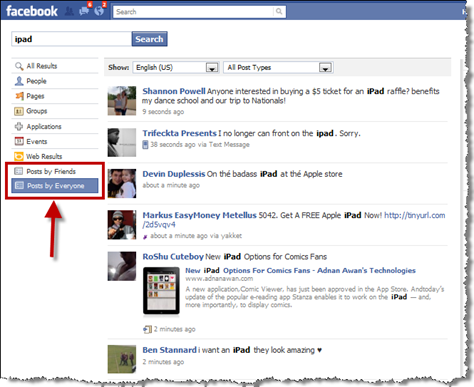
This is exactly what is displayed on the new Facebook-administered Community Pages. When you view any Community Page, you'll see a section for “Related Posts.”
#2: Community Page content is already public.
Content on Community Pages is publicly viewable information anyway. Anything that was being said about your brand—good, bad or indifferent—was findable in the past. Now, that same content may be aggregated on Community Pages. As John Bell from Ogilvy PR states in this post, “Are the Community Pages really that much different than a Google search that returns a bunch of blog posts, the Wikipedia article for your brand, user-created videos and more? 25% of the top Google search results for the top 100 brands are user-generated content.”
#3: Users still maintain control via privacy settings.
As a user, if you wish to have more control over how your content is viewable, adjust your privacy settings. The main setting to edit is “Posts by Me” (that is, “My status, photos and posts”—anything you publish on your own wall). I recommend first making Friend Lists and going for the Custom setting where your default is “Friends of Friends” and hide from certain lists. That way you can better control on a post-by-post basis who sees what content.
Six Steps Businesses Can Take to Optimize Pages
#1: Monitor your mentions.
As part of your routine brand monitoring efforts, experiment with a combination of www.youropenbook.org, www.kurrently.com and Facebook's own deep search feature to search for your various keywords and company name. (Of course, you may be using a Brand Monitoring tool that will already be picking up public content on Facebook.)
For the most part, you may not need to take any action at all, depending on how large your brand is, what's being said and how often. But there are two primary aspects to look for as described in steps #2 and #3 below.
#2: Appease any naysayers.
Look for any negative mentions of your brand and, depending on the severity of the negativity, reach out to these individuals. Email them on Facebook and/or search for them on Twitter, Google, etc., and contact them. See how you can listen to their complaint, take remedial action and turn them into fans.
#3: Find your Superfans.
Look for your undiscovered brand evangelists and reach out to them. Email them on Facebook and/or search for them on other social media channels, and contact them as well. See how you can reward, incentivize and empower these individuals to become what Aliza Sherman calls Superfans.
#4: Keep your Wikipedia content accurate.
Make sure you periodically check that any content pertaining to your company, brand, products and services on Wikipedia is highly accurate.
#5: Continue to drive attention to your Official Page.
The more you can put the spotlight on your Official fan page, the better you'll be able to dissipate any confusion among your fans and potential fans. Refer to one of my earlier Social Media Examiner posts here: 21 Creative Ways to Increase Your Facebook Fanbase.
#6: Sign up for all community pages of your brand.
As best you can, search for all possible Community Pages in your name, company name, product names, etc. (As mentioned above, I found Google search was more reliable than searching on Facebook.) Sign up to put yourself on the list of possible administrators, and also suggest your official Wikipedia article if you have one, and your official website for sure.
 After reading this post, hopefully you have more clarity on what exactly Facebook Community Pages are, how they impact your business and what proactive steps you can take to maintain control of your brand and reputation.
Have you had any challenging situations to deal with stemming from these Community Pages? How about any positive experiences? Have you already integrated a Community Page monitoring initiative in your company? If not, do you think you will? Please share your thoughts in the comments box below.

Where Do You Actually Stand With AI?
Most marketers use AI, but they don't know what's holding them back from real results.
Our 3-minute quiz pinpoints the one gap keeping you stuck — and gives you the exact next step to fix it.
GET MY RESULTS






