 by
by  Do you use Slack?
Want to streamline communication with team members and clients?
There are a number of third-party apps and add-ons to help you customize Slack to fit your marketing team's needs.
In this article, you'll discover eight apps for social media marketers using Slack.
Listen to this article:
Where to subscribe: Apple Podcasts | Spotify | YouTube Music | YouTube | Amazon Music | RSS
#1: Monitor Your Twitter Feed
With the Twitter integration, you can send all of the updates from your Twitter feed directly to a Slack channel. This includes direct messages, mentions, replies, and retweets.
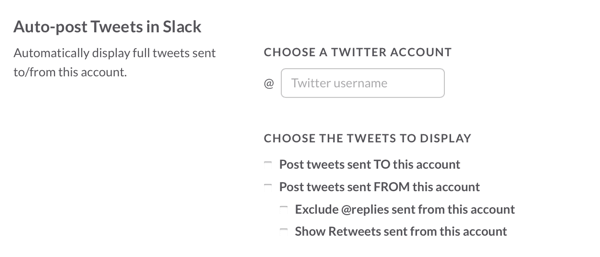
You can also monitor outgoing tweets from your Twitter account. Social media marketers can use this integration as a Twitter dashboard.
#2: Collaborate With Team Members With Hootsuite
Hootsuite has more than 150 app integrations, including Slack. Installing the Hootsuite Slack app lets you send a social post from your Hootsuite dashboard directly to a Slack channel.
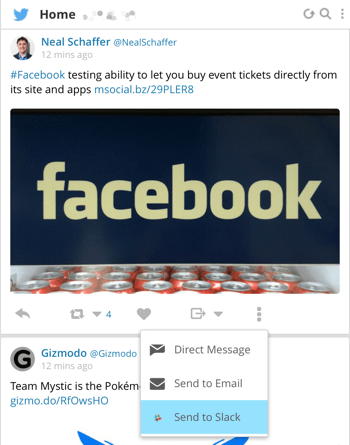
Note that the app doesn't allow you to send posts from your dashboard directly to a Slack user. However, through a Slack channel, the app lets you collaborate with your team and get the right response for particular social posts.
#3: Monitor Subscribers' Social Details With Drift
Drift is a live chat service that can be hosted on your website. It lets you chat directly with website users. While the stand-alone product is not particularly helpful for social media marketers, its Slack app is a handy tool.
Drift's Slack integration can be connected to your MailChimp account. Once you set this up, you'll receive a notification on your Slack channel every time somebody subscribes. The notifications contain details about subscribers' social media accounts, which is handy if you want to reach out to them that way. You can then use this integration to initiate conversations with them.
#4: Find Trending Stories With Nuzzel
Nuzzel lets you see the most shared content from your friends' feeds and your friends' friends' feeds. This makes the content that you read very personal and reflective of the topics you're interested in. Think of it as a newspaper service that curates content based on your interests.
Nuzzel lets you connect your Facebook and Twitter accounts. Once you do that, it shows you the most popular content in your timeline.
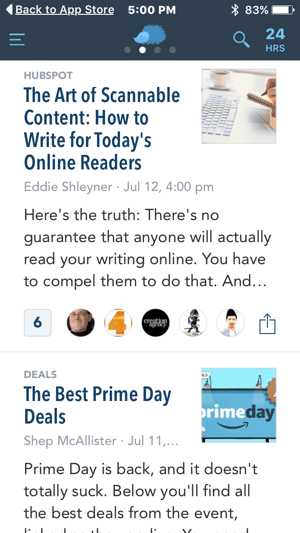
With the Nuzzel Slack integration, you can get notifications of popular content in your niche through a Slack channel. This is helpful when you're curating content that you want to share across your social profiles.
Go Deeper Than an Article Can Take You

Join thousands of small-business marketers at Social Media Marketing World — three days of AI, social media, and marketing strategy taught by world-class experts. April 1–3, 2027 in Anaheim.
Every session is pitch-free and built around tactics you can use yourself, no big team required. Your All-Access ticket includes an extra day of workshops, full access to AI Business World, and recordings of everything.
GET MY ALL-ACCESS TICKET — SAVE $800
Tired of Guessing Which AI Moves Matter?
New AI tools and strategies launch every week — and figuring out which ones matter takes hours you don't have.The AI Business Society filters the noise for you, with expert-led training you can put to work the same day — plus a community of marketers sharing what's actually working.
I'M READY FOR REAL AI RESULTS
#5: Integrate RSS Feeds
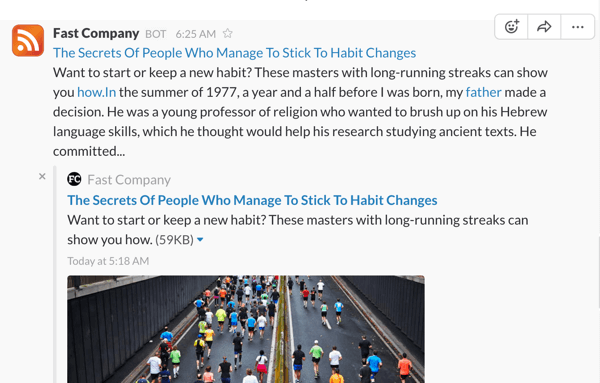
As a social media marketer, you need to follow multiple blogs, influencers, and official news from social platforms to stay on top of industry news, and subscribing to RSS feeds will help you do that. Every time new content pops up on the blogs or sites that you follow, the RSS feeds will give you an update.
You can integrate RSS feeds into Slack to ensure that you receive new updates. Once you subscribe to an RSS feed, Slack will automatically update the feed and post new content in a Slack channel.
#6: Send Short Video With Giphy
GIFs are a great way to convey your thoughts or appreciation to people on social media, as they combine two crucial things: your message and a pop-culture reference, which shows a human side to your business.
By installing Giphy on Slack, you won't have to switch platforms to search for the right GIF when you're communicating with people on Slack. For example, if you type in “/giphy im busy,” you might get a GIF like this one.

#7: Run Polls With Open Agora
Slack is known for team collaboration. But how many times do you see all of the communication happening in a channel? It's easy for people to start ignoring stuff unless it's directed toward them.
If you need your team's help, polls are a great way to share opinions. It could be anything from deciding whether to run a social campaign or providing an extra six months of onsite warranty to a user.
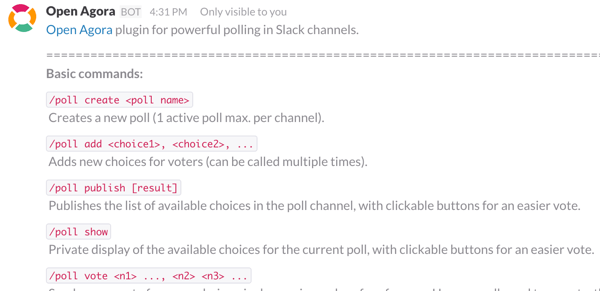
Open Agora provides a cool poll-taking option in Slack, which you can use to get timely opinions and views from your team.
Bottom line, polls are worthwhile, and people typically don't ignore them.
#8: Check Slang With Urban Dictionary
Communication on social media is mostly informal, so it can sometimes be challenging to decipher slang or abbreviations in posts. The Urban app comes to the rescue here. When you add this app to Slack, it allows you to look up specific definitions or pop-culture references. For example, if you type in “/urban fomo,” you get the following definition.

Social media marketers need to have a good understanding of the language and phrases used online. Slack's Urban Dictionary integration will help you stay up to date with new acronyms and modern slang words that are invented every day.
In Conclusion
Slack has seen a meteoric rise in the SaaS world, acquiring more than 2.3 million users in a short span of two years. For social media marketers, these apps are just a few ways to customize Slack and improve your experience.
What do you think? Do you use Slack in your social media marketing? Have you installed some of the apps in this list? Are there other Slack integrations that you find useful? Please let us know in the comments below.


Where Do You Actually Stand With AI?
Most marketers use AI, but they don't know what's holding them back from real results.
Our 3-minute quiz pinpoints the one gap keeping you stuck — and gives you the exact next step to fix it.
GET MY RESULTS






