21 Creative Ways To Increase Your Facebook Fanbase

social media how toIf you build a Facebook Page, will fans come? This is the great hope for many businesses. However, fans do not magically appear from the Facebook mist.

People must be lured to your fan page. And there are some good and bad ways to go about doing this. In this article, I’ll share a big myth and 21 ways to drive more fans to your Facebook fan page. (Though Facebook recently changed the “Become A Fan” button to the new, omnipresent “Like” button – and a fan page is called a “Business Page” or “Facebook Page” – we can still call them fan pages and people who join are fans!)

The Big Myth

There’s a great myth that once you create a Facebook fan page for your business, the first thing you should do to get fans is invite ALL your friends from your personal profile using the “Suggest to Friends” feature.
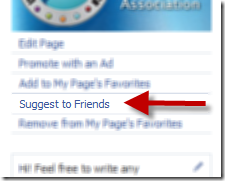
Unfortunately, this strategy may not be that effective and can, in fact, often backfire. I have seen many industry gurus complain that when they decline a fan page request, it’s frustrating to continue to be asked again and again.

There are several reasons not to use the Suggest to Friends feature:

  • Facebook users can only like up to 500 pages and may wish to be selective. (Though I have seen it’s possible to go over this limit).
  • Fan page suggestions may often build up, unnoticed. (At last count, I have 593 overlooked fan page suggestions and am already a fan of 500!)
  • To aggressively pursue all your friends to join your fan page – for no apparent incentive – is counterintuitive to the nature of social media.

So, the good news is there are many ways to promote your fan page and proactively increase your fan base without bugging all your current Facebook friends, and also by thinking wider than just Facebook.

Here are 21 ways to get more fans for your Facebook fan page:

#1: Embed Widgets on Your Website

Select from a number of the new Facebook Social Plugins and place them on your website and blog. The Fan Box widget is now the Like Box and it works well to display your current fan page stream and a selection of fans - see screenshot below with Whole Foods Market Facebook Like Box. I would recommend adding a title above the box encouraging visitors to your site/blog to click the “Like” button (which makes them a Facebook fan).
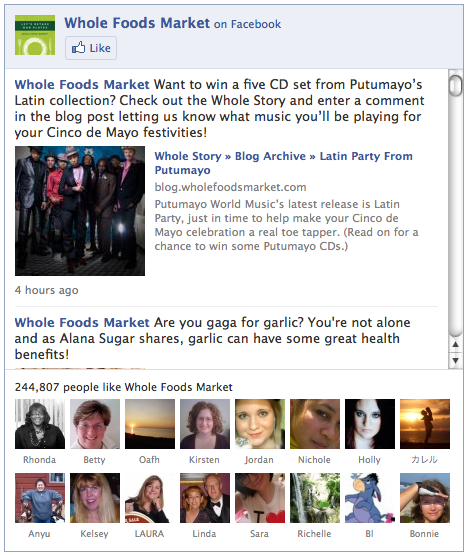
Whole Foods Market Facebook Like Box.

You might also consider the Live Stream widget for more advanced uses, particularly on an FBML custom tab of your fan page itself. The Live Stream widget allows Facebook users to add their comments to a live event, for example, and that activity pushes out into their stream.

#2: Invite Your Email and Ezine Subscribers

Assuming you have an opt-in email list, definitely send out an invitation to your subscribers via email (several times, over time) letting them know about your fan page and encouraging them to join. Ideally, provide them with a description of the page and an incentive to join.

Be sure to have the Facebook logo/badge appear in your HTML newsletters. Instead of the usual “Join our Fan Page,” say something creative like “Write on our Facebook wall,” or “Join our Facebook community,” or “Come add your photo to our Facebook group” (where “group” is actually your fan page). Users have to be a fan in order to interact with your fan page in this way.

#3: Add to Your Email Signature Block

Instead of promoting your Facebook personal profile (if you do), include a link to your fan page in every email you send out. If you use web-based email, check out the Wisestamp signature addon.

#4: Make a Compelling Welcome Video

Create an attractive landing tab (canvas page) with a video that explains exactly a) what your fan page is about, b) who it’s for and c) why they should become members.  The result: you’ll increase your conversion rate from visitors to fans. One of my favorite fan page welcome videos is by Steve Spangler, the Science Guy! After watching his video, you can’t help but want to join!
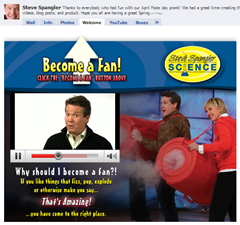
(By the way, with the new Facebook changes, if your custom welcome tab and video talk about clicking the “Become A Fan” button, you may want to change the wording to “click the Like button” now).

#5: Use Facebook Apps

I recently tested a new live video-streaming app called Vpype. The app adds a tab to your fan page called “Shows” and when you broadcast as your fan page, everyone can view by default. (You can also broadcast as your personal profile and selectively invite friends/friend lists). I wrote up a review of this app here. By announcing via Twitter, your personal Facebook profile, your blog and your email list, you can broadcast regular live Internet TV shows from your fan page and create much buzz.

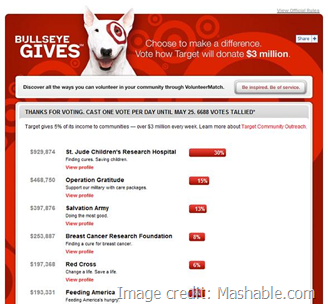
Another example of app integration is Target’s “Bullseye Gives” campaign. Target had their fans vote on which of ten charities they most wanted to see the company donate to. By voting, a post goes out onto your Facebook wall and into the News Feeds of all your friends, thus providing Target with valuable exposure. (For custom apps, see companies like Buddy Media, FanAppz, Wildfire Apps, Involver, Virtue, Context Optional.) [UPDATE: Thank you to Context Optional, the creators of Target’s “Bullseye Gives” campaign!]
#6: Integrate the Facebook Comment Feature

My favorite example of this is the t-shirt company Threadless. On their landing tab (canvas page), you can view and purchase t-shirts as well as Like and comment on any item and choose to have that comment posted to your Facebook profile, as shown in this screenshot:
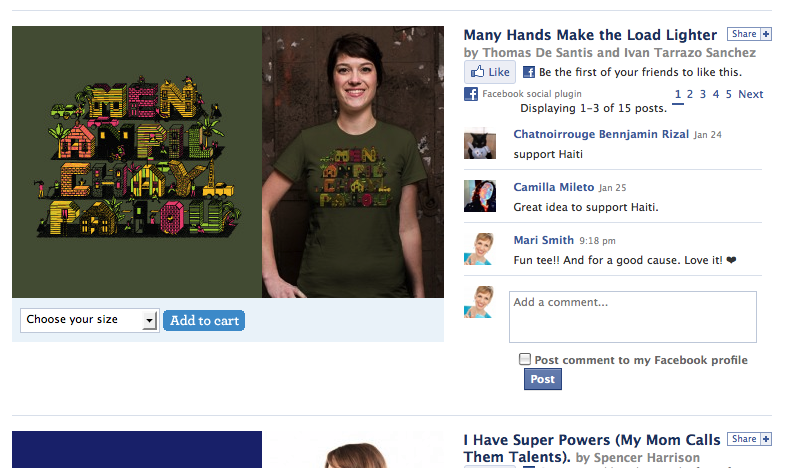
(Screenshot of Threadless Facebook Fan Page landing tab)

Threadless actually has their landing tab set up so visitors don’t have to become a fan to purchase/comment/interact. Yet they have organically built well over 100,000 fans.

As users comment on items, that activity is pushed out into their stream (profile wall and their friends’ News Feeds), which creates valuable viral visibility for your fan page.

For further information on adding the comment box to your FBML page/app, see these pages.

#7: Get Fans to Tag Photos

If you host live events, be sure to take plenty of photos (or even hire a professional photographer), load the photos to your fan page and encourage fans to tag themselves. This, again, pushes out into their wall and friends’ News Feeds, providing valuable (free!) exposure. And, a picture says a thousand words – we notice the thumbnails in our feed more than text. (Props to Nick O’Neil for this tip.)

#8: Load Videos and Embed on Your Site

Facebook’s Video feature is extremely powerful. You can load video content to your Facebook fan page, then take the source code and embed on your blog/website. There is a “Become a Fan” button right in the video itself. For an excellent tutorial, see Nick O’Neil’s post: How To Get Thousands of Facebook Fans With a Single Video.

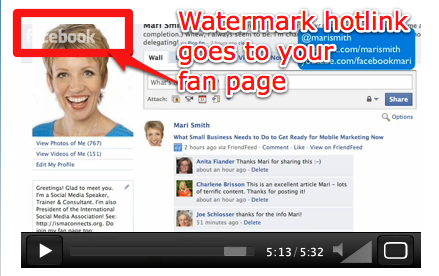
[UPDATE: Since Facebook changed the Become a Fan button to the Like button, embedded Facebook videos now display a white watermark hotlink of the Facebook name in the upper left corner of the video player - see first screenshot below. This is a clickable link that goes to the original video page on your fan page. If the visitor to your site clicks through to Facebook from your video, and they are logged into Facebook at the time, they will see a Like button at the top left corner of the video player - see second screenshot below.]


(Screenshot shows example of an embedded Facebook video on an external site)
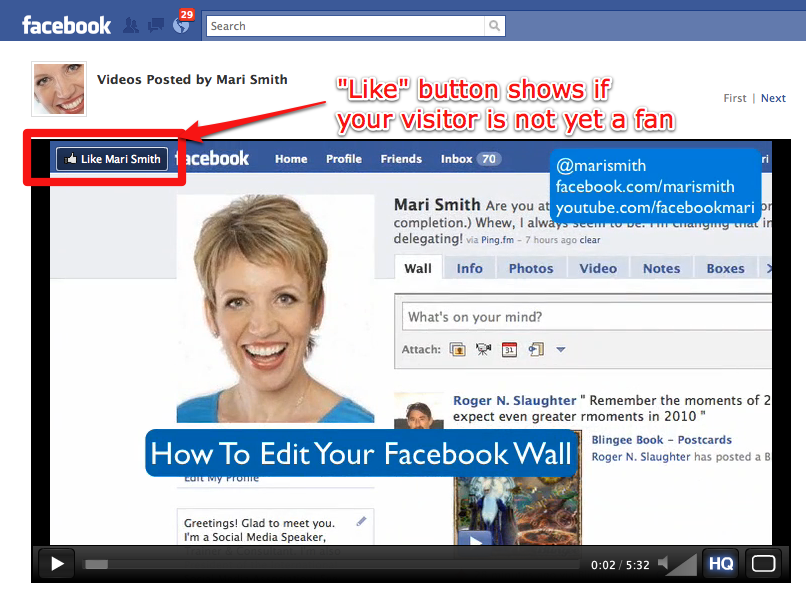
(Screenshot shows the same video on the original page of the fan page with the Like button)

#9: Place Facebook Ads

Even with a nominal weekly/monthly budget, you should be able to boost your fan count using Facebook’s own social ad feature. It’s the most targeted traffic your money can buy. To buy an ad, scroll to the foot of any page inside Facebook and click the link at the very bottom that says “Advertising.” From there, you can walk through the wizard and get an excellent sense of how many Facebook users are in your exact target market.

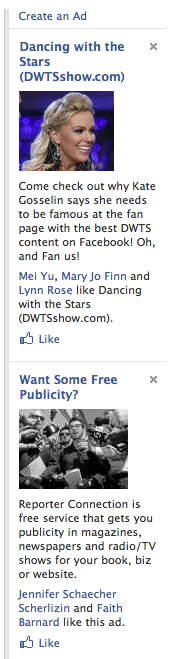
Then, when you advertise your fan page, Facebook users can become a fan (click the Like button) right from the ad as shown in the screenshot below. Additionally, Facebook displays several of your friends who have already liked you, thus creating social proof.
My book with Chris Treadaway, Facebook Marketing: An Hour a Day (Sybex) contains comprehensive instructions on maximizing your marketing through Facebook social ads.

#10: Run a Contest

This is somewhat of a gray area because Facebook changed their Promotional Guidelines last year. Essentially, you need prior written permission from Facebook and need to be spending a significant amount on ads per month. However, you CAN require Facebook users to become a fan of your fan page in order to enter a contest, sweepstakes, drawing or competition. See these two posts for further explanation. PLUS, good news: you CAN run contests and sweepstakes with the use of the apps created by Wildfire App.

#11: Link to Twitter

Link your Twitter account to your Facebook fan page and automatically post your Facebook content to Twitter. You can edit what gets posted, choosing from Status Updates, Photos, Links, Notes and Events.

You have 420 characters on the Facebook publisher and 140 on Twitter. In the tweet that goes out, Facebook truncates your post past a certain character count and inserts a bit.ly link back to your fan page. To track click-through stats on that link, just paste the bit.ly link that Facebook created for you in your browser’s address bar and add a “+” sign to the end. This works for any bit.ly link!

I also recommend you promote your Facebook fan page on your Twitter background and possibly in your Twitter bio/URL field too.

#12: Get Fans to Join Via SMS

Your fans can join your fan page via text message! You’ll need to get your first 25 fans and secure your username. Then, to join your fan page, Facebook users just send a text message to 32665 (FBOOK) with the words “fan yourusername” OR like yourusername (without the quotes).

This feature is ideal when you’re addressing a live audience, say. Have everyone pull out their mobile phones and join your fan page on the spot! This would also work well for radio or TV. (Note that this only works for Facebook users with a verified mobile device in his or her account.)

#13: Use Print Media

Look at every piece of print media you use in your business. Your Facebook fan page (as well as Twitter and any other social sites you’re active on), should be clearly displayed. Put your Facebook fan page link (and the logo) on your business cards, letterhead, brochure, print newsletter, magazine ads, products, etc.

#14: Display at Your Store/Business

If your business is run from physical premises, put a placard on the front desk letting your customers know you’re on Facebook. Ideally, you have a simple, memorable username. Incentivize customers to join right away via their mobile device and show you/your staff the confirmation for some kind of instant reward!

You might give out physical coupons promoting your fan page. For restaurants, put the Facebook logo, your username and a call to action on your menus.

I was at a hotel in San Francisco last fall and they had a placard in the elevators promoting their presence on Facebook and Twitter. The sign was very noticeable because of those ubiquitous Facebook and Twitter logos/colors!

#15. Add a Link on Your Personal Profile

If you’d like to promote your fan page to your Facebook friends, just under your photo on your personal profile there is a section to write something about yourself. I call this the “mini bio” field and strongly suggest adding a link to your fan page like so:
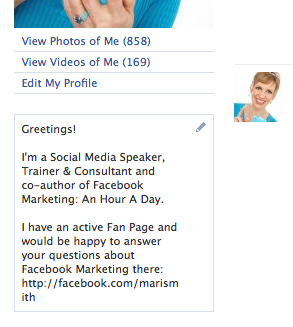
Be sure to format the URL with http:// otherwise it will not be clickable with just the www’s. You have a limited amount of characters, so keep it succinct and leave out the www’s. You can put in hard line breaks though to make the content easier to read.

#16: Add a Badge/Button to Your Profile

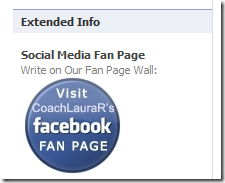
Using an app like Profile HTML or Extended Info, you can create your own custom HTML, including a Facebook badge and/or graphic embedded, as shown in the screenshot below:
#17: Use the Share Button

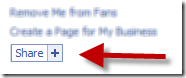
The Share button is all over Facebook and is a very handy feature. It only works for sharing on your personal profile. So periodically go to your fan page, scroll toward the bottom left column and click the “Share+” button. Add a compelling comment along the lines of exciting news, recent changes, special incentives, etc., happening on your fan page and invite your friends to join if they haven’t already. I find the Share button far more effective than the Suggest to Friends approach. (And, if you’d like to Share content from the web on to your fan page vs. profile, I highly recommend using the Hootlet bookmarklet tool at HootSuite.com).
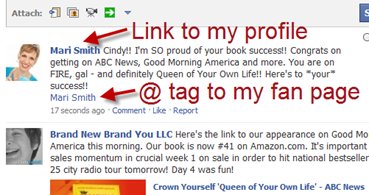
#18: Use the @ Tag

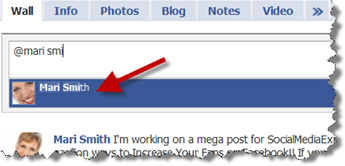
As long as you’re a fan of your own fan page, you can “@ tag” it on your own personal profile wall. From time to time, you can let your friends know about something happening on your fan page by writing a personal status update that includes tagging your fan page with an @ tag. Simply start typing the “@” symbol and the first few letters of your fan page name (this works whether you have your username registered or not), and it will appear from a drop-down menu to select. This then makes it a nice, subtle hyperlink that your friends can choose to click on.
#19: Autograph Posts on Other Walls

A subtle way to gain more visibility for your fan page is to add an @ tag for your fan page when writing on your friends’ walls as a way to sign off.

I would use this one sparingly and, again, monitor the response from your friends. I have never been a fan of adding a signature block on Facebook wall posts because our name and profile picture thumbnail are always hyperlinked right back to our profile anyway. But the simple @ tag could be effective.

#20: Autograph Other Fan Pages

As with adding your fan page @ tag to posts you make on your friends’ walls, you could equally use the same technique when posting on other fan pages. This needs to be used with discretion and I would advise against doing this on any potentially competing fan page!
#21: Maybe Use “Suggest To Friends”

I won’t rule this one out completely as it does depend on how many friends you have, your relationship with your friends, how often you suggest fan pages/friends to your friends, etc (see ‘The Big Myth’ above). But I do recommend monitoring the response to this technique – perhaps simply by asking for feedback in your status update.

So, these are just 21 ways to create strategic visibility and promote your Facebook fan page.

Let’s hear from you.  Which ones have you implemented with success? Plus, do feel free to add any of your own creative promotional ideas in the comments box below!

Tags: , , , , , , , , , , , , , , , , , , , , , , , , , , , , , , , , , , , , , , , , , , , , , , , , , , , , , , , , , ,

About the Author, Mari Smith

Mari Smith is a widely-recognized social media speaker and trainer and is coauthor of “Facebook Marketing: An Hour A Day.” Fast Company calls Mari “the Pied Piper of the Online World.” Follow Mari on Twitter: @marismith. Other posts by Mari Smith »


Share this post


248 Comments

 
  1. cherylvargas says:

    Great article that my clients and business associates will definitely find useful!

  2. matthewlyle says:

    Awesome tips, Mari. I'm in the process of getting a Facebook “Like” page for my latest website venture and this article's really going to help.

  3. CityCliq says:

    Thanks Mari,

    There are definitely some tools mentioned in this article that I am going to research further. At first, I was not happy about Facebook removing the “fan” moniker but after seeing the new “Like” system in context (especially with the ads) I have to say that I am coming around :-)

    Thanks again!

  4. Cindy King says:

    Mari, thanks for being here to explain all of this soooo clearly – just wa are all getting used to the “Like” button. Love all of these ideas!!! Thanks for sharing them.

    I immediately put up a Comment widget after reading this post and want to try Vpype soon too. It's great to come away with be able to put things into action immediately after reading an article.

  5. Michele says:

    Wow, great information in one concise article! I'm sharing this one. Very helpful and practical information. Will be sharing this with my clients for sure! thanks!

  6. Pliggs says:

    Excellent list, I like the embedding the comments form tip, excellent idea.

  7. lisavalentine says:

    I've used some of those in the past, but that's a comprehensive list, thanks!

    Just want to share a helpful resource for anyone whose company or workplace is blocking, or talking about blocking employee access to Facebook and other social media apps. It's a whitepaper called “To Block or Not. Is that the question?”

    http://bit.ly/9f8WOT

    It has lots of insightful and useful information about identifying and controlling Enterprise 2.0 apps (Facebook, Twitter, Skype, SharePoint, etc.)

    Share it with the IT dept.

  8. billbulloch says:

    Thanks for these tips, Mari. As usual your stuff is timely and helpful. Looking forward to reading your new book!

  9. Karen The Connector says:

    Great insight! Appreciate the valuable information shared in this article.

  10. Kristi Hines says:

    These are great suggestions. If you don't have a personal profile linked to your Facebook fan page, it's hard to figure out how to find new fans. It's great that there are some tips here that can be used sans having a profile. Since I do have a profile, I really like the tip about signing with an @ tag when posting on other walls – what a subtle way to get your page out there!

    One other interesting tip I found was adding content that is exclusive to fans to encourage more to “like” your page. (http://www.kimwoodbridge.com/how-to-encourage-p...) The code is findable if you view page source, so it's not exactly top secret info that you can hide from non-fans, but I'm sure many would just like the page to see the content.

  11. deelirium says:

    These tips are great. I do have some problems with the way Facebook implements certain functions.

    For example, the comments widget for your own website:

    “As users comment on items, that activity is pushed out into their stream (profile wall and their friends’ News Feeds), which creates valuable viral visibility for your fan page.”

    Ok, so I comment on a website through this widget, and maybe other people add to it to create a conversation. The conversation stays in context on that website. But for each person's comment to be posted on their FB wall? That doesn't make any sense to me. The comment is totally out of context standing alone on a fan's wall.

    That's why I haven't implemented that feature on my website yet. I prefer it when people add comments to a link or post on my fan page wall, then the comments all come one right after another and there's no weird out of context post on each of those fans' walls. (Does all that make sense?)

    Or, perhaps I'm misunderstanding how these comments from this widget show up on a fan's wall.

  12. rduermyer says:

    Great tips, Mari. Looking forward to your sessions at SMSS10 as well.

    @randy_duermyer

  13. I always learn something new. Thanks, Mari!

  14. I always learn something new. Thanks, Mari!

  15. I always learn something new. Thanks, Mari!

  16. I always learn something new. Thanks, Mari!

  17. I always learn something new. Thanks, Mari!

  18. I always learn something new. Thanks, Mari!

  19. TwtrCoach says:

    Mari you are awesome.. Will all these new changes be reflected in your upcoming book.. It was next month yeah? or do I recall wrong? Can't wait to get your book.

    Cheers… Are

  20. coachtia says:

    Ah good, good tips. I like the idea of @ tagging yourself on other pages – unfort this won't work as well if you've gone and gotten yourself a fanpage name that's longer than your arm. Off to share! @TiaSparkles

  21. Great info, Mari ! I will have to try out number 8 for sure!!!

  22. If many of your Facebook friends are interested in the kind of content or product you are promoting, the Suggest to Friends tool can be very efficient.

  23. phylliskhare says:

    as usual – an excellent post Mari! I really like thinking out of the box with FB. Yes, and the book…?

  24. DNux says:

    Thank you! These suggestions are practical and seem easy to implement – even for a novice.

  25. anoll says:

    You rock, Mari! How do you find out about all those apps(extended info, Vpype)? Is there a blog you read regularly that tells you? (I'm sure you get pitched a lot as well and that tells you)

  26. VasserPro says:

    Awesome step by step. I still don't quite understand how the “@” thing works, so I guess I'll just have to give it a try and find out! Thanks!!

  27. Great post, thanks Marie. One thing I have to add about #21 “Suggest to Friends” – you cannot suggest to your friends more than once. Those friends that you have already sent a “suggest” request to – are faded and are in gray The only friends that it will send to are NEW friends. So all your friends only get ONE request to become a fan — or “like”. Correct me if I am wrong? thanks @yasminbendror

  28. Bex says:

    Definitely a few there I'll be trying. I've been considering using the Facebook ads but, have so far decided against it. Might give it a trial though and see how it goes :).

  29. Mikko Kemppe says:

    Awesome advice! WOW…

  30. Kimberly says:

    Hi Mari – As you know the Facebook promotional guidelines can be a bit confusing. Is it okay for the average person to run a contest using the Wildfire App “without written permission” from Facebook? If so, is this your interpretation of the guidelines or info from an inside source? Thanks much!! – Kimberly

  31. Naomi Trower says:

    Hi Mari! I have a different twist to the Suggest to Friends feature. Since my most active fan page is for real estate & mortgage professionals, I use this feature often when I meet new like minded professionals online and at live events. We friend each other on Facebook and I suggest they become a fan of my page. I must say that I don't use this feature for my personal friends (although many of them become fans without me asking) but only for friends in my business world. It's funny but I really don't want my childhood and/or high school friends to become fans of my page because they aren't my target market UNLESS they are a real estate or mortgage professional. :)

  32. Great tips Mari…you are always a fantastic resource :-)

    One of the things I do on my Fan Page (http://facebook.com/strongsinglemomnetwork) is include @ tagging when I post on our Fan Page wall. The benefits are two-fold…we increase our Fans, and the people and/or businesses that support our network gain exposure/traffic/recognition/kudos/etc publicly. Win-Win way to increase your own # of Fans, but give exposure to others as well!

    Thanks for all your awesome insights…I appreciate you!

  33. LAHornbogen says:

    Great article Mari.

    I already implement the “add a link to your personal profile” and it works well.
    If I receive a friend request on my personal page from someone I have met through networking I send them a message and suggest they join me on my fan page as that is predominantly my business page – that works well too.
    Rather than link Twitter to LinkedIn and Facebook I utilise Ping.fm which distributes to all my other sites via one post. If I am putting a post out that I only want to share individually on a site then I use the site direct.
    Thanks again for a great article.

  34. dougmcisaac says:

    Mari,
    Thanks for the list of ideas. Lots of good ones even one or two I didn't know.

    Here's another one:
    Mention your fan page whenever you are being interviewed.

    …or get t-shirts with your fan page name on them and hand them out.

    Doug

  35. This is such a great article! I'm going go down list and see what I am missing!

  36. iuperica says:

    Hi Mari,

    Thanks for the ideas – I'm definitely going to implement @ tagging in all of our page's posts.

    But I had a question about encouraging fans to tag themselves…somehow our page is set up that fans cannot tag photos and I can't find the setting that is preventing that. Navigating Facebook's help section is ridiculous, so do you have any idea where to find the setting for this? Or what we've done wrong?

    Thanks,
    Erica
    http://www.facebook.com/cilcp
    http://www.twitter.com/cilcp

  37. jeffgoldmx says:

    Great tips, but in clicking through to the “embed video” tutorial, well, it's not really a tutorial, as there is no “how to”. Also, this only works for “sponsored” video's. Other than that, thanks for all the great info

  38. Hi Mari
    Thank you for such a clear article. As a newbie I find these very useful and helpful. Fab :-)

  39. somedayilllearn says:

    Great tips! I still know of people using Facebook for contests without permission. I highly doubt they could ever monitor every single one, but it's good to be aware of the restrictions and have a back-up plan in case a contest gets shut down. I wonder what the ramifications for people caught running unauthorized contests…

  40. Ash Patel says:

    Hi Mari

    GREAT article…if someone implements even 30-50% of the 21 cool ideas, they'll see their fans (likes) soaring…thanks for sharing

    My business fanpage (http://www.facebook.com/pages/MarkeZing/1603353...) can do more with some of the ideas too :o)

    Cheers and thanks again.

  41. emarketed says:

    Thanks for the tips Mari. I
    I think your suggestions are very concise and realistic, unlike other resources I've come across. I like that you can use the @ shoutout on Facebook now, almost forgot about that!

  42. Good list and to the point! Thanks.

  43. Namit Gupta says:

    A great article, lot of insightful tips on promoting any Facebook Page. Till date I only thought of “Suggest to Friends” as the best promotion method but, came to know many more today. Thanks for the informative article.

  44. Great article. I added the links to my fanpage on my facebook page today. I added my Fan page badge to my blog today. Now, I just need to figure out the signature block. I don't think I want Wisestamp because it is not used in IE. Any other suggestions?

  45. Dina Meek says:

    Mari, your tips and insights are always current and concise. Thanks as always! http://twitter.com/owords

  46. jennyjkaplancommunications says:

    I always forward articles like this to all my clients – Thanks for the great tips!! You always make me look FABULOUS To all my clients!

  47. MariSmith says:

    Thanks, Cheryl!! Glad to hear it. :)

  48. MariSmith says:

    Woohoo – stoked to hear that!! I checked out your website, very nice!!

  49. MariSmith says:

    You know what, I feel the same way. Suddenly having the ability to Like anything around the entire web and share that with my Facebook friends is really, really cool!! :) I'm enjoying the creative implementation too, such as on levis.com! :)

  50. CoachLaura says:

    Fabulous tips and resources Mari. And thank you for showing the badge from my profile that links to my fan page. I find that most people don't have a link showing anywhere on their profile that directs people to their fan page…. oh by the way, is it still called a fan page now that the “become a fan” is obsolete?

    Here are several ways I suggest people link their profile to their “fan” page:
    1. Place a link to your fan page in the info/bio box right under your picture. Create a shortened link (using http://bit.ly or similar) to your fan page if you don't have a custom username and be sure to include the http:// in the link so it becomes an active hyperlink.

    2. On your Info tab (on your profile), list your fan page URL (or shortened url) as one of your websites in the Contact Information section.

    3. Use either the Extended Info, More Extended Info or Profile HTML application to either add a button or a badge.

    – To add a button that is hyperlinked to your page, the process is described here (http://www.facebook.com/note.php?note_id=191139...) or

    – Copy and paste the fan page badge code you can get from the Edit Page area of your fan page. To find the code, go to your fan page and
    i. Click Edit Page under your photo. Look for the heading Promote with Facebook Badge on right column, then click the link that reads “Get Your Badge”
    ii. Select Other under the “Choose where to add the badge” heading
    iii. Copy the code that appears
    iv. Insert the code into your Extended Info or Profile HTML application tab on your profile

  51. MariSmith says:

    COOL!! Thanks, Cindy. I do love action takers. You rock. :)

  52. MariSmith says:

    Good to know – thanks for your kind words, Michele!!

  53. MariSmith says:

    Thanks!! Keep us posted if you set it up on your page!

  54. jackbarker says:

    Anyone know how to add a facebook plugin such as the “like box” to a tab in your facebook fan page? I tried pasting in the code that the fan box gave me into the static fbml and nothing appears… Any help would be great appreciated!

    Thanks!

  55. MariSmith says:

    Ooo, this is excellent – many thanks, Lisa!! I checked it out… kinda strange to me, though, that they are combining the white paper download with a sweepstakes. I just want the paper, no sweepstakes. LOL! (Definitely a funny video!!)

  56. MariSmith says:

    Thanks, Bill!!!

  57. MariSmith says:

    My pleasure, Karen – you rock!!

  58. MariSmith says:

    Aha – excellent tip to add to the mix, Kristi!! “Fan only content” is something that isn't talked about much. I love what Carrot Creative did on their team tab http://facebook.com/carrotcreative – what you see as a non-fan is different as a fan. Very clever, and not that challenging to do … if you have a coder on your team, right?!

  59. MariSmith says:

    Yes, you're absolutely right. In fact, the entire “socialmediasphere” is riddled with “fragmented conversations.” Look at anyone's tweetstream and you see a slew of one-sided conversations. So, yes, context can certainly be important.

    Let's also look at this very plugin I'm typing on right now – Disqus. As I logged in via Facebook connect and make my comments here on SocialMediaExaminer.com (or Mashable.com, LouisGray.com, Scobleizer.com… basically any site that also uses Disqus), I can *choose* comment by comment whether to share that onto Facebook as well.

    However, with the new Facebook Like (and optional comment), it's not possible to *choose* whether to post on Facebook or not.

    So, bottom line, it's up to the user to decide how/where they wish to push content. Certainly, this ubiquitous Like feature is making me even more cognizant of what I'm endorsing. And, so far, I like it!! :)

    P.S. this is one comment I'm sharing on Facebook… will be interesting to see responses! :) [I rarely, however, share my Disqus comments on Twitter as it just puts out a half-sentence and often doesn't add value as a fragment!]

  60. MariSmith says:

    Sahweet – thanks a mil. I'm super excited for SMSS10 too!! ;)

  61. MariSmith says:

    Aw thanks, I'm honored!

  62. MariSmith says:

    Hey Are — you're very kind. Facebook Marketing: An Hour A Day comes out May 3rd!!! Happy Dance!! Super excited. Available on Amazon.com now: http://bit.ly/facebook-mktg and we're on Twitter at @facebookmktg and Chris and I are hosting a free virtual book launch party on May 3rd too: http://bit.ly/FacebookMktgParty – drop in any time!

  63. MariSmith says:

    Heheee Tia – you're “longer than your arm” comment made me LOL!

  64. MariSmith says:

    Excellent – keep us posted!! :)

  65. MariSmith says:

    Yes, very true!! There are always exceptions and it's important to experiment and find what works for our respective markets.

  66. lisagarciaruiz says:

    Thank you Mari! Once again you offer up so many concrete, easy to follow tips…so helpful and appreciated!

  67. MariSmith says:

    Ooooo, I LOVE these two excellent tips!! I'm off to see about getting turquoise & bling t-shirts with my fan page on the front and Twitter ID on the back. hehee!!

  68. MariSmith says:

    Aha – good to know. Thanks for pointing this out, Jeff. I'll scope out with Nick more thoroughly and see what I can find.

  69. MariSmith says:

    Whew, I know exactly what you mean. Basically you have 500 million users being “policed” by a mere 1500 staff. I'm not sure how Facebook could possibly monitor all the “illegal” contests. Mostly, I think people just aren't aware they are breaking any of FB's TOS.

  70. MariSmith says:

    You GO girl!! I heart action takers. :) Hmmm, depends what email program you use. You don't really need a plugin/addon — just type the URL with a good call to action in your regular signature block. e.g. I have this on my iPhone and iPad email signature block cuz I don't use FireFox/Wisestamp on my mobile/portable gadgets! :)

  71. MariSmith says:

    hehee – I'm grinning like a Cheshire cat here. Delighted to hear, Jenny!! :)

  72. Brian Short says:

    Mari,

    Thanks for the wonderful tips, you are such a fountain of facebook knowledge :) Looking forward to more of your tips from the Summit!

  73. Nice work as always Mari. I was just thinking about running a contest (#6), so your comment and link to
    FB promotional guidelines is very helpful. Keep it rollin!

    -Travis

  74. DonnaGilliland says:

    Mari, as usual, great tips! You are always generous with sharing your knowledge.

    I am beginning to “like” the Like button on Facebook. Especially after watching Mark Zuckerberg's keynote on F8. It's all beginning to make better sense to me about the strategy behind the change.

    Can't wait to read your blog on all the Facebook changes happening. Exciting time!

    The next item on my “To Do” list is to purchase your new book – Facebook Marketing: An Hour a Day. Oh my, do I ever need that.

    To all you of out there who would like to take a “preview peek” into a page of Mari's book that releases on May 3, you can do so at Amazon at http://amzn.to/bk2J6J.

  75. DavidBrim says:

    Offer fan only content…Create a custom FB tab and share links to whitepaper, embed special videos, audio, discounts, etc. Non fans will click on the custom tab then be prompted to become a fan before accessing fan only content.

    Empower your visitors to invite their FB friends through a special application or code embeded into a custom FB page in FBML.

    Just a few additional thoughts…..great post!

  76. Nikunj says:

    Great Tips will try it for sure, thanks for sharing

  77. Lori says:

    Fantastic, well researched article, Mari! Thank you! :D

  78. Elizabeth T says:

    This is a awesome resource. Very nicely done and you didn't oversell it. I'll definitely be able to put some of these creative ideas into action almost immediately. Thank you.

  79. Thanks for some of the tips.

    I never knew about the tags you could use in Facebook.

    Very smart!

  80. dougmcisaac says:

    That's awesome, not my choice of t-shirt colors, but it will work for you
    :-)

  81. algates says:

    One of the more useful articles I've seen on how to utilize Facebook. Very practical. Thanks Mari.

  82. jeffgoldmx says:

    Thank you Mary! I did enjoy the article…so I became fan #19011….http://www.jeffgoldmusic.com :o)

  83. Daniel Bates says:

    First time I have ever looked at FB's guidelines. The 3rd party stuff at the end seems very odd, like it was written just to get wildfire a piece of the action. Maybe there was a lawsuit or something, but it all just seemed counter intuitive, anyone else???

  84. Has anyone told you how totally and completely amazing you are? Hail Mari!! This is FABULOUS!

  85. kymog says:

    Hi Erica
    If you go into your page, and click Edit Settings. Once on the Edit Page, under Applications, go to Photos. When you're taken to your photos page, click Edit Settings, and you have the opportunity to choose whether fans can upload photos of themselves, or tag photos of themselves.

    This is a great way we have found to generate activity and interaction on our http://www.facebook.com/XXXXAleHouse page for our Brewery Tours.

    Best of luck.
    Kym

  86. Thanks for all the tips. You have given me a lot of home work! Bad enough I am keeping up to all hours at the moment!

  87. DJ NightLife says:

    #21 is not a big myth, it's the most effective. Ask everybody (and I mean everybody) you know to suggest and it's gonna pay off, no doubt.

  88. scruffles4 says:

    Wonderful tips Mari,
    I can't wait for your sessions at the summit….

    Thanks Again
    Carolyn

  89. DJ NightLife says:

    Only for a limited period of time.

  90. Ralph Leon says:

    Just when I thought I knew it all. Thanks so much for sharing Mari! There are many tips that I haven't heard and even some that sparked more ideas.

  91. eljefe says:

    Really really great list! As if I didn't have enough to do this week already…;)

    Our web site provider is really on top of things, and had already started implementing the Like buttons on our product pages almost as soon as they were announced! You can see an example at http://www.twistedoak.com/pottymouth – really great response so far!

    One trick I recently stumbled into helps me keep track of comments on my pages. FB doesn't do page notifications, but if you “Like” your own wall post, it turns out you are “liking” it as your personal profile. After that, you get notified of any further comments to the post. At least a partial solution!

    Thanks again for the great pointers! – j

  92. I agree 100% with your “The Big Myth” statement. I get 3 to 5 request a day from friends asking me to join their fan pages. Some will send multiple requests over a weeks time. If I didn't join on the first request, I'm most likely NOT going to join on the 10th request.

    Very nice post.

  93. mbconsulting says:

    Thank you so much for the great article.I really liked the idea of using the Welcome Video to enhance your page.We are looking to use our Facebook as a platform to teach SEO and Social Media lessons as we have done with our Twitter Account.
    I believe the link to Nick O’Neil’s post will help us a great deal. Do you suggest using FBML to enhance the look of your Fan Page?Thanks and I look forward to your future posts.
    Brian
    http://www.twitter/seonow
    FB Page:
    http://bit.ly/chjTXy

  94. MariSmith says:

    Thanks heaps, Joshua. Always gotta think outside the box, eh! :)

  95. MariSmith says:

    VERY nice implementation of the Facebook Like button on your winery website. LOVE it!! Liked a few wines and surfed around your wildly humorous copy!!

    Re the Like trick for notifications – excellent!! I do that on occasion and it's too funny to get my push notifications on my iPhone “Mari Smith just commented on Mari Smith's post.” heheee!

  96. Des Walsh says:

    Thanks for sharing all this in your usual generous way. Very timely as I'm in the process of setting up a new page and have resolved this time to get it right. I've been going back over the webinar you delivered some time ago and this is the icing on the cake.

  97. MariSmith says:

    Wheee – you're very kind, Phyllis!! :)

    And my book with Chris Treadaway, Facebook Marketing: An Hour A Day comes out May 3! http://bit.ly/facebook-mktg to order on Amazon! PLUS, do join us at the fab fun virtual launch party all day May 3 – http://bit.ly/ceEYlX

  98. MariSmith says:

    Good to hear! You're very welcome. :)

  99. MariSmith says:

    Ah, thanks hon! Peeps I follow closely via Facebook friend lists, Twitter and their blogs include Pete Cashmore (Mashable), Robert Scoble, Nick O'Neil (allfacebook), Justin Smith (insidefacebook), Louis Gray, TechCrunch, ReadWriteWeb and many more.

    And I do indeed get pitched a lot for all manner of new beta apps, etc. etc. which I rather love! :) In fact, that is the coolest story of how I first got into Facebook marketing – I was on the alpha team of a Facebook app!

  100. MariSmith says:

    Ah, thanks hon! Peeps I follow closely via Facebook friend lists, Twitter and their blogs include Pete Cashmore (Mashable), Robert Scoble, Nick O'Neil (allfacebook), Justin Smith (insidefacebook), Louis Gray, TechCrunch, ReadWriteWeb and many more.

    And I do indeed get pitched a lot for all manner of new beta apps, etc. etc. which I rather love! :) In fact, that is the coolest story of how I first got into Facebook marketing – I was on the alpha team of a Facebook app!

  101. Tia Singh says:

    Ah yes, I speak from experience of course … just praying for the day FB decides to allow fanpage name changes. I keep the faith ;)

  102. Thanks for this very useful and insightful post! I'm in the process of launching a fan page for one of my clients, so very timely too. One question – the “Like Box” social plugin seems to work only if the user is actually logged in to Facebook. Am I wrong? Is it possible to remove this requirement when I use the iFrame method of integrating the plugin into a web site?

  103. MariSmith says:

    Lol. ;) “Turquoise and bling, that's my thing.”

  104. doncoches says:

    Very good post.
    Congrat!

  105. Very insightful! I'm sharing this on Facebook. :)

  106. Really useful article.
    I already knew most of them and was using them.
    For a new one on the market this is a killing article.
    By only reading this ou can start FB marketing.
    Thanks.

  107. Great post, Mari!
    One of the things that we all forget that is very simple, but very powerful is: ask questions and go out of your way to engage fans. If you don't ask folks to comment/share/mention/etc, there is a good chance they won't.
    At the end of the day your Facebook page might be really cool-looking, but if people are not engaging with you it is all for naught. Plus, when they engage (like, comment, etc) it is visible to their friends and that is an opportunity for organic growth.

  108. Unfortunately #8 does not work. I have a feeling there is a catch, or the functionality was changed in some way. Ideas?

  109. [...] Okay, maybe there’s a reason for this, but I never found out, and to this day most of us really have no idea. Just a few months ago, you removed the ability for businesses to easily run contests on Facebook pages. The stipulations that surround contest hosting on Facebook at this present time actually benefit big brands and not small companies who are looking to build their presence on the network. Apparently, Page owners have to ask permission but only if they are spending a lot of money on Facebook Ads. [...]

  110. You can suggest to your friends more than once if they have not already become a fan. Those that are already fans are grayed out. http://www.facebook.com/ColleenPhotoPro

  111. maxiosearch says:

    Tremendous advices Marie, thanks for sharing! Your list exceed my expectations and there are lots of things there I will start to do just right now with my page.

  112. Hi Mari,

    Thanks for the shout-out for the Target Bullseye Gives program, which my company built for Target. Would you mind adding us to the list of custom application developers you mention at the end of that tip?

    Thanks,
    Brendan
    VP of Strategic Accounts
    Context Optional, Inc.

  113. MariSmith says:

    Hey Travis – HUGE hugs and thanks for pointing this out. Indeedy, the new Facebook changes have rendered the embeddable videos a wee bit different. I had to log out, clear cookies, log in as one of my team members and figure it all out. It's rather weird – but now the embedded video only has a very faint, almost unnoticeable watermark of the Facebook logo!! See my updated comments and two screenshots on Tip #8 above.

  114. beckycarroll says:

    Mari, thanks for sharing this! A wealth of Facebook knowledge, as always. I will be sharing this information with my upcoming UC San Diego social media students this summer (with credit to you).

    You rock!

  115. Thanks a lot for great informazion. We will try it out!

  116. Jgoal55 says:

    great job on these tips. Thanks for sharing…..

    I do have to say though, that I disagree with the Big Myth in that personal friends are very likely to support your efforts. You shouldnt invite ALL friends perhaps, but sending the invite to personal friends I think is a must.

    If someone has found a way around this please let me know.

  117. MariSmith says:

    COOL!! Thank you kindly, Becky. I'm delighted to continue contributing to your wonderful class. hehee! Thanks for all you do too. :)

  118. MariSmith says:

    Hi Brendan!! Awesome to see you here – thanks for stopping by. Absolutely – more than happy to give you props. I've added a link to your company on Tip #5 with proper credit for your talents on the Target Bullseye Gives campaign. Really fabulous job!

  119. MariSmith says:

    Awesome – good to know, Colleen. I think some peeps were getting confused… yet I know for sure many folks have been expressing frustration at repeated fan page suggestions/invites on Facebook. So, this makes sense with the graying out of existing fans (likers?!) heh

  120. MariSmith says:

    Indeedy – makes perfect sense. There are always exceptions! Many thousands of my friends are also fans already, so clearly they have migrated over. I found just by using the Share button and @ tag and other creative ways that over time my friends chose of their own volition to become a fan. As opposed to me clogging up their “suggestions box”!! Different strokes for different folks. :)

  121. ScribeDevil says:

    Hi Mari! In regards to item #10, there are many providers of Facebook contests and promotions. My company, Bulbstorm, builds promotional apps for Facebook that are in full compliance with platform terms of service. Your audience may be interested in alternatives to the provider highlighted. If so, we welcome them to check out our Idea Challenges platform at facebook.com/bulbstorm. Thanks!

  122. Beckie says:

    My question is about the question is about how to add the comment feature up in tip #6. I went to the comment social plug in created the code, copied it into FBML and it did not work. Is there a different FBML application I need to use. How do I get this work?

  123. Mari, you continue to amaze me. I learn so much from you on a daily basis! When are you going to come to Lexington Ky? Horse country..

  124. Jgoal55 says:

    totally see where you're coming from. I think a lot if it also depends on the popularity of the brand and how well that brand is represented amongst your friends….for example, if you suggest milk and you know that all your friends like milk then inviting them should go fairly well. But if you are suggesting wine and you know most of your friends hate wine, then other avenues would obviously be better….of course, who doesn't like wine? ;)

  125. writebyte says:

    I thought there might be a lot of repetition in this article so nearly didn't read it. I'm glad I did – the sections about video have sparked a lot of ideas.

  126. masndol says:

    walking walking

  127. help_jesuscrist says:

    yeah my question how how how i claim my all income from facebook,twitter,youtube,plaxo,google,blooger,GVO,yahoo and my smart money

  128. Suresh Adams says:

    Excellent post. Very useful and informative.I mostly prefer the App recommendation. Create an app in line with your business that provides users with useful info and see how it would be recommended by others. http://www.indyarocks.com/send/free-sms

  129. Jason says:

    Hello there thank you so much for these wonderful article. Always learning something new from you. Thanks.. Very much appreciated.. http://www.facebook.com/pages/Newgadscom-Malays...

  130. Juan says:

    Great post but I don't understand the point #20: Autograph Other Fan Pages ¿Tag to my fan page? How can you do that?

    Thanks in advance

  131. acekard 2i says:

    Great sharing!These all tips are very helpful and effective for small businesses which can promote their product on Facebook to attract people and get traffic.Now Facebook has added a new feature by which we are able to know that what our friends like on the web.

  132. #7: Get Fans to Tag Photos

    As far as i know, fans can not tag themselves on Page's photos, only on Personal Profile's photos, am i wrong?

  133. dcfemella says:

    Extremely informative. This will aid me in my Facebook page. Thanks for writing this

  134. Dmailer says:

    Wonderful article Mari..hats off..
    I am gonna revive the company's FB page right away..

  135. kalynbaldwin says:

    Mari,

    I love all twenty one tips for a company's Facebook page. Being a community manager for a marketing firm, I feel like each blog or forum I read is the same – been there, done that. However, your tips were not only helpful, I'm going to act on them immediately. My personal favorites were your ideas to incorporate your Facebook page link into your signature blog, the option of using SMS and using the @ sign, to tag your company page (or self) in a comment. My company page, http://www.facebook.com/gcgmarketing has already added a Twitter and YouTube tab and we're working on a customized landing page. Thanks for all the great tips.

    Kalyn Baldwin
    http://www.gcgmarketing.com

  136. Asena says:

    Hey Mari,
    Thank you for the great article. I really like Treadless' canvas page and am really excited to implement a shopping cart to my company's canvas page too. Do you know how can I add a shopping cart linked to my company's ecommerce site?

  137. Daisy says:

    Mari,

    An excellent article. I will be retweeting it for sure. I have a question for you tho'. How do I ensure that my Fan Page is the default instead of my Friends Page. Whenever someone sends me an invitation or I click on a Like button it automatically goes to my Friends Page. I then end up with people on my Friends Page instead of the Fan Page. Would welcome an explanation.

    Thanks.

    Daisy

  138. Adrian Eden says:

    The texting thing was new to me, everything else is standard. Thanks.

  139. isla7 says:

    Thanks so much Mari, for sharing with us all this useful info.

    I did not know about Promotion rules in FB. After reading it, I am still not sure..so, here is my question.
    I want just to draw a price ( for example a pair of shoes, it is a fashion web) among my fans ….without any aplication getting data from mi fans…My objective is just to get more new fans. Is it illegal?

    Thanks so much for your help!

    María

  140. AK Stout says:

    Hi Mari – Just as an FYI, I think FB must have changed the limit on the number of pages you can “like” because I currently “like” 558 according to my Info tab.

  141. Wow! What a wealth of information. I've taken quite a few notes that I am going to implement when I come back home after the weekend.

  142. Thanks for such great content Mari!

    Very glad I found your blog and I'm making it a must read. As a novice, you make me feel like I can actually implement this stuff which helps with the “overwhelmed feelings” I'm experiencing as I wade into all this social media marketing.

    Looking forward to your book too.

    Cameron
    http://www.carothersphoto.com

  143. elainefogel says:

    Thanks, Mari! Great ideas here. I'm going to share this article with participants in a nonprofit presentation I'm doing on Monday.

  144. Oliver Jones says:

    Really nicely written post and great site. Thanks

  145. MariSmith says:

    I'm SO delighted and honored by all your positive feedback. I'll be returning here in the next few days to answer any questions I may have missed!

  146. MariSmith says:

    Lol – it's still 500 max. But, clearly, Facebook are not stringent about this rule. A Twitter buddy let me know the other day he has managed to join a whopping 1800 pages!! :)

  147. sarahkayhoffman says:

    Thank you for all the great information, Mari! I have implemented much of this already. I heard you speak on a Webinar and tried the text to “fan yourusername,” but it did not work? I think that's one of the greatest tips you gave. The way of Social Media, I believe, is going to be mobile. Each day I find myself on my sites via my phone. So thank you! Always a please reading what you'll have to say!

  148. [...] Social Media Examiner – 21 Creative Ways To Increase Your Facebook Fanbase [...]

  149. Brosix says:

    Great post! I never thought to use the @ tag to tag your own page when you're commenting on other's walls and pages. Awesome idea.

  150. Kelly says:

    Thanks for this helpful article. Can you tell me how to shorten my URL for my fanpage? When I tried changing it, it changed it for my personal page instead of my fan page. I don't want to promote my personal page! But when I got to Account>Account Settings>User name, it's linked to my personal page only. I can't find any clear answer on Facebook. Any help is greatly appreciated!
    Kelly

  151. Great tips and we'll be using many of these to enhance our campus's Facebook page.

    The one I'd disagree with, at least partially, is the idea of pushing FB updates to Twitter. Personally I find it really annoying to read a tweet with a link, click on the link, and be taken to the exact same sentence on Facebook.

    It doesn't make me more inclined to become a fan (liker?) of that page–in fact it has just the opposite effect because it looks sort of clueless about the difference between the platforms, content length, and audience. You have just wasted my time by enticing me with a click that didn't give me any extra information.

    It's even worse if you DO have a link to more info on the FB page because I know you could have posted THAT link to Twitter instead of the link to the FB page if you really mean for your Twitter feed to have direct value for your followers there.

    I get what you're after in letting people know you have a FB page, but I'd rather do that with a tweet, not a tease.

    Another reason not to is that we have different audiences for our Facebook page (mostly local, students, alumni, faculty/staff) and Twitter (identity-building account focused on drawing followers in health professions/health sciences, design disciplines, media, and local folks). The content that works well for one doesn't necessarily translate to the other.

    People who do want to do this also need to be cognizant of the wording. If you're on Facebook saying “You can follow us on Twitter too! We're @Username” and that goes out to your followers on Twitter it looks silly, just like saying “Like us on Facebook!” would look silly posted to people who already like you.

    Great ideas overall though!

    @BarbChamberlain
    Director of Communications and Public Affairs
    Washington State University Spokane
    @WSUSpokane
    http://www.spokane.wsu.edu

  152. MariSmith says:

    Ohhh silly me, Travis — I just realized you commented twice. I had a wee hiccup when I was posting my replies. So pasted my reply re #8 to your comment about #6. Lol!!

  153. MariSmith says:

    Alrighty – reposting my comment from above where I put it in the wrong place. hehe!

    Hey Travis – HUGE hugs and thanks for pointing this out. Indeedy, the new Facebook changes have rendered the embeddable videos a wee bit different. I had to log out, clear cookies, log in as one of my team members and figure it all out. It's rather weird – but now the embedded video only has a very faint, almost unnoticeable watermark of the Facebook logo!! See my updated comments and two screenshots on Tip #8 above.

  154. MariSmith says:

    Wonderful!! Thanks a mil for letting us know. Will check out for sure!

  155. MariSmith says:

    Wonderful, good to know!! I'm so glad you read through, too! :)

  156. MariSmith says:

    Hi Juan — the @ tag works when you are in the Publisher – which is the place on any wall that you can write content in. So, as soon as you type the @ symbol and the first few letters of a name, Facebook starts to fill in suggestions from people who are your friends, fan pages you've joined (liked), groups you've joined and events you've RSVP'd for. You can @ tag up to six times in any post. Hope this helps!

  157. [...] great post at Social Media Examine lists 21 creative ways to increase your facebook fanbase. Yet, far too many people become involved in marketing activities instead of actions. The [...]

  158. Lani Voivod says:

    Well Mari, you've done it again. You've written an epic and invaluable post here while somehow making it easy and fun to read. Love the case studies and examples.

    As hubby and I head into our work day armed with your insights, tips, and strategies (turns out our version of morning romance is sitting side by side at the kitchen table, reading about how to bring good Likers to our Fan page and the Pages of our clients and partners!), we found ourselves asking one question:

    “What's ONE THING we could do TODAY to take what we've learned from your post and put it to action toward our own business's success, and/or toward the success of our clients?”

    We'd be curious to know which tip you'd recommend above all others, if there is a favorite.

    Thanks again and always for your solid and thoughtful guidance on how to thrive in the social realm.

    Keep rockin' the free world, Mari!
    Lani

    P.S. Of course, if you'd like to share your thoughts on OUR FB Page's Wall, come on over! http://Facebook.com/AhaYourself :-)

  159. Shelly Lodes says:

    Excellent source of information as always Mari! #8 is a gem!

  160. Thanks for sharing this – have just shared it on Facebook, very helpful :-)

    We've published our own list of tips here – http://www.siliconbeachtraining.co.uk/blog/face... although in contrast we do recommend inviting friends to begin with. I would say this is a good idea when you start off as people are more likely to follow the crowd and “like” a page that others like. But of course never invite people twice – that can be very annoying!

  161. ilan says:

    Can I put Like Box of a specific Fan Page on other Fan Page Tab?

  162. MariSmith says:

    Aha – great question! I don't see why not – give it a try!!

  163. MariSmith says:

    Thank you dear Shelly!!! (and I know I owe you an email. lol!)

  164. MariSmith says:

    You're most welcome – glad you enjoyed!

  165. MariSmith says:

    heheeee — I just adore reading your writing too, Lani!! You have a way with words and are playful and entertaining! ;) (Def fulfilling your mission!)

    To answer your question, ideally, I'd like to know the #1 objective/purpose of your fan page first. :) Meantime, I took another look at your fan page and my intuitive hit for you two is #10 – run a contest!! Make it fun and juicy and vibrant and just plain wacky like you two. ha!!

    Check out http://wildfireapp.com and also http://bulbstorm.com – just scoping the latter out myself, thanks to a comment on this blog post!! (Do Ctrl + F and search for bulb, you'll find it here too!)

    Keep me posted!!

  166. MariSmith says:

    Cool – glad you like!! :)

  167. MariSmith says:

    Ahh, bless you for saying!! :) Hmm, did you send the text to 32665? And is your mobile phone registered with Facebook? Check under Account Settings. Also, now that Facebook changed the fan button to like we can test “like yourusername” and it works as well as “fan username” ;)

  168. ilan says:

    i tried .. no success .. what I did is inserting the Facebook Like Box code into a new FMBL tab … nothing happened. Maybe I need to change the code … don't know how .. please help

  169. MariSmith says:

    Wowee – got this DM today from a social media author: “Mari your 21 Creative Ways to Increase Your Facebook Fan Base post is likely THE most helpful post on the topic I've ever read” — what a delight and honor to receive such feedback. :)

  170. baldjake says:

    Mari-

    Great article! It's always nice to have all these tips in one place. Have you found a way to use bookmarklets to share contents to fan pages? My google toolbar and 3rd party ones always send it to my personal profile. Thanks a bunch :)

  171. Mari Smith says:

    Hi Kimberly – yes for sure. Wildfire App is an approved app – I've double checked with both them and some power uses like my buddy, Dave Kerpen of theKbuzz!

  172. Mari Smith says:

    I checked out your site and didn't see that it's a contest app comparable to WildfireApp – am I missing something?

  173. [...] a fan page and inviting all your friends at once, there is a smarter approach. In the article 21 Creative Ways to Increase Your Facebook Fanbase, some good suggestions are given. Here are some [...]

  174. I am really struggling with social bookmarks. I am not that savvy but I write good articles. All I can do at this point and adhere to this wonderful article and follow through with the next.

  175. find people says:

    I have realized this with a recent Facebook page I created. Thanks for the tips.

  176. Tim Gold says:

    Mari, that is the most awesome and helping article I've ever read on FaceBook page promotion! :) Thank you soooo much! Will tweet your post now and go work on my FaceBook promotion! :)

  177. [...] Smith suggests you mention the link to your Facebook Fan Page in your Twitter bio or on your Twitter background as mentioned below. Although this will not be an active link, it [...]

  178. Ewhitley says:

    nFusion is conducting a quantitative study on Facebook. If you’re a marketer, take 3 minutes to answer the questions and you will get a free copy of the research findings. Improve your marketing efforts on Facebook! The survey will be up until May 31, so hurry and complete yours now. http://bit.ly/9P3g15

  179. Impressive Ground Work… Very few authors hv been able to highlight so many ways to increase the fan base.. I'll surely try to apply all of them.. and i hope they work…

  180. Scott Prock says:

    Hi Mari … as I have been soaking up anything related to FB marketing I always find myself coming back to the tips you share, love the article.

    I took your advise (after you answered my question on your fan page) and you also mentioned it here in #17 regarding sharing sites to your fan page.

    I guess there are different ways to create a fan page now, and the obvious choice for me since I'm promoting a business was to use the business account page, it appears the Hootsuite Hootlet does not work with business accounts – at least that's what Hootsuite says on their help page for reasons the Hootlet isn't working on fan pages.

    I don't understand why FB has to make things so difficult / confusing … anyway, love all that you do, thanks for the tips … Scott

  181. Ian cleary says:

    Great tip, I was asked that very question during training last night and I didn't have a good answer :-)

  182. Peter says:

    Hi we have just launched a fantastic new poker application on facebook called GAMBINO POKER, we will use your tips to try and get more people to join .. guys if you havent tried it please give it a go.

  183. Peter says:

    gambino poker now on facebook give it a go you will love it ….

  184. [...] 21 Creative Ways to Increase Your Facebook Fanbase [...]

  185. Great tutorial, Mari! I'm looking forward to your immersion program.

  186. tracysestili says:

    I would advise against #9Facebook ads, they have virtually very little conversion success and are a huge waste of money. I tried this in November for an entire month and saw futile results. And thanks for mentioning Hootlet. I am a HUGE HootSuite fan. I even have the app for my iPhone. Thanks for the great list!

  187. rossjoyner says:

    I would tend to agree with Tracy's assessment of the 9th tip, while it sounds like a good idea, I have been using Facebook ads for a few months now and feel I have given it a pretty good run. (2 completely separate Ads) and have had no success with them. The ads were well written. It just seems people just ignore the ads on facebook. The only thing I have not tried is some sort of a bribe to get them to click the ad. :-) http://rossjoyner.com

  188. air jordan 9 says:

    Here elaborates the matter not only extensively but also detailly .I support the
    write's unique point.It is useful and benefit to your daily life.You can go those
    sits to know more relate things.They are strongly recommended by friends.Personally!
    http://www.you-rselfas.com

  189. Tim Gold says:

    by the way there are already facebook templates available to purchase! like here – http://www.flashmint.com/show-type-facebook.html
    it's a great way to enhance your page!

  190. Sydmohdm says:

    thanks mari…i will make sure these steps to make more fanbase..
    if u like to hear the latest world cup updates and scores in your home page..follow us/like our page
    http://www.facebook.com/futbolmail
    http://twitter.com/futbolmail
    http://futbolmail.com/
    thank you..!!

    Si te gusta escuchar las ?ltimas actualizaciones de la copa del mundo y las puntuaciones en su p?gina de inicio .. siga con nosotros / como nuestra p?gina
    http://www.facebook.com/futbolmail
    http://twitter.com/futbolmail
    http://futbolmail.com/
    gracias ..!

  191. Violet says:

    I have implemented some of these ideas, and guess what? they have really worked.

  192. DJInBoise says:

    Thanks for the information and I'll be sure to visit your site more often. I have a fan page promoting my book on using social media to promote a business or a cause.
    http://www.facebook.com/SocialMediaBook

    DJ Smith
    https://www.createspace.com/3451356
    Promote your Business or Cause using Social Media
    A Beginner's Guide

  193. [...] root of the anger: Businesses have invested in Facebook pages only to find community pages appearing that seem to compete with their [...]

  194. Advertising on Face Book appears to be worthless. There are charges for clicks, but never any real response. Moreover, there is no way to know if your ad is really being displayed. In standard media, one can see their ad, but it never shows up anywhere on the ad buyers pages or anywhere that can be searched. If I can't see what I am paying for and don't get any response, it's absolutely foolish to go on paying for the alleged clicks.

  195. Advertising on Face Book appears to be worthless. There are charges for clicks, but never any real response. Moreover, there is no way to know if your ad is really being displayed. In standard media, one can see their ad, but it never shows up anywhere on the ad buyers pages or anywhere that can be searched. If I can't see what I am paying for and don't get any response, it's absolutely foolish to go on paying for the alleged clicks.

  196. This website sucks as well – this comment section operates wth little common sense…

  197. Jerry, your comments all came through fine

  198. Thank you Mari!

  199. Great article! I myself have recently started steps necessary to growing my business' facebook page. I did have a question of a slightly more facebook-technical nature, perhaps someone here could address:

    My business frequently attends shows all over the country. One of these shows has a fanpage which encourages companies that partake, to make a facebook page and promote it on their page. Few have taken advantage of this but I would like to.

    My question is, how do I make a post on their page in such a way as to have it be on behalf of my own fanpage, rather than as my individual identity. I'd rather not have myself as an individual seem as though I'm trying to push something, but rather simply have the business as an entity saying, “Hey, come check out our page and visit us at the show” sortof thing. Is there any practical way of accomplishing this?

    If not, is there a most efficient, professional way I can promote the page as myself while having the post direct visitors to our fan page if they choose to pursue it?

    Thanks in advance for any and all advice!

  200. Jillian says:

    Regarding number 12–is there any way to track the results/number of people who sign up via SMS texting?

  201. I can't thank you enough for this post. It is just what I need. JacquelineMcGinnis.com

  202. Thanks for these great tips! Will use for sure on our SkillStorm Facebook Page at http://www.facebook.com/SkillStormFB !

  203. [...] la página Social Media Examiner han publicado un artículo en el que explican cuáles son las 21 maneras más creativas para [...]

  204. [...] (One great way to attract your ideal client is with Facebook ads.  For more info on what these ads could do for your business, check out Mari Smith’s recent Facebook article here. [...]

  205. Mari Smith says:

    Happy Dance!!! You're very welcome. I LOVE your use of fan-only content, by the way!! Brilliant. I've bookmarked your page as an example!

  206. Mari Smith says:

    Well hey there Jacqueline!! Long time – we met in San Diego like a gazillion years ago. heheee. Okay, not quite, just feels that way. Glad you enjoyed my post here!!

  207. Mari Smith says:

    Oooooooeee – now THAT would be a fabulous stat to have. To my knowledge, Jillian, there isn't anywhere that shows this number. Heck, it's hard enough the way Facebook have the current fans: we can't search for anyone by name nor can we see more than about 50 at a time. Makes it hard if ever you need to go in and remove someone!

  208. Mari Smith says:

    Hey Cedric – aha, what you're asking can be achieved with the use of @ tags. So, on your own fan page, you would publish a post and include an @ tag for this other fan page. (Type the @ symbol then start typing the name of the page). That way, both pages get exposure. Hope this makes sense and answers your question!! If not, just let me know!

  209. Mari Smith says:

    Jerry – Facebook ads is a very complex beast for sure. One has to really know what they're doing — and so many people sadly lose a lot of money … lining Facebook's pockets! I've tried FB ads one time for a month last year and got a decent result… but that was enough! I do enough organic promoting. :)

  210. Mari Smith says:

    Sahweeet – thrilled to hear that!!

  211. Mari Smith says:

    Tracy & Ross too — I hear you on FB ads. One really needs to hire a specialist/agency who knows the workings of Facebook advertising inside out in order to get a decent ROI. Otherwise, you're just shooting in the dark, really! My coauthor of Facebook Marketing: An Hour A Day, Chris Treadaway, is my go-to guy for ads!

  212. Mari Smith says:

    Scott – you rock!! Thanks heaps, my friend. I'm guessing you'll know by now – Facebook changed the way Admins are treated. Any Admin can add/remove any Admin, including the originating Admin. Therefore, probably no need to touch Business Accounts. However, for sure you'll want to only allow access to uber trusted peeps!!!

  213. Alexandra says:

    Thank you so much for the insightful information that you send on a daily basis (I am registered on your emailing list) – I just have one question regarding the sms option – how much does it cost and how do you track the results? Our company/ministry is based in South Africa and we engage live audiences on regular basis. This option would work ideal for us. Thanks again!

  214. [...] There are also some don’t-miss guides here on Social Media Examiner, including how to increase your Facebook fan base. [...]

  215. Hi Mari,
    Yes, I do remember us meeting a few times way back when… I think it was both at a Shared Vision networking meeting and then at the Church of Religious Science in Encinitas. I could be wrong.

    I'm learning a lot about social media marketing from you and follow you on Facebook. Maybe you will join me on my Facebook page Ask Jacqueline McGinnis.

  216. [...] Leverage creative ways to grow your Facebook fan base. [...]

  217. [...] Smith posted on Social Media Examiner about Creative ways to increase your Facebook fan base. Some tips here I need to start putting into [...]

  218. [...] media outlets for companies to promote and market services and information. A recent blog by the Social Media Examiner discussed 21 creative ways to increase your Facebook fan base. Of these 21, there are a few tips [...]

  219. Katie, Tripbase says:

    Hi Mari, I'm finding your FB articles really useful thanks so much!

    One question and that's is it possible to DM all the people that like your page easily? I haven't figured out how to do this.

    Many thanks, Katie @tripbase

  220. CSP says:

    seriously one of the most effective social media articles I've read in a while. Definitely some useful and very practical tips. thanks Mari

  221. [...] 21 Creative Ways To Increase Your Facebook Fanbase | Social Media Examiner. [...]

  222. Bill MacReynolds says:

    Just a query. What is meant by “DM”?

  223. [...] are many ways you can increase your Facebook fan base.  Remember, showcase the quality of your service and why it matters to be a part of your page [...]

  224. Incredibly useful article. Thank you very much for it!

  225. Alpharetta says:

    Very timely and useful article. Thank you!

  226. Vitaly says:

    Great job, Mary. Nice article. But I have a question, concerning Facebook Social Plugins. What should I do with XFBML codes? I don't know where to paste them. Thanks in advance for any answer.

  227. [...] all want to see our Facebook Page skyrocket in numbers. And, there are many tactics for doing so. However, the fact is that numbers don’t necessarily equate to engagement and [...]

  228. This is a really great resource! As I work closely with my horror and sci-fi clientele to broaden their outreach using social media, I'm always looking for fresh tips and hints. I'll defnitely share this extremely useful info. Thank you!

  229. Noam says:

    Thank you for a helpful post. Just started to learn how to promote my new fan page http://en-gb.facebook.com/pages/webstockpro_pho...

  230. Rob Griggs says:

    Hi Mari, Great post. Some wonderful tips on getting more fans! Will be subscribing to your feed for sure.

    Thanks

  231. Alex says:

    Hi Mari – great info. An improvement on your discussion of #14 where you viewed printed material in a hotel elevator containing Facebook and Twitter logos and channel ids. Chances are you had your mobile phone with you and perhaps the hotel had WIFI running — so what if instead of the text listing on that poster, there was a mobile 2D barcode which you could snap with your phone and instantly be brought to the Facebook or Twitter company page? You can learn more about QR and Tag codes at http://www.lifestreamz.com

  232. Alex says:

    Also – regarding #5 Vype app is no longer available – 404 error.

  233. Federico says:

    Hi Mari

    My page is slowly growing and I have over 500 fans now, quite a few of them obtained via FB advertising which I think was succesfull. As of lately I am getting many requests of people who want to be FB friends and I would like to relate to them via my Facebook page. As of now I am simply telling them that I would like to connect with them via my facebook page, and a few go with it but not all. Do you have any ideas on how to make this happen?

    Also, do you knwo of any application that can tell me who has been my latest fans and when?

    I am sure you get plenty of emails with questions, but I just hope you can answer me.

    Thanks!

    Federico

  234. Hi Katie

    Apparently it is not possible, the only way to send a message to all the page fans is with the Update Followers tool in the Edit Page section. Unfortunately whatever you write will not go to their wall but to a separate section which will not even warn them that they have a message- and thus will never check. I really dislike this as well as reaching all would be very useful.

    Good luck!

  235. Amit2110 says:

    Very nice articles, but I don't found Vpype on facebook…

  236. Amit2110 says:

    Very nice articles, but I don’t found Vpype on facebook…

  237. Mari

    This is excellent advice.

    Thank you!!!

    Lindsay

  238. Could anybody tell me how to change container width without css? As far as I can see, css doesn’t work in Static FBML.

  239. Ken Rochon says:

    Brilliant tips Mari! Thanks! I think this belongs in my book.

    Ken

  240. Pablo (DreamToReal) says:

    Great ideas and tips Mari. They will surely help for my page. Keep up the good work.

    Pablo

  241. [...] to talk about it with. I have no problem with it. What I do have a problem with is that I read and read and read but I don’t get a chance talk and talk and [...]

  242. Great collection of ideas for anyone using facebook for busines or promotion

  243. Very interesting strategy! Will check it out now!


Leave a Comment


XHTML: You can use these tags:
<a href="" title=""> <abbr title=""> <acronym title=""> <b> <blockquote cite=""> <cite> <code> <del datetime=""> <em> <i> <q cite=""> <strike> <strong>


blog comments powered by Disqus