
10 Tips for Creating Buzz With Facebook Events
Whether you attend events via Facebook and/or you host your own, this post should interest you. The Facebook Events application is one of the most powerful tools on the platform and there is a fine art to using it effectively.
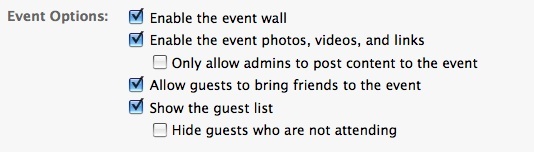
When setting up the event as an organizer, I highly recommend you leave all the default settings the way they are – that is, allow guests to invite others, upload photos, write on the wall, etc. The reason is that every one of these activities creates news items that go out into the feeds of those individuals and their friends. This is great viral visibility for you and for them. Here is an example of all options you want to check:
And, as an attendee of any event on Facebook, you can easily help create buzz and visibility for both yourself and the event organizer. Win:win!
I do recommend being strategic and mindful about the events you RSVP for. (I’m sure, like me, you get your fair share of non-relevant event invitations!)
Also, when setting up your own events, be sure to choose a really catchy title, subtitle and photo. These three fields are the only ones seen in “Requests” when you invite your friends (and they invite their friends). The small greeting you can include goes out in the email notification, so that’s important too.
Here are my top nine tips for creating buzz as a Facebook Event attendee and/or host.
1. Always RSVP
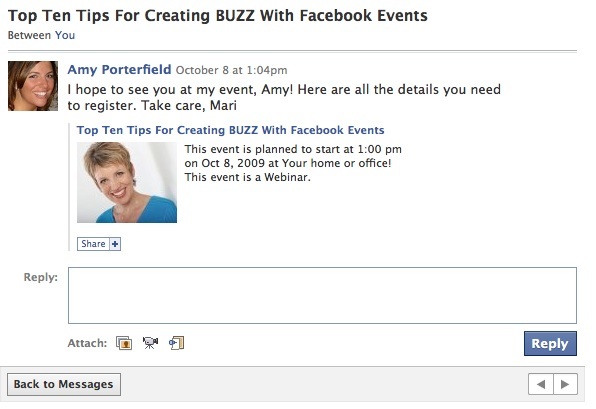
If you are attending an event, make sure to RSVP and write a message in the box on the “Request” page. Here is an example of a personal invite to an event. The invitee could then write a reply in the box below. If you want to punch it up a bit, you can even record a short video from your computer, letting your friend know you are excited to attend their event. And then all you need to do is click on the video icon and upload it!
2. Get Noticed
If you RSVP to an event, make sure to write a note on the event wall – whether your RSVP is a yes, no or maybe. This is great visibility for you!
Also, if it is your event, continue to generate buzz by periodically commenting on your own event wall. When people RSVP and write on your event wall, go write on their wall to thank them personally. Comment on any added photos/videos/links. Each of these activities goes into your mini feed and your friends’ news feeds. I call this strategy “RSV” – radical, strategic visibility.
3. Upload Photos
Make sure to choose an engaging photo for your main event description and add multiple photos related to the event to pique interest. An engaging photo should be eye-catching, warm, friendly, and inviting. Typically a person’s face is better than logos/images/graphics. You MUST include a photo or your event will have that nasty question mark. And who wants to attend a “?” event?

4. Upload Videos and Links
As mentioned in tip #1, you can record a video and upload it to any of your RSVPs. If it is your event, you can make a short video explaining what your event is about and upload it to the invite. And just like photos and videos, links are a great way to offer more value as well. You will want to make sure you include a link for your participants to register if you have an opt-in strategy. Make this very clear to your participants.
5. Write a Personal Message
This makes your event more personable. Most people have their email notifications turned on and they’ll get an email with your event title, date, time and your personal message. I also recommend including the time zone in the personal message, because Facebook defaults to your own time zone.
6. Send Out Invites
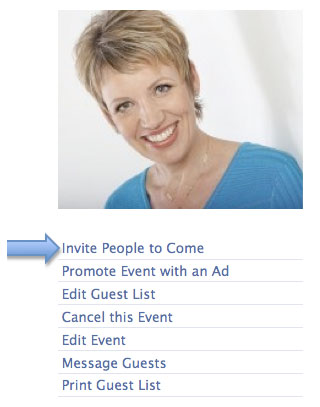
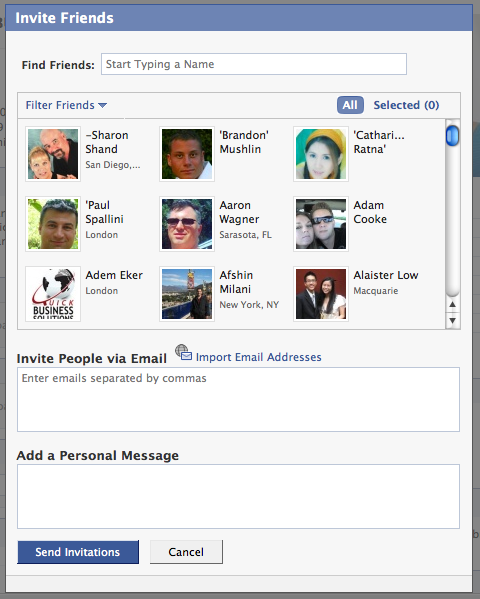
Click on “Invite People to Come” and invite your friends. This invitation will go into your friends’ “Event Requests.”
7. Spread the Word
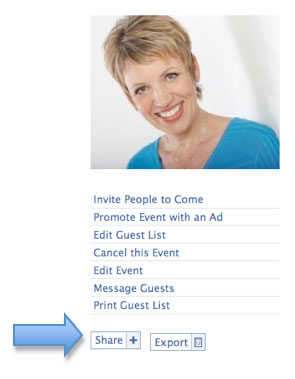
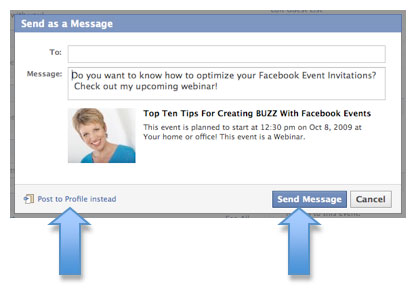
Click the “Share” button and “Post to your Profile” and your invite will go on your wall for all to see.
Or use the “Share” button to send an invite to specific friends or lists.
This is my rule (you may want to test your own parameters): I only promote about one event of my own on Facebook every month, so I don’t have any qualms about inviting all friends because my events are virtual (conference calls). (In this case, I would use tip #6 above and “Invite People to Come” and “Select All” to invite everyone.) For location-specific events, you may want to be more selective.
8. Tweet About Your Event
Send out tweets with a link to the Facebook event. Preferably not just, “Check out my event! [insert link].” Rather, offer something enticing like, “Learn How to Create a BUZZ With Facebook Events [insert link—use a short URL].” (Link to either the Facebook Event page or your registration page.)
Also include the link in your Facebook status updates periodically and mention your event on Plurk, LinkedIn, Plaxo, FriendFeed, Ping.fm – whichever platforms you’re active on and have followers/friends! Your friends and followers will happily pass the snipped link on for you.
9. Experiment With Social Ads
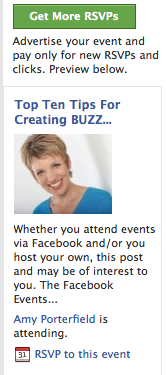
Promote your event with Social Ads and every time someone RSVPs, their name and photo may appear alongside your ad. Experiment with a weekly/monthly budget and see what happens.
10. Send Out Reminders
As the event date approaches, be sure to gently remind people who have not yet registered that there’s still time.
Wow, that was a lot to cover! I hope you find value in these tips!
What do you think? Did you learn something new about Facebook Events? What has your experience been so far with Facebook Events? Share your thoughts in the Comments box below.

Mari Smith is a widely-recognized social media speaker and trainer and is coauthor of “Facebook Marketing: An Hour A Day.” Fast Company calls Mari “the Pied Piper of the Online World.” Follow Mari on Twitter: @marismith. Other posts by Mari Smith »


41 Comments
Terrific information Mari. You make an interesting point about spreading the word.
A large number of my friends on Facebook are friends and family – totally unrelated to my line of work.
I really wish Facebook had a way to classify friends. Example – “friend”, “family”, “business”, etc. This way, we'd be able to quickly filter messages to the correct people in our network, without having to select them one by one.
Just dreaming out loud. :) Thanks again.
David Smania / Foodservice.com
Helloooo Mari!
Thanks for the step by step detail in this post. I've used the Facebook event application *once* and missed out on all the various ways of leveraging the app, specifically items #2, 3 & 4. To the un-trained eye, it's a no-brainer to fill out the event form…But it's all the other stuff that you learn from experience that makes this post invaluable.
Thanks again and in YOUR words “w00t! w00t!”
David – You'll be very happy to know you can classify people in Facebook and determine what they can and cannot see! I was real excited when I learned about this. I'll let Mari tell you how. – Mike
Good information Mari. We utilize Facebook Events regularly for our events here at Bristol Motor Speedway. But thanks for providing even deeper insight on how to add some “umph” to the usage.
Hi David – yes indeedy, there is a simple solution!! You need to create Friend Lists. There are a couple ways, the easiest is this:
Click on Friends in the top blue navigation bar.
Click on Create New List.
Give the list a name, then select the friends you want to add by first starting to type in their name and they'll pop in – click on the image and it selects.
Then save.
Now, go into your Privacy settings (click Settings in the top blue nav bar, then Privacy).
Adjust which content/features gets published to which list by selecting Custom.
Also, on a different note but related to Friend Lists: on your Home Page — you can now drag and drop your Friend Lists and the one you place at the very top above the News Feed filter will be your default view!
Hope this helps! I have a few video tutorials on my YouTube channel at youtube.com/facebookmari and my Fan Page facebook.com/marismith. Any questions let me know!
Thanks Mike!! You rock. :)
Truly my pleausre, Ben – happy to help!!
Teehee – can never have enough w00t w00ts!! :)
Love the tips and detail Mari! Thanks for sharing. I've used events for conferences, but it was not until I read your article that I even thought to put up events for our http://www.LearnFromExpertsToday.com series. (yes, a duh moment for sure). Thanks for the inspiration.
Just what I needed!
I've been posting facebook events for over a year, but didn't know all the points you shared.
Thank you!
Thanks Mari for your generous information always. You are a plethora of great info. I'm going to set up an event for my webinar on conscious parenting – http://recreateyourlife.com/a/parentingweb – Alex calls this Donkey Smuggling :).
Warmly, Shelly
Wow – that's an awesome soundbite. Glad to contribute to you Eleanore!! :)
Heheee — too fun, Shelly!! You rock!! Btw, do you know my friend Dorcy Russell?? She has a whole program on conscious co-parenting!
Mari,
You rock! As always, your advice and insights are right on. Your post encouraged me to post my upcoming “Use LinkedIn® Properly and Experience the Magic- to Get Record Profits” teleseminar – http://bit.ly/ts2ndw. I also used the video feature for the first time. Thanks again for all you do.
Hi Mari,
I was just talking about you tonight to my friend Beth Greer –
supernatural mom and singing your praises.
I don't know Dorcy Russell but sounds like I should. What is her
website?
I'm about to launch and I'd love to talk to her. Do you know Vishan
Lakshmi? I'm working with him on it.
Thanks for writing.
Warmly, Shelly
PS I still can't find the f—– link to events :):).
Woooohooo, Rick!! Truly my pleasure. Delighted to hear you're doing awesome things out there! :)
aaah, thanks a mil, Shelly!
Dorcy's site is at http://www.consciouscoparentinginstitute.com/ and she's on Twitter @DorcyRussell.
I do indeed know Vishen!!! He totally rocks and he's actually on the Board of Advisors for my new International Social Media Association. (I also have a pic of him on my Twitter background. hehe!!)
How bizarre re the Events – how about this direct link: http://www.facebook.com/events.php
Great article. Sending out a tweet about it next.
Great stuff Mari! For more information on how to use Facebook for events, please check out:
http://www.experientialmarketing20.com/2009/09/...
Thanks, great advise and I look forward to deploying this advice in my next event!
Thanks for the insight Mari. I wasn't aware of this. :)
[...] 10 Tips for Creating Buzz with Facebook Events – Social Media Examiner [...]
THANKS, Mari! Like Marian Sparks, I had used Facebook events once, to promote the opening for my first solo art exhibit, and missed out by not having your tips. Fortunately, I have more events planned before the exhibit closes (women's night, jewelry night, etc.), and I'll try your great tips when I post these events. THANKS! – Linda (contemporary fine art, jewelry design, writing, creativity coaching – solo art show thru 1/2/10 @ Circle S Vineyards, Sugar Land, TX)
[...] 10 Tips For Creating Buzz With Facebook Events [...]
[...] Mari Smith (pictured left) is a social media expert and blogs over at Why Facebook. She recently wrote a blog post called the 10 Tips for Creating Buzz with Facebook Events. [...]
Mari – this info is perfect timing for me. Although I am a Career Transition & Reinvention Consultant, my husband and I are also artists and we are having our first joint art show. We're very excited and I have been trying to learn how to let everyone know about our Artist Reception celebration coming up on November 20. (I wish YOU could join us – it would be great to have a celebrity there!) Facebook seems like a great tool to let people know about it. Thanks for your help.
Linda – I wish we lived closer because I'd love to see your solo art show – it sounds great. My husband and I are also learning how to use Facebook to get the word out about our upcoming art exhibit. It's the first time we are showing our work together. So exciting. A friend of mine lives in Texas (Spring Hill, I think) and she is a fabulous mosaic artist – you two should meet each other! Terry
Congratulations on showing your work with your husband. If your friend lives in Spring, TX, that's a Houston suburb — I'd love to meet her. In addition to my solo show, I just found out that I got into a juried show and I have a piece in a benefit auction next weekend and one in an online auction going on now. Life is good! All the best with your exhibit — Linda
Fantastic, Terry!! Thanks for your kind words. Good luck with the Nov 20 event – I'll attend in spirit, k?! :) hehe
[...] also writes for the Social Media Examiner and has some very handy tips in her post 10 Tips for Creating Buzz With Facebook Events. One tip Mari suggests is to send a personal message to those registered with the time of the [...]
I've created a flyer for my event. I want it to appear in the description. A nice big version of the picture so everyone can see and read it. Not a landscape oriented medium sized image in the top right of my event or a tiny (and completely unreadable) image buried at the bottom of the page where no one ever looks.
Is this possible?
[...] 10 Tips for Creating Buzz With Facebook Events [...]
Hi, is there an app that you know of that can post Facebook events on another site (like the company site)
Great tips, as always, Mari! As you mentioned in #7, I would stress that if an event is location-specific, you take time to select the friends who are close enough to the location to be there. Every day I get invitations to far-away events that aren't travel-worthy. (A car wash at a church 1000 miles away?) Your friends may not know to appreciate your restraint, but if you spam them with irrelevant invitations, they definitely won't be happy about it.
Hey Mari, Very informative article, quick question: Is there a way to contact people who have rsvp'd to your event if they are not a fan of your page?
[...] For the full article on tips for creating buzz with Facebook events go here http://www.socialmediaexaminer.com/10-tips-for-creating-buzz-with-facebook-events/ [...]
how do create a link or url for my event??
[...] the full article on tips for creating buzz with Facebook events go here http://www.socialmediaexaminer.com/10-tips-for-creating-buzz-with-facebook-events/ Tags: Facebook, Social Media, Social [...]
Air Jordan
Air Jordan shoes
cheap air jordan
Air Jordan 2010
Air Jordan 2009
Womens Air Jordan
Kids Air Jordan
Air Jordan 23
Air Jordan 22
Air Jordan 21
Air Jordan 20
Air Jordan 19
Air Jordan 18
Air Jordan 17
Air Jordan 16
Air Jordan 15
Air Jordan 14
Air Jordan 13
Air Jordan 12
Air Jordan 11
Air Jordan 10 X
Air Jordan 9 IX
Air Jordan 8 VIII
Air Jordan 7 VII
Air Jordan 6 VI
Air Jordan 5 V
Air Jordan 4 IV
Air Jordan 3 III
Air Jordan 2 II
Air Jordan 1 I
[...] In this article we are going to show what the best practices are for setting up a company page and / or a company profile on Facebook allowing you to showcase your products and services on Facebook and creating a social network around it. MAybe you are even able to create a little buzz with Facebook. [...]
[...] I usually find the tipping point in social media is between 500-1,000 fans/followers/friends/email subscribers. You’ll start to see measurable results with this size group. You’ll be building trust and loyalty among your fanbase with consistently good content and reliable responses. Now you must have a strategy in place to convert your fanbase to paying clients or customers. Perhaps you’ll offer a special event (live or virtual), coupons, discounts and other incentives to give your fans a strong call to action. The bottom line is to let your fans know exactly what you want them to do. And pace your offers. If you’re hosting live/virtual events, be sure to also use the Facebook Events feature. See this post for ideas: 10 Tips for Creating Buzz With Facebook Events. [...]



