by
by Want to create high-quality, on-brand blog posts, YouTube descriptions, or eBooks at scale? Wondering how to set up a reliable, efficient, and replicable workflow with AI?
In this article, you’ll learn how to streamline and scale content production with Claude Projects.
Why Few-Shot Prompting and Claude Projects Work Better Than AI Chats for Content Creation
Most people use AI in “Zero-Shot” mode. This means they simply ask Claude for what they want in a chat (e.g., “Write a blog post about marketing”) without providing any examples. This forces the AI to guess your preferred style, often resulting in generic, robotic output.
Casey Meehan relies on a method he calls Few-Shot Learning with Claude Projects.
Few-Shot Learning means providing the AI with a small set of carefully selected examples (usually 3–10) before asking it to perform a task. Instead of describing your tone with adjectives like “professional” or “witty” (which the AI might misinterpret), you show the AI exactly what you want.
Why use it with Claude Projects? In a standard chat, you would have to paste these examples into every single prompt, which is tedious and eats up your word limit. Claude Projects allows you to upload these examples once into a Knowledge Base. The AI then references this training data for every request you make, effectively becoming a specialist in your specific writing style.
The Few-Shot IPO Content Creation Framework for Claude Projects
Here’s a look at Casey’s workflow:
Notion serves as Casey's central command center and energy management tool. He maintains a dedicated page for his weekly schedule that contains direct hyperlinks to his specific Claude projects. This setup is designed to reduce friction; regardless of his energy level or mindset, he simply clicks the link for the task at hand (e.g., “Generate Titles”) and is immediately transported into the correct project with the right context, allowing him to start working instantly.
Claude Projects function as the engine of his production assembly line. Rather than treating Claude as a generic chatbot, he builds distinct Projects for each stage of content creation—such as a “Title Bot,” “Hook Creator,” or “Critique Bot”. Each Project houses a specific knowledge base containing examples of his best-performing work (the Few-Shot method), allowing the AI to reference his unique style and data to generate high-quality, brand-specific assets.
With this setup, he is able to consistently publish on-brand videos and repurpose those videos for ebooks without losing focus or feeling overwhelmed.
To build these Projects effectively, you should use the IPO Framework:
- Input: The raw material you give the AI (e.g., a messy transcript).
- Process: The specific instructions + your Few-Shot Knowledge Base. Your Few-Shot examples must be clean and consistent. A good shot file usually looks like this:
- Context: A brief note on what the content is (e.g., “A LinkedIn post about SEO”).
- The Content: The actual high-quality text you previously wrote.
- The Logic (Optional): A short sentence explaining why this piece worked (e.g., “Note how the hook uses a contrarian opinion to grab attention”).
- Context: A brief note on what the content is (e.g., “A LinkedIn post about SEO”).
- Output: The clear deliverable you expect (e.g., a polished article).
Here is how to set up this workflow for your own production process.
Step 1: The Title and Thumbnail Generator
Casey combines his title and thumbnail creation in a single project for a strategic reason: he views the thumbnail text and the video title as a single, cohesive unit.
The text on the thumbnail acts as the main headline, while the video title functions more like a subhead that pulls the viewer in. By generating them together, the AI ensures the two elements complement each other rather than repeating the same information or clashing in tone.
Ready to Supercharge Your Marketing Strategy?

Get expert training and an unbeatable conference experience when you attend Social Media Marketing World—from your friends at Social Media Examiner.
Broaden your reach, skyrocket your engagement, and grow your sales. Become the marketing hero your company or clients need!
🔥 Save $520 on an All-Access ticket. Sale Ends Friday! 🔥
GET THE DETAILSHere’s how to set up a project to generate concepts that match your historical winners.
First, create a new Claude Project.
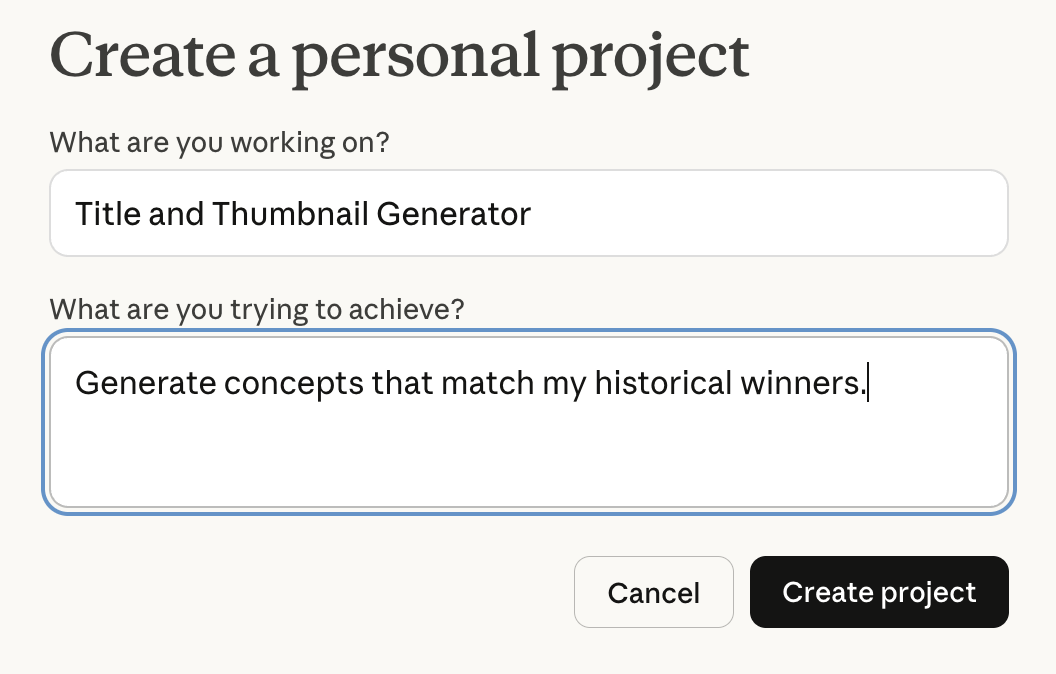
In the Project's instruction box, type:
The user will input ideas for a video. You will generate 10 titles and thumbnail ideas based on the patterns found in the files in your Knowledge Base.
In the knowledge base, give your project the few-shot examples it needs to give you on-brand content. Create a document titled Best_Titles.txt. Inside, list 10 of your best-performing titles. Next to each title, add a one-sentence description of the thumbnail that pairs with it. Upload this document to the knowledge base.
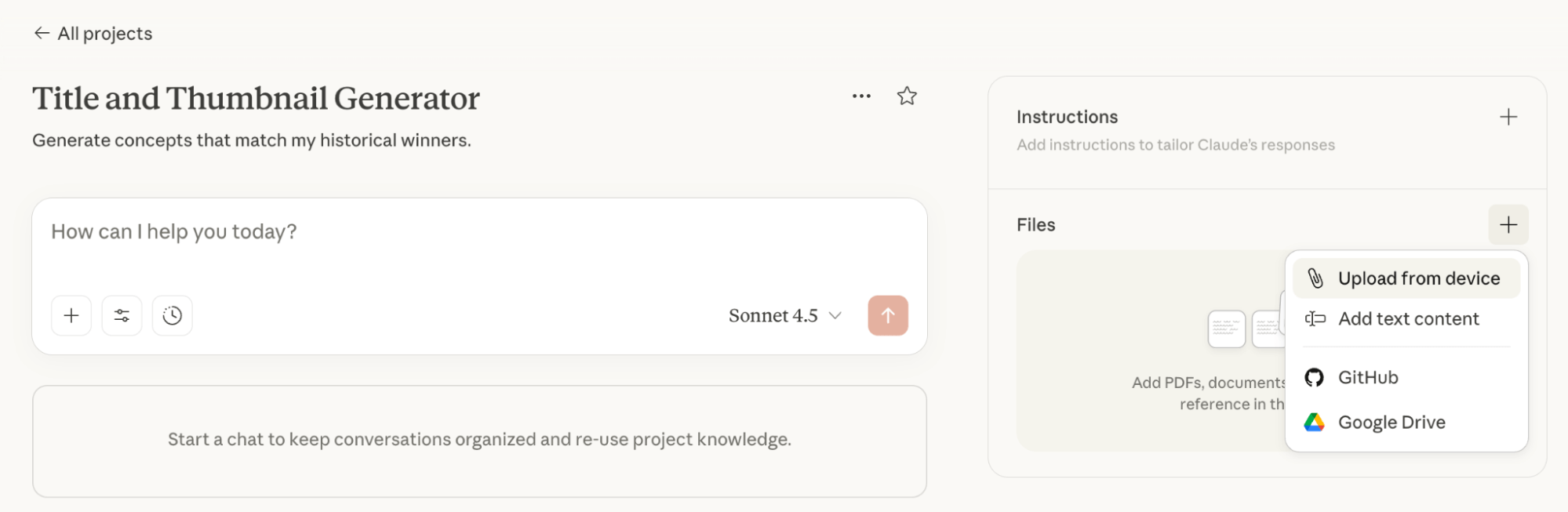
Pro Tip: Do not use artistic jargon for the thumbnail descriptions. Instead, focus on the text on the screen (e.g., “Text says: ‘Stop Doing This'”).
To use your newly-trained project, begin with your input. Type in a rough topic, like “email marketing tips.”
Claude will output 10+ options that follow the exact structure of your best performers.
AI Is No Longer Optional for Marketers—Ready to Master It?

Join over a thousand forward-thinking marketers at AI Business World—a conference-in-a-conference at Social Media Marketing World.
Get two days of practical AI training where you'll discover:
✅ Systems that 3x your output—leaving time for strategy and creativity
✅ Proven strategies you can deploy right away—no guesswork, no wasted budget
Become the indispensable AI expert your company needs.
GET YOUR TICKETS—SAVE $200Step 2: The Hook Creator
This project will write the critical first 30–60 seconds of your script.
In the system instruction, type:
Your role is to generate a script for the opening of a video based on the title and thumbnail provided. Mimic the pacing and structure of the examples provided.
In the knowledge base, upload three separate documents (or one combined file) containing the scripts of your best-performing hooks. To give your project a breadth of examples, choose one hook that tells a story, one that is data-heavy, and one that is controversial. This variety prevents the AI from sounding repetitive.
To use your project, paste the winning title and thumbnail concept from Step 1. This is your input.
Your output will be a scripted hook that uses your specific opening techniques (e.g., asking a question vs. making a statement) to match your brand voice.
Step 3: The Outline Generator
This project will turn your hook into a full content structure.
In the system instruction, type:
Create a detailed content outline based on the provided hook and title.
In the knowledge base, upload examples of your best video or article outlines. If you create different types of content—like “How-To” tutorials vs. “Strategy” deep dives—ensure you have at least one example of each format in the files.
To use your project, your input will be the title, thumbnail, and the generated hook from Step 2.
Your output will be a comprehensive outline. Because the AI has read your previous outlines, it knows details such as whether you prefer 3 main points or 7, and whether you like bullet points or full paragraphs.
Now you can record your video.
Step 4: The Critique Bot
This project acts as a virtual editor that checks your work before you publish.
Your system instructions are:
Act as a critic. Compare the user's transcript against the successful examples in your Knowledge Base and identify weaknesses.
In your knowledge base, upload the full transcripts of your absolute best videos or articles—the ones that got the most engagement or sales.
To use your project, input the raw transcript of the content you just recorded. Next, ask:
What is missing from my new transcript compared to my best examples?
The AI output might tell you that your intro is too long or that you forgot your signature sign-off, allowing you to edit and adjust the video before publishing.
Step 5: Repurposing Content into Lead Magnets
This project will turn a video transcript into a PDF guide or eBook without you having to write it from scratch. While you will still need to review and polish it, the “Few-Shot” data ensures the structure is 80–90% correct on the first try.
Your system instructions are:
Draft an eBook chapter based on the transcript provided. Follow the formatting style of the examples.
In the knowledge base, upload previous PDFs, eBooks, or whitepapers you have created. This is crucial for formatting; without seeing your previous work, the AI won't know how to structure the headings, pull-quotes, or sidebars.
To use your project, input your final, edited transcript.
Your output will be a near-complete draft of a lead magnet you can review and polish.
Casey Meehan is an AI coach and trainer who helps marketers and entrepreneurs thrive with AI. He offers group coaching sessions through Patreon for power users, people building applications with AI, and those who want to become AI coaches themselves. Follow him on YouTube.
Other Notes From This Episode
- Connect with Michael Stelzner @Stelzner on Facebook and @Mike_Stelzner on X.
- Watch this interview and other exclusive content from Social Media Examiner on YouTube.
Listen to the Podcast Now
This article is sourced from the AI Explored podcast. Listen or subscribe below.
Where to subscribe: Apple Podcasts | Spotify | YouTube Music | YouTube | Amazon Music | RSS
✋🏽 If you enjoyed this episode of the AI Explored podcast, please head over to Apple Podcasts, leave a rating, write a review, and subscribe.
Stay Up-to-Date: Get New Marketing Articles Delivered to You!
Don't miss out on upcoming social media marketing insights and strategies! Sign up to receive notifications when we publish new articles on Social Media Examiner. Our expertly crafted content will help you stay ahead of the curve and drive results for your business. Click the link below to sign up now and receive our annual report!

Want to Unlock AI Marketing Breakthroughs?
If you’re like most of us, you are trying to figure out how to use AI in your marketing. Here's the solution: The AI Business Society—from your friends at Social Media Examiner.The AI Business Society is the place to discover how to apply AI in your work. When you join, you'll boost your productivity, unlock your creativity, and make connections with other marketers on a similar journey.
I'M READY TO BECOME AN AI-POWERED MARKETER