by
by Do you feel like using AI images is cheating or lacks true creativity? Are you looking for a way to produce high-quality brand assets without a six-figure photography budget?
In this article, you'll discover a seven-pillar framework for prompting and a streamlined workflow to generate professional AI images for your business.
Why AI Image Generation Is Finally Ready for Business
In recent months, two models transformed the AI image generation landscape: Imagen 3 launched in August 2024. Separately, Nano Banana launched in August 2025, followed by Nano Banana Pro in November 2025. These models completely changed the game for businesses looking to use AI-generated imagery as actual usable assets.
AI imagery democratizes high-quality visuals. You don't need a six-figure budget for quality photos anymore. You don't need to wait six weeks for images to come back—or six months when photographers don't get around to your work.
Brands and businesses can move faster and more agile, producing the imagery they need at the drop of a hat. Speed matters. Getting to market faster than your competitor is massive. If you and a competitor have similar products and yours launches faster because you created imagery with AI in an hour versus a month, you're winning.
While any people dismiss AI-generated images as “cheating” or not truly creative, Lauren deVane disagrees completely.
Lauren spent years overseeing social media creative at Ulta Beauty, managing multiple photography bays with photographers and stylists. She believes creativity isn't about the physical labor you put into something. Creativity is about connecting dots and finding connections that other people don't see. It's about ideas, perspective, intuition, and taste. Creativity means taking existing ideas and flipping them on their head. If you can do that without AI, the tool will help expand those ideas and show off your creativity even further.
AI Image Generation Models & Tools
You need to grasp two concepts before creating images: describing what you want to see, and understanding how image models work and what makes them different.
Nano Banana and Nano Banana Pro: Nano Banana and Nano Banana Pro are Google's image models. Most image models were trained on images and their metadata. Nano Banana works differently—the model uses Google Gemini as a large language model on the back end, giving Nano Banana all the world knowledge of Gemini while creating images.
This enables real-time capabilities. You could tell Nano Banana to find the weather forecast for Chicago for the next week, specify colors and style, and the model will retrieve that information and generate a gorgeous infographic with the weather data.
Nano Banana Pro excels at text. You can include full paragraphs of text in images and the model nails text generation. Before Nano Banana, text in AI images looked like gibberish. Even now in Midjourney, you'll still get poor text quality.
Nano Banana Pro also replicates faces properly. The model outperforms others at recreating and pulling actual data to analyze and use. You can drop in a mood board, tell Nano Banana Pro to act like a graphic designer, analyze the mood board, and generate a website mock-up using that brand aesthetic combined with what the model knows about good websites. Nano Banana Pro will deliver a solid starting place. Using the model as a creative consultant or counterpart is incredibly powerful.
Access Nano Banana Pro through Google Gemini. If you have a Google Workspace account or paid Gmail, go to gemini.google.com and select the pro option.
See Dream: See Dream produces different poses and more saturated, intense color. Even with the same prompt, Seed Dream generates very different looks with more saturated, intense colors. Seed Dream also offers a 4K model, allowing you to get much larger images without upscaling.
Ready to Supercharge Your Marketing Strategy?

Get expert training and an unbeatable conference experience when you attend Social Media Marketing World—from your friends at Social Media Examiner.
Broaden your reach, skyrocket your engagement, and grow your sales. Become the marketing hero your company or clients need!
🔥 Save $570 on an All-Access ticket. Sale Ends Tuesday! 🔥
GET THE DETAILSFlux: Flux is a tool by Black Forest Labs, and they're really good with images. Flux is really good at editing, so good in fact that Adobe put Flux into Photoshop alongside Nano Banana.
Freepik: Lauren uses Freepik to access all these different models in one interface. Instead of paying for multiple models separately and learning different user interfaces, you learn one interface and select from different models depending on your project.
With higher tier FeePik subscriptions, you don't use tokens for image generation—you have unlimited image generation. This freedom eliminates the nagging worry about burning through tokens.
Beyond image generation, you can use tokens for video generation using top video models, audio generation, and upscaling to make images bigger or improve quality.
The Seven-Pillar Prompt Framework for Exceptional AI Image Generation
Lauren developed a seven-pillar framework that captures all the necessary detail in your prompts. The core principle: if you don't tell the AI, the AI doesn't know. The AI can't read your mind and will make up what the AI thinks you want.
Consider the prompt “a woman on the street with a coffee.” What does the woman look like? What is the street? What is the weather? What is the coffee? What is she doing? The AI has to decide all of this for you. The more details you provide, the better results you'll get.
This framework will help you get the image you want.
#1: Subject
The subject is the focus of your image.
For a person, describe: short hair or long hair, curly or straight, brown or blonde, skin color, body type. All these details matter when describing a person.
For a product, describe: is the product a can, a box, a bottle, a cylinder? The physical details of the subject are crucial.
The level of detail you provide depends on how specific you want to get. If you have an exact vision—maybe an older woman with wrinkles, age spots, a weird scar on her left eyebrow, and an interesting haircut with a pink stripe—include all those details.
If you care less about the exact identity and just need an older woman, you could say “an older woman in her seventies wearing a woolly scarf.” The choice is about how much direction you want to provide.
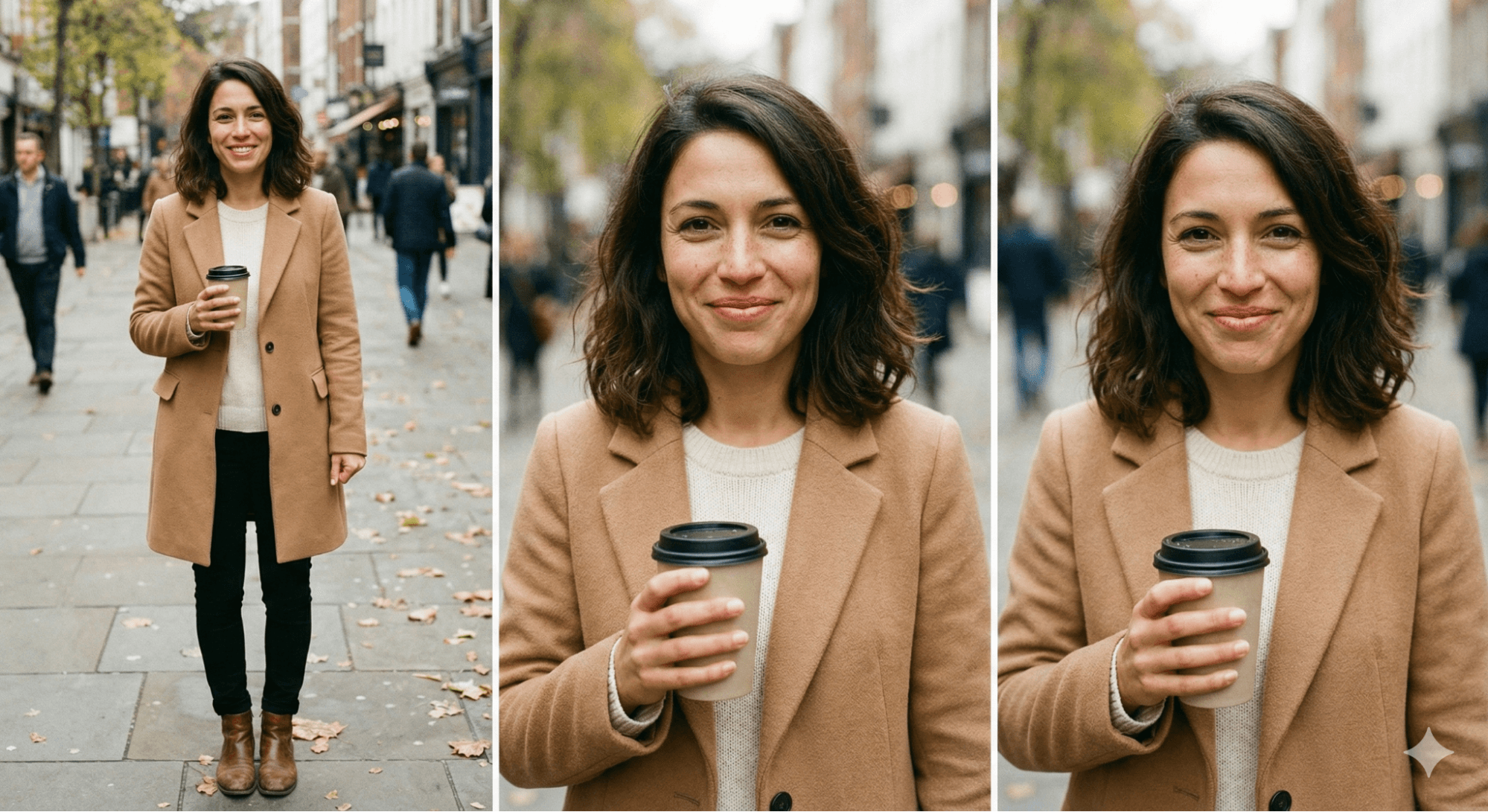
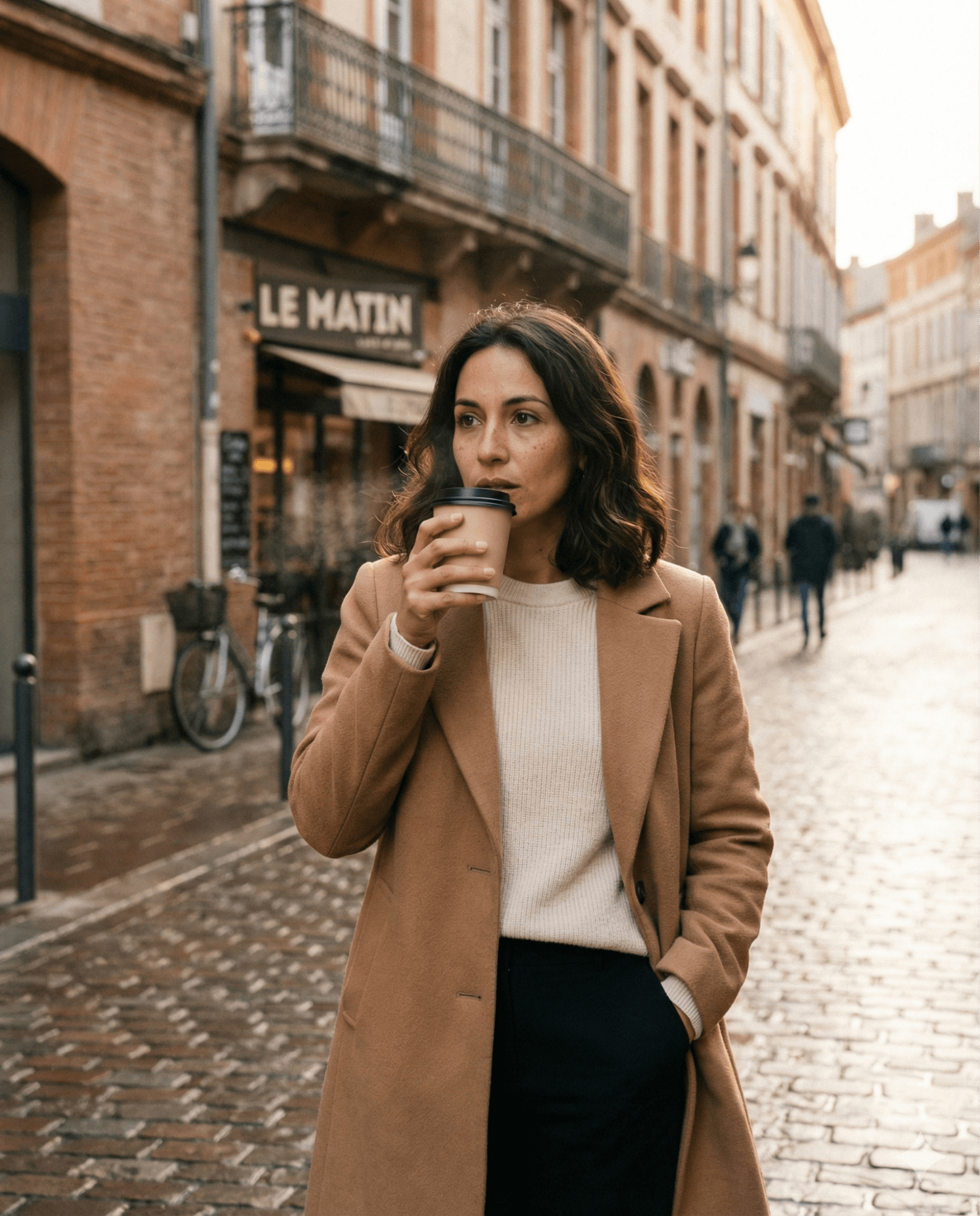
A woman in her early thirties with warm olive skin, shoulder-length dark brown hair worn loose with natural waves, and faint freckles across her nose. She has an average build, expressive dark eyes, and slightly chapped lips. She’s wearing a tailored camel wool coat, a soft cream knit sweater, slim black trousers, and worn leather ankle boots. She’s holding a matte ceramic takeaway coffee cup with a black lid, faint steam rising from it.
#2: Action
The action tells the story of what's happening in the image.
For a person, is she walking, running, or limping? Yes, the image is static, but if she's running, her hands are pumping. If she's walking, her hands are down by her sides. If she's limping, maybe one knee is slightly lower than the other.
Is she in a hurry? Standing in a line? Staring into space? On her phone? What is she doing to tell the story?
Think about what happened right before this shot and what's about to happen right after, then describe what she's doing in the middle of the moment in the image.
For a product, maybe the product is floating, balancing, stacked, or being opened. Even a cup of coffee or water bottle needs an action. Is the cup sitting softly or pushed in? What is that object doing to tell the story rather than just existing?
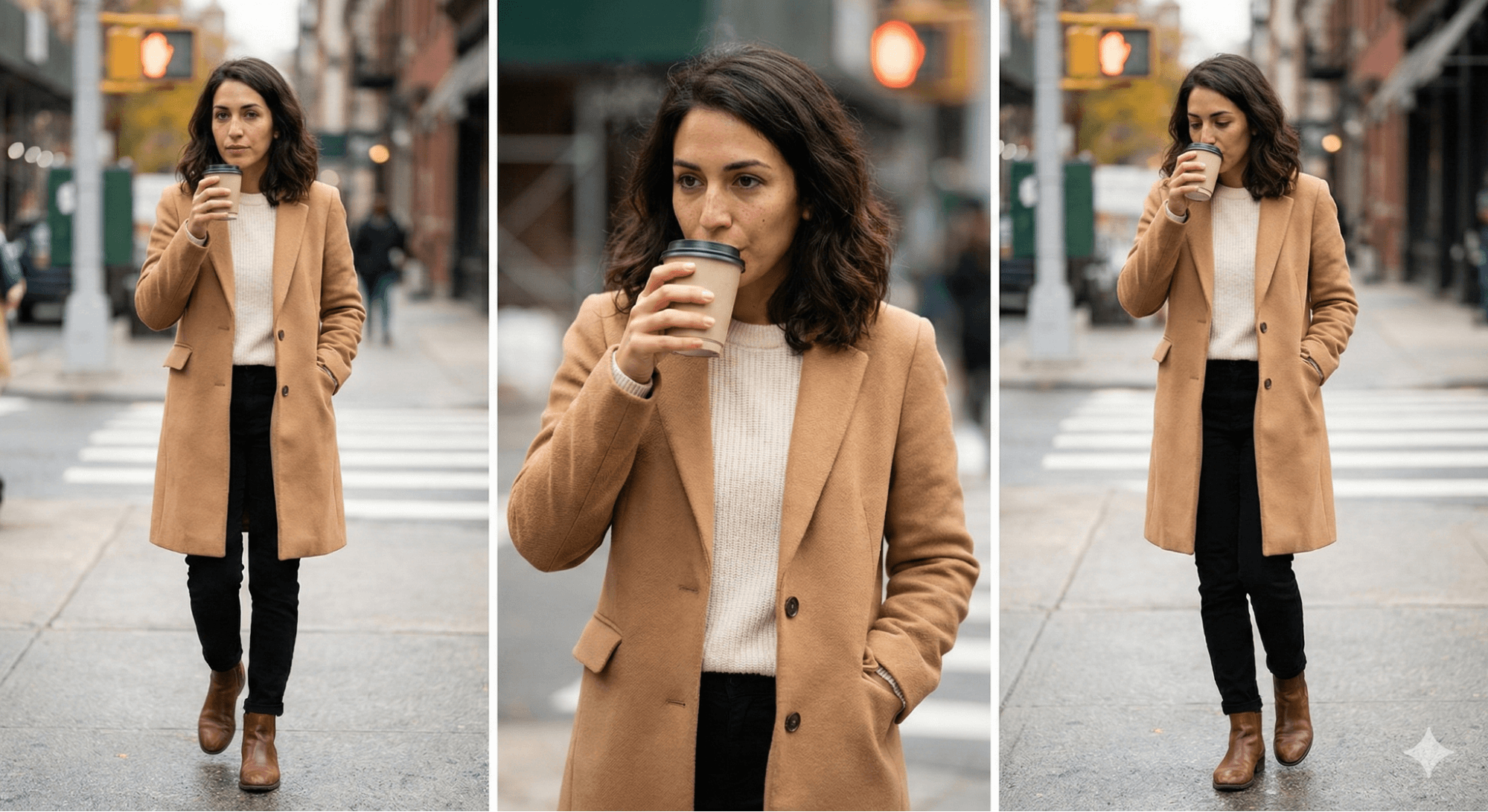
She is mid-step, walking slowly but purposefully, gently lifting the coffee cup toward her mouth as if about to take a sip. Her other hand is tucked into her coat pocket. Her posture suggests she’s lost in thought—calm, reflective, and unhurried—caught in the moment between errands.
#3: Scene or Setting
Where is the subject? On a countertop, an iceberg, in a rainforest, in a room? What's happening around the subject?
If you don't include all those details, the AI makes them up.
Photographers, art directors, storytellers, and authors excel at describing scenes like, “a man in a blue coat walking in the background towards an older woman as a small raccoon runs across in front of her.” Using the same type of descriptive language will generate you a great shot.
You can also use the model for both ideation and direction.
AI Is No Longer Optional for Marketers—Ready to Master It?

Join over a thousand forward-thinking marketers at AI Business World—a conference-in-a-conference at Social Media Marketing World.
Get two days of practical AI training where you'll discover:
✅ Systems that 3x your output—leaving time for strategy and creativity
✅ Proven strategies you can deploy right away—no guesswork, no wasted budget
Become the indispensable AI expert your company needs.
GET YOUR TICKETS—SAVE $250Maybe you start by saying “in a busy city,” see some options, then realize you should add cars or specify lighting. Rather than describing everything perfectly upfront, leaving some elements up to chance gives you ideas about what you actually want. Then you adjust your prompt to specify exactly what you want.
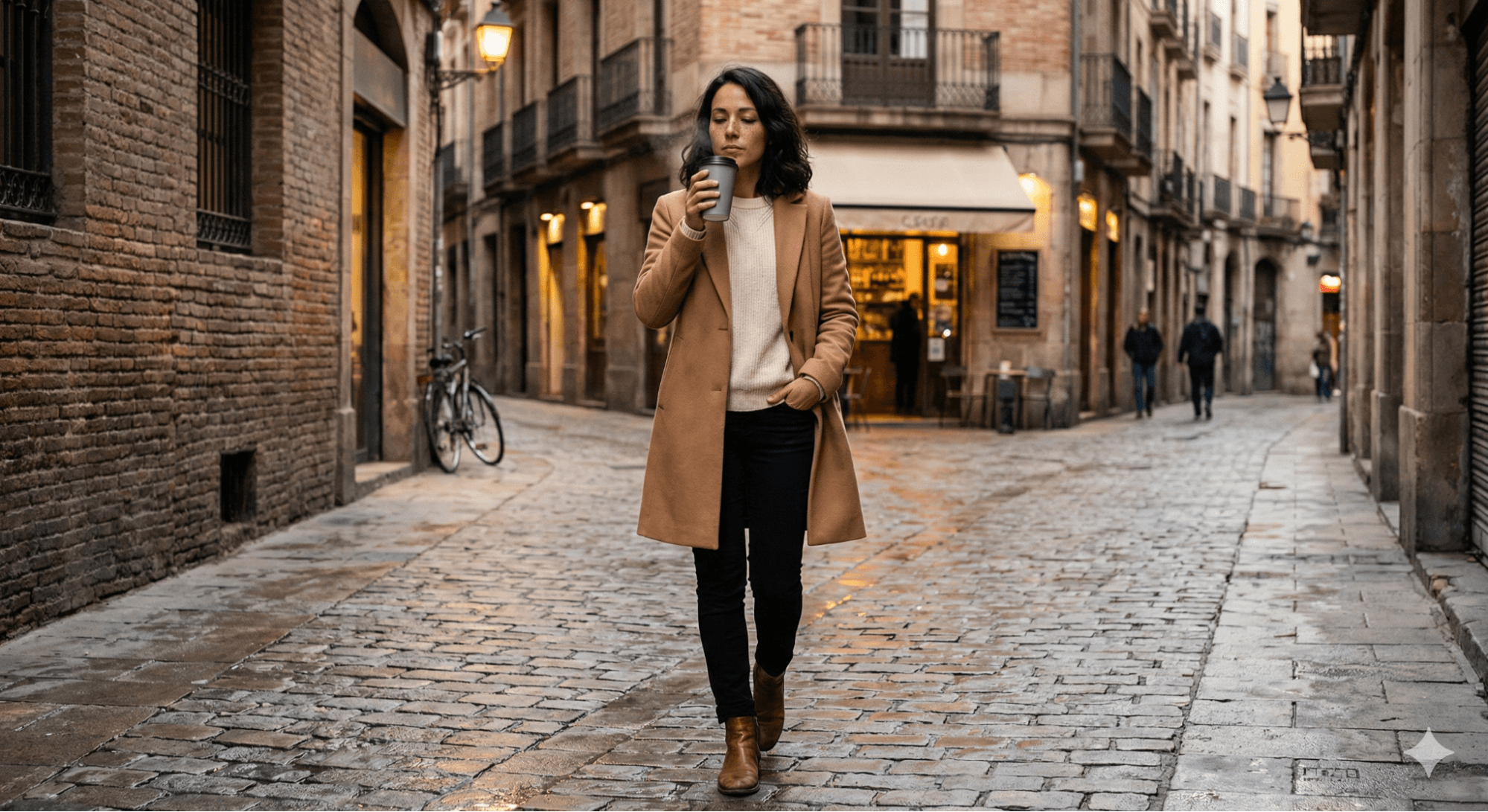
She’s on a narrow European-style city street in the early morning. The street is paved with slightly wet cobblestones, reflecting light from nearby storefront windows. Old brick buildings line the street, with wrought-iron balconies above and a small café behind her. A bicycle is casually leaned against the wall in the background, and a few pedestrians are blurred in the distance, suggesting quiet city movement.
#4: Medium
There are many types of image styles and you'll need to tell the AI model which one you want to see.
Do you want an e-commerce shot in the studio on white, a life-style shot, a cinematic still, nighttime photography, CCTV footage, drone photography, or portrait photography?
But you're not limited to a photographic rendering. These tools handle all sorts of mediums, including illustration styles such as watercolor painting, gouache, oil painting, Sharpie marker, crayon—whatever you want. You can request images made from ripped-up magazines in a collage style, stained glass images, or playing card designs.
The possibilities are extensive. If you're a brand wanting to develop an illustration style you use consistently, create that style and use the style as your reference. Then you can create your branded imagery in your brand colors.
High-end lifestyle photography with a cinematic, editorial feel—similar to a fashion magazine street-style shoot. Photorealistic, shallow depth of field, captured as if shot on a full-frame DSLR camera.
Pro Tip: If you're unfamiliar with different photography types, use ChatGPT or Google Gemini for help.
I'm getting started with AI imagery and I'm working on a photo for my candle brand. I want to know how I can create images.
The model will explain your options and can pull example images for you to review.
#5: Composition
Composition is how the shot is framed. Is the shot a close-up or pulled way back with white space? Is the shot from above (bird's eye view) or from below (making the product feel heroic)?
Are you cropping in interestingly on someone's face so part of their ear is cut off, creating visual interest rather than centering the subject straight on? Are you following the rule of thirds?
Three-quarter body shot framed using the rule of thirds, with the subject positioned slightly off-center to the right. The camera is at eye level, slightly angled, creating an intimate, observational feel. The background softly falls out of focus, drawing attention to her face, hands, and coffee cup. Subtle motion blur in her moving foot to enhance realism.
If you're not fluent in describing shot angles, use ChatGPT to ask for help:
What are some prompts for different angles I could use if I wanted this shot to feel heroic?
#6: Lighting & Aesthetics
Describing the lighting accurately matters.
Is the lighting warm golden hour lighting, cool clinical lighting, or studio lighting? Are you using colored gel lighting? Do you want light hitting from the side? Coming in from a window? Creating a halo effect?
ChatGPT can help you determine good lighting for your shot. Upload a working image and ask:
Help me figure out five different ways we could light this.
While you've described all the technical elements, certain key phrases infuse additional character without extensive description.
This could be asking the AI to infuse the feel of a specific decade—do you want the image to feel like the image is from the seventies, futuristic, or the Renaissance period. Maybe you want the image to feel Gen Z. Or premium and editorial versus comfy and warm.
Soft, natural morning light with a warm golden hue, diffused by light cloud cover. Gentle side lighting from the left creates natural highlights on her hair and cheekbones while preserving soft shadows. The overall color palette is warm and muted—camel, cream, charcoal, and soft browns—with a premium, cozy, editorial aesthetic that feels modern and timeless.
#7: Communicate Intent
Intent matters because if you explain what the image will be used for or what goal the image serves, the model performs better.
For a shot of hand cream, if the goal is showing premium quality texture, the AI will focus more on texture than if you say you want to showcase a new product.
Alternatively, you can specify that the end intent is for the image to be used on a billboard versus a social media logo.
When you communicate that intent, the AI understands and delivers images that align with the actual purpose. For example, if the image is meant to be used as a logo, the model will ensure the logo is scalable and readable at small sizes.
The image is intended for a premium lifestyle brand website and social media hero image, communicating calm sophistication, everyday luxury, and quiet confidence. The focus should feel aspirational but relatable, emphasizing mood, texture, and authenticity rather than posed perfection.
Lauren deVane, known online as Your AI Auntie, is an AI creative futurist and former creative director who helps marketers and entrepreneurs build brands with creative design strategy and AI. Explore her Foundations in Fauxtography course, Prompty Poppins custom GPT, and The Launchpad community. Follow her on Instagram.
Other Notes From This Episode
- Connect with Michael Stelzner @Stelzner on Facebook and @Mike_Stelzner on X.
- Watch this interview and other exclusive content from Social Media Examiner on YouTube.
Listen to the Podcast Now
This article is sourced from the AI Explored podcast. Listen or subscribe below.
Where to subscribe: Apple Podcasts | Spotify | YouTube Music | YouTube | Amazon Music | RSS
✋🏽 If you enjoyed this episode of the AI Explored podcast, please head over to Apple Podcasts, leave a rating, write a review, and subscribe.
Stay Up-to-Date: Get New Marketing Articles Delivered to You!
Don't miss out on upcoming social media marketing insights and strategies! Sign up to receive notifications when we publish new articles on Social Media Examiner. Our expertly crafted content will help you stay ahead of the curve and drive results for your business. Click the link below to sign up now and receive our annual report!

Want to Unlock AI Marketing Breakthroughs?
If you’re like most of us, you are trying to figure out how to use AI in your marketing. Here's the solution: The AI Business Society—from your friends at Social Media Examiner.The AI Business Society is the place to discover how to apply AI in your work. When you join, you'll boost your productivity, unlock your creativity, and make connections with other marketers on a similar journey.
I'M READY TO BECOME AN AI-POWERED MARKETER