 by
by  Does your business have a blog?
Do you allow comments?
One of a blogger's toughest tasks is managing the discussions around posts, and determining which comments are valuable and which are spam.
In this article I'll explore top blog commenting systems and the features that make them a great choice for your blog.
Comment Moderation and Spam
Whenever you post content, it is almost guaranteed you will receive some spam in your blog comments. People will submit comments that are completely irrelevant to the discussion to get exposure for themselves or drop a link to their website.
Listen to this article:
Where to subscribe: Apple Podcasts | Spotify | YouTube Music | YouTube | Amazon Music | RSS
Remember, there is no comment system, plugin or tactic that will fully eliminate spam. Even if you require registration, people who want to leave spam will simply register and then leave spam comments.
Requiring registration or using advanced commenting systems will reduce the amount of spam you receive. However, it may also lower the overall number of comments you receive. This is something to consider when you choose a blog comment system and configure your settings.
#1: Base Comment Systems Offer Ease of Use
Most blogging platforms such as WordPress, Blogger and Tumblr have a built-in commenting component. With Drupal, the default comment module must be enabled.
Depending on your platform, the base comment system will allow you to configure options, such as whether people need to register for your website to comment or they can freely comment with their name, email and website address.
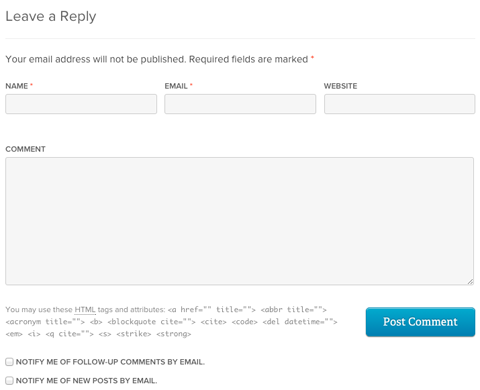
The main reason to use the base comment system is that it doesn't involve any additions to your website. It is usually ready to go when you set up your website. The second reason is speed. A past study by Pingdom revealed that the base comment system on WordPress is faster than the top third-party comment systems.
The downside of the base comment system on any blogging platform is that it will only have basic features. Advanced moderation functionality and spam-handling involves adding plugins to your website.
For WordPress self-hosted websites, you can install plugins like Akismet, which uses algorithms to detect and automatically filter out spam. WordPress and Drupal users can also try Mollom, which works similarly to Akismet to help combat spam. Akismet is the more popular of the two, as it comes installed on most WordPress blogs.

Which AI Moves Actually Matter?
That's what every marketer is wrestling with now. New AI strategies, new tools, new takes every week — but no clarity. Most marketers and business owners are trying to figure out AI alone.The AI Business Society is your trusted guide. Get expert-led training you can put to work immediately. Plus a community of marketers sharing what's actually working.
I'M READY FOR REAL AI RESULTSMost people will be familiar with the base commenting system from any of the top platforms. The only missing element for some comment authors on these systems are their photos, as only other bloggers will have images linked to their emails or accounts.
#2: Facebook Comments Allow Direct Facebook Shares
The second most-used commenting system is Facebook Comments, which is mostly due to the fact that Facebook is the most popular social media network. With 968 million daily active users, you can be assured that people who visit your blog will not only have a Facebook account, but will also be logged into it.

Blog visitors can either choose to comment with a personal profile or use the drop-down menu by the Post button to use a Facebook business page instead. They will get notifications when their comment receives likes or replies through Facebook.
This system will help you, as a blog owner and content creator, get to know the people who read and comment on your posts. Depending on the comment author's privacy settings, you will see the commenter‘s location, job title, school and other relevant information.
Plus, there's a built-in social sharing option. Commenters can check a box to also post on Facebook, which allows them to quickly share your post to their Facebook audience while commenting.
Facebook Comments are great for blogs where people won't mind being publicly linked to their comments. On the other hand, people may be less likely to comment with their photo and profile link on blogs that cover more personal topics.
3 Days of World-Class Training—Zero Travel!

Couldn't make it to Social Media Marketing World and AI Business World this year? Get all of the great content at a fraction of the price with a Virtual ticket.
That’s full access to recordings of every keynote, workshop, and session—the ones people travel thousands of miles to see. Don't wait. Get your Virtual ticket and enjoy actionable content that you can watch anytime, anywhere.
There are several ways to install Facebook Comments. Use the Comments Plugin Code Generator to grab code and install it on your website as directed or the Facebook Comments plugin for WordPress. Shopify users can get the FB Comments app for $2.99 a month. Joomla and Drupal also have add-ons and extension options.
#3: Disqus Provides Strong Moderation Features
If you're a regular reader of websites like ABC News, TMZ, Mother Jones or Fashionista, you're already familiar with Disqus.
This comment system requires comment authors to create an account with Disqus via email or their Facebook, Twitter or Google+ profiles. Once someone creates an account, they can use it on any website with the Disqus comment system.
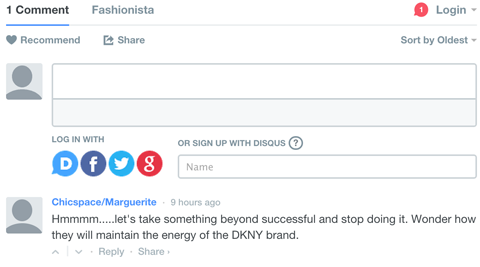
Whenever someone leaves a comment using Disqus, they will get notified via email each time the blog post gets a new comment, when someone likes their comment and when they get a direct reply from someone. This is a great reminder for them to return to the discussion and your website. Disqus users can also tag specific people in a comment.
Plus, if someone wants to follow a conversation, they can subscribe to the comments of a blog post with or without commenting. Visitors can also share a particular discussion or the post on Twitter and Facebook, as well as flag comments they feel are inappropriate to help moderators find and remove them.
Business bloggers will love the advanced capabilities Disqus has to offer. Enable Disqus to publish comments, hold them all for moderation or allow only those with verified emails to be published. Set up additional moderators to login and moderate comments. Also, get analytics for all of your comments, information about specific commenters and much more.
Another great feature is the optional recommended stories box at the end of your Disqus comments. Use this to keep visitors on your website by directing them to other great posts or monetize this space by sharing posts from publishers advertising on Disqus.
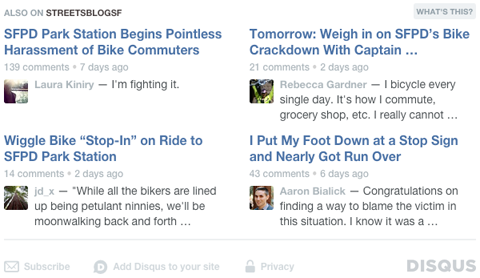
Install Disqus on WordPress, Blogger, Tumblr, Squarespace, TypePad, Moveable Type, Drupal and Joomla for free. Simply register for Disqus Engage, using the same account you use for commenting, and it will guide you through the setup process for each of these platforms.
#4: Livefyre Encourages Continued Discussion
Another popular comment system, Livefyre, is somewhat similar to Disqus. You've likely seen it on a variety of popular websites, including Hootsuite, CBS Sports, MarketWatch, CNET, New York Magazine and Salon.
Like Disqus, people who want to comment will need to sign up for a free Livefyre account, which they create using their email address or by signing into Twitter, Facebook, Google+ or LinkedIn. Comment authors can like comments, reply to comments and tag people.
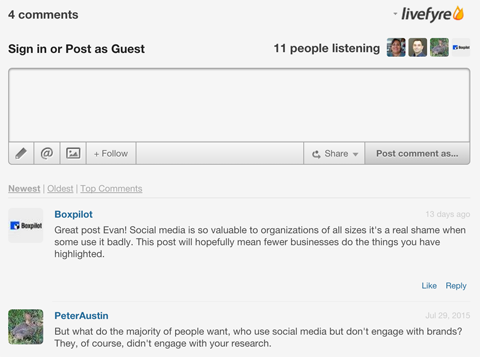
Visitors are able to follow conversations with or without commenting, as well as share particular comments along with a link to the post on Twitter and Facebook. Plus, they can flag comments they find inappropriate.
Livefyre offers powerful administration features for blog owners, including spam protection, multiple moderators, whitelists, blacklists, individual activity reports and more.
Install Livefyre on WordPress and Tumblr blogs once you have created a free account or signed in with the account you use on Livefyre.
Which Comment System Is Best for You?
Your choice of blog commenting system will depend on the technology that works with your blogging platform or content management system. You will also want to figure out which one is most user-friendly for both you and your readers.
One way to choose is to do some research. Visit other popular blogs in your industry and see which ones get a lot of comments using a particular system. That might be the best option for you and your blog comments.
What do you think? What has been your experience with commenting systems? Which one do you use for your blog? Please share your thoughts and experience in the comments!


Curious About How to Use AI?
Our newest show, AI Explored, might be just what you're looking for. It's for marketers, creators, and entrepreneurs who want to understand how to use AI in their business.
It's hosted by Michael Stelzner and explores this exciting new frontier in easy-to-understand terms.
Pull up your favorite podcast app and search for AI Explored. Or click the button below for more information.







