 by
by Wondering how to set Codex up and connect it to your tech stack? Curious about using Skills with Codex?
In this article, you’ll discover how to use Codex by OpenAI to automate business workflows, no coding background required.
What Is OpenAI’s Codex?
The first thing most people assume when they hear Codex is that it’s only for software engineers. Karl Yeh says that’s the central misconception holding back business owners and marketers.
Then there’s understanding what Codex is. Here’s the simple breakdown:
OpenAI has a tool called ChatGPT. ChatGPT has different models, such as 5.5, Instant, or Thinking. Think of the models as brains. To use ChatGPT, you deploy it in a harness such as the web browser version of ChatGPT or OpenAI’s desktop Codex app. Think of the harness as a robot that needs a brain. Regardless of which robot you use, the interface is the same, and you can decide which brain it’s using at any time.
The learning curve for Codex is far shorter than the name suggests. You don’t type code; you communicate in the same way you would in the web version of ChatGPT, by typing or speaking.
The difference is that when you use Codex, the agents you build move from being reactive to proactive. In addition to creating a spreadsheet for you, Codex can review the spreadsheet, create a new file, delete files in a connected folder, and execute multi-step business tasks, all from a natural language request.
Practitioners who’ve made the switch describe it as ChatGPT on a whole new level. One of the biggest factors in that upleveling is that Codex doesn’t require platforms like Make, Zapier, or n8n to connect to and run your tech stack.
#1: Download and Deploy OpenAI Codex
First, don’t confuse the desktop app with the lighter Codex option visible inside a paid ChatGPT subscription. Be sure to download the dedicated Codex desktop app first, available for both PC and Mac.
When you open Codex, the interface is familiar: a sidebar of chat threads, similar to ChatGPT, with additional sections for Plugins and Automations.
The foundation of Codex’s business value is its connection to your actual files.
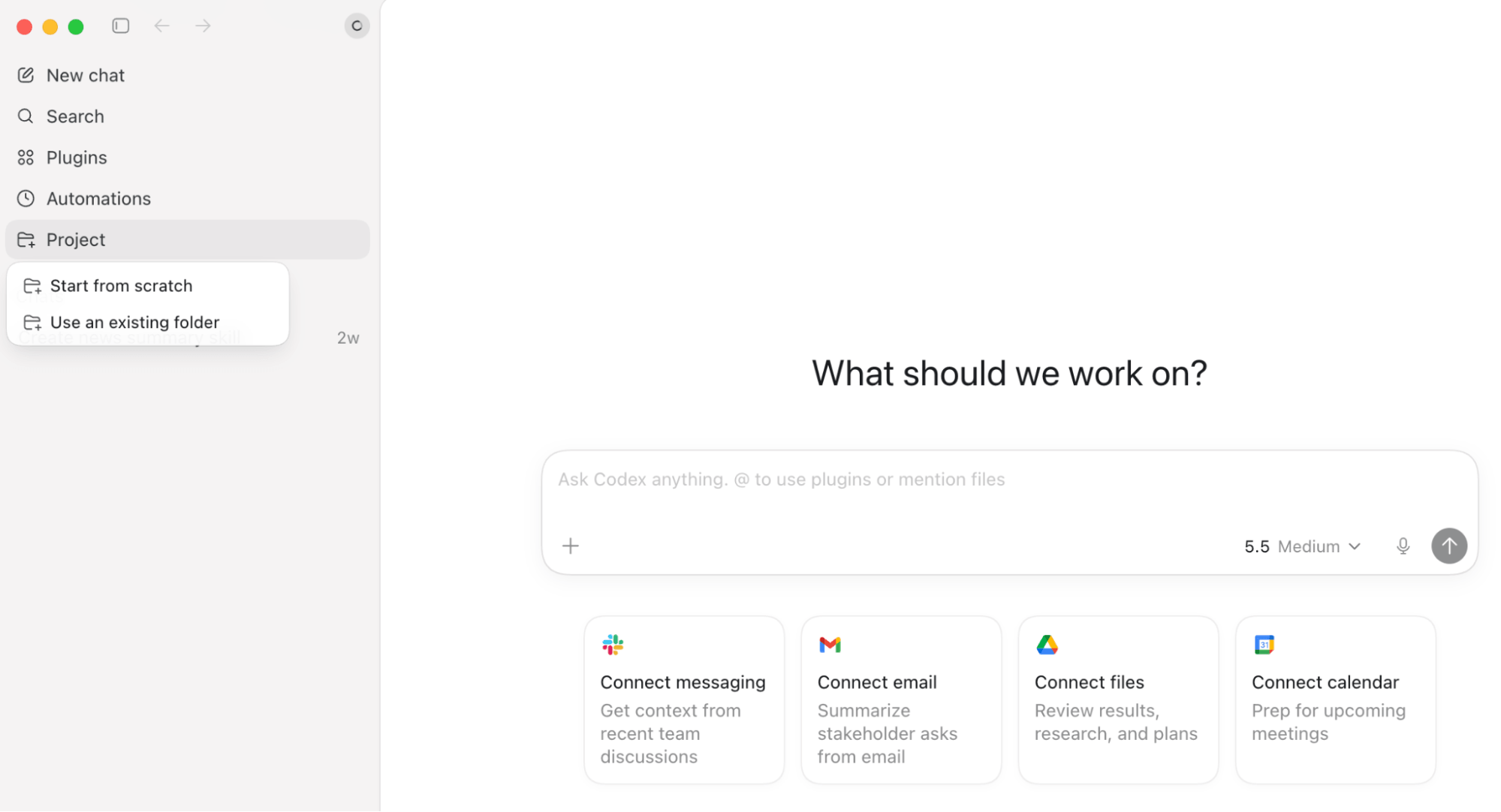
When you start a Codex session, you point it to a specific folder on your computer or on your local network. From there, Codex can read and modify any files within that folder and its subfolders. In the sidebar, you’ll see a thread for each folder you connect to Codex, in which you can see the full record of everything Codex has done inside that folder.
You can also connect Codex to your broader tech stack. For those in a Microsoft environment, that includes Outlook, Teams, calendar, SharePoint, and OneDrive. For Google users, it covers Gmail, Google Calendar, and Google Drive. Other integrations, such as Notion and Slack, are also supported.
What You Need to Know About Security
Use a Dedicated Folder: The most important security step for any new Codex user is creating a dedicated folder for Codex, rather than connecting it to a root drive or a critical working directory. Connecting at the root level gives Codex and any subagents it creates access to your entire network. Start with a scoped folder and expand carefully.
Go Deeper Than an Article Can Take You

Join thousands of small-business marketers at Social Media Marketing World — three days of AI, social media, and marketing strategy taught by world-class experts. April 1–3, 2027 in Anaheim.
Every session is pitch-free and built around tactics you can use yourself, no big team required. Your All-Access ticket includes an extra day of workshops, full access to AI Business World, and recordings of everything.
GET MY ALL-ACCESS TICKET — SAVE $900Understand Permission Modes: Codex offers three permission levels when you connect it to a folder:
- Default (Sandbox): Codex can only operate within the connected folder. This is the correct setting to start with.
- Auto Approve: Codex asks your permission before each individual action. More transparent, but it becomes tedious as automations scale up.
- Full Permission: Codex bypasses the sandbox and has unrestricted access to everything in the connected folder. Use this only after you’re fully comfortable with the tool’s behavior.
Karl recommends starting with default permissions and moving to full permissions once you understand exactly what Codex is accessing and why.
Prompt Injection: The Risk Most People Don’t See Coming: Prompt injection is the security concern Karl considers most critical for anyone building agents that browse the web. As website owners have become aware that bots visit their pages more often than humans, most are simply optimizing their content for AI consumption. But some embed hidden instructions designed to override your agent’s directives.
A compromised research agent could be instructed to extract contact information from your email, pull financial records, or install files on your machine, all while appearing to complete the task you assigned it.
Karl’s framework for staying protected:
- Keep your external research agent and your internal agent completely separate. The agent browsing the web should have no access to your internal files or write permissions.
- Restrict the research agent to read-only output in structured formats like JSON or Markdown, so a second agent can verify the results before they’re acted on.
- Use a second reviewing agent to confirm that the research agent’s output matches the expected format and contains no embedded instructions.
- Write your research agent’s instructions with explicit safeguards stating they cannot be overridden.
The goal is a clean separation: one agent gathers raw information from the outside world, another verifies its integrity, and only then does your internal workflow receive clean data to act on.
#2: Use Skills and Plugins to Let Codex Execute Recurring Business Processes
A skill teaches Codex how to do something. A plugin connects Codex to the tools, apps, and external systems it needs to run a skill.
Using Codex Skills
Codex has a pre-built skills directory accessible through the Plugins section of the app, or you can use the native Skill Creator skill to build your own.
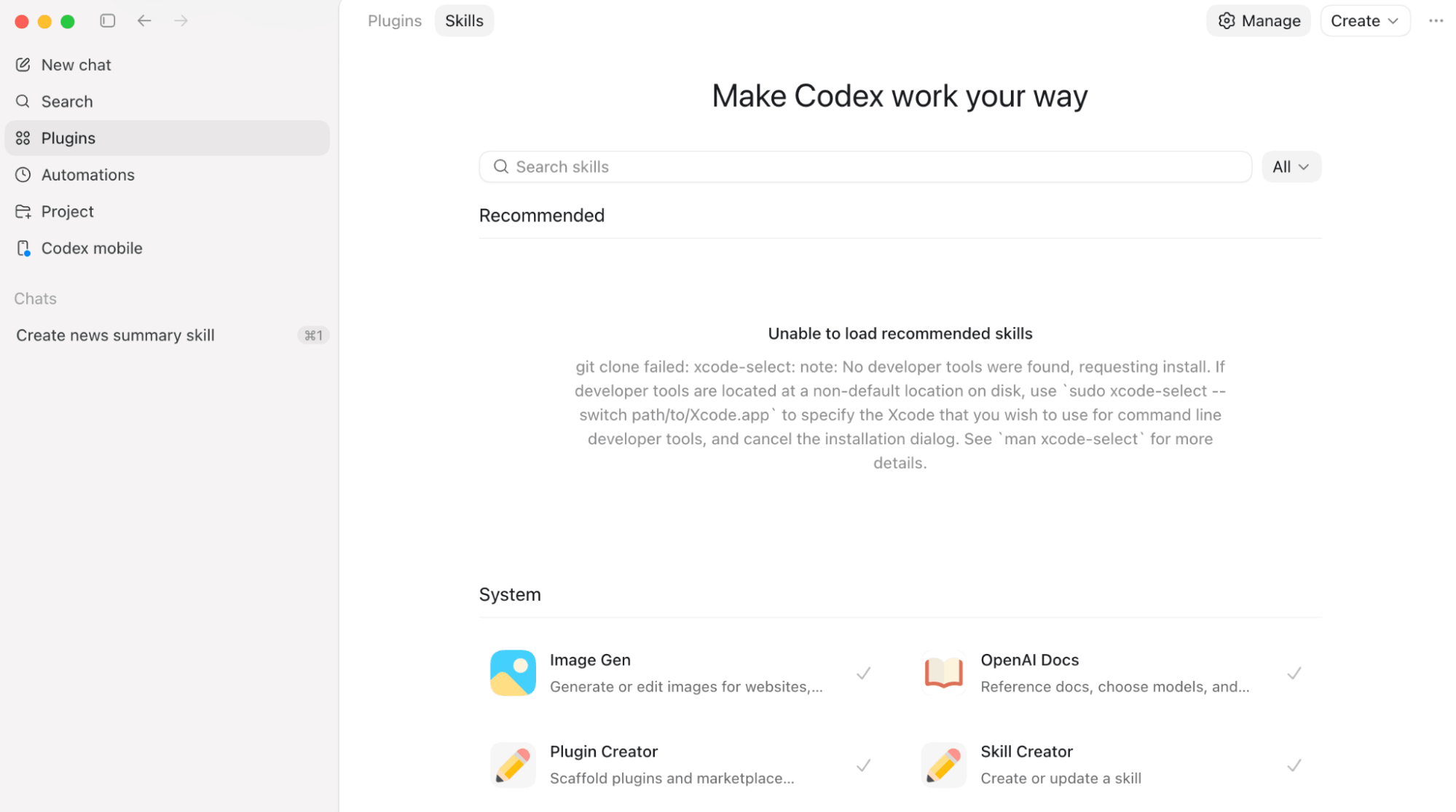
Because most business processes are repeatable, skills are extremely valuable if you want to save time. You use them to teach Codex your exact workflow by giving it the source data, the required format, and the expected output. Once built, you can call on that skill indefinitely.
One of the most immediately useful applications Karl describes is converting your company’s brand guide or writing style guide into a skill.
Instead of team members prompting AI from scratch and producing inconsistent, off-brand content, you create one standardized skill and deploy it across the organization. Any time someone uses AI to generate a document, they apply the brand skill, and the output reflects your company’s voice automatically.

Tired of Guessing Which AI Moves Matter?
New AI tools and strategies launch every week — and figuring out which ones matter takes hours you don't have.The AI Business Society filters the noise for you, with expert-led training you can put to work the same day — plus a community of marketers sharing what's actually working.
I'M READY FOR REAL AI RESULTSUsing Codex Plugins
Karl says the recently launched Chrome plugin is more valuable than almost any other plugin in the directory.
To set it up, first add the Codex extension from the Chrome Web Store to your Chrome browser. Then, inside the Codex desktop app, install the Chrome Plugin from the Plugins section.
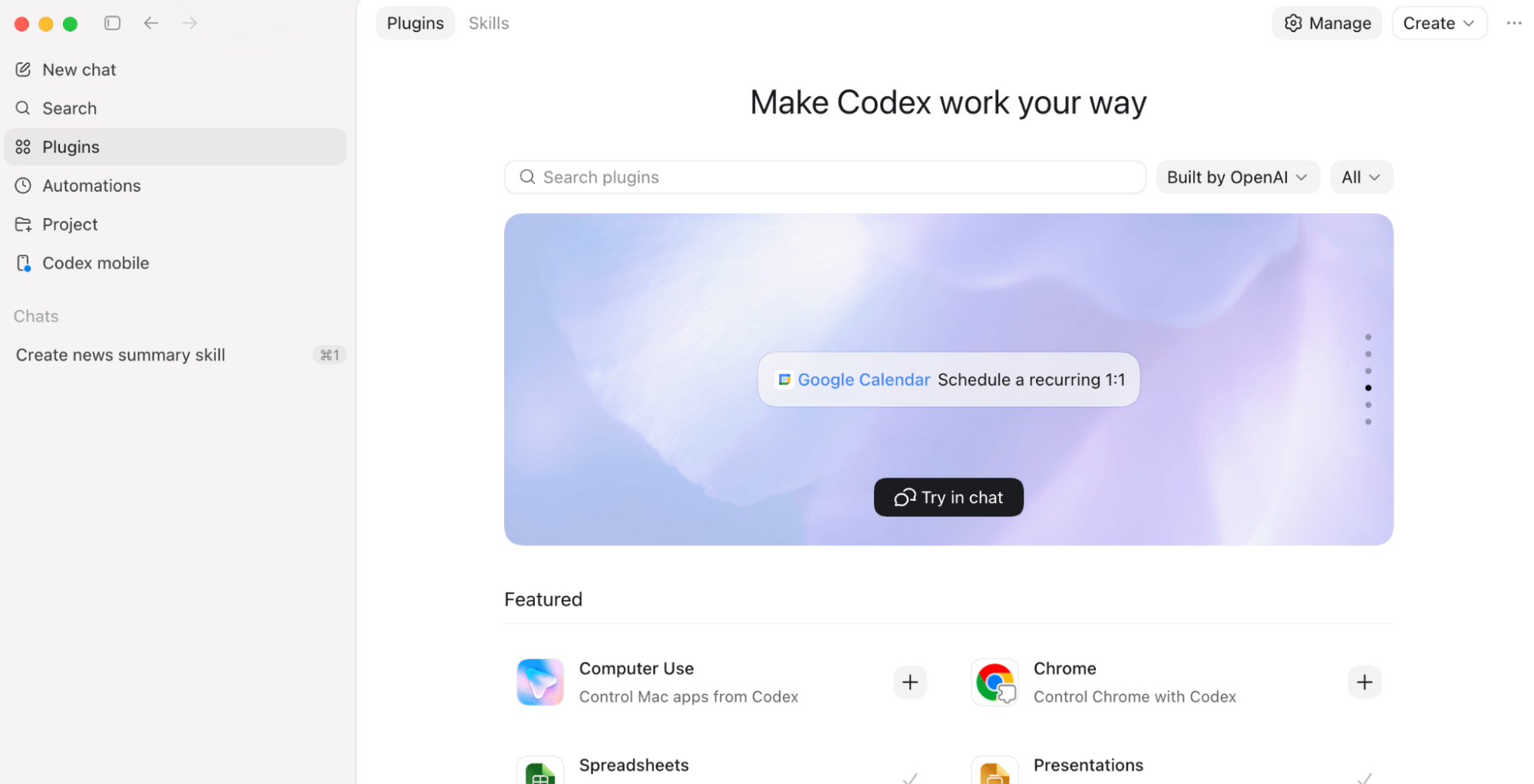
Once connected, Codex can control your Chrome browser directly: opening tabs, clicking buttons, filling forms, and navigating pages the way a person would. Installing this plugin gives Codex the ability to run automations with legacy software tools that lack an API.
Another useful plugin, Computer Use, allows Codex to open and control desktop applications directly on your Mac. Karl uses this as part of his morning workflow: Codex opens and reviews his Notion, and sends him a daily meeting brief every morning at 6:30AM via his iMessage.
If video generation is part of your workflow, the Remotion plugin generates animated videos from natural language instructions.
#3: Use Goals, Automations, and Heartbeats to Run Recurring Business Processes on a Schedule
A goal is what you want Codex to accomplish, an automation is the scheduled or ongoing workflow you want Codex to execute, and a Heartbeat is a recurring check-in you set that keeps the workflow alive and progressing.
Using the Codex /goal Command
One of Codex’s most significant features is the /goal command. Type /goal followed by a detailed description of what you want accomplished, and Codex will work independently, for hours if necessary, until it completes the goal (or runs out of processing credits).
The specificity of your goal description matters. Treat it like a detailed prompt by breaking down exactly what you want accomplished before executing. For example:
Summarize competitor AI news every morning at 8AM Pacific.
or
Monitor LinkedIn mentions of our brand every 4 hours.
Using Codex Automations and Heartbeats
For tasks that need to run on a fixed schedule, Codex supports two automation patterns.
A thread-based automation creates a new run or conversation context each time the automation executes. You can review past runs individually, which makes this approach useful for recurring reports, reconciliations, summaries, or workflows that require a clean record of each execution.
A Heartbeat runs inside the same ongoing thread, allowing Codex to retain conversational and workflow context across runs. You define an interval — such as hourly or every few hours — and Codex periodically wakes up, continues the task, and posts updates into the same thread. This format works especially well for monitoring, long-running research, iterative workflows, or tasks that benefit from accumulated context over time.
Karl uses Heartbeat automation during deep work sessions. Rather than interrupting himself to monitor email and Slack, he sets a Heartbeat to check his unread messages every couple of hours and send him a summary in iMessage with flags for anything that looks important.
#4: OpenAI Codex In Action: A Use Case
When a task involves multiple components, Codex can spawn several subagents that work in parallel or in sequence. Each subagent receives a specific, narrow job. Karl used this with a construction company client to tackle two separate workflow problems.
The first was invoice reconciliation.
The team was spending two to three full days every month manually checking hundreds of vendor invoices against an internal spreadsheet, looking for duplicates, outstanding balances, and discrepancies.
A previous ChatGPT workflow had cut that to two to three hours, but staff still had to upload invoices and spreadsheets manually each session.
With Codex, the team drops vendor invoices into named folders organized by vendor. Every Sunday at 10pm, an automation fires and spawns one subagent per vendor folder — five vendors means five subagents running simultaneously — each reconciling its invoices using a custom invoice reconciliation skill. By Monday morning, the individual vendor reports and the master summary will be ready. The full process now takes 15 to 30 minutes.
The second problem was daily field logs.
Each day, every foreman had to login to a legacy project management system, navigate through seven slow-loading clicks to find the right field log, export it to Excel, add formulas, and compare it against a reference spreadsheet — about 8 to 9 minutes per log.
Karl built a three-subagent Chrome Plugin workflow to handle it: one agent navigates the legacy system, filters to the correct log, and exports it to a designated folder; a second adds the required formula; a third updates the output against the reference spreadsheet.
The entire sequence runs unattended overnight for 18 to 20 minutes.
Karl Yeh is an AI strategist and the co-founder of 0260.ai, a consultancy that helps mid-sized traditional businesses successfully implement AI. He co-hosts the AI Accelerator for Business Show. Follow him on TikTok.
Other Notes From This Episode
- Connect with Michael Stelzner @Stelzner on Facebook and @Mike_Stelzner on X.
- Watch this interview and other exclusive content from Social Media Examiner on YouTube.
Listen to the Podcast Now
This article is sourced from the AI Explored podcast. Listen or subscribe below.
Where to subscribe: Apple Podcasts | Spotify | YouTube Music | YouTube | Amazon Music | RSS
✋🏽 If you enjoyed this episode of the AI Explored podcast, please head over to Apple Podcasts, leave a rating, write a review, and subscribe.
Stay Up-to-Date: Get New Marketing Articles Delivered to You!
Don't miss out on upcoming social media marketing insights and strategies! Sign up to receive notifications when we publish new articles on Social Media Examiner. Our expertly crafted content will help you stay ahead of the curve and drive results for your business. Click the link below to sign up now and receive our annual report!

Where Do You Actually Stand With AI?
Most marketers use AI, but they don't know what's holding them back from real results.
Our 3-minute quiz pinpoints the one gap keeping you stuck — and gives you the exact next step to fix it.
GET MY RESULTS






