 by
by  Are you ready to respond if someone pretends to be you on social media?
Wondering how to protect your customers and brand from a social phishing attack?
From erroneous links to outright brand impersonation, social phishing is becoming more frequent.
In this article, you'll discover four ways to protect your business from social phishing scams.
What Is a Social Phishing Attack?
Phishing is a criminal activity in which scammers target Internet users and your customers by imitating your legitimate company or brand. These attacks lure prospects and customers to provide sensitive data that can lead to the theft of their identity. Phishers might use a company's logo, a similar URL, or other markers of its identity to convince people they're the real company.
To illustrate, check out these two tweets from the official Equifax social account. The first tweet has the URL equifaxsecurity2017.com, which leads to a real website set up by the credit-reporting company.
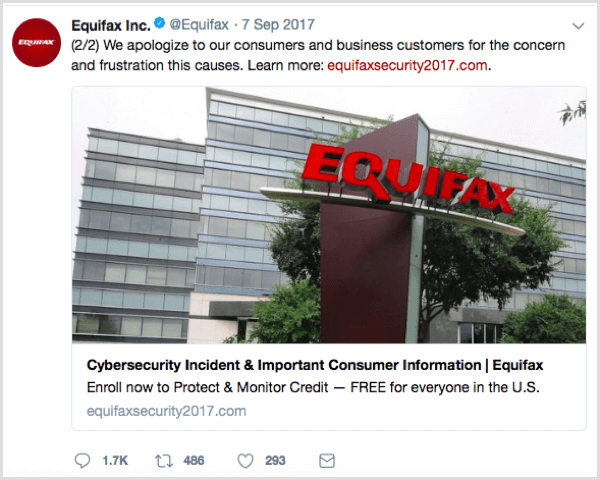
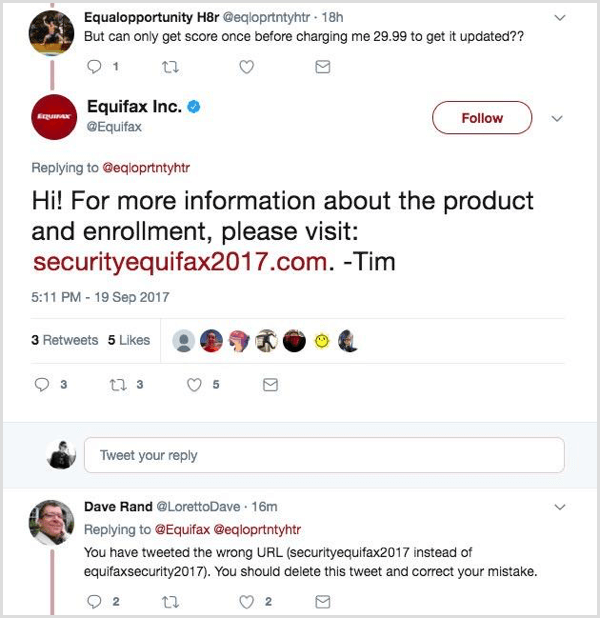
The second tweet (inadvertently tweeted from the genuine Equifax account) has the URL securityequifax2017.com, which could have linked to a phishing site. The subtle changes in the URL make it hard for customers to catch.
Instead, the URL in the second tweet led to a site created by Nick Sweeting, who wanted to point out how easy it is to create a phishing website that fools people into sharing their information.
Phishers target social networks because so many people use them. In the U.S., 81% of people are on some form of social media platform. The impact on businesses and customers is likely to increase. A 2017 phishing report by RiskIQ revealed a 100% increase in phishing via social media from Q3 to Q4.
As a social media manager, you play a crucial role in building your company's brand, handling customer service issues, and executing marketing plans. The last thing you need is to have social phishers pretending to be your brand to scam your customers out of sensitive information or funds. This article offers tips to help protect your identity and report social imposters.
#1: Monitor Your Brand
Having monitoring and listening systems in place will give you an eagle-eye view of who's mentioning your brand name online and in what context. Google Alerts is a great tool for monitoring social media mentions of your company's brand and business name.
3 Days of World-Class Training—Zero Travel!

Couldn't make it to Social Media Marketing World and AI Business World this year? Get all of the great content at a fraction of the price with a Virtual ticket.
That’s full access to recordings of every keynote, workshop, and session—the ones people travel thousands of miles to see. Don't wait. Get your Virtual ticket and enjoy actionable content that you can watch anytime, anywhere.
When you set up a Google Alert for a word or phrase, you receive an email when someone mentions it online, allowing you to find mentions you might otherwise miss. After you receive an alert in your inbox, you can see if this mention is from your actual company or scammers. When you set up the alert, you can choose whether to receive alerts weekly, daily, or as they happen.
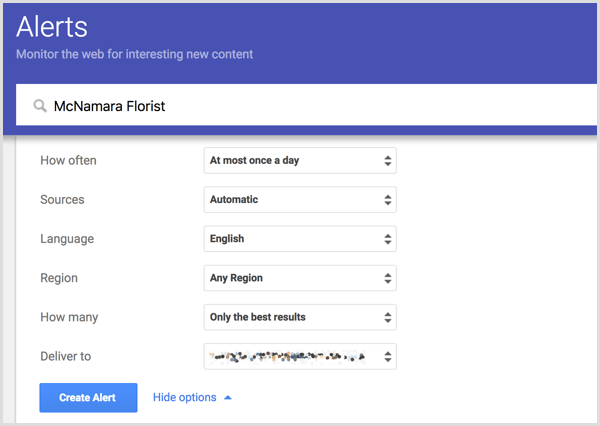
The best part? Google Alerts are super-easy to set up and totally free. Enter the term you want to monitor in the field at the top. Then choose your settings for the frequency, source, language, and so on. When you're done, click Create Alert. To edit your settings, simply return to the Google Alerts page and click the Edit icon.
You may also want to use a tool that specifically monitors social media platforms. For example, Mention and Hootsuite are fee-based tools for monitoring your brand name and reputation across social media platforms. Whether you use these tools depends on your needs.

Want to Unlock AI Marketing Breakthroughs?
If you’re like most of us, you are trying to figure out how to use AI in your marketing. Here's the solution: The AI Business Society—from your friends at Social Media Examiner.The AI Business Society is the place to discover how to apply AI in your work. When you join, you'll boost your productivity, unlock your creativity, and make connections with other marketers on a similar journey.
I'M READY TO BECOME AN AI-POWERED MARKETERFor instance, say a lot of your customers use social media to get help from customer support. These tools can help you find an identity phisher who's pretending to be a customer support agent on Twitter and Facebook. People who don't verify that your company owns the account may end up submitting sensitive information.
#2: Protect Your Social Community With HTTPS
The HTTPS lock shown in a browser bar confirms that traffic to and from a website is encrypted and the only people who can read that traffic are associated with that website. Enabling HTTPS on your site will add an extra layer of security for you and your customers to keep user communications, identity, and web browsing private.
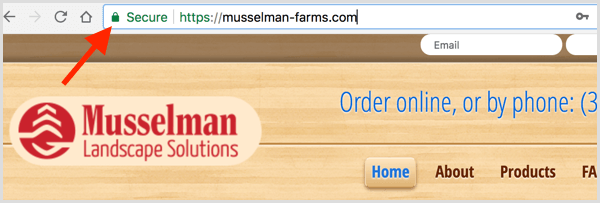
Additionally, as you curate content for your audience, be vigilant about verifying that each URL you share is from a site that has enabled HTTPS. Tell your customers to look for the lock next to any URL address before they submit any sensitive data, such as a username, password, or banking information. Also, encourage them not to enter sensitive information on an unlocked site.
#3: Report Social Phishing Scams
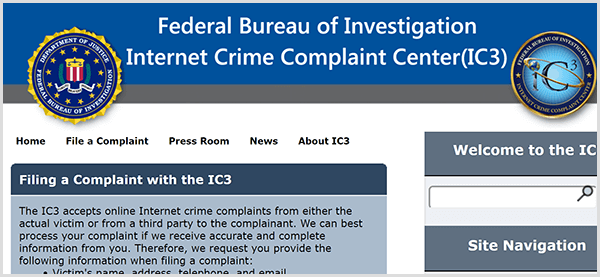
If you find a phisher impersonating your business or brand, you can take action to protect your brand and your social media audience. First, contact law enforcement. If someone is impersonating your business, it's a big deal. In the United States, report the fraudulent activity to the FBI Internet Crime Complaint Center.
You should also contact the social platform about the account impersonating your brand. Each major social platform offers support for shutting down any accounts that are impersonating your business or brand. The following links point to the current support page for each social media platform:
Each week, set time aside to check for variations of your brand name and report any fake profiles.
#4: Educate Your Social Team
As a social media manager, you might have all of the knowledge and tools to keep your company profiles safe, but what about your co-workers? Teach everyone on your social team (and in your company) to recognize social phishing and understand how damaging a phishing scam can be for the company, its customers, and your social audience.
To help your co-workers spot fake handles, make sure everyone has a list of your company's social media user handles. Also, encourage your staff not to click links sent to them through social accounts, even from friends, if the link seems suspicious. This will stop them from inadvertently downloading malware that can compromise customer accounts and sensitive company information.
To protect your accounts from hackers, make a policy that social media login credentials are stored securely in a password keeper and that the logins are updated regularly.
Conclusion
As a social media manager, you can help keep your company, customers, and co-workers safe from phishers. Learning a few signs to watch out for, pausing before you click, and informing others will go a long way.
You can also use tools to monitor mentions of your company, and report to the FBI and social media platforms anyone impersonating your business to get customers' important information.
What do you think? Have you used any of these tools or tactics to prevent phishers? How have they worked for you? Please share your thoughts in the comments.
Curious About How to Use AI?
Our newest show, AI Explored, might be just what you're looking for. It's for marketers, creators, and entrepreneurs who want to understand how to use AI in their business.
It's hosted by Michael Stelzner and explores this exciting new frontier in easy-to-understand terms.
Pull up your favorite podcast app and search for AI Explored. Or click the button below for more information.







