by
by Wondering if your business should be marketing on Instagram? Curious whether your marketing is attracting the right Instagram audience?
In this article, you’ll discover six ways to research and analyze your target audience on Instagram.
What Can You Learn About Your Target Market From Instagram Research?
Making time to conduct market research is essential for getting to know your customer base and making sure your products and services align with consumer demand and industry trends. Ideally, you’ll do a lot of of your own market research before your business ever opens. But it’s helpful to update your findings periodically, especially if you’re planning to launch new offerings.
Instagram is one of many sources you can use for conducting market research. This social media channel can uncover valuable information like:
- Whether your current audience matches your target customer base for specific products, services, and offers
- Audience size and demographic details for your target market, even if they are potential customers and don’t follow your Instagram account yet
- Level of brand awareness your target audience already has of your business, products, or services
- Sentiments and preferences among current customers, including answers to specific questions about your brand or your offerings
- Trends in consumer behavior and across the industry as a whole, including competitor activity
As helpful as Instagram can be for market research, it does have some drawbacks. Because Instagram can only provide data from its users, the insights you draw from it will naturally be limited in scope. Unless your team uses Instagram marketing exclusively, it’s a good idea to research multiple sources and compare findings.
To get the most data from this channel, it’s helpful to use both passive (i.e., reviewing insights) and active (i.e., asking questions) tactics. Be prepared to invest time in analyzing the information you collect so you can get actionable insights to guide your decision-making.
How to Do Market Research on Instagram
Together, the Instagram app and Meta Business Suite offer several interesting avenues for market research. Let’s look at six options you can start using now to learn about brand recognition, consumer's buying habits, and more.
#1: Check Instagram Audience Insights
Every product line or service offering has a target audience. But just because your brand wants to appeal to a specific segment doesn’t mean that’s who ultimately takes an interest in your business or follows your Instagram account.
Should you completely rethink your target market if your Instagram followers turn out to be markedly different from your intended target audience? Probably not. But reviewing your audience insights may prompt you to expand your targeting and reach a new, more lucrative customer base.
Meta Business Suite Insights
In Business Suite, go to the Insights dashboard and click on the Audience tab. On the Current Audience tab, Business Suite breaks down the demographics of your existing Instagram followers including age, gender, and location.
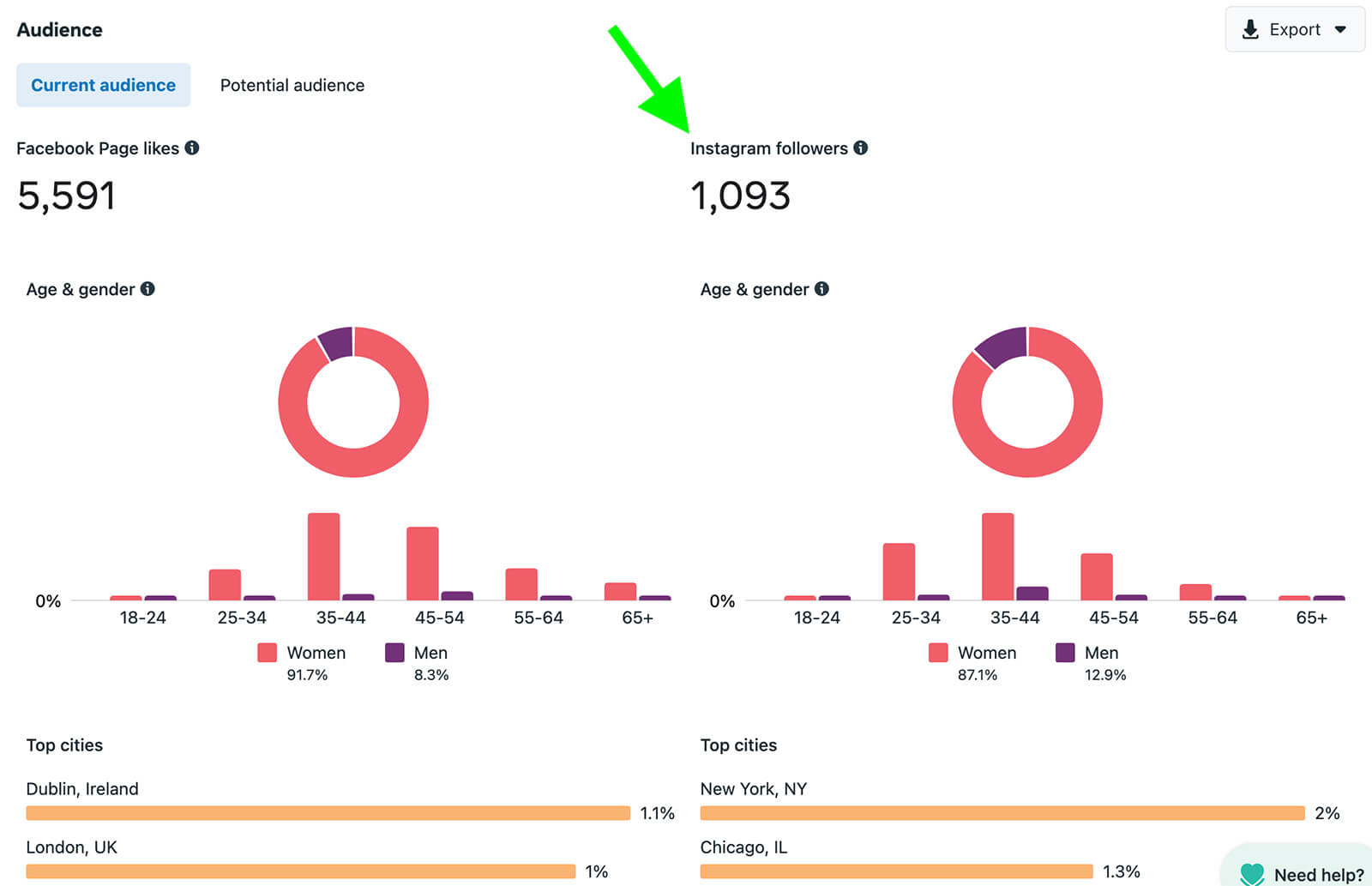
How do the age and gender breakdowns compare to your brand’s buyer persona? Do they match perfectly or is a specific segment more prominent on Instagram? If you’re seeing similar patterns on other channels—like in your website analytics—you may want to work with your marketing team to review your target market.
Scroll down to review the top cities and countries for your Instagram followers. Some locations may match cities or regions you’ve already been targeting with paid or organic social media content. But others may alert you to new areas to explore and new opportunities to build a localized customer base.
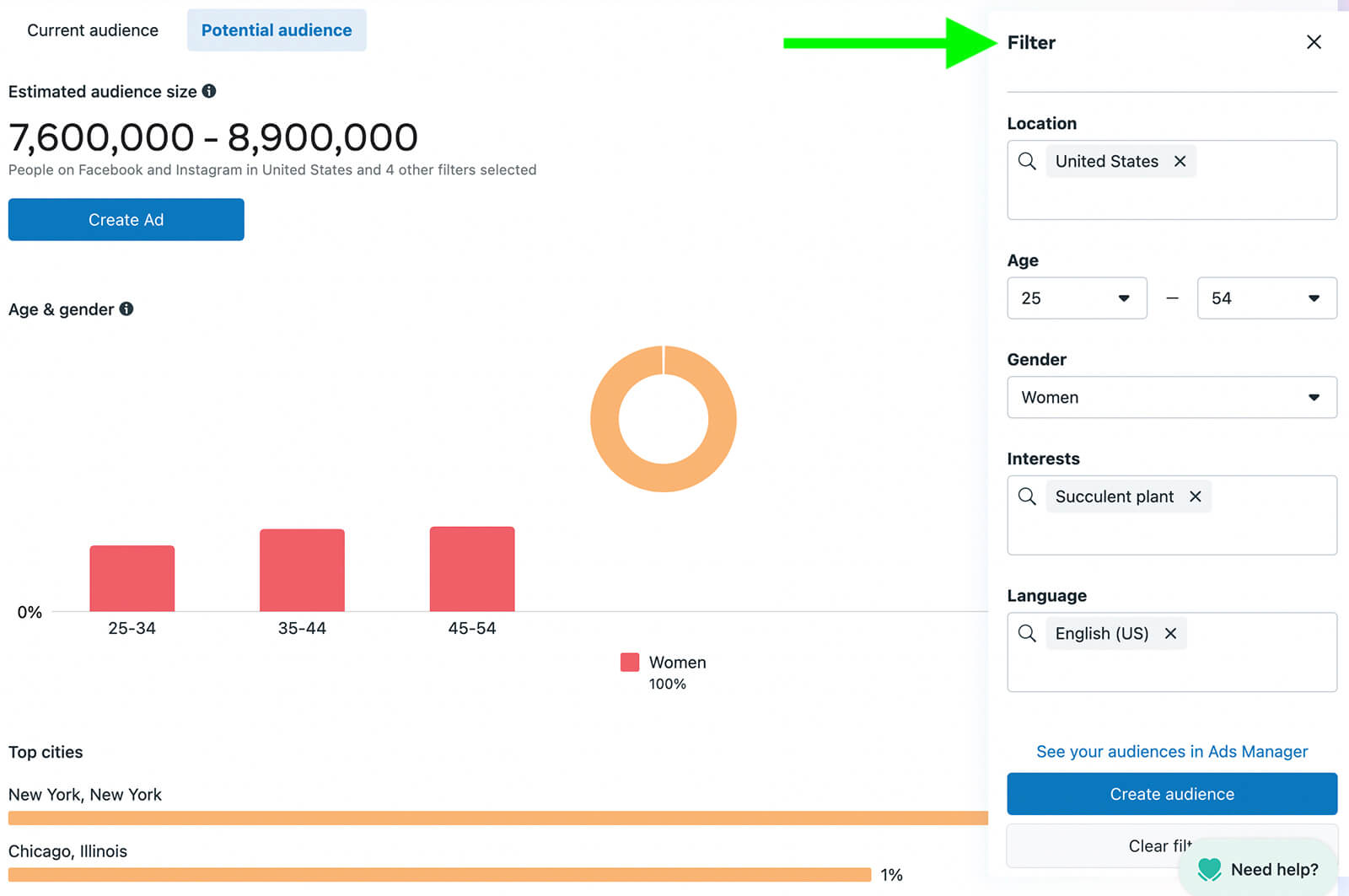
Wondering how large your addressable market is across Meta platforms and what traits those users share? Go to the Potential Audience tab to learn more about Instagram users who don’t necessarily follow your account yet.
Ready to Supercharge Your Marketing Strategy?

Get expert training and an unbeatable conference experience when you attend Social Media Marketing World—from your friends at Social Media Examiner.
Broaden your reach, skyrocket your engagement, and grow your sales. Become the marketing hero your company or clients need!
🔥 Save $500 on an All-Access ticket. Sale Ends Tuesday! 🔥
GET THE DETAILSUse the filters to plug in some of the characteristics you already know. Then enter interests that relate to your business and use the estimated audience size to gauge your potential market. Review the top cities and interests to identify new ways to reach more members of your target audience.
Instagram App Insights
In the Instagram app, go to your account and tap the Insights tab. Scroll to the Insights Overview section and review each of the three sections separately. Then compare what you’ve found.
Start with the Total Followers tab. Review the age, gender, and location breakdown for your followers.
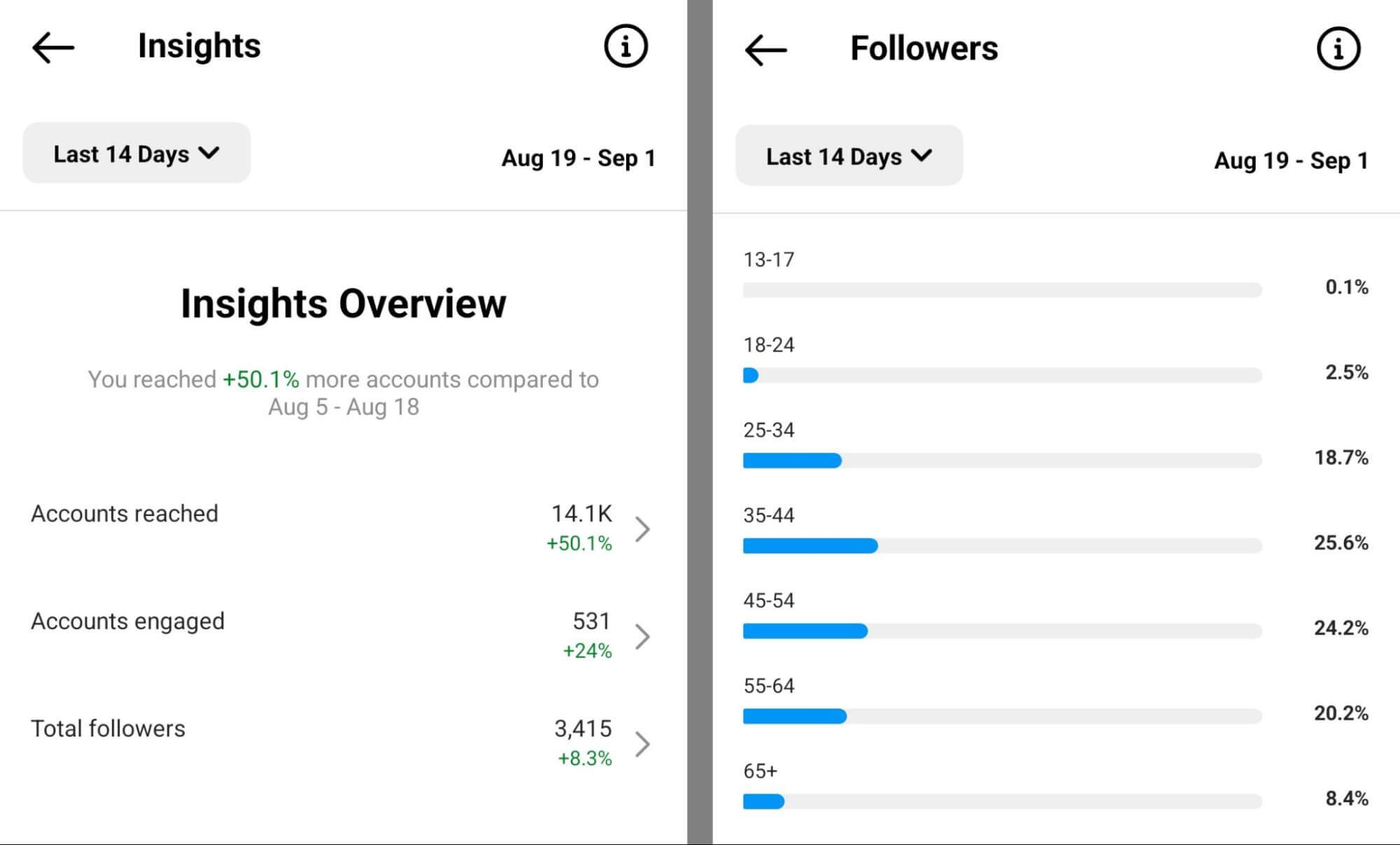
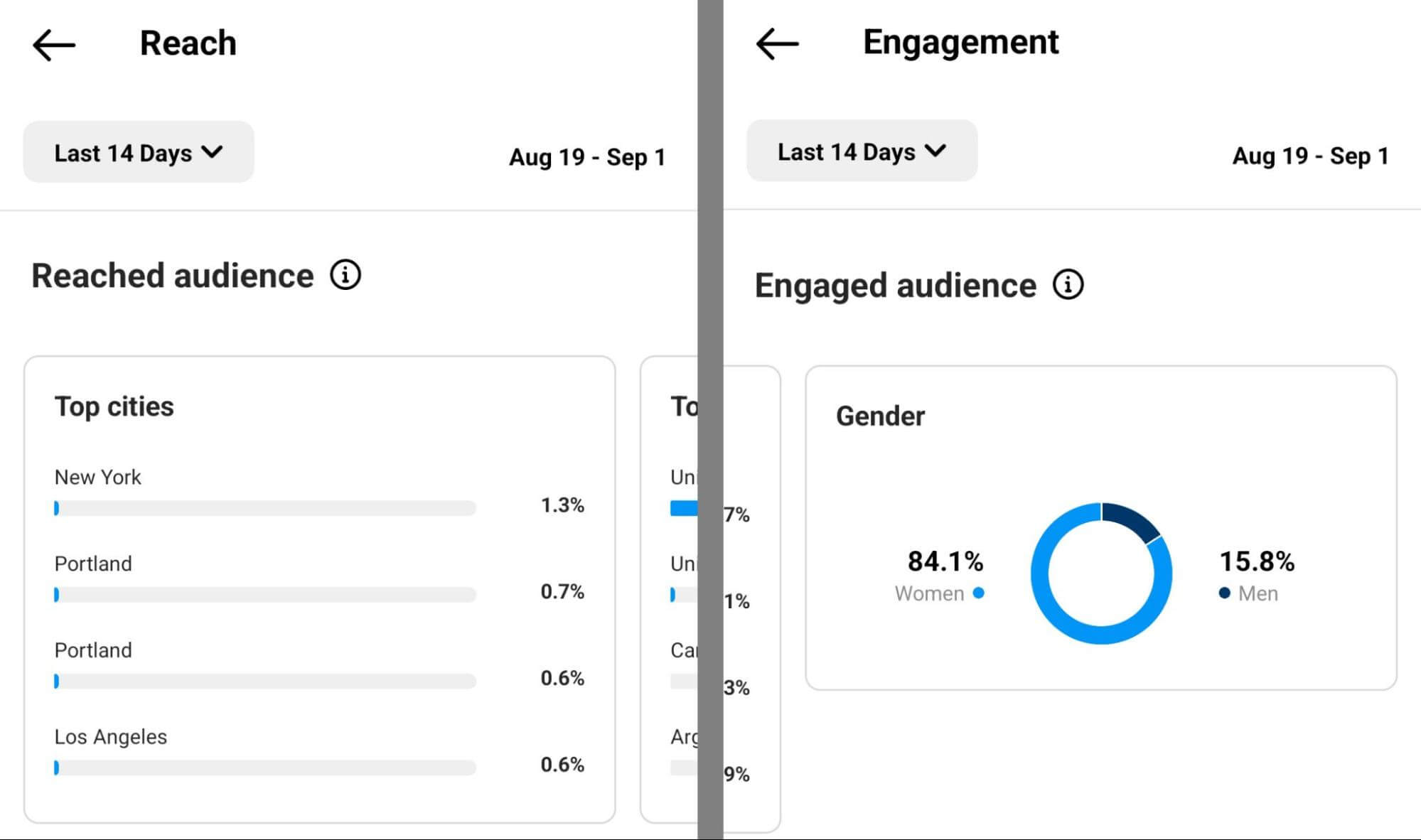
Compare that data to the related breakdown on the Accounts Reached tab. Where are you reaching people and how many aren’t following you yet?
Then compare your findings to the Accounts Engaged tab, which reflects the users who are most interested in your business and may show the most intent to purchase. Who are the most engaged audience segments and how is your business actively marketing to them?
#2: Evaluate Instagram Content Analytics
Demographics and interests can tell you a lot about your current and potential audience on Instagram. But seeing what they respond to and how they react can give you even more nuanced insights.
While you’re in the Instagram app, scroll down to view content analytics on the Accounts Engaged tab. First, take a look at the total number of interactions for each type of content. Are users leaving a lot of comments on your content or are they more likely to save or share?
Next, identify the posts, stories, reels, and lives that generated the most engagement.
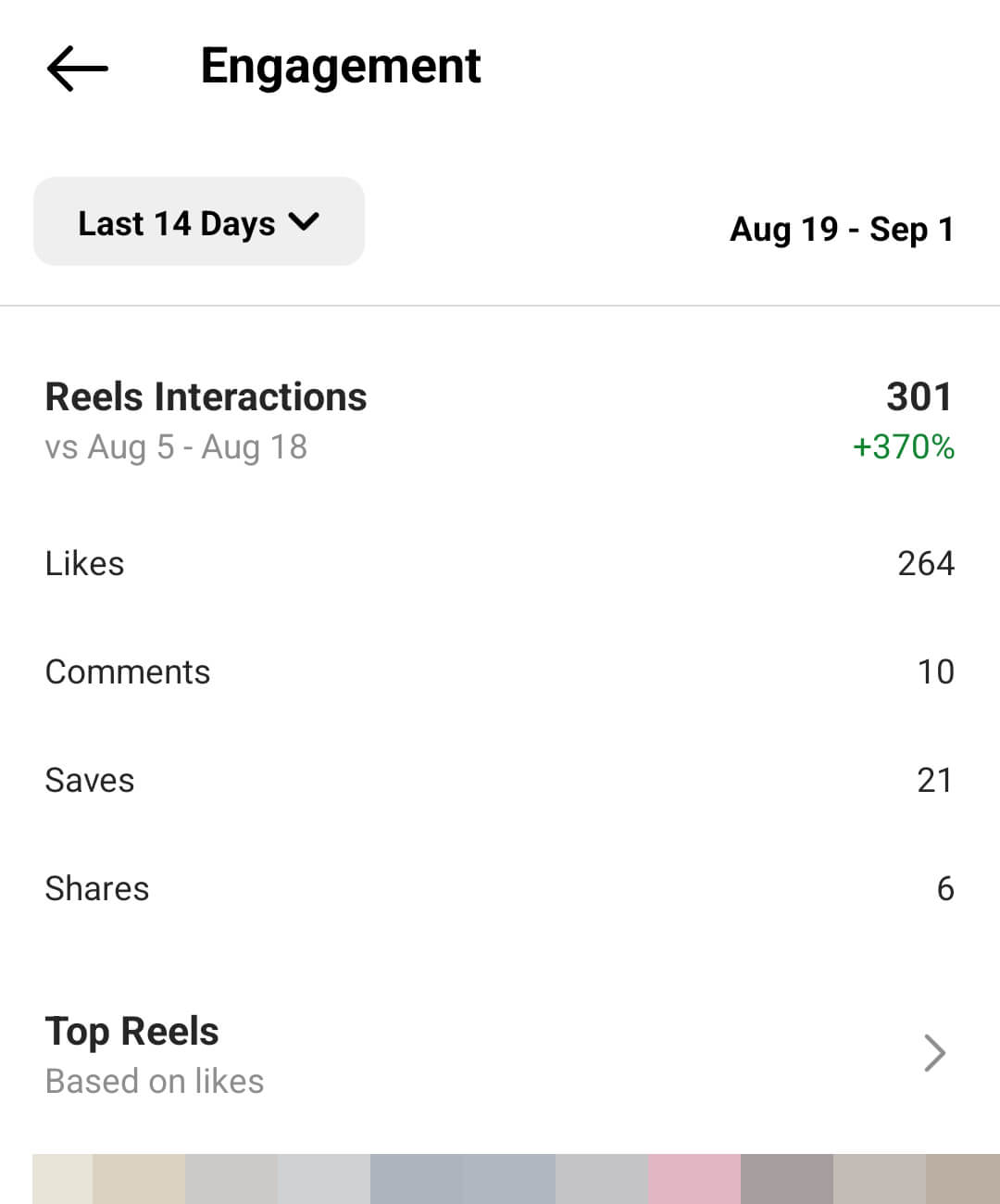
What kind of content or topics do users respond to most often? With this data, you may be able to hypothesize about demand for certain products or interest in specific regions.
#3: Review Instagram Comments and DMs
Instagram analytics can help you collect a lot of helpful data quickly but this information isn’t very detailed. Analyzing comments and DMs takes a lot more time and manual review but it can give you much more nuanced results.
Note that some third-party intelligence tools can track and assess Instagram engagement automatically. But for our purposes, we’ll focus on native tools that every business can access at no cost.
In Business Suite, open the Instagram Comments tab in your inbox. Find your top-performing posts and read through the comments to gauge the context. Chart the ratio of positive, negative, and neutral comments so you can track the overall sentiment.
Do the same for your DMs. To sort and filter your DMs efficiently, consider creating a labeling system. For example, you can add sentiment labels or indicate if users are current customers or high-intent prospects. Then you can tally and compare segments faster.
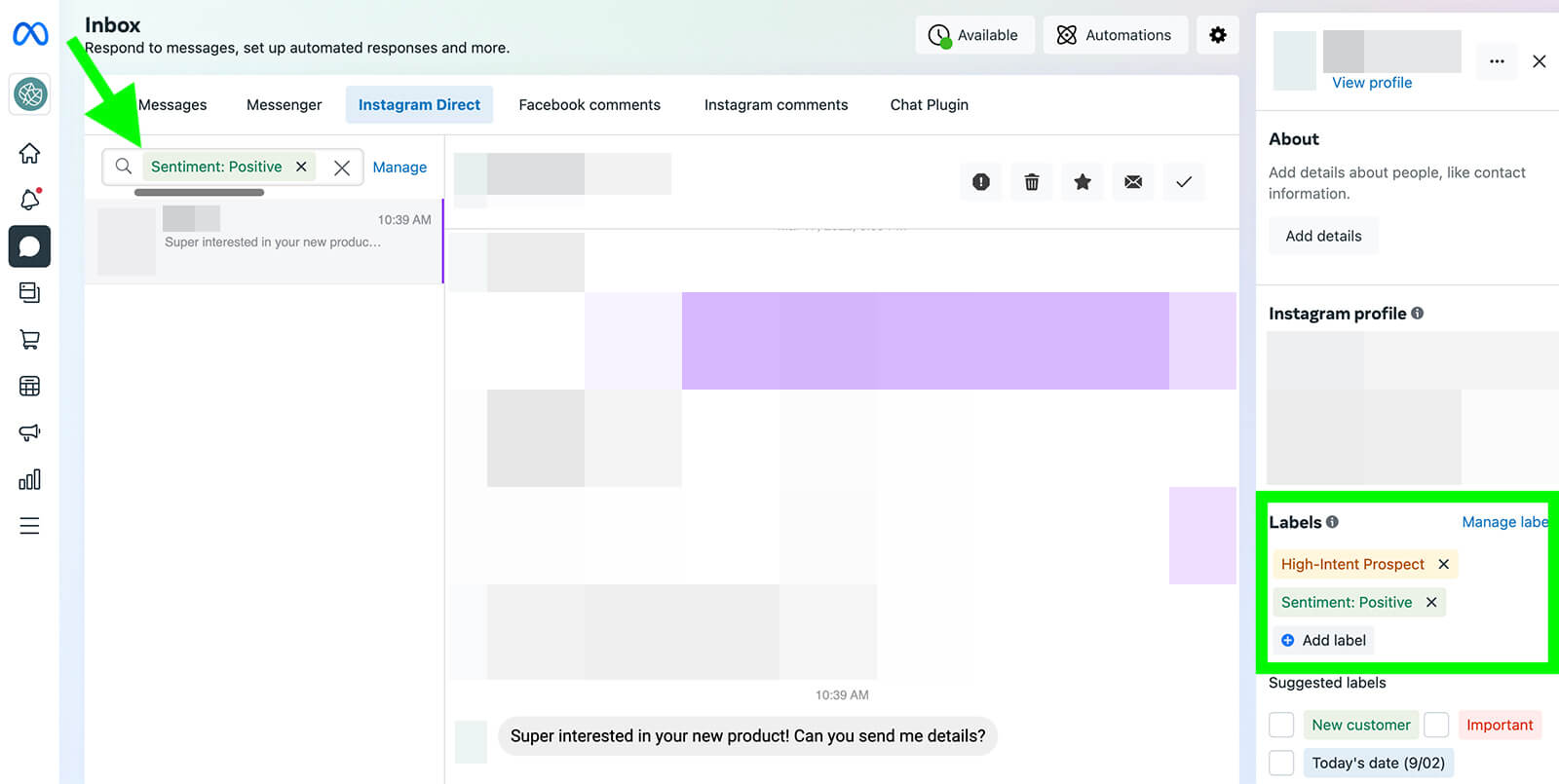
With this data, you can get a general idea of how people feel about your brand and offerings. But keep in mind that comments and DMs only reflect what people say when they speak directly to your brand so you may not be able to assess the full range of customer sentiment.
AI Is No Longer Optional for Marketers—Ready to Master It?

Join over a thousand forward-thinking marketers at AI Business World—a conference-in-a-conference at Social Media Marketing World.
Get two days of practical AI training where you'll discover:
✅ Systems that 3x your output—leaving time for strategy and creativity
✅ Proven strategies you can deploy right away—no guesswork, no wasted budget
Become the indispensable AI expert your company needs.
GET YOUR TICKETS—SAVE $150#4: Analyze Tags and Brand Mentions
Instagram may not have an official review platform. But that won’t prevent your customers from unofficially reviewing your products and services or expressing opinions about your brand across the platform. If you take the time to find mentions and tagged posts, you can get a more complete picture of how your target audience views your brand.
In the Instagram app, go to your profile and tap to view the Tagged tab. Here, you’ll see all of the Instagram posts where users tagged you including user-generated content that features your products and services.
Mentions tend to get buried quickly in the Instagram notification feed but you can easily find them in Business Suite. Go to the Post & Stories dashboard and navigate to the Mentions & Tags tab. Use the drop-down menu to select Instagram and review all of the posts that mention your brand in the caption.
Similar to comments and DMs, tags and mentions require manual review.
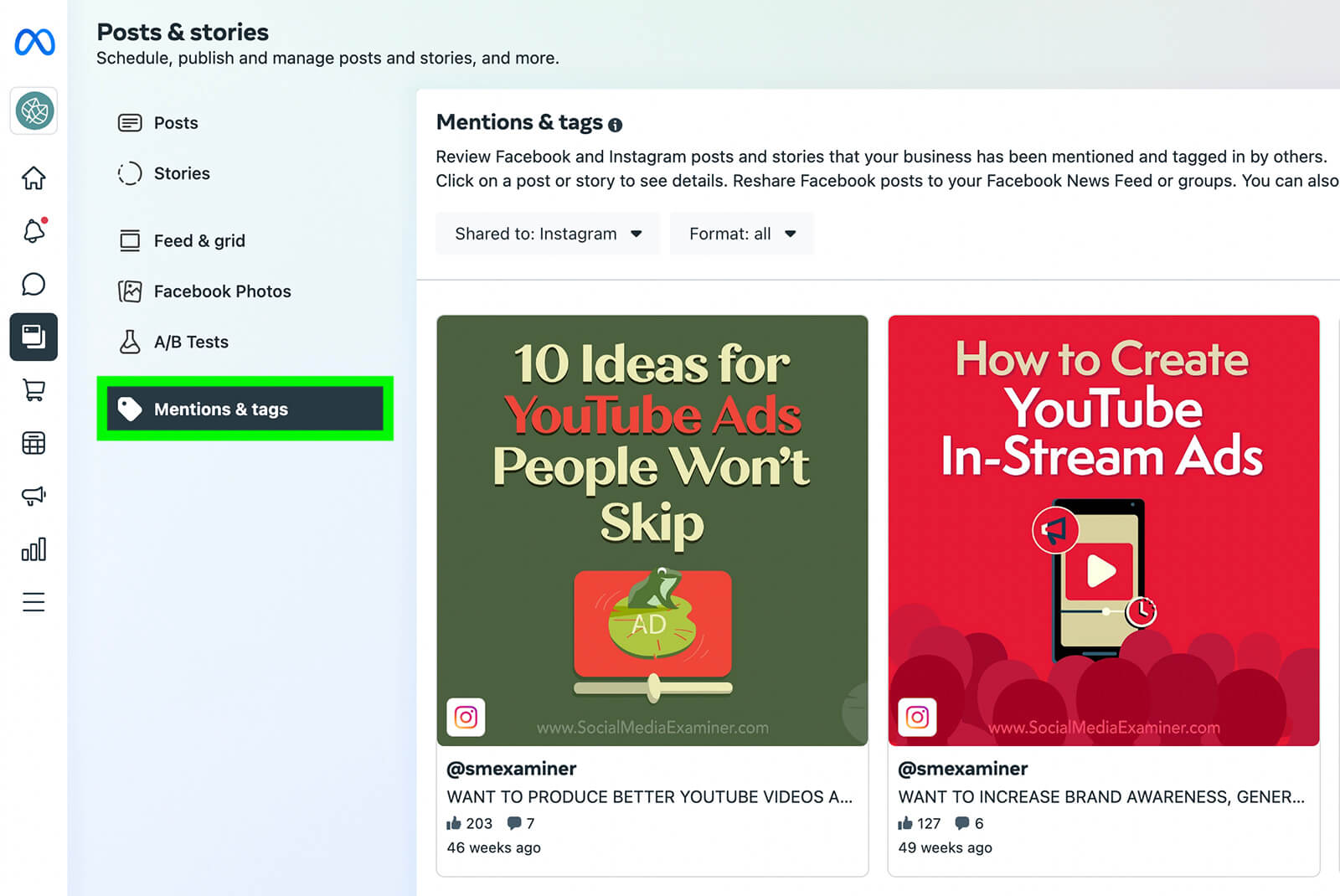
But if Instagram users are talking about your brand, it’s critical to understand what they’re saying. To inform your market research, you might chart:
- Dates of tags and mentions so you can see spikes in activity and patterns over time
- Sentiment of tags and mentions so you can track positive and negative reviews or assess other purposes like complaining or questioning
- Products or services mentioned so you can monitor awareness of various aspects of your brand
- Users who mention or tag your brand so you can see the types of influencer communities your brand has already reached
#5: Search for Relevant Hashtags
When users want your brand to see what they have to say, they’re more likely to tag your account or mention your @username. But if they’re posting less candidly, Instagram users may not mention or tag your brand. That’s why it’s important to search for hashtags and other relevant terms in captions and comments.
Use Instagram’s Explore tab to search for content related to your brand. While it’s helpful to start by searching your brand name and branded hashtags, it’s a good idea to go beyond the basics. For example, you might search for your most popular products or common nicknames and misspellings of your brand name.
Don’t stop there. You can also use Instagram’s Explore tab to do competitor and industry research—both of which feed into your market research. For example, you can search for Instagram posts about your competitors and gauge customer sentiment. Then you can get a better sense of how your brand compares and where it stands in the industry.
Searching for industry terms and hashtags can also help you understand consumer trends and emerging behaviors. If you can identify growing demand in a certain niche, you may even be able to take advantage of opportunities to grow your brand.
The more data you collect, however, the tougher it becomes to manage it and glean insights in the Instagram app. If you’re serious about using Instagram for social listening and market intelligence, it’s a good idea to invest in a third-party platform that can run searches and provide analytics for your team.
#6: Ask Your Instagram Followers
So far we’ve focused on analyzing content and audiences that already exist. But Instagram also has some interesting options for asking prospects and customers about your brand, products, and services. Let’s look at how you can ask for opinions on Instagram.
Market Research in Instagram Stories
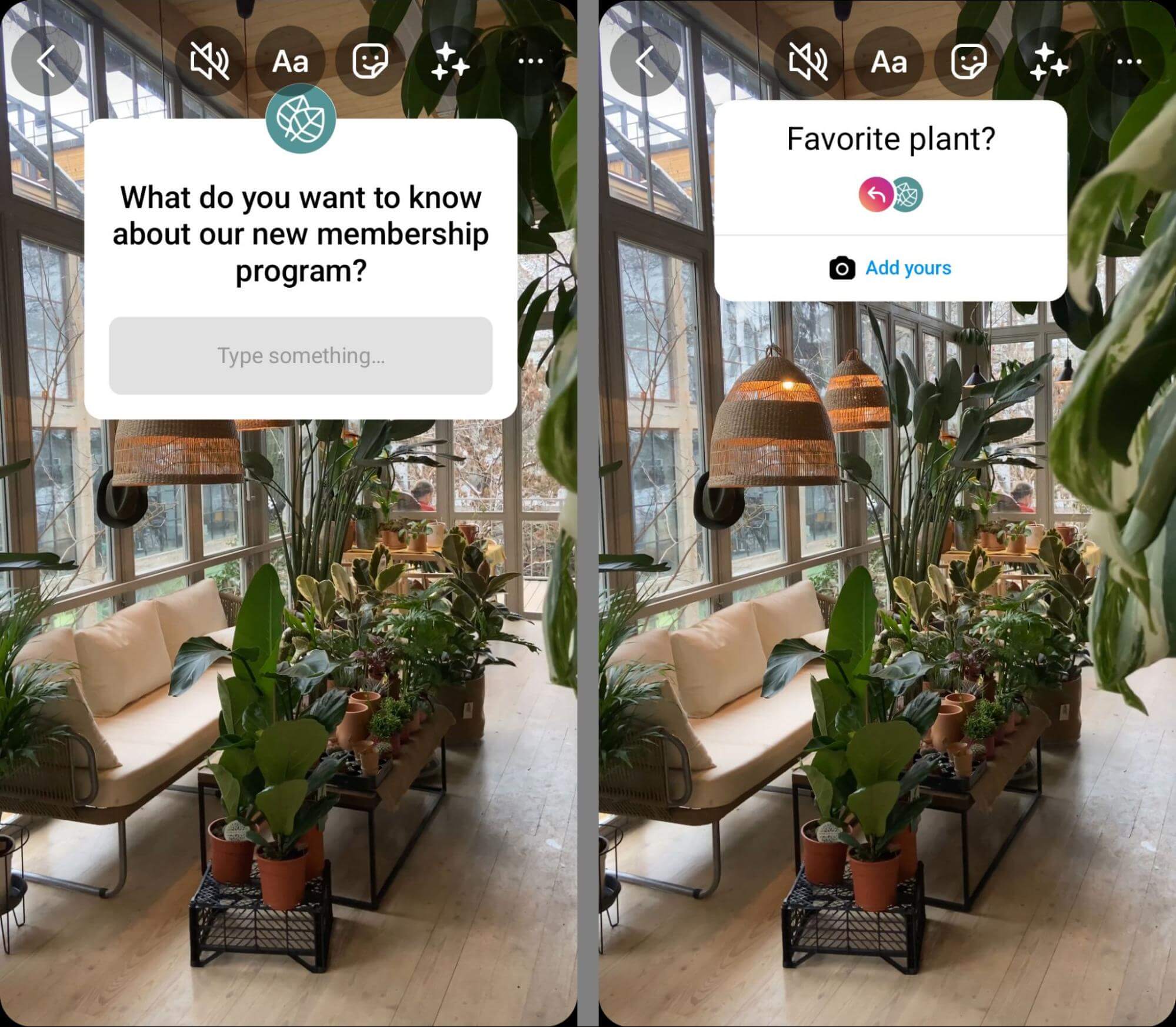
When you create stories, you can use interactive stickers to prompt engagement. For example, you can use the questions sticker to get followers to ask about your offerings. In addition to answering the questions, you can use the insights to assess brand awareness and demand.
Want to find out whether customers prefer one option over another or if followers fit your ideal customer profile? You can use the poll or emoji slider sticker to get users to share responses or state preferences. With the poll option, you can give users multiple responses to make data collection easy.
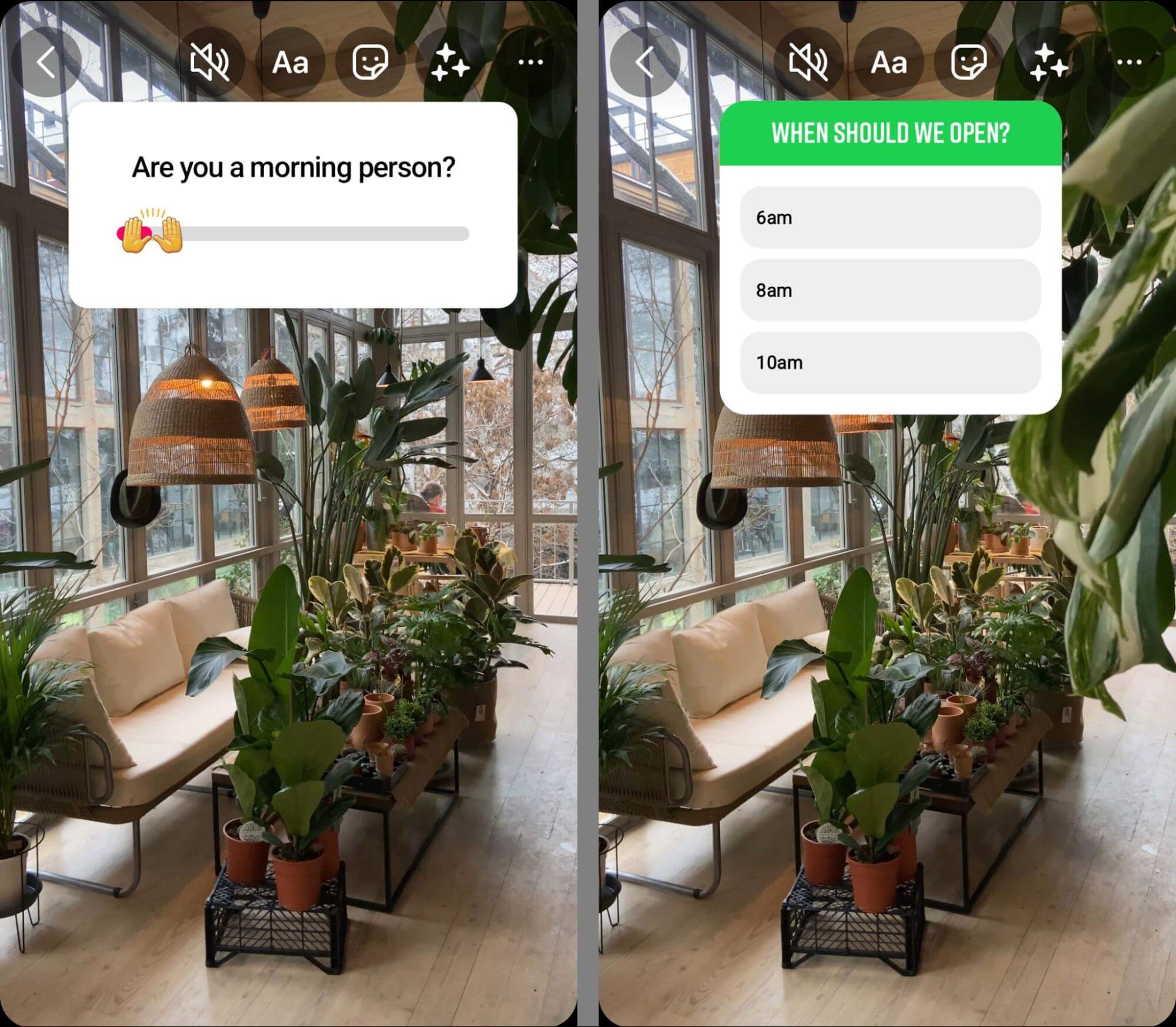
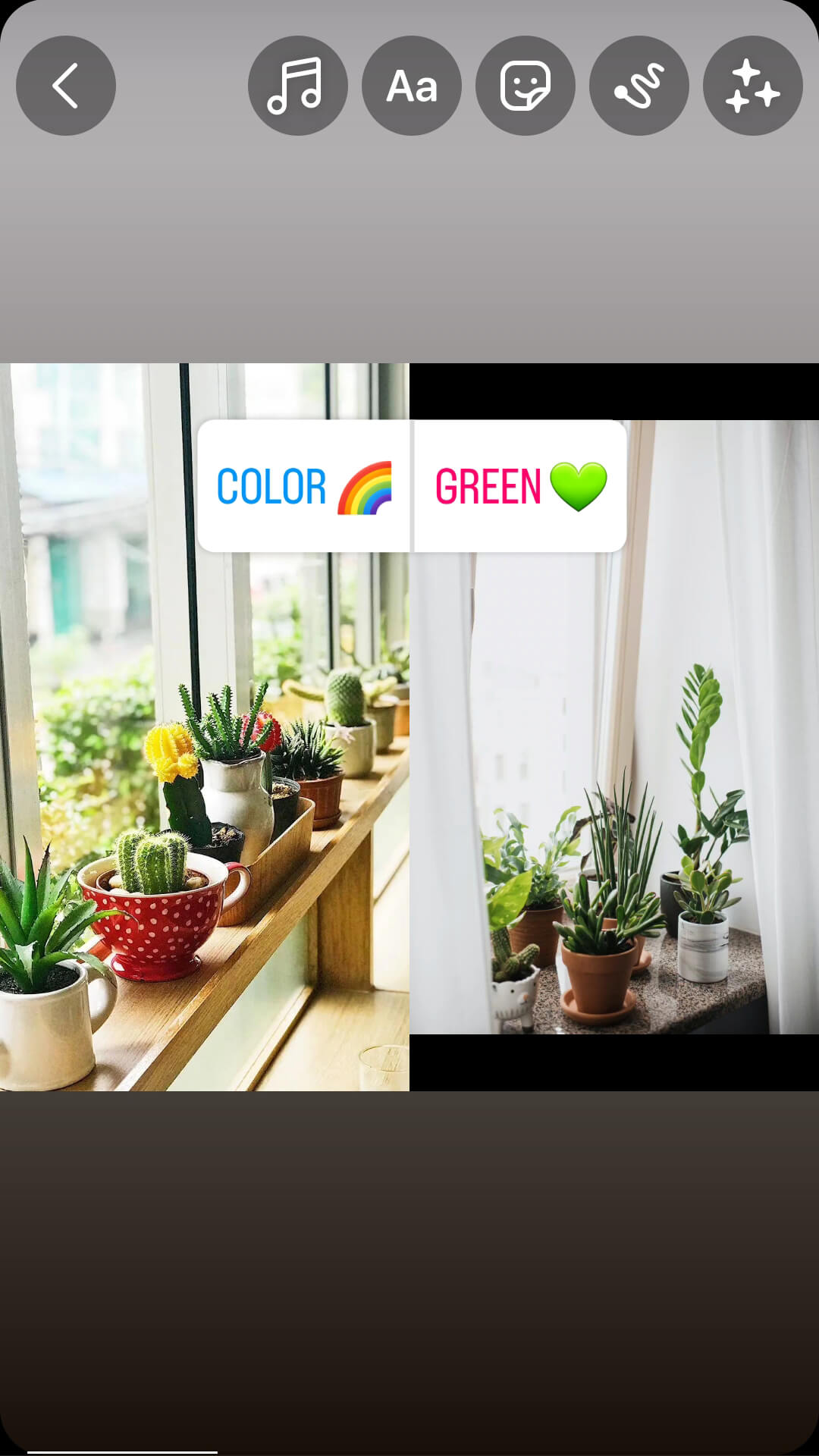
The add yours sticker is also helpful for getting followers to share more nuanced responses. For example, you can ask followers to share a picture of their favorite product in a specific niche so you can get ideas for a future product line or make sure you’re stocking the right designs now.
Market Research in Instagram Reels
Like stories, reels also have interactive sticker options. You can use poll stickers to get your audience to choose this or that, or you can use the emoji slider to prompt them to express a preference. The add yours sticker is also available for collecting visual data.
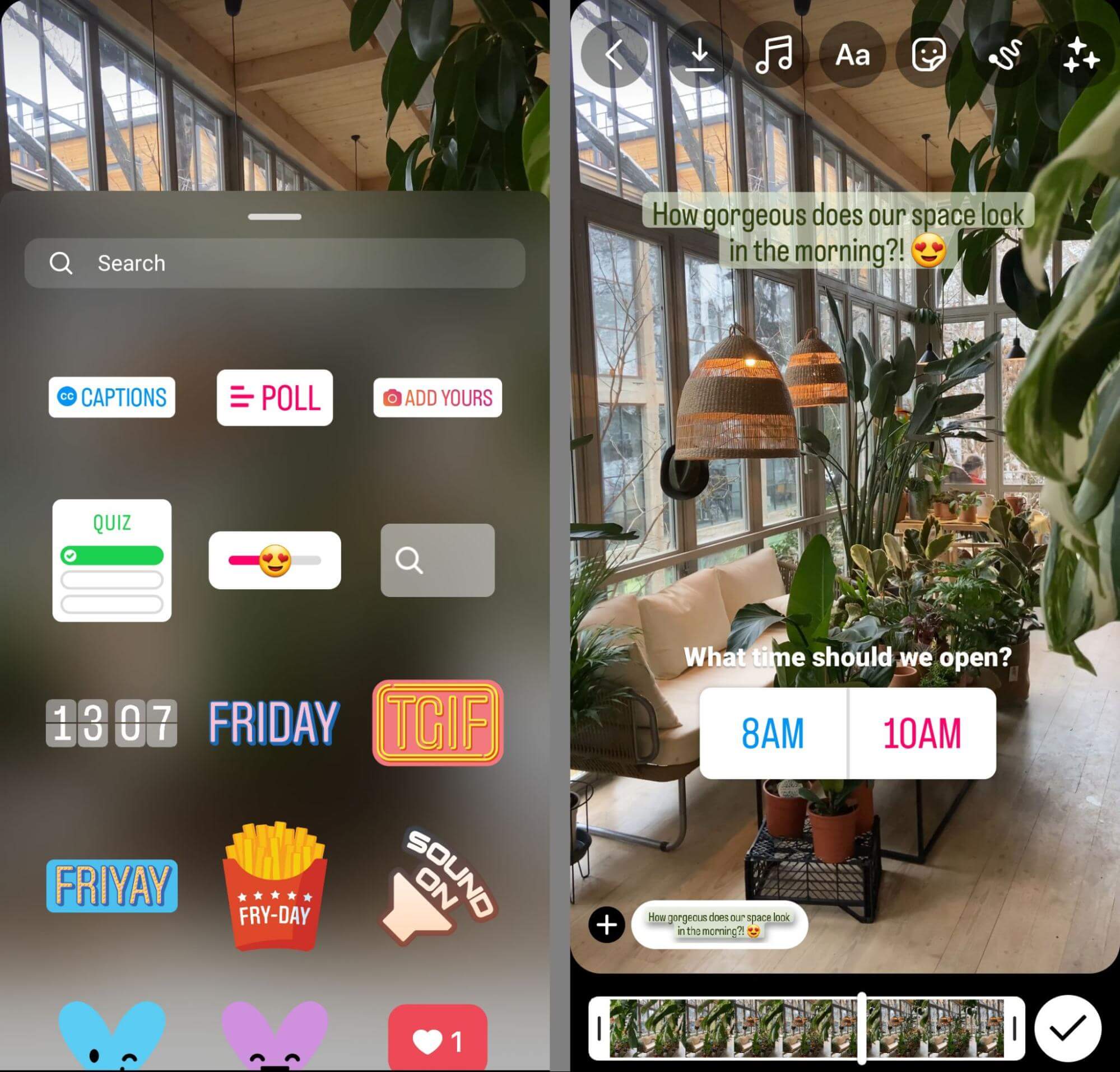
Although reels don’t have the 24-hour lifespan that stories do, it’s important to note that results from interactive stickers disappear after 48 hours. So make sure you check the results before they expire so you don’t lose your research.
With reels, you don’t have to create completely new content. When you use the Remix tool, you can reuse older posts in your content. Select any published reel or post, open the menu, and select the Remix option. Then choose a new photo or video to use as a comparison and use one of the interactive stickers to prompt followers to engage.
Market Research in Instagram Posts
Instagram posts may not have the same interactive options as stories and reels, but you can still use them for market research. To grab attention as your audience scrolls through the feed, make sure your question appears in the image instead of only in the caption.
Continuing the same example from above, you might ask your audience about their preferred product. If you have a few options to share, a carousel post works particularly well. You can make the question clear in the first image and then prompt followers to scroll through the carousel to see all of the options.
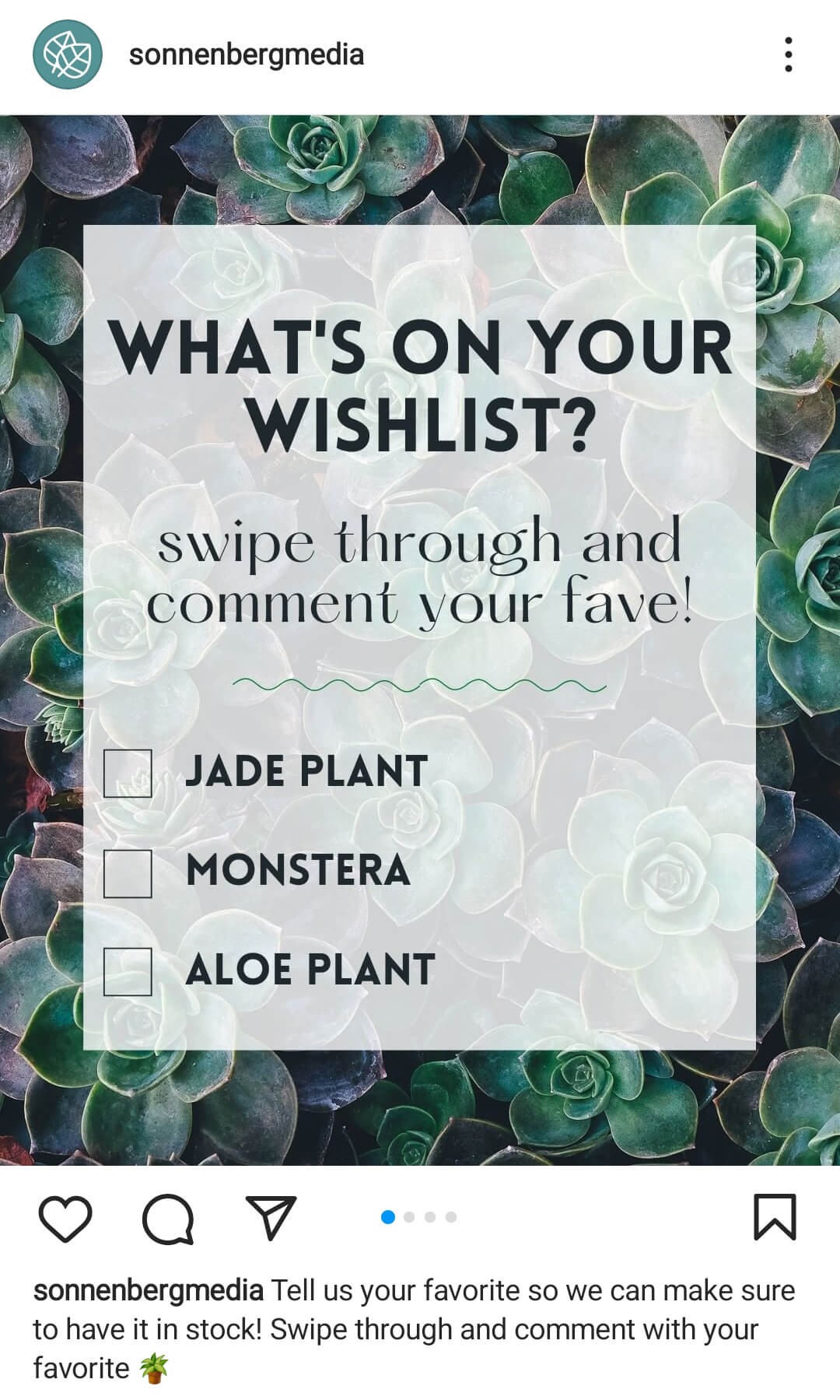
Make it clear how you’d like followers to express their opinion. For example, you can ask them to leave a comment with the color, size, or design they prefer. Then you can review and chart responses when a week has passed or after the comments have slowed.
Market Research in Instagram Bio
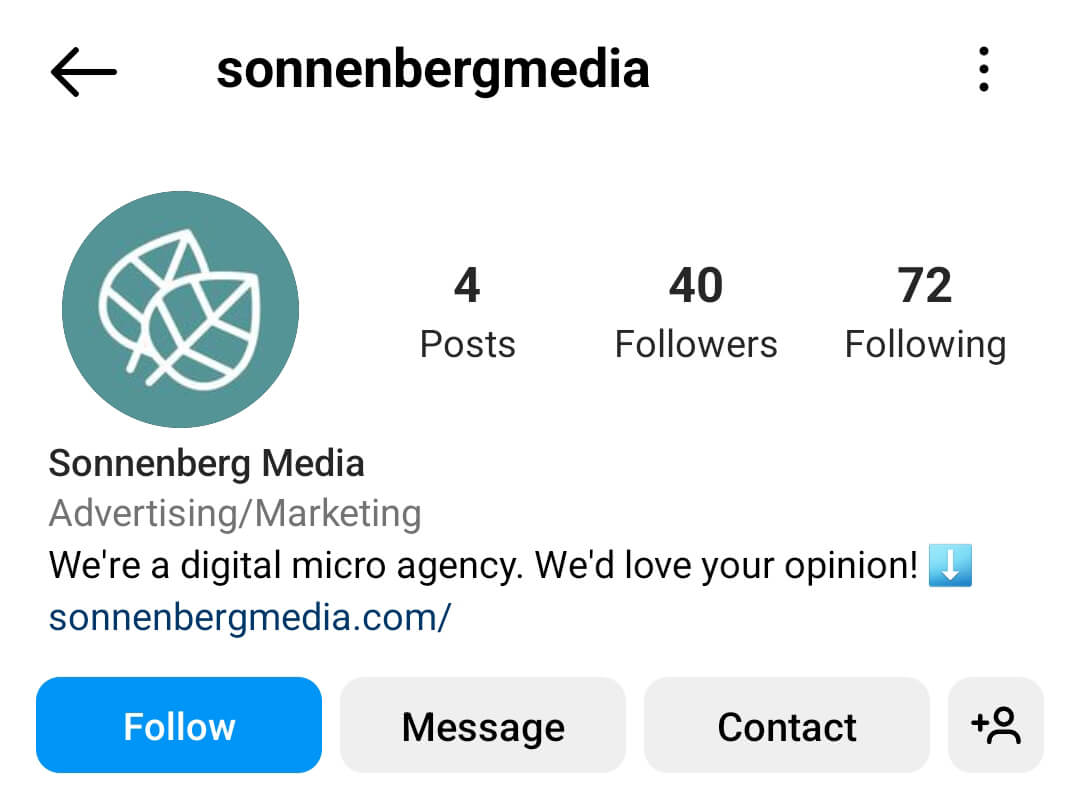
Do you already have a market research survey that you’d love for customers and prospects to complete? You can link to it directly in your Instagram bio, using a simple call to action to draw attention to it.
Conclusion
If your target audience uses Instagram regularly, this channel may have tons of valuable data that can inform your market research. Use the tips above to gather info on your audience, industry, and competitors, and find new opportunities for business growth.
Stay Up-to-Date: Get New Marketing Articles Delivered to You!
Don't miss out on upcoming social media marketing insights and strategies! Sign up to receive notifications when we publish new articles on Social Media Examiner. Our expertly crafted content will help you stay ahead of the curve and drive results for your business. Click the link below to sign up now and receive our annual report!

Want to Unlock AI Marketing Breakthroughs?
If you’re like most of us, you are trying to figure out how to use AI in your marketing. Here's the solution: The AI Business Society—from your friends at Social Media Examiner.The AI Business Society is the place to discover how to apply AI in your work. When you join, you'll boost your productivity, unlock your creativity, and make connections with other marketers on a similar journey.
I'M READY TO BECOME AN AI-POWERED MARKETER