 by
by  Are you using the right social media dashboard?
Do you know which tools you need?
In this article you’ll discover five benefits of social media dashboards to get the best return on your efforts.
Why You Need a Good Dashboard
Managing your social media accounts can be a time- and resource-intensive endeavor.

Those companies that don't recognize and accommodate the time it takes to manage social media efforts end up turning their social accounts into ghost towns. Don't let that happen to you.
With a myriad of social channels to manage and monitor, you either need to have several staff members devoted to social media or software to take care of your social media management needs. All the better if you have both.
You can make your life quite a bit easier (and ensure your social media marketing efforts pay off) by using the right social media management dashboard.
The best dashboards integrate with each of the popular social networking sites and offer a plethora of features. They offer everything from addressing real-time data to engagement metrics that facilitate predictive analysis.
So how do you decide which dashboard is right for your business? Look for these five key features.
#1: Evaluate Progress With All-In-One Monitoring
Dashboards that allow you to monitor vital social media marketing data and analytics in real time from a central location (like the Cyfe dashboard below) are ideal because they offer a bird's-eye view of engagement opportunities, brand mentions, social demographics and more.
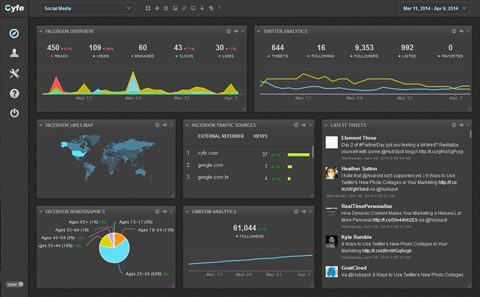
Your social media marketing tactics are directly related to your company's other marketing campaigns (how much budget you allocate to social pages, for example). A dashboard that gives you insight into all of your business efforts at the same time allows you to come up with a better overall strategy.
#2: Collaborate With Team Members to Create Great Content
Companies often have teams to handle multiple social media profiles for each of their clients. In these instances it's helpful to have a dashboard that allows for multiple user permissions.
Specifically, your dashboard should let you create a structured hierarchy consisting of a management team, team members and all social profiles so everyone can easily collaborate on content and tactics.
Go Deeper Than an Article Can Take You

Join thousands of small-business marketers at Social Media Marketing World — three days of AI, social media, and marketing strategy taught by world-class experts. April 1–3, 2027 in Anaheim.
Every session is pitch-free and built around tactics you can use yourself, no big team required. Your All-Access ticket includes an extra day of workshops, full access to AI Business World, and recordings of everything.
GET MY ALL-ACCESS TICKET — SAVE $790For example, HootSuite lets you set permission levels for different people in your organization. You can give each person as much or as little access as you like. The screenshot below gives you a glimpse of the team collaboration option in the HootSuite dashboard.
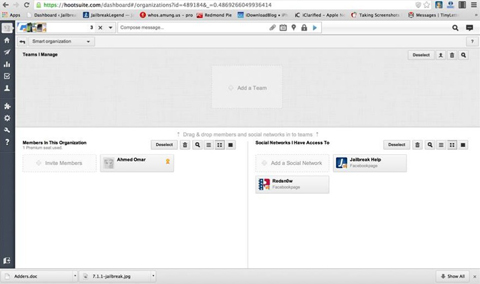
You can empower some or all of your team members to approve content before it is posted on social profiles. And features like message notifications and internal conversations within the dashboard make collaboration even more fruitful.

Tired of Guessing Which AI Moves Matter?
New AI tools and strategies launch every week — and figuring out which ones matter takes hours you don't have.The AI Business Society filters the noise for you, with expert-led training you can put to work the same day — plus a community of marketers sharing what's actually working.
I'M READY FOR REAL AI RESULTS#3: Measure Results With Advanced Reporting Tools
Your ideal dashboard should also include reporting and analytics tools that measure the results of your social media marketing campaigns. Those reports should include information about the number of brand mentions, likes, clicks, new followers and other such activity in an easy-to-understand way.
Sendible is an example of a dashboard that includes insightful reports on various metrics such as fans and followers gained as a result of your team's social media efforts over time.
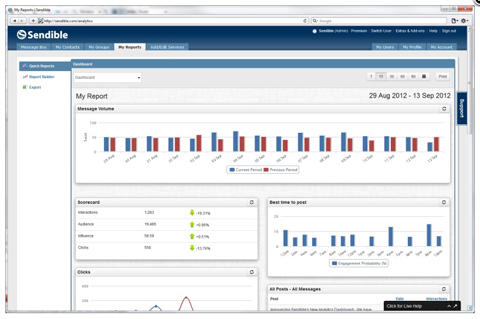
It is very useful if your dashboard integrates with Google Analytics to provide key metrics and superior tracking and reporting tools.
#4: Monitor Multiple Campaigns With Custom Boards and Widgets
Different campaigns require different metrics and data. I encourage you to find a dashboard that allows you to customize and organize different tasks so you can identify and work on individual campaigns simultaneously and seamlessly.
Cyfe offers custom and pre-built widgets, shown in the screenshot below, that pull and display data from company databases and let you export the data to a CSV file for easy analysis and reporting.
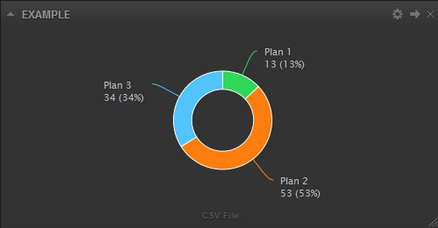
HootSuite recently introduced an option to create highly customized dashboards that fit specific use cases, as well as the workflow of businesses. These kinds of customized dashboards let all of your team members quickly find business insights through analytics.
#5: Stay Front and Center With Scheduled Content
As I said earlier, writing, finding, evaluating, curating and publishing content for various campaigns is incredibly time-consuming. I'm sure you would take advantage of any opportunity to make that process more efficient.
To that end, a dashboard that streamlines social media content publishing across social profiles is definitely worth a look.
The Sprout Social dashboard does just that. It lets you save drafts for peer or team review and schedule content for future publishing.
Not only are those features helpful for posting relevant content consistently, but they also help you track and determine the best times and how often to publish on each social platform.
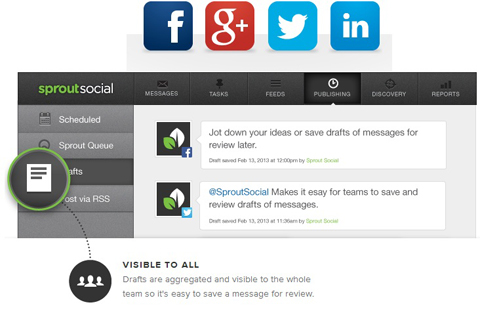
Additionally, you can see which content is most useful or interesting to your fans. Do they respond to shortened links, high-quality images or videos? Does the response change based on the social platform or time of day? Your dashboard should be able to tell you.
Knowing what content provides the best engagement, when to publish and how often helps ensure your brand is always part of relevant conversations.
Conclusion
While most social media dashboard tools provide useful options, these five are the key features you should look for.
Being able to customize your dashboard, collaborate with team members, monitor the success of your social media tactics and campaigns and quickly analyze various data streamlines your process to save you time and money.
What do you think? What features do you look for in a social media dashboard? Which of those features have been the most useful? Leave your experience, advice and questions in the comments below.
Social media symbol doodle photo from Shutterstock.
Where Do You Actually Stand With AI?
Most marketers use AI, but they don't know what's holding them back from real results.
Our 3-minute quiz pinpoints the one gap keeping you stuck — and gives you the exact next step to fix it.
GET MY RESULTS






