How to Add Google Analytics to Your Facebook Fan Page

social media how toYou’ve created a Facebook fan page and people are frequenting your page.  But do you really know how many people visit your page, what areas are popular and what parts of the world your visitors come from?

Facebook Insights shows some demographic information on your page, but is limited to information about interactions with your fans.  The free Google Analytics tool offers more sophisticated and comprehensive data.  Adding Google Analytics to your fan page can be done easily but requires some special steps.

One of the limitations of Facebook fan pages is they can only run limited JavaScript. Google Analytics needs JavaScript code included on a page to correctly track visitors in the traditional way.  And running JavaScript won’t work on your fan page…

However, there is a new solution.  Using free and opensource FBGAT (Facebook Google Analytics Tracker), you can get Google Analytics working on your Facebook fan page. Now you can track visitor statistics, traffic sources, visitor countries, and keyword searches with all the other powerful reporting of Google Analytics.

What follows are the instructions to set up Google Analytics tracker on your Facebook fan page. (Note: Your fan page must use an HTML application like static FBML for you to use this method.)

#1: Create a Google Analytics account

If you already have a Google Analytics account, create a new website profile to separately track visits to your Facebook fan page.
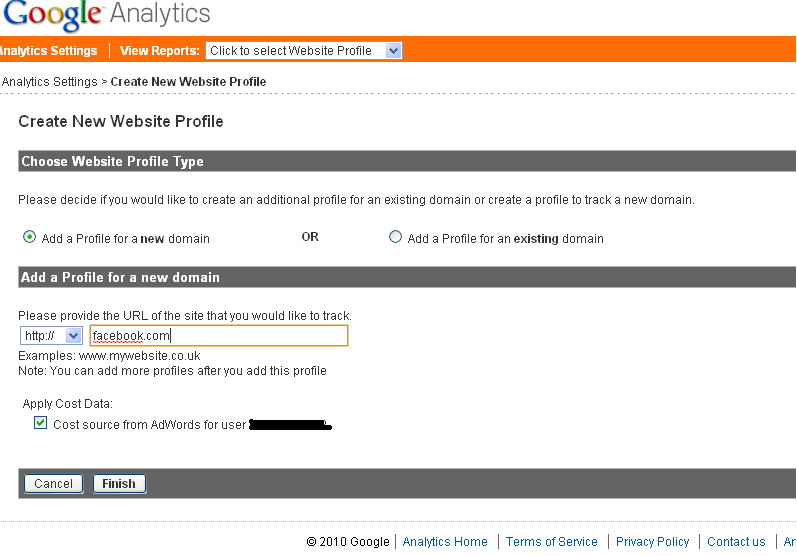
Where it says "Add a Profile...", simply paste your fan page URL or use Facebook.com.

After the step above, Google will display your tracking code. The tracking code generally looks like this: UA-3123123-2.  Note: Google will tell you to activate the website.  You do not need to do this.

#2: Get your tracking images

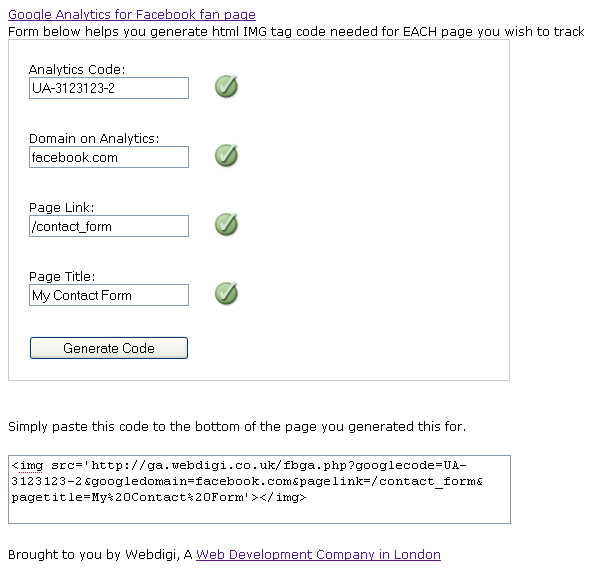
The way to work around the Facebook JavaScript limitation is to generate custom images. FBGAT is a free tool that will generate your custom image code to track visits on each of your Facebook fan pages.

The above screenshot shows what the code generator looks like.

Here’s what to include in the fields shown above:

  • Analytics Code: This is the tracking code that you got in step #1. (It is very important that you enter this correctly.)
  • Domain on Analytics: The domain name you created in step #1 (use Facebook.com if you used it in step #1).
  • Page Link: This is to let you track the page on Google Analytics. What would you like to call your page so that you’ll recognize it in Analytics?
  • Page Title: This is for your reference.

After clicking the “Generate Code” button, you’ll get a code which you’ll need to copy in full. You’ll have to generate a separate code for each fan page you want to track and place it as shown in step #3 below.  Note: If you have multiple pages powered by FBML, you can do this for each page.

#3: Add the code to Facebook

Place the code generated as shown within your Facebook page using an app like Static FBML.  Programs like Static FBML allow you to add HTML to your pages.  By simplify editing your Static FMBL pages and inserting the code from step 2, Google Analytics will track all visits to those pages.

You can place the code anywhere as long as it does not disrupt functionality of your existing page. I prefer the top or the bottom of the page.

That’s all there is to it. The tracking has begun. Google Analytics will now need about 24 hours to show you a report of your visitors.

Tracking Visits to Your Fan Page Wall

Editor’s note added 8/26//2010: Since Facebook removed Boxes, tracking wall traffic is no longer an option

The wall might be your main page. To track this, again you will need to create a page with static FBML. The only difference is that to show this on the wall, you are required to make it a box. Just click on the (add) on the Box, and it will be added to the wall. To change this setting, click on “Application Settings” under the FBML that you would like to create as a box. As with other pages, please note that you have to create a unique tracking code for this page as well.

What do you think? Will you be able to better justify your Facebook marketing with this added insight? Please comment below.

Tags: , , , , , , , , , , , , , , , , , ,

About the Author, Mariam John

Mariam John is a developer at Webdigi, a web development company that specializes in custom web application development and developing Facebook apps. Other posts by Mariam John »


Share this post


217 Comments

 
  1. DawnTrenee says:

    Thanks for going through the process of setting up google analytics for Facebook Fan Page. This will become a valuable resource for all those Fan Pages out thee.

  2. i think there are most importance idea for seo tips!

  3. MariamWebdigi says:

    You will be able to further track fan/non-fan based activity, visualise your visits in a funnel, track activity on a page, using the same technique following the steps here http://www.webdigi.co.uk/blog/2010/tracking-use....

  4. Chris Leone says:

    This is definitely peaking my interest. Looking forward to giving it a shot.

    Thanks for the tip, Mariam :)

  5. ross says:

    Fantastic article going to try this on my facebook page tonight!

  6. Martin Lucas says:

    Will definitely be giving this a go – it will be nice to see how effective my fan pages actually are.

  7. sully says:

    Will this track data across the whole fan page? Or just in the FBML tab (and/or your wall if you add the FBML box)? Ex. will Photos or the Info tab be tracked?

  8. Thanks for the tip, Marian.

    Can you also do this for a LinkedIn group page or for a twitter page ??

    Patrick (@itworks on twitter)

  9. Hey Sully – It works on any tabs that are created with FBML and can work on the wall if you move a FBML box to the wall. – Mike

  10. Morley says:

    Note that this'll only work with tabs created by the Static FBML applications. Tabs generated by applications can't be tracked this way because all the images would be cached by Facebook, which washes out the tracking.

  11. dinalundberg says:

    Thanks for sharing such valuable insights Mariam!

    It´s essential for businesses running their Facebook fan pages to know what their customers like the most about it and if they actually have adopted it as a useful tool or they have just add themselves to it and don´t really use it. Join some interesting conversations about this topic on http://startups.com/

  12. webdistortion says:

    or try the simple Facebook supported option.

    http://wiki.developers.facebook.com/index.php/F...

  13. That option does not work for Facebook pages. Please refer to the notes on the link you sent. “This tag can only be used on canvas pages”.

  14. mikel_z says:

    Good stuff! I really like GA for my site, and now I can really nail down the details for my clients Pages.

  15. mikel_z says:

    One more question, if we add it to the wall can we add an image to the code so that there isn't a box labeled and blank on the wall page?

  16. John W says:

    So I can add it to the wall to keep track of the main visitors to my page and I can add it to tabs that I create to keep track of visits to that particular tab?

    If this is true, Thank you guys very much for this information.

  17. Devstu.org says:

    We just had a meeting yesterday about our Facebook traffic and how our current Google Analytics account doesn't break it down as specifically as we want it to. We look forward to implementing this soon to get better metrics for our team. Thank you!

  18. Joanne says:

    Is their google analytics for LinkedIn pages, aside from the Event page?
    Thanks!
    Joanne

  19. Yep, thats true :)

  20. Naomi Trower says:

    I've had this installed on my fan page for a few weeks now and I LOVE IT! Thanks for providing this in depth way to track analytics. I'm off to RT this article!

  21. This is quite a timely article. True, Facebook insights does not provide sufficient information. It will be much easier for my clients to gauge facebook activity and to make necessary changes to further promote their brand and services.

    I read above it works with FBML box. Will this also track, wall posts and wall activity?

  22. justinrains says:

    Thanks for the article! I'm definitely going to give this a try on my fan page.

  23. CDowns says:

    This is cool, but I am struggling with the instructions. I generated the code and put a static FBML box on the site. But I can't seem to paste the code into the box? Or what do I do with the box? I clicked “move to wall” and it seemed to disappear, and I couldn't find it on the wall. Wow do I sound like a newbie or what? Any help would be appreciated. Thanks

  24. [...] : "http%3A%2F%2Flongtale.wordpress.com%2F2010%2F03%2F24%2Fgoogle-analytics-meets-facebook%2F" } This will probably be retweeted half the world around, but it’s great use of old technology to [...]

  25. We didn't even know this was possible, Mariam. Thanks for the in-depth explanations!

  26. maryfletcherjones says:

    Sounds great, but I just have to question how many businesses really need it. Maybe gilding the lily. Insights works for me.

  27. I had no idea! – thanks for the education an the 'how to”

  28. I think you are doing fine. This is how the static FBML box typically has to look like http://www.webdigi.co.uk/blog/wp-content/upload... Also, please give us a link to your facebook fan page.

  29. vmiecznikowski says:

    Very exciting! Thank you for sharing.. I am looking forward to trying it out.

  30. Our hosted FBGAT (Facebook Google Analytics Tracker) currently helps track well over 1 million facebook fan page views a day! So brands are definitely using this on their fan pages to track visits. Tracking like this can come in handy when you run adverts or ad-campaigns. Best of all it is free, so added visitor information (location, browsers used, timing of visits, etc) can always help.

  31. You might find these further advanced tips useful on your fan page if you already have the basic tracking installed http://www.webdigi.co.uk/blog/2010/tracking-use...

  32. This is one of the most useful articles I've seen lately–retweeting now. Thanks!

  33. Annie says:

    I followed all this procedure from another site two weeks ago, it was workin the two first days but after nothing… Why ?

  34. Samantha says:

    Absolutely! I can't wait to see the referring sites and time spent there. Thank you!

  35. Awesome measurement tip! I just went through the process and it took ten minutes or less! Very insightful and worthwhile post.

  36. Very good post. This new capabilities will provide marketers and page owners a whole new insight into their FB pages. You laid out the process very well – Well done..

  37. Cdowns says:

    Our fan page is facebook.com/mylff

    I only have a blank FBML tab… no box that I can find.

    Thanks for your help!

  38. Cdowns says:

    I think I responded to the wrong post earlier. Sorry.
    Our facebook fan page is facebook.com/mylff.
    I only have a blank FBML tab. No box.
    Thanks for your help!

  39. hectormillan says:

    This was awesome! Great idea!

  40. Kasia Gola says:

    Great guide – very insightful!

  41. Thanks This is really gr8 advice I will get this on my fan pages ASAP!!!!! Thanks for the step-by-step guides…

  42. facundo says:

    Great one Mariam, saw your tutorial a while ago and still need to sit down and figure out how to do the wall thing. Excellent info, thanks for sharing

  43. Great actionable information! Thanks so much for the enlightenment.

  44. Sandy says:

    Thanks for sharing! I've added it to my fan page and looking forward to it seeing detailed results.

  45. Luke Thomas says:

    I have one issue! I created a FBML landing page and I tried moving it to the wall, and the landing page image shows up in a box, and is pretty distorted and distracting! Can I add 2 FBML applications to one fan page, how can I set up 2 different codes? One for the landing page, one for the wall…..Thanks!

  46. TheBlizzrdGroup says:

    This is awesome. Now there's no need to invest with those companies that sell social media analytics. Thanks!

  47. Terri says:

    how do i know if my Facebook page uses FBML. it has an FBML tab across the top but there's nothing underneath it. is this something i needed to add myself. if so, how do i do that?

  48. [...] Google Analytics to Your Facebook Fan Page! Posted by John Saddington on Mar 24, 2010Whoa.This trick and technique is super-awesome. In fact, I bet most of you hadn’t even considered adding Google Analytics [...]

  49. anuconvo says:

    Awesome Stuff, Webdigi guys!! Looking forward to your next update!! :P :P

  50. Custom Applications Simply Amazing! I am sure that adding an image tag is simple and allowed by all sites. So this workaround should help with all similar sites that do not allow javascript too. Not only facebook fan pages!

  51. FBML is an application you can add to your fanpage. You must first add it. See link in above article Terri

  52. Luke, what is your fanpage URL?

  53. wow……. That's nice.

  54. Allen says:

    I can't get this to work at all. The FB source code shows the code is there, but Google keeps saying that the tracking code is not installed. My code:
    <img src='http://ga.webdigi.co.uk/fbga.php?googlecode=UA-9552763-9&googledomain=http%3A//www.facebook.com/pages/Jim-Rohn/317351405634&pagelink=/fan_page&pagetitle=Home'></img>
    I created a new profile in GAnalytics for this. Any ideas?

  55. Allen – You need to wait 24 hours per the article above. – Mike

  56. Allen says:

    that's for the collection of data to begin. GA will tell you instantly if it thinks the tracking code isn't installed, which is my problem.

  57. I have taken a look at the code and it looks to be working ok. You will need to give Google Analytics about 24 hours for it to start showing you the results (although it has already started capturing visitor information from the point you have inserted the code). Once you start seeing results Google Analytics will not show you the “tracking code is not installed” and will be replaced with a green tick and a message Receiving Data.

    Your page has more than 50000 fans, it might be a good idea to try some of the advanced features with Google Analytics http://www.webdigi.co.uk/blog/2010/tracking-use...

    So, in short it looks like all you need to do is wait for Google!

  58. I have responded above. Again the answer is to wait for Google.

    Google only checks if Google's official tracking is installed. We are not using Google's official tracking code as it does not work in Facebook. This is because Facebook does not allow Javascript as complex as Google's to run on their fan pages.

  59. Dee says:

    Is this application able to generate a specific list of who commented on your page, the date they commented and their posting frequency. We need this data for a contest we're hosting and I'm trying to avoid doing it manually–thanks.

  60. bfrankemusic says:

    Thanks for getting this out there. My question is a simple one. I generated the code for the FB page and put it in FBML (under “Edit FBML”). Was that the right place to paste it in?

    Also do I need to paste in the code generated by Google Analytics as well? It says my url is inactive. Thanks so much!

    Brian Franke
    Singer/Songwriter
    http://www.brianfranke.com

  61. Chicago SEO says:

    Good post, followed your instructions, I'll have to wait and see tomorrow if anything is getting tracked in my analytics.

  62. Marcelino says:

    Extremely interesting, I will have to give this a try and see what my fan page results are.

  63. Tony says:

    So this would mean I would be unable to track visits to the Info tab, Photos tab, and other tabs generated by non-FBML generated pages? To track visitors to my wall, I would need to create a FBML box that appears on my left sidebar and insert the code there? But that would mean it would track the Info page since it shows up when I browse to the Info tab.

  64. Per Lund says:

    Hi there,

    This is so cool. Can't wait to get the first readings of usages of my Facebook Page in Google Analytics.

    Thanks alot.

    /Per Lund

  65. Tony – That would be correct that the info tab and other related tabs that do not allow customization will not be tracked by Google Analytics.

  66. Abstraktmg says:

    I am currently receiving the new Facebook analytics. What information does the Google Analytics provide once installed on Facebook Fan Page?

  67. Jo says:

    This is awesome! For each new fan page do you need to start again at step 1 or step 2?

  68. dawnbaird says:

    So, how do you move an FBML box to the wall. I'm getting stuck at this point.

  69. Justin says:

    Does it matter that Google Analytics says that my tracking is not installed?

  70. This so cool, thanks so much

  71. Thanks for sharing this, set it up and waiting for the results.

  72. djtonyz says:

    Justin,

    If you read back through the threads here, you will see that GA will not immediately notify you that it can see the code. It took about 6 hours or so for it to show up for me. Now, I'm waiting for the data to follow.

  73. lilainoz says:

    Hi Mariam,
    Thank you so much for the great article!
    Unfortunately, it doesn't work for me… I've tried to set up my Facebook and GA account according to your instructions and have been waiting over the weekend but I still have the alert icon on the GA account and no numbers have been picked up yet.
    I've checked all settings again and my only guess is the FBML page on the Facebook page – I am not sure, if I've set it up correctly. Would you mind to have a look at it?
    http://bit.ly/dDhhga

    Thank you so much!

  74. [...] at SocialMedia Examiner has a great step-by-step article on how to us the open source tool called Facebook Google Analytics Tracker which bypasses the normal restrictions on javascript which usually blocks analytics tracking. For [...]

  75. Justin – No it does not. Just give it about a day. – Mike

  76. maddieweber says:

    Mariam,

    This is really useful information. I think I've got it installed correctly on our facebook page now. Quick question, when you're tracking your wall does the box with the FBML have to be on your wall, or can it be on the boxes tab?

    Thanks!
    Maddie
    @maddieweber

  77. Thanks for sharing! Very interested to see how this works and the results that are revealed.

  78. Thomas Petty says:

    This is great stuff. I *just* launched my new FB fan page yesterday (http://www.facebook.com/bayareasearchengineacademy), so will be using your tutorial to add GA to it. Thanks!

  79. Kelly_A says:

    I just did this so I'm not positive its the solution, but give it a go — go to the boxes tab and click on the box, then an option should appear saying move to wall or something like that. Hope this helps!

  80. Michelle Murray says:

    Thanks for this great article. Just a follow up question about the wall. We already have several FBML pages and I've added a couple of them to the wall. So I would just add the code to any of those pages that I add to the wall, and then it will track the wall traffic? Should I only add one box to the wall or doesn't it make a difference? Thanks.

  81. AF says:

    If the boxes are on the sidebar (to the left of the wall) does that mean they are on the wall? This would mean that if I paste the code in that box's FBML it would track data across the wall itself? Thanks for the help!

  82. Debra Zimmer says:

    Thanks for this info. I hadn't thought of adding my fan page to google analyitics but this is a huge help. I'm so excited to see all the data in one place. thanks again.

  83. My Facebook Fan Page tells me I might like FBML, but won't let me use it. This may have something to do with having only the fan page and not a personal profile.

  84. [...] Facebook Insights and Facebook Insights integrated with Google analytics [...]

  85. Rachel Melia says:

    This is a great suggestion. I am not techy at all, and am getting stuck. I created the code in Google Analytics. Then I created code using your FBGAT tool. If I am going to pick one page to track, I choose the wall. I am getting stuck on the instructions to “make it a box”. Please help.

  86. [...] (32:26) Adding Google Analytics to Facebook Fan Pages [...]

  87. Coach Evie says:

    Well, I just did it. I think I did correctly. It showed up on my google analytics page.

  88. Its a good description for adding Google Analytics to facebook fan page.This will be useful for me as I did not know that how can I add Google analytical to facebook fan page.I was just searching for this information and I get it here.

  89. SEM Guy says:

    Great article and a good way to dig deep into your facebook analytics!

  90. [...] socialmediaexaminer Related Posts :How to use Google Analytic‘s Goal Funnel to track conversionsTop Facebook Page [...]

  91. Jamie Dunne says:

    Hi Miriam,

    This is Very Sneaky.. but *cool*

    …. Ive been trying to get an app that will integrate Google analytics for a while…
    heading straight over to get this done..

    great post and explanation.

    Tasty Blog here.
    Best Regards

    - Jamie D

    PS – the tracking “user engagement” code you provided in the followup is even cooler ! ;)

  92. [...] somewhere along the yellow brick road we were smacked with new options and new features. And with these new features came new rules. Rules that would change the way we [...]

  93. Awesome. Just went through the set-up process and am waiting for GA to show results. Thanks!

  94. thnx a ton for this valuable piece of info.
    i was searching for something like this only as Facebook Analytics is very limited…
    And I must say tht execution of Google Analytics has been explained in a very detailed and easy manner for someone like me who is not well verse with programming

  95. I can't get this to work on my page. I followed the directions exactly but Static FBML isn't letting me put the generated code anywhere. I thought I had it installed last week but Google Analytics kept giving me an error.

  96. Zac says:

    Sorry if this has already been asked, but does it apply to the whole fan page including all the tabs, or is it just one single tab?

  97. Hey,
    I've installed FBML App, added a Tab, and pasted the code. (not just the google code, but some other code as well). It renders great if you click on the tab and view that page … but how can I actually get this code to show up on all the other pages, and not just in this useless tab? (I keep reading about others saying to “move to wall” but that doesn't come up for me. When I click the pencil/edit icon on the tab itself, it only says “delete tab” … and the “tab options” is greyed out?

  98. Katie says:

    Great information! Hoping to track data for our fan page wall. I went through the process, but am not sure how to get rid of fans being able to see the labeled “KUEA wall tracking” box on the left-hand sidebar…do I just need to make something up to put there, and leave the img code in to track the rest of the wall? Fan page is: http://www.facebook.com/kuendowment

    Thanks!

  99. [...] but how do you analyze your visitors’ data so you can track your effectiveness? One way is to install a free Google Analytics tool that will allow you to measure such things as visitor statistics, traffic sources, visitors [...]

  100. lilahali says:

    Thank you so much Miriam for posting this! I finally figured out how to apply it to my Non-Profit company page and the data is great!

    Do the amount of visits to my facebook page include how many times the administrator (myself) clicks on our fan page?

    Thank you! :o)

  101. This is a load of rubbish, the application just disappeared and is now nowhere to be found.

  102. kboode says:

    Thanks for the easy step by step explanation. Even though Facebook is getting better at sharing data Google Analytics still tops the Facebook stats.

  103. Nathan says:

    I just follwed the directions, and google analytics says “the tracking isn't installed” (in the tracking status section)
    Any ideas on what the problem is?

  104. masoodsipra says:

    Masood Sipra
    Sipra Book Company
    Sipra House
    E-34 Block ‘F’ Gulshan-e-Jamal,
    Railway Housing Society, Rashid Minhas Road, Karachi-75350, Pakistan
    Cell: 0300-2144694, E-Mail: sipra@go4b.net.pk sipra.masood@gmail.com

    & SIPRA ALLIANCE OF PAKISTAN — Become a member, send ur details.

  105. [...] John has an excellent post on Social Media Examiner, covering the entire process of how to add Google Analytics to Facebook Fan Pages.  You’ll need to use a free tool, that turns your Google Analytics code into tracking [...]

  106. Haris says:

    I'm trying to use a modification of this code to track a private website, and get it to emulate a public domain I own. So it would be like http://www.publicwebsite.com/privatewebsite/pri...

    This is the code I'm using, but it's not working for some reason. Any ideas?

    <script type=”text/javascript”>
    var pagePath = document.location.pathname;
    var pageTitle = document.title;
    document.write(”<img src='http://ga.webdigi.co.uk/fbga.php?googlecode=UA-xxxxxxx-2&googledomain=publicwebsite.com/&pagelink=http://www.publicwebsite.com/privatewebsite” + pagePath + “&pagetitle=” + pageTitle + “'></img>”);
    </script>

  107. Hello,

    Thanks so much for this! I have done mine and hey pesto – 24 hours later it is working! Very valuable.

  108. just the one tab

  109. go to the edit page area of your facebook page. scroll down until you see fbml. click on application settings. make sure you have a box “added” – if it says available click add.

    now go to your facebook fan page. click on the tab called boxes. (its up next to the wall/info/photos area) (you might have to click on the double arrows to bring down the dropdown menu to find it)

    when u have the boxes tab open click on the pencil edit symbol on your fbml box. click where it says move to wall.

  110. yes i would just give it another name and put some filler content in there if you dont have anything else to put.

  111. beeeeees says:

    you have to become a fan of fbml before you can add it i think

  112. beeeeees says:

    if you add the code to just one of the fbml boxes on your wall it will track all traffic on the wall page

  113. Mike I followed all of the directions in this blog and it doesn't seem to be working for our fan page. http://www.facebook.com/marketingmud. Any suggestions?

  114. David Corr says:

    I could be wrong, but if I am using Google analytics to track my web site activity, and I add my Facebook fan page info, won’t this artificially increase my website numbers by increasing the page views, time on site and other metrics?

  115. Excellent post. Analytics is crucial to any Internet marketing, and this helps bring all your website satellites like Facebook pages into the mix.

    I'm going to create a 'new site' on my analytics so I can get a unique tracking code and keep the traffic separate from my actual website.

  116. William says:

    If you have a static FBML page and a box on the wall, do I need get two seperate google codes? Or can I use the same on on both the static page and the static page that is a wall box?

  117. radiator says:

    what a useful post!

    I never knew it was possible!

  118. Wayne Ulery says:

    Fabulous job!! http://www.islandconsultingcorp.com |Building your island in the ocean of social media. is my site and I am helping local businesses emerge into the realm of social media. This tip was very helpful and will obviously add more value to my services. I appreciate all your effort and plan on doing similar overviews through my site. I look forward to reading more of your posts. Best of success to you. I believe if you help enough people get what they want in life, you can have everything you want in life.

  119. nettap says:

    hello there,
    we're trying to add tracking to each tab of our page, but google will not allow us to track a tab. we're right clicking the tab and then pasting the address that exists for that tab when adding a new profile for a domain. we get a message that says “invalid input.” anyone know a way around this? Thanks!

  120. nettap says:

    it takes about 24 hours.

  121. nettap says:

    does anyone know if its possible to add this to other tabs? i'm getting an error in google analytics when i try to add tracking for other tabs. thanks!

  122. nettap says:

    hey michael – maybe you'll have some tips for me. we're trying to track using google analytics on other tabs that DO utilize FBML, but we're having issues with setting this up in google analytics. when we try to make a new profile for these tabs, we're getting an error message that says “invalid input.” thanks for any help you might be able to offer!

  123. nettap says:

    hey dee – there are certain services out there that provide something like this. vitrue has one, and i think spredfast. they both cost money, however.

  124. Brian says:

    It seesm GA has nerfed this method. The __utm.gif now serves broken.

  125. [...] How to Add Google Analytics to Your Facebook Fan Page [...]

  126. Namrata says:

    Hello, i had a small doubt… for step 1, when i provide the url for my page, do i give the url of justthe main fan page or the exact url of the tab that i would be tracking ?

  127. I would be specific, but I am not sure it matters

  128. Namrata says:

    Thanks Michael, but then would i be able to use the same code in different fbml tabs of the same page and get info for all seperately ?

  129. could you see your referring sites? i can't see anything but facebook subdomains. is there a hack to get the real referring sites out from Facebook?

  130. sowedane says:

    Hi, Thanks for sharing good information.I like it very much…

  131. hiteshram says:

    How to Add Google Analytics to Your Facebook Fan Page – http://ramoliya.amarinfotech.com/category/deevl...

  132. CUAdvantage says:

    When I tried to set one up for the Welcome tab for my page, it said that it was an invalid address. (it is a Static FBML tab). Do I just use the same code from my Wall? If not, how do I enter the url for the specific tab in a format that GA will accept?

  133. John Garrett says:

    I thought I read something about Facebook getting rid of boxes soon? Is this going to matter at all to this process?

  134. sculley says:

    HI Miriam,

    Thanks for this article. Very helpful. I'm just wondering…..I'd like to track people who come to my main FB page not just the added FBML pages (I've added FBML pages). Would I need to make an FBML page the main landing page to do that or is that what you mean by adding a box (that the box will track the main landing page)?

    Thanks!

  135. [...] would forget the popular Google Analytics post about the magic code we place in the FBML tabs to track page visits? Combining this fantastic [...]

  136. Sato travel offering services like travel tickets, travel military discount, holiday packages, travel guide aervices and also cheap hotel room for Europe Travelers.

  137. Enjoy journey with Sato travel and Sato vacations to Europe.

  138. Enjoy journey with Sato travel and Sato vacations to Europe.

  139. Enjoy journey with Sato travel and Sato vacations to Europe.

  140. Pleather says:

    Gosh I hope the “Facebook Privacy Petition” Fan Page doesn't plan to use google analytics to gather information about their fans who need their privacy. We might all slip into some weird vortex.

  141. mbt shoes says:

    Gosh I hope the “Facebook Privacy Petition” Fan Page doesn't plan to use google analytics to gather information about their fans who need their privacy. We might all slip into some weird vortex.
    shoesmbt

  142. Max says:

    First, thank you, this is a great move and very well written. I successfully put a FBML Box on my Fanpage which includes the tracking code and now I am receiving data.

    However, the data is not very sophisticated. The only page which shows up in my GA-Reporting is “facebook.com/myfanpage” – I can’t track clicks on the single Tabs or even the links on the page, but these are the details I need to know to rearrange our fanpage.

    Is this simply not possible with this solution or did I do something wrong?

    Cheers,
    Max

  143. [...] falar sobre como adicionar o Google Analytics à sua página de fãs no Facebook. Os colegas do Social Media Examiner escreveram recentemente um artigo interessante sobre este assunto, o qual agradecemos como base [...]

  144. Njemile says:

    Whew! I have spent a lot of time on this and can't seem to get it right. I read all the posts before mine and still have not been able to figure it out. I can get the fbml to show up in a tab, but when I click on the pencil, the “options” section of the tab is grayed out.

    Now, I've read that I need to go into the “Application Settings” area, find where the fbml application is and make certain changes. However, I have scoured the every section of the “Application Settings” area and I don't see the fbml app anywhere.

    I would appreciate any assistance. The link to my fan page is here: http://www.facebook.com/editapps.php?ref=mb#!/p…

    Thanks in advance,
    Njemile

  145. [...] The following instructions for adding Google Analytics to your Facebook Fan page were inspired by and learned from web posts by WebDigi and Social Media Examiner. [...]

  146. kelly says:

    how do you set up FBML on your fan page? I am new at this, and I am told to copy codes etc. How can I get these codes on my fan page? I need some help

  147. kelly says:

    how do you set up FBML on your fan page? I am new at this, and I am told to copy codes etc. How can I get these codes on my fan page? I need some help

  148. Jeff says:

    It's pretty easy to add Static FBML to your Facebook Page. I created this video to step one through it: http://www.youtube.com/watch?v=3Ph_ry7KYmI

  149. Jeff says:

    Folks – I'm really interested to see how this works on my Facebook Page. I've installed your self-hosted version, generated the code and plugged it in. Now I'll just sit on my hands for a day. Thanks!!!

  150. Jeff says:

    No more sitting on my hands. It, in fact, is tracking hits to my custom Static FBML tab on my Facebook Page. Thanks! Definitely something I can use for my clients and appreciate the share.

  151. kelly says:

    The video is very clear, but I cannot make it work for my business page. It only works that way when you have a normal Facebook page. It shows that on a business page/fan page that it is possible, but I am less convinced of that more & more.

  152. Ford Parts says:

    Good stuff! I love it. I will definitely try this one. Thanks for sharing such information anyway.

  153. Dana says:

    how do u move an fbml box to the wall? I only found how to make it a tab

  154. dana says:

    to me it says move to wall tabs, and it creates a tab for it. I don't think this is good

  155. [...] Social Media Examiner – how to add Google Analytics to Facebook – hier [...]

  156. [...] Published How to Add Google Analytics to Your Facebook Fan Page | Social Media Examiner. [...]

  157. [...] wall, is one of the most relevant enhancements you can make to your Facebook page. This is where adding Google Analytics to your Facebook page helps tremendously with [...]

  158. Hi Jeff,

    Google Analytics is not tracking. I have had it install or thought I had it installed about two weeks ago. And it has always worked on my blogs for months. Which says that I do not have it properly installed on my Facebook Fan page.

    I have not established a static FBML tab. Will it capture data about visitors to my wall (tab)?

  159. Hi Jeff,

    Google Analytics is not tracking. I have had it install or thought I had it installed about two weeks ago. And it has always worked on my blogs for months. Which says that I do not have it properly installed on my Facebook Fan page.

    I have not established a static FBML tab. Will it capture data about visitors to my wall (tab)?

  160. Woody, it will only if you have an FBML box on your wall

  161. Swiftsid says:

    It's “piquing” not “peaking”.

  162. Andrew says:

    What's the difference between the Static FBML plugin pages and a “canvas” page?

  163. Tips4php says:

    Google is a great tool for web analytics, but there are other interresting alternatives – especially for social media. You can see a lineup with 14 alternative tools here: http://tips4php.net/2010/06/14-free-alternative...

  164. justy says:

    most of the data has been coming through google analytics from facebook fan page fine (thanks to your instructions) for about 3 weeks but “time on site” is not being recorded for some reason.. it still shows zero! any ideas?

  165. wonderful i will like you guys to come to my fan page and learn how to invite your facebook friends to any page group or event without ticking them one after the other just learn the code to do this.

  166. wonderful i will like you guys to come to my fan page and learn how to invite your facebook friends to any page group or event without ticking them one after the other just learn the code to do this.

  167. come to fan page to learn how to invite your friends o any page without ticking them after one another

  168. sato travel says:

    nearly 50 years, SatoTravel has provided travel services for the United States military under routine peacetime conditions, at times of war and during .http://travelocity-city.blogspot.com/

  169. Steve Tasovski says:

    never thought that it is possible to integrate google analytics into facebook fanpage.
    great how to.
    you also can check the facebook templates http://www.flashmint.com/show-type-facebook.html at flashmint to customize your facebook fan page.

  170. Linna291 says:

    In Nike's development path, many stars and celebrities to endorse it done. These were passed to us the spirit of Nike and realism. nike air force 1 shoesis not just a pair of shoes: it is an experience, it is a culture of their place of birth with a connecting bridge, and this culture which made its own survival.Our company is the result of production of athletic shoes, quality inspection, we absolutely will showcase the best products to you. We provide you with insurance services, so you can rest assured to buy, Free shipping, 7 days to your door No tax, 100% real quality.Our products are various styles, color coordination, you are welcome to enjoy our website to buy!http://www.airforceonesbox.com/

  171. Linna291 says:

    Exquisite design and manufacture makes nike shoes incredibly comfortable to wear and long

    lasting.AF25 combination of Max Air cushioning technology (heel) and Zoom Air technology (at the top of stratification), the

    technological improvements raise the overall cushioning the impact of the athletes.Do you want to buy best quality products? Do you

    want to get best deal? Are you looking for a reliable supplier to do long term business? We are a manufacturer of

    nike air force 1 shoes and we are able to provide you various styles and brands caps on

    factory-out price with top quality, Our products are popular all over the world with High Quality, Competitive Price, Best Service

    and Safe Delivery.Here you can achieve your dreams!http://www.nikesbox.com/

  172. This post is just what I needed. Tracking facebook results for my web design business http://www.thedesignary.com allows me a lot better insight into my market.

  173. MarketHOLD says:

    Thank you, SO MUCH. This is an invaluable tool, and it only makes sense that it should be possible to integrate it with a Facebook page. As FB is no longer the social tool it originally was, but more of a reformed MySpace bombarded by businesses and advertisers (myself included), we need to consider Fan Pages like web pages. FBML and analytics completes this consideration. Thank you!

  174. herve leger says:

    Thank you for going through the process of setting up google analytics for Facebook Fan Page. I found your website perfect for my needs. It contains wonderful and helpful posts. I have read most of them and it was informative for all.

  175. Dshimko says:

    This process no longer works.

    For a while now facebook apps have had images proxied so only the initial proxy click is tracked by GA. About a month ago the static fbml app was also update to proxy images.

    Does anyone have a workaround for the proxy image tracking issue?

  176. rt says:

    No, appears to be the same change that stopped animated gif's working within Static FBML. Only other avenue is the fb:google-analytics code, but this is primarily for canvas pages, no idea if it will work within a Static FBML page.

  177. http://www.Melodyhead.com says:

    Great Stuff! Thanks

  178. [...] can however add Google Analytics to any custom pages or to your Wall. This post will tell you how: http://www.socialmediaexaminer.com/h…book-fan-page/ __________________ Kimberly Tips & Tricks on Using Facebook for [...]

  179. Pradip Ghatak says:

    Really very helpful information. Thank you Mariam. You may be interested in http://www.clickasiasummit.com to find out Asia's largest Digital and Mobile Marketing event including SEO, SEM, SMO and Online Marketing.

  180. Lahori_Munda says:

    Thats really gr8 post. Thanks

  181. [...] you to do some really fascinating things. Not too many people understand that you can actually install Google Analytics on a tab in Facebook so you can start to measure the activity—almost like you can with your website analytics, to get [...]

  182. Vicki says:

    It will be interesting as to who is looking at my profile.

  183. Claire Voss says:

    i would love to see who is looking at my profile.

  184. Tara Dunn says:

    Hey! I saw that I got a hit from this page, thanks… I guess? I'm still doing a lot of testing on this page, so if you guys want to check it out and give me any feedback…

    http://www.facebook.com/pages/Tara-Dunn/1380325...

  185. Sweet – works like a charm! I installed on multiple tabs across 11 different Pages. Thanks so much!

  186. Miracle man says:

    Hello Mariam,

    1st off thanks for sharing your knowledge with the world. I had a few questions for you regarding installing the code:

    For the page link I used the text you suggested (”contact_form”), and in the Page Title slot I typed in a name (”Facebook Fan Page”) in the FBML window. I am no techie, I hope I handled it right.

  187. Amir says:

    hello. first of all thank you for this article. it was very inspiring and i got it to work.

    BUT! I have a big problem and i will appreciate it if you find time to answer me. Here is the question:

    - in google analytics the report is showing that all of the page visits are from direct traffic which i do not think is possible.

    - all of the visits are only from USA, which is also not possible because my page is UK only.

    why is that? any specific reason?

    Thank youuuu :)

  188. Geoff Shames says:

    Just a quick question.

    Is it possible to just add a blank box (no other code except for the GA tracking code) to the wall and have it track? I just added a box to our page (http://www.facebook.com/throwedboston) and I can't actually SEE a box. Does this mean I did something wrong??

    I used the following code, generated by your awesome little generator:

    <img src='http://ga.webdigi.co.uk/fbga.php?googlecode=UA-17778650-1&googledomain=facebook.com/throwedboston&pagelink=/Google_Analytics&pagetitle=Throwed%20Fan%20page'></img>

  189. Ci06eea says:

    i couldn't add the application FBML! how can i do that? every time i press add to my page it says no results

  190. [...] that you can use up until now to improve what you see on Facebook pages in terms of analytics like adding Google Analytics but they are cumbersome workarounds at best. I genuinely think Facebook have been taken aback but [...]

  191. Jgoers says:

    What if my page has multiple Static FBML Boxes on it. Do I have to create unique Google codes (example: UA-17778650) for each box? Or can I just use the same code for all the boxes? I have multiple static FBML boxes on my wall page as well. In order to track the wall page, do I have create a separate new box for that or can I just post the Google code in both static boxes or in just one box? I hope this question is clear.

    Thanks,

  192. Vasquez Justin says:

    can i get this to work onmy facebbok PROFILE? not on just a fan page?

  193. noypiscripter says:

    Does it work accurately? Facebook proxies everything including images on Facebook tabs and caches the images.

  194. Mike Adams says:

    This is an incredible site, thanks for this great tip I never thought Google analytics could be used like this.

  195. Decard1 says:

    Forgive me if I'm dumb in the “page link” can I put anything there? Or do I need need to put the exact link to the page like “http://www.facebook.com/pages/Kielce-Poland/Elite-Language-School/102241176501211

    What exactly do I need to put in “page link”, sorry but the explanation in the post is insufficient for me. Please Help.

  196. Decard1 says:

    or maybe I have to put the “link to this tab”

    http://www.facebook.com/pages/Kielce-Poland/Eli...

    Please help.

  197. Decard1 says:

    Forgive me if I’m dumb in the “page link” can I put anything there? Or do I need need to put the exact link to the page like “http://www.facebook.com/pages/Kielce-Poland/Elite-Language-School/102241176501211nnWhat exactly do I need to put in “page link”, sorry but the explanation in the post is insufficient for me. Please Help.

  198. Decard1 says:

    or maybe I have to put the “link to this tab”nnhttp://www.facebook.com/pages/Kielce-Poland/Elite-Language-School/102241176501211?v=app_4949752878nnPlease help.

  199. [...] Some helpful resources: Facebook Page Insights and What They Mean Webtrends Facebook Analytics How to add Google Anlytics to Your Facebook Fan Page [...]

  200. Incubators says:

    This will be of great use. Hopefully we can start using similar tactics for other social sites

  201. web design says:

    Just what I was looking for and nice explanation as well. Thanks for the time it took.

  202. [...] If your objective with a Facebook page is to listen and talk with your “likes” (can we still call them fans?), Facebook’s defaults metrics are: Total likes, monthly active users and page activity. Depending on your objectives with the page you may want/need to measure other metrics. Here’s a guide on how to install Google Analytics to a facebook fan page. [...]

  203. Dining Sets says:

    What a great idea!

    I am pretty amazed that this is possible and after following your explanation found it very easy to install – many thanks!

  204. [...] There you go, in a short while you should see data coming in form your new Facebook website profiles. Here’s a longer and more detail guide on SocialMediaExaminer – How to add Google Analytics to your fan page. [...]

  205. Grea, I’ve been using this tip for a while now. It’s great to see when (what time during the day) people engage with your page.

    http://joakimnilsson.com/social-media-tools/to-add-google-analytics-facebook-page/

  206. Very soon (possibly even today) Facebook is getting rid of page boxes. No more boxes tab, no more boxes on the left side of the wall. Can you think of any way to still use Google Analytics for the wall? Obviously the code could still be used in a separate Static FBML Tab, but I don’t see how to get it on my wall tab any longer. Great tutorial btw, has been working well for months!

  207. I have the same question as David.. If FB is getting rid of boxes, now what? Thanks!

  208. There will be no way to track traffic to the wall w/ Google Analytics

  209. There will be no way to track traffic to the wall w/ Google Analytics

  210. Jordan Lane says:

    This is a good option if you’re tracking the “Likes” on your site to your FB page:
    http://www.websharedesign.com/blog/how-do-i-track-that-little-facebook-like-button-in-google-analytics.html


Leave a Comment


XHTML: You can use these tags:
<a href="" title=""> <abbr title=""> <acronym title=""> <b> <blockquote cite=""> <cite> <code> <del datetime=""> <em> <i> <q cite=""> <strike> <strong>


blog comments powered by Disqus