 by
by Do you want a competitive edge in your marketplace? Are you using LinkedIn to research your competitors?
In this article, you'll learn how to use LinkedIn to gather valuable insights about your competitors and use what you learn to grow your own business.
Why You Should Research Your Competitors on LinkedIn
There are many benefits of using LinkedIn within your business including showcasing your experience, skills, and career achievements; sharing content for thought leadership positioning; building and nurturing a network; and accessing job opportunities. But the benefit people often overlook is the value of using LinkedIn as a research and insights tool.
In today’s business world, we’re all competing for our audience’s attention across a multitude of channels and against an increasing volume of content. There are strong arguments for and against monitoring your competitors. It can be a huge distraction from your own business if you let it. However, it can also be hugely inspirational in driving your own activities forward. There is, after all, always something to learn.
If you choose to monitor your competitors on LinkedIn, you need to first understand who your competitors are. You might have direct competitors that offer identical or similar products and services to your own, or indirect competitors that you compete with for the resources your target audience holds. You may not feel that a person or business is your competitor but if your target customer does, you might want to pay attention to who they are and what they’re doing.
LinkedIn is the world’s largest professional network with more than 650 million users so there’s a treasure trove of information available within it.
#1: Adjust LinkedIn Profile Privacy Settings Before You Research Competitors
Before seeking out insights about your competitors, first review your own LinkedIn presence to ensure you’re not leaving yourself open to sharing valuable information about your own business. While the content you post on LinkedIn might be well-considered, if you haven’t reviewed your privacy settings, you could be giving away more information than you realize.
To access your privacy settings, click your profile photo and select Settings & Privacy. From here, consider modifying these privacy settings for your LinkedIn profile.
Allow “Only You” to See Your Connections
By default, your 1st-degree connections can see your list of LinkedIn connections. This lets them browse your network, which might include your clients, prospects, and business partners. While you can’t hide any mutual connections, you can amend the setting so that only you can see your connections. This setting will also stop advertisers from serving ads to your connections.

Here are a few additional points to keep in mind concerning the visibility of your connections to others:
- Some of your 1st-degree connections may sync their LinkedIn account to their account on a partner service and see this information there unless you opt out of profile visibility on partner services within your privacy and settings.
- LinkedIn users can see connections who endorse your skills. If you want to keep your connections as private as possible, you may wish to adjust your endorse settings (switch them off).
Switch Your Profile Viewing Setting to Private Mode
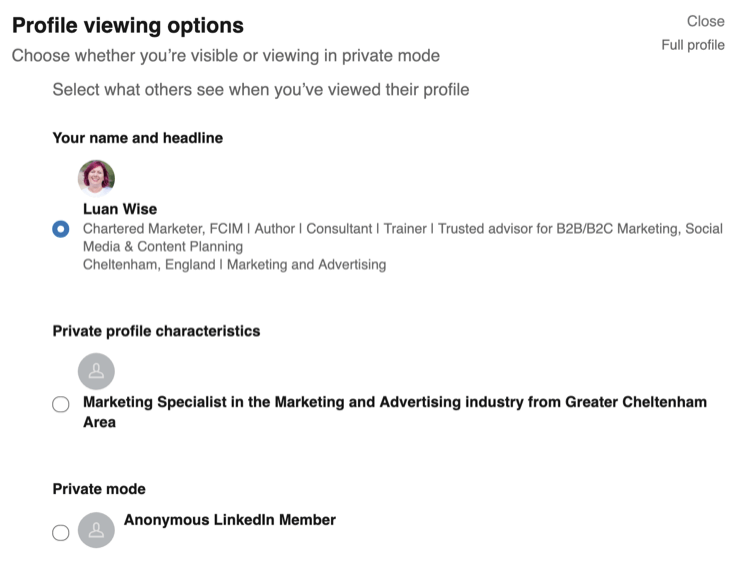
Under Profile Viewing Options, you can choose whether you’re visible or viewing in private mode. If you’re viewing competitors’ personal profiles on LinkedIn, you might wish to avoid leaving a footprint in their Who’s Viewed Your Profile summary, which lets them know you’re having a look.
3 Days of World-Class Training—Zero Travel!

Couldn't make it to Social Media Marketing World and AI Business World this year? Get all of the great content at a fraction of the price with a Virtual ticket.
That’s full access to recordings of every keynote, workshop, and session—the ones people travel thousands of miles to see. Don't wait. Get your Virtual ticket and enjoy actionable content that you can watch anytime, anywhere.
When researching competitors, switch your profile viewing setting to Private Mode.
When you’re in private mode looking at the profile of a 1st-degree connection, you’ll potentially be able to look through their connections if they haven’t locked down their own Who Can See Your Connections setting. They’ve left the door wide open for you to look through their network and potentially find a list of customers and prospects!
Pro Tip: Don’t forget to switch your profile viewing option back to fully visible after your competitor research session to ensure you receive the details of who’s viewing your profile (because it becomes unavailable to you when you’re in private mode).
Turn Off the “Viewers of This Profile Also Viewed” Option
When checking out a LinkedIn profile, you may have noticed a feature called People Also Viewed down the right side of the page. You can also access the feature from the LinkedIn mobile app by scrolling to the bottom of either your profile or a member’s profile.
The People Also Viewed feature is a box that shows some of the other LinkedIn member profiles that viewers of a profile have also looked at.
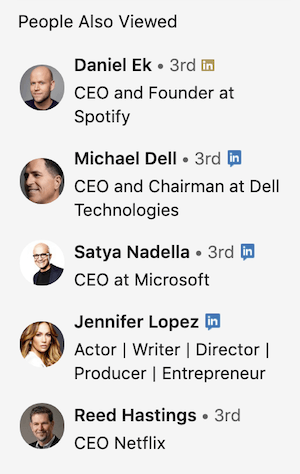
If you leave this feature switched on in your privacy settings, any customer or prospect who visits your profile is likely to see a handy list of your competitors that they can also check out.
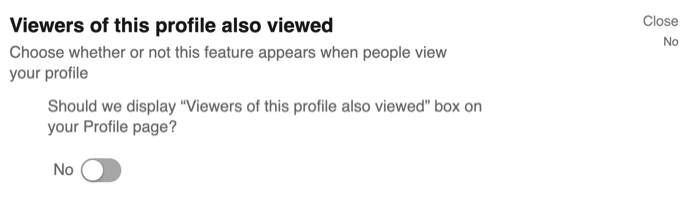
The information shared in the People Also Viewed feature doesn’t reveal any individual’s browsing history, including your own. The feature is updated multiple times each month and shows a maximum of 10 profiles that viewers of your profile have also viewed. The member at the top of the box has had the most views by people who have also looked at your profile.
When you’re not using LinkedIn to better understand your competitors, you might find this part of a profile highly useful for identifying opportunities. Be wary of leaving your business assets wide open for others to view, while hoping that not everyone reads this article and switches the feature off!
#2: Follow or Connect With Competitors on LinkedIn
Primarily, LinkedIn is considered a place to connect with individuals and to follow companies. While this is true, you can also follow individuals.
Members connect on LinkedIn because they know and trust each other. If you’re connected to someone, you’ll both be able to see each other’s updates on your LinkedIn home page. You can also send messages to connections on LinkedIn.
Decide who your competitors are, and whom you might need to monitor by connecting and/or following them on LinkedIn.
Should You Connect With Your Competitors?
If you’ve met them, yes, why not! The business world can be small and you might also be former colleagues, working in partnership, or able to refer business when you’re unable to help a potential customer. Plus, you now have your privacy settings under control, protecting your most valuable business assets.

Want to Unlock AI Marketing Breakthroughs?
If you’re like most of us, you are trying to figure out how to use AI in your marketing. Here's the solution: The AI Business Society—from your friends at Social Media Examiner.The AI Business Society is the place to discover how to apply AI in your work. When you join, you'll boost your productivity, unlock your creativity, and make connections with other marketers on a similar journey.
I'M READY TO BECOME AN AI-POWERED MARKETERWhat Is Following on LinkedIn?
Following someone on LinkedIn allows you to see their posts and articles in your home page news feed without actually being connected to them. It’s only when you’re connected that the ability to view posts and articles in the news feed is reciprocated. As a reminder, it’s also only when you’re connected that you can (potentially) see connections, as described above.
Following someone can be a useful option, particularly for competitor research, because you don’t need to wait for an invitation to connect to be accepted. However, it’s important to note that a notification is sent when you do start following an individual so they may spot what you’re doing!
To follow a person or company, click Follow on their profile page. If you don’t see a Follow button, click the More icon on the top portion of the person’s profile. Then select Follow from the drop-down menu.
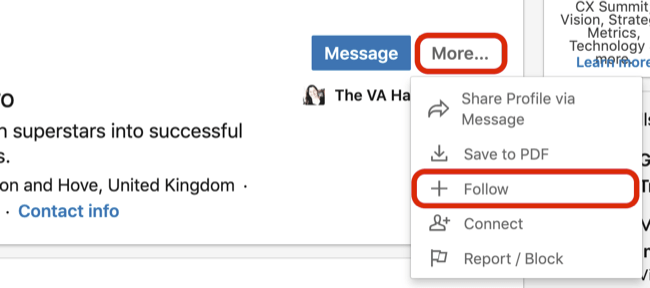
You can also follow people, companies, or topics by navigating directly to the Follow Fresh Perspectives Page, which displays recommended sources to follow.
Members may follow up to 5,000 people who aren’t connections.
#3: Review Relevant LinkedIn Profiles of Competitors
There are a number of areas within LinkedIn that you can use to gather insights about competitors. Let’s take a look at individual profiles and company pages as our primary focus.
Pro Tip: Set aside time in your calendar to gather information about your competitors on LinkedIn. You could do this daily, weekly, or perhaps monthly.
If you’re not sure who your competitor contacts might be on LinkedIn, use search. It’s easy to find people by job title, industry sector, and criteria such as company size.
Using the search bar, enter the keywords you think someone might use to find you and take a look at the results. You might find competitors you weren’t previously aware of. Note that most likely you’ll be in private mode while performing this research.
When you take a look at individual profiles, you can review career history, articles and activity previously shared, skills they’re listing, recommendations they’ve received, and more. At the end of a personal LinkedIn profile, you’ll find interests. This is where you can see the pages this person is following.
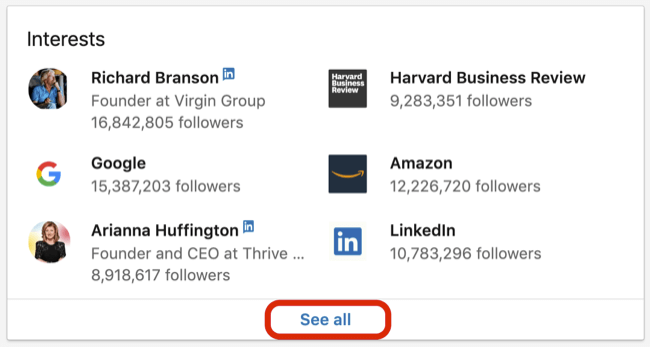
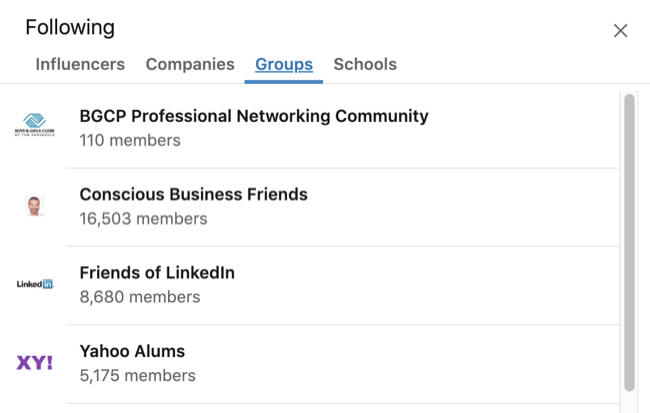
If you click on See All, you’ll find information about influencers they follow, membership in LinkedIn groups, and places of education.
Take a look at some profiles and consider what this tells you:
#4: Analyze Competitors’ LinkedIn News Feed Content
The content posted and shared by individuals—that appears in your LinkedIn home page news feed and Notifications tab—can offer valuable insights into the activities of an individual and their business.
With competitor understanding as your intention, take a fresh scroll through your news feed and answer these questions:
- What updates have your connections posted? Can you spot what they might be working on in their business?
- Are they sharing business networking events they might be attending? Should you be there too?
- If your connections are sharing content, what or who is the original source?
- Are there any content ideas you can adapt for your own business?
- Who’s commenting on their content? Might they be customers, prospects, or partners? Do you have connections in common?
Pro Tip: Because commenting publicly on LinkedIn is so visible, I recommend doing a quick check before you comment to determine if it might be better to send a private message. You don’t want to potentially give away information to anyone who might be watching you or your business. Plus you can often be more personal and go into more detail via a private message.
#5: Explore Competitors’ LinkedIn Pages
The information detailed on a LinkedIn page is akin to a website’s About page so you’ll likely already know most things here.
If you have a LinkedIn Premium account, you’ll have access to Insights on a page that include total employee count, employee distribution and headcount growth by function, new hires, notable alumni, and total job openings. This is based on the profile information of employees on LinkedIn. Any page with fewer than 30 employee profiles on LinkedIn won’t have Premium Insights displayed.
Following a page on LinkedIn can provide some insights within your home page news feed, although it’s likely to be more corporate information such as articles and links to content on a company website.
To note, when you follow a page, the business doesn’t get notified, although it will be visible on your own profile in the Interests section at the end.
#6: Turn Competitor Insights From LinkedIn Into Actions for Your Business
You can gather a wealth of information via LinkedIn, but for that information to be valuable, it needs to be focused and purposeful. If you don’t know what to do with the information when you find it, it’s unlikely to add value.
When documenting your research, I recommend a simple SWOT analysis. This 4 x 4 matrix helps organize issues important to your business under the headings of:
- Strengths
- Weaknesses
- Opportunities
- Threats
Remember that strengths and weaknesses should relate to your own business. Opportunities and threats are external factors.
Start by reviewing the insights you’ve gathered and asking yourself, “So what?” What does this information mean for your business and your industry?
Also consider how you can make the most of your strengths and minimize your weaknesses. How can you maximize any opportunities and manage your threats?
Finally, decide on relevant actions for your business. Identify anything you should now stop doing, start doing, keep doing, or do more of.
Conclusion
Analyzing your competitors and their activities on LinkedIn can reveal valuable insights for your own business. Learn what your competitors are up to, identify trends in your industry, and stay one step ahead of your peers.
What do you think? Are you inspired to start researching your competitors on LinkedIn? What information would be valuable to your business? Share your thoughts in the comments below.
More articles on marketing on LinkedIn:
- Discover how to use four LinkedIn marketing features to nurture leads.
- Learn how to measure five key performance metrics for your LinkedIn company page.
- Find out how to get LinkedIn leads without advertising.

Curious About How to Use AI?
Our newest show, AI Explored, might be just what you're looking for. It's for marketers, creators, and entrepreneurs who want to understand how to use AI in their business.
It's hosted by Michael Stelzner and explores this exciting new frontier in easy-to-understand terms.
Pull up your favorite podcast app and search for AI Explored. Or click the button below for more information.







